
TL;DR: SharePoint Embedded Archival
Microsoft is introducing Container Archival for SharePoint Embedded in February 2026. This feature allows organizations to move inactive data to a cold storage tier, slashing storage costs by 75% (from ~€0.19/GB to ~€0.05/GB) while maintaining security and searchability.
As organizations migrate specialized workloads into SharePoint Embedded, managing the content lifecycle has become a financial priority. With the rollout of Container Archival in February 2026 (Public Preview), developers and IT leaders finally have a native tool for large-scale cost management and AI optimization.
Why Archiving is Critical in 2026
Inactive data doesn’t just inflate your Azure bill; it creates “data drag.” In an era of AI-powered search, outdated documents can pollute Microsoft 365 Copilot results with irrelevant information. Archiving solves two problems at once:
- Cost Efficiency: Moves data to a low-cost tier.
- AI Precision: Shields “cold” data from active search indexes to improve Copilot’s accuracy.
The Bottom Line: Storage Economics (Euro Breakdown)
SharePoint Embedded uses a consumption-based, pay-as-you-go billing model via Azure. Moving inactive containers to the archive tier offers a massive ROI.
| Storage Tier | Cost per GB / Month | Cost per TB / Month | Estimated Savings |
| Standard (Active) | ~€0.19 | ~€190.00 | — |
| Archive Tier | ~€0.05 | ~€50.00 | ~75% |
Pro Tip: Keep an eye on “Reactivation” costs. While Microsoft 365 has trended toward removing these fees for standard sites, SharePoint Embedded is metered differently. Budget for potential egress or “thawing” fees if you plan to reactivate terabytes of data frequently.
Key Features for Admins & Developers
To leverage these savings, your technical team needs to be aware of the new management hooks:
1. New Microsoft Graph APIs
Developers can now programmatically archive and reactivate containers. This is perfect for building automated lifecycle triggers—for example, automatically archiving a container 30 days after a project is marked “Closed” in your app.
2. Admin Center Visibility
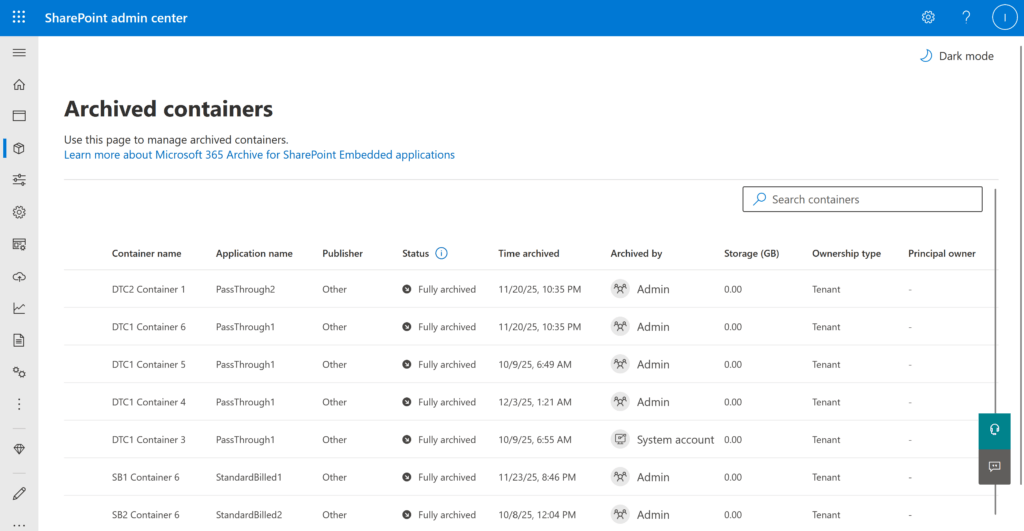
SharePoint Admins can now view and manage archived containers directly alongside active ones in the SharePoint Admin Center, providing a unified view of the organization’s storage footprint.
3. PowerShell Opt-In
This feature is OFF by default. Admins must use PowerShell to enable archival support for specific container types before the APIs can be used.
Projected Rollout & Verdict
- Public Preview: February 2026.
- General Availability: TBD (Expected Mid-2026).
My take: This marks the maturity phase of SharePoint Embedded. By providing the same archival power found in standard SharePoint, Microsoft is proving that Embedded is a top-tier, enterprise-ready storage platform for custom application development.
References:
- Source: MC1215074
- Documentation: New-SPOContainerType PowerShell Reference