
TL;DR: Microsoft is introducing a new ongoing meetings indicator in Teams channels using the threads layout. This feature allows users to see active meetings and join them directly from the channel header, supporting better visibility for simultaneous sessions. This should be rolling out in March according to Microsoft.
Microsoft Teams Ongoing Meetings Indicator: Visibility in the Flow
As organizations move toward more transparent, channel-based collaboration, the need for better meeting discovery has become clear. Many teams are shifting away from personal calendar invites toward channel-based meetings, which keep all recordings and transcripts in one centralized location. Roadmap ID 513272 supports this shift by introducing the Microsoft Teams Ongoing Meetings Indicator.
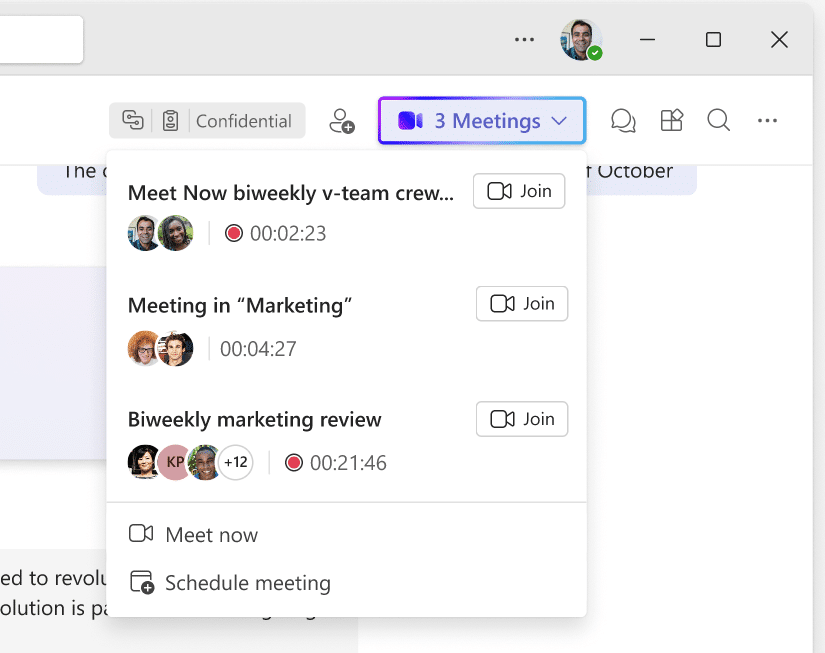
Currently, discovering active meetings within a busy channel can be difficult, especially when multiple workstreams are operating at once. The new indicator provides a centralized ‘dashboard’ in the channel header, ensuring that no member is left searching for a link while a critical discussion is happening.
Key Features of the Channel Meeting Indicator
The Microsoft Teams Ongoing Meetings Indicator is designed to streamline how users interact with active sessions:
- Header Visibility: An active meeting icon appears in the channel header, providing an at-a-glance view of current activity.
- Expandable Details: Users can expand the indicator to see basic details about every active meeting in that specific channel.
- Direct Access: A prominent ‘Join’ button is included for each meeting, removing the need to find the original post or calendar entry.
- Threaded Layout Support: This specifically enhances channels using the threads layout, where multiple conversations often happen simultaneously.
Administrative Setup and Governance
For IT administrators, the Microsoft Teams Ongoing Meetings Indicator is a low-maintenance update:
- On by Default: The feature will be enabled automatically for all tenants; no admin configuration or toggles are required.
- No Policy Changes: This update does not change existing meeting behaviors, policies, or administrative controls.
- Rollout Schedule: Targeted Release begins in mid-February 2026, with General Availability completing by mid-March 2026.
- Preparation: Admins are encouraged to update internal training materials to highlight the new ‘Header Join’ workflow.
Strategic Tips: Why You Should Move to Channel Meetings
As a Microsoft MVP, I recommend using this update as a catalyst to move your recurring syncs into Teams Channels. When a meeting is organized by a person, the chat and files are often ‘orphaned’ when that person leaves the project or company. By using Channel Meetings, the Microsoft Teams Ongoing Meetings Indicator ensures that everyone in the team has equal access to join, and the resulting data remains a permanent part of the channel history.
Stop relying on the ‘Person-as-Organizer’ model for team-wide work. Channel meetings foster a ‘Join-in’ culture where expertise is shared rather than gatekept. The new header indicator makes this ‘open’ style of working more intuitive than ever, as you no longer need to be on the ‘To’ line of an invite to see that a valuable discussion is taking place.
FAQ: Microsoft Teams Ongoing Meetings Indicator
Will this show meetings from other channels? No, the indicator is specific to the channel you are currently viewing. It helps you discover activity within that specific context.
Does this require a special Teams license? No, this feature is rolling out to all Microsoft 365 tenants as a standard update for the Teams client.
Can I hide the indicator if I find it distracting? The feature is enabled by default and integrated into the header layout; currently, there is no user-level setting to hide the active meeting indicator.