
TL;DR: Microsoft is introducing a simplified Microsoft Teams app bar to reduce visual clutter and improve user focus. Desktop users will see fewer default elements, a cleaner overflow menu, and the ability to hide the bar entirely. This should be rolling out in April according to Microsoft.
Simplified Microsoft Teams App Bar: Designing for Focus
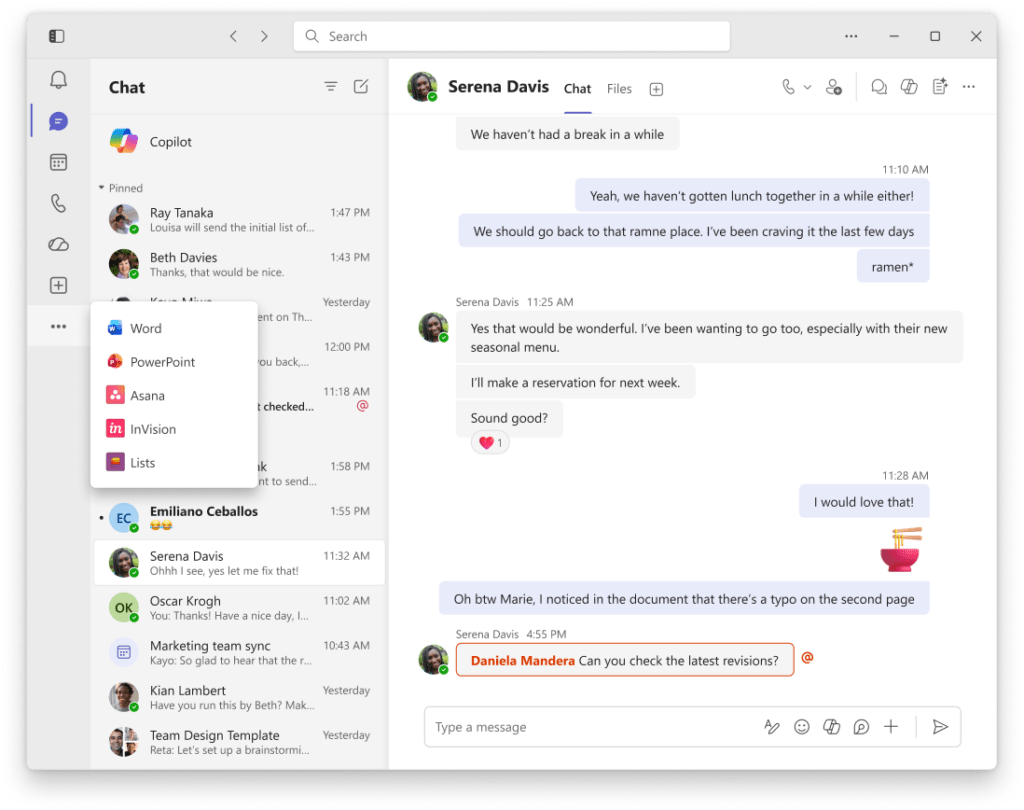
In the modern digital workplace, ‘context switching’ and visual distractions are the primary enemies of productivity. As the Teams ecosystem has grown, the app bar (the vertical rail on the left) has often become cluttered with various first-party and third-party applications. Roadmap ID 557169 addresses this by launching a simplified Microsoft Teams app bar.
The goal of this update is to help users spend less time navigating complex menus and more time on actual collaboration. By streamlining the interface, Microsoft is giving users back valuable screen real estate and reducing the cognitive load required to find essential tools.
Key Features of the App Bar Update
The simplified Microsoft Teams app bar brings several functional and aesthetic improvements to the desktop client:
- Reduced Default Elements: Teams will display fewer icons by default, prioritizing the most essential communication tools.
- Redesigned Overflow List: The ‘View more apps’ section has been overhauled into a cleaner, easier-to-scan list for a less cluttered navigation experience.
- Toggle Visibility: For the first time, users can choose to show or hide the app bar completely, creating a ‘distraction-free’ mode.
- Shortcut Support: Quick toggling is supported via keyboard shortcuts, ‘Ctrl + ‘ for Windows and ‘Cmd + ‘ for Mac.
Administrative Setup and Governance
For IT administrators, the simplified Microsoft Teams app bar rollout is a seamless change that requires no backend configuration:
- No Admin Action Required: The feature is enabled by default for all tenants and does not override any existing app policies.
- Compliance Consistency: No compliance considerations have been identified, as the update only affects the visual layout of the client.
- Rollout Schedule: Targeted Release begins in mid-March 2026, with General Availability expected to complete globally by early April 2026.
- App Policies: Admins can still manage which apps are pinned via Teams App Setup policies, but the ‘overflow’ behavior will now follow the new simplified logic.
Strategic Tips for Your Simplified Microsoft Teams App Bar Strategy
As a Microsoft MVP, I recommend using this update to encourage ‘Deep Work’ habits within your organization. Most users do not realize how much those small red notification dots on the sidebar pull their attention away from their current task.
When the simplified Microsoft Teams app bar lands in April, teach your teams the keyboard shortcut to hide the bar. It is a simple, supportive way to help employees reclaim their focus during intense periods of work, such as writing reports or analyzing data. It turns Teams from a constant stream of interruptions into a tool that stays out of the way until it is needed.
FAQ: Simplified Microsoft Teams App Bar
Will my pinned apps disappear? No, your pinned apps will remain accessible, but the overall presentation of the bar and the overflow menu will be streamlined to look less cluttered.
Can I prevent users from hiding the app bar? No, the ability to show or hide the app bar is a user-level preference designed to improve individual productivity and is not currently governed by a tenant-level admin policy.
Does this affect the mobile app? This specific update is targeted at all users of Microsoft Teams on Windows and macOS desktop clients.
Pingback: Microsoft Teams Context Preservation: No More Lost Tabs
Pingback: Microsoft Teams App Bar Simplification: A Cleaner Interface