
Teams bot detection is about to change how your organization handles AI-powered meeting participants. Microsoft is rolling out a new capability in Teams that identifies external meeting assistant bots the moment they try to join a meeting, giving organizers clear visibility and control over who, or what, is in the room.
This post covers what Teams bot detection does, how organizers and admins can use it, what licenses are required, and what you should do before the rollout reaches your tenant.
What Is Teams Bot Detection?
Teams bot detection is a new feature that identifies external automated bots as they attempt to join meetings hosted by your organization. These bots typically appear as external participants joining via a third-party service, things like Otter.ai, Fireflies.ai, or similar AI transcription and summarization tools.
Until now, those bots could join meetings without the organizer being explicitly aware of their nature. They show up as a regular participant and unless you know what to look for, you might not realize you have an automated service recording and transcribing your conversation.
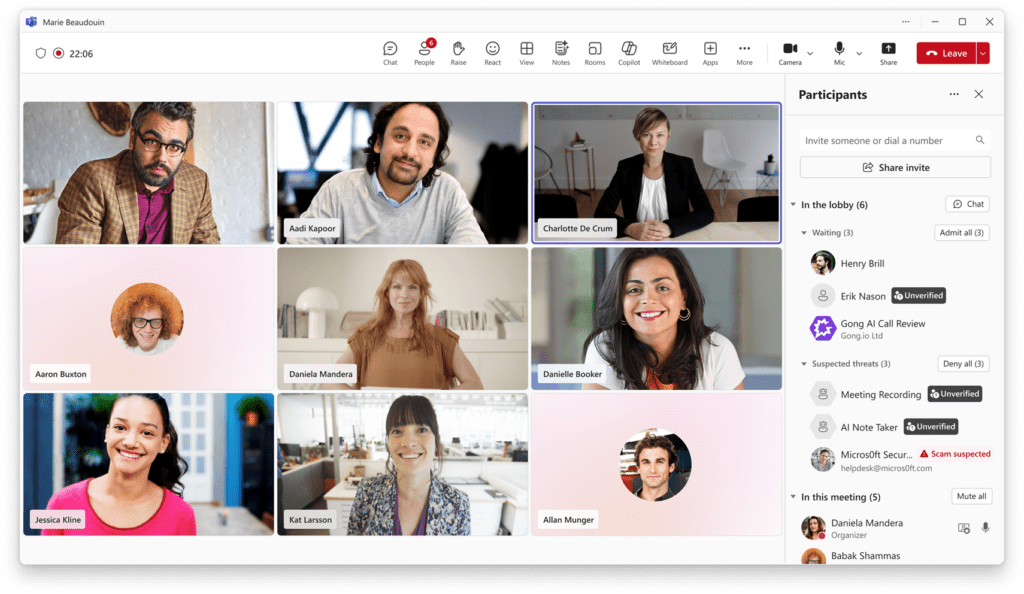
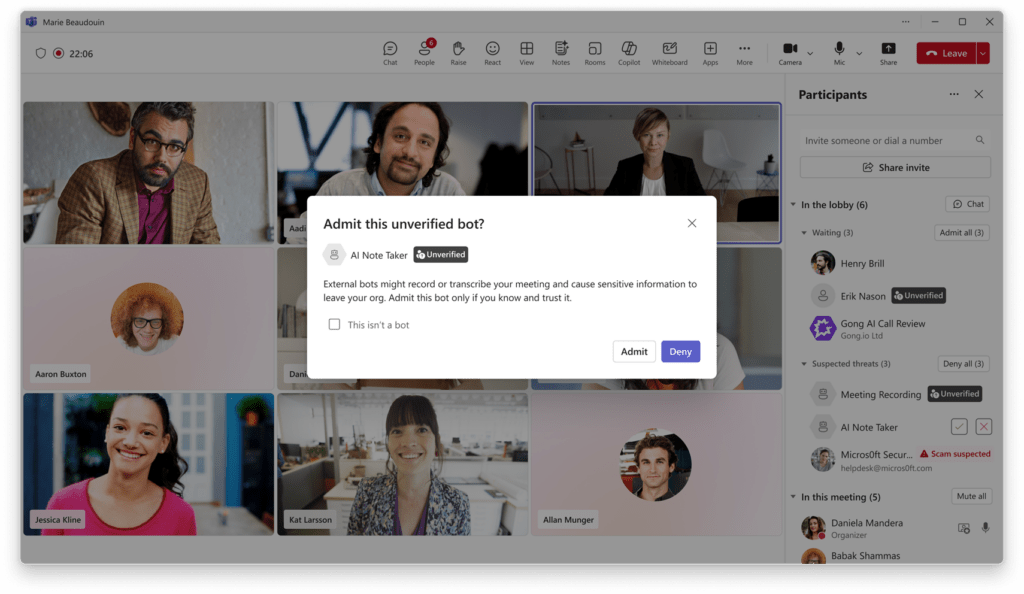
With Teams bot detection, those bots are clearly labeled in the meeting lobby. Organizers can see them for what they are and decide whether to let them in.
This connects well to a broader trend of Microsoft adding more AI participant controls to Teams. If you haven’t seen it yet, the Teams Channel Agent feature is another example of how Microsoft is rethinking how AI entities participate in collaboration workflows.
Why Teams Bot Detection Matters for Your Organization
For most organizations, the concern isn’t that bots are inherently bad. Transcription tools can improve productivity. The problem is consent and visibility. When a bot joins your internal strategy meeting or an HR discussion, every participant should know it’s there.
Teams bot detection gives organizers that visibility. It doesn’t block bots by default. It surfaces them, which is the right approach. Your marketing team might be happy to use a transcription bot for their weekly standup. Your legal or finance team probably isn’t. Now organizers have the information they need to make that call in the moment.
From a compliance perspective this is also significant. Regulatory frameworks like GDPR require transparency around data processing. If a bot is recording your meeting and sending that data to a third-party server, participants have a right to know. Teams bot detection helps your organization stay on the right side of those requirements.
This feature also supports broader admin governance, which is increasingly important as AI tools become part of everyday work. If you’re thinking about how Microsoft 365 admin delegation is evolving, the Restricted Content Discovery post is worth reading alongside this one.
Teams Bot Detection in the Meeting Lobby
When Teams bot detection identifies an automated participant, that participant is labeled in the lobby. The organizer sees a clear indicator that this is a detected bot, not a regular human participant.
From the lobby, the organizer can approve the bot and allow it to join the meeting, deny the bot and prevent it from entering, or remove a detected bot during the meeting if circumstances change.
These controls are intentionally simple. The goal is to make bot participation a conscious, informed decision rather than something that just happens.
How Admins Configure Teams Bot Detection
Teams Bot Detection Policy in the Admin Center
Teams bot detection comes with a new meeting policy in the Teams admin center. Admins can use this policy to define how detected bots are handled across the organization.
At launch, the policy options will include turning detection off entirely (not recommended) or requiring organizer approval, which is the default setting. Microsoft has indicated that more granular admin controls are coming in the future, so expect this to expand over time.
Teams bot detection is enabled by default for all tenants. You don’t need to configure anything for the feature to start working. But reviewing the policy once it’s available in your admin center is good practice, and aligning it with your organization’s collaboration and compliance requirements is a smart move.
For background on how Teams meeting policies work more broadly, the Microsoft documentation on Teams meeting policies is a solid starting point. For lobby-specific controls, the meeting lobby settings documentation covers what’s already configurable today.
Rollout Timeline
According to Microsoft, Teams bot detection should be rolling out around May 2026 for Targeted Release tenants, with General Availability in June 2026.
| Ring | Start | Expected Completion |
|---|---|---|
| Targeted Release | Mid-May 2026 | Early June 2026 |
| General Availability (Worldwide) | Early June 2026 | Mid-June 2026 |
License Requirements
Teams bot detection is available to all Microsoft Teams customers. No additional license is required. GCC tenants are included in this rollout.
Admin Tips
Before Teams bot detection reaches your tenant, here is what I recommend.
Update your internal communications first. Meeting organizers will start seeing new indicators and approval prompts in the lobby. If they don’t know what those prompts mean, they will either blindly approve everything or ring the helpdesk. A short message explaining the change goes a long way.
Keep the default policy setting. Requiring organizer approval is the right balance. It doesn’t block legitimate bot use. It makes it a conscious choice.
Revisit your meeting governance policies. If your organization uses AI transcription tools internally, think about whether those use cases should be documented and communicated to organizers so they know what to expect and when to approve.
Monitor future Message Center updates. Microsoft has explicitly said more granular admin controls are coming for Teams bot detection. When they arrive, review whether your current policy configuration still fits your organization’s needs.
Finally, educate users to report suspicious participants directly from the app. Teams bot detection may not catch every bot in every scenario. User reporting helps Microsoft improve detection accuracy over time, and it builds a culture of meeting security awareness in your organization.
The Paul-Take
Teams bot detection is a feature I’ve been waiting for. I’ve walked into clients who had no idea that an AI bot from a personal Otter.ai account was sitting in their executive briefings. That’s a data governance problem, a compliance risk, and frankly just uncomfortable for everyone once they find out.
This feature doesn’t solve everything, and Microsoft is honest that some bots may still slip through. But Teams bot detection moves the needle significantly. What I appreciate most is that Microsoft made the default sensible. Require approval, not automatic block. That respects the fact that bots can be useful tools, while still giving humans the final say.
My one note of caution: don’t treat Teams bot detection as a complete solution. Pair it with user education, a clear internal policy on AI transcription tools, and a habit of reporting anything that looks suspicious. That combination is far stronger than any single feature.
MVP Reference List
- Roadmap ID: 558107
- Teams meeting policies: https://learn.microsoft.com/en-us/microsoftteams/meeting-policies-overview
- Meeting lobby controls: https://learn.microsoft.com/en-us/microsoftteams/who-can-bypass-meeting-lobby
Pingback: Teams Test Audio: The Smart New Way to Join Calls Better