
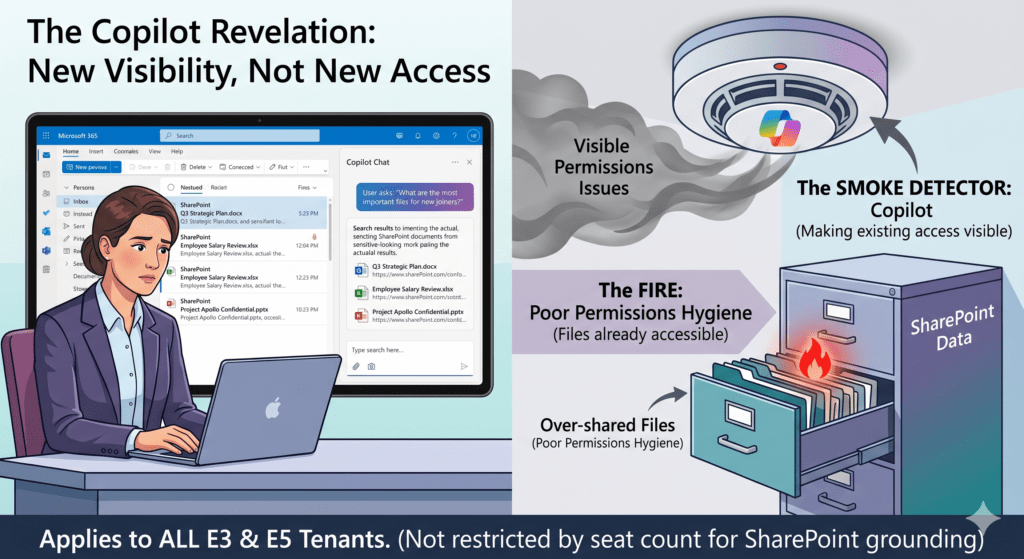
Copilot Chat SharePoint behaviour caught one of my customers completely off guard last week, and I think it is about to catch a lot of admins the same way. They run Microsoft 365 E3. No M365 Copilot add-on anywhere in the tenant. A user opened the free Copilot Chat in Outlook, asked for the most important files a new joiner should read, and Copilot handed back real SharePoint documents. The customer’s first reaction was fear. Surely the free Copilot is not supposed to touch SharePoint at all?
That reaction is understandable, and it is wrong. Let me walk through what is really happening, why it is by design, and the governance work it should trigger.
What Is Actually Happening with Copilot Chat SharePoint Access
The free Microsoft 365 Copilot Chat, the one bundled with E3, E5 and Business plans, is no longer limited to general web answers. Microsoft has extended it to reason over your work data through Microsoft Graph. That includes your inbox, your calendar, your meetings, and the files indexed in SharePoint and OneDrive.
So when a user asks a question like ‘what are the most important files for new people to read’, Copilot Chat searches the Graph and returns documents the user can already open. This is the Copilot Chat SharePoint connection that surprised my customer. It is not a back door. It is the assistant doing exactly what it was built to do, scoped to one person’s existing access.
This capability is associated with Microsoft 365 Roadmap ID 554934, so this is documented and shipping, not an accident or a hallucination.
Is Copilot Chat SharePoint Grounding a Bluff?
No. This is the question my customer really wanted answered, so let me be blunt. Copilot Chat is not inventing file names to look clever. When you see SharePoint documents in a free Copilot Chat response, those are real items pulled from the Graph index. The Copilot Chat SharePoint result is grounded in genuine content the signed-in user has permission to see.
If anything, the fear should flip direction. The danger was never Copilot making things up. The danger is Copilot accurately surfacing files that were over-shared years ago and quietly forgotten.
Why Copilot Chat SharePoint Results Respect Permissions
Here is the part that should calm everyone down, and then immediately put them to work.
Copilot Chat never bypasses SharePoint permissions. It runs strictly within the signed-in user’s existing access. If a user cannot open a file by browsing to it directly, Copilot Chat cannot surface it for them either. There is no privilege escalation, no shared service account reading everything, no magic key to locked libraries.
So the unlicensed user in my customer’s tenant did not gain new access to anything. Copilot Chat simply made it faster to find what that person could already reach. The same governance model applies here as it does everywhere else in Microsoft 365. Permissions are the boundary, and Copilot Chat SharePoint behaviour honours it.
If you want to control what gets surfaced in search and Copilot beyond raw permissions, that is exactly what features like Restricted Content Discovery are for. I covered the new delegation model in my post on Restricted Content Discovery delegation(opens in new window), and it pairs perfectly with this rollout.
The 2,000-Seat Question, Cleared Up
A reader asked me whether this is only for tenants with fewer than 2,000 licenses. Good question, and it is worth getting right, because two different changes are being mixed up.
There is a separate Microsoft change about in-app Copilot Chat inside Word, Excel, PowerPoint and OneNote. That one does carry a 2,000-seat threshold. Tenants over 2,000 users see that specific in-app experience change, while tenants under 2,000 keep it under standard access.
The Copilot Chat SharePoint grounding in Outlook is not that change. It is not gated by tenant size. So if you are sitting on a large E5 estate assuming this does not apply to you, that assumption is wrong. Treat this as something every E3 and E5 tenant should plan for, regardless of seat count.
Rollout Timeline
| Release phase | Audience | Status |
|---|---|---|
| Preview | Eligible Copilot Chat tenants | Rolling out |
| General Availability | E3, E5 and Business with Copilot Chat | Rolling out, all tenant sizes |
According to Microsoft, this should be rolling out around the current GA window for Roadmap ID 554934, with no size gate on the SharePoint grounding.
How to See What Copilot Chat SharePoint Can Surface
You do not need to guess. Test it the way my customer did.
- Open Outlook on the web with an account that has no M365 Copilot license.
- Open Copilot Chat from the ribbon or side panel.
- Ask a broad discovery question, for example ‘what are the key documents a new starter should read’.
- Review what comes back. These are files the test account can already access.
- Repeat with a low-privilege account, such as a fresh new joiner, to see the real exposure surface.
That last step is the one that matters. A new joiner account is your honest mirror of what over-sharing looks like.
Admin Tips
A few things I would do this week.
Run the new-joiner test above before your users do. You want to find the embarrassing results first.
Review your most-shared SharePoint sites for ‘Everyone’ and ‘Everyone except external users’ grants. These are the classic sources of accidental Copilot Chat SharePoint exposure.
Lean on SharePoint Advanced Management features like Restricted Content Discovery for sites that should stay out of search and Copilot, even when permissions are technically correct.
Communicate to your users that the free Copilot Chat now reaches work data. People behave differently once they know the assistant can read the Graph.
If you are also rolling out the paid experience, my walkthrough of SharePoint Lists Copilot grounding through Context IQ(opens in new window) shows the same permission-respecting model applied to structured list data.
License Requirements
The Copilot Chat SharePoint experience described here rides on the free Copilot Chat bundled with Microsoft 365 E3, E5 and Business plans. No paid M365 Copilot add-on is required for this specific grounding behaviour. The paid M365 Copilot license unlocks the deeper, in-app experiences across the Office apps, which is a different conversation.
The Paul-Take
Stop framing this as a Copilot problem. It is a permissions hygiene problem that Copilot just switched the lights on for.
For years, over-sharing in SharePoint was invisible. Files sat in libraries with ‘Everyone’ access, and nobody noticed because nobody went looking. Free Copilot Chat now goes looking on every user’s behalf, instantly. The files were always reachable. The only thing that changed is how easy they are to find.
So the right response is not to panic about Copilot, and it is definitely not to try to switch it off and pretend the exposure is gone. The right response is to fix the sharing. Run the new-joiner test, clean up the broad grants, and put discovery controls on the sites that need them. Copilot Chat is the smoke detector here. Ripping out the battery does not put out the fire.
According to Microsoft, this should be rolling out around the current GA window, across all tenant sizes.
MVP Reference List
- MC1187671 (Copilot Chat reasoning over Outlook and Microsoft Graph data)
- MC1253858 and MC1253863 (separate 2,000-seat in-app Copilot Chat change for Word, Excel, PowerPoint, OneNote)
- Microsoft 365 Roadmap ID 554934: https://www.microsoft.com/en-us/microsoft-365/roadmap?id=554934(opens in new window)
- Microsoft Learn, Copilot Chat requirements: https://learn.microsoft.com/en-us/microsoft-365/copilot/microsoft-365-copilot-chat-requirements(opens in new window)
- Microsoft Learn, Copilot FAQ: https://learn.microsoft.com/en-us/copilot/faq