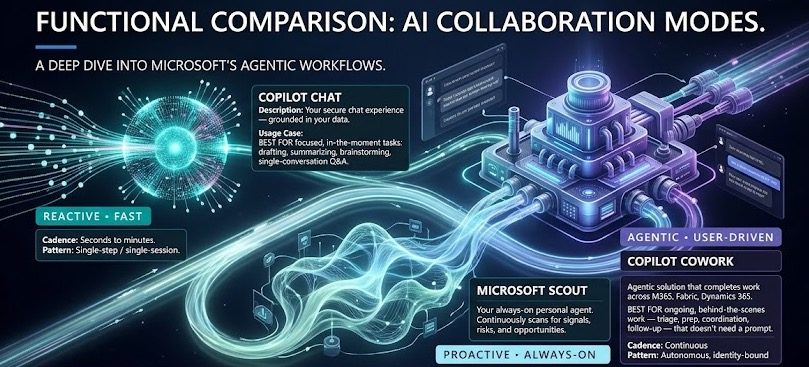
Microsoft Scout is the first always-on Autopilot agent for Microsoft 365, and it changes the game in a way Copilot never did. Announced at Build 2026 (MC1332811), Scout does not wait for a prompt. It runs in the background, watches your priorities across Teams, Outlook, OneDrive and SharePoint, and takes action on your behalf inside the guardrails your organisation sets. For business this is a real productivity unlock. For security teams it is a new surface area you need to understand before anyone signs in.
This post breaks down what Microsoft Scout actually does for a business, the security decisions you must make first, the licensing reality, and how to roll it out without creating a governance headache.
What Is Microsoft Scout?
Microsoft Scout is a new category of agent that Microsoft calls an Autopilot. Where Copilot is reactive, you ask and it answers, an Autopilot is proactive. It operates continuously, with its own governed Entra identity, and acts on your behalf without needing to be prompted each time.
Scout is built on OpenClaw, the open-source agentic framework, and it is delivered as a local desktop application for Windows 11 and macOS plus a connected experience inside Teams, Outlook, OneDrive and SharePoint. You interact with it in Teams and extend its reach through the desktop app to your browser, local files and Model Context Protocol (MCP) servers.
The key point is the identity model. Every Scout agent operates under its own governed Entra identity, not a shared service account, so every action it takes is attributable to a known actor your directory already understands. Over time it builds context through Work IQ, learning how you work and what needs to happen next.
What Microsoft Scout Does for Business
This is where Scout earns its keep. The whole pitch is that it removes the coordination work that piles up across a normal day. At launch, Microsoft Scout is positioned to handle:
- Meeting coordination across time zones. It schedules and reschedules, flags the meetings that matter, and prepares the materials you need beforehand.
- Calendar protection. It identifies upcoming deliverables and automatically blocks focus time so the work actually gets done.
- Risk spotting. It surfaces stalled decisions and blockers early, so you can act before they become a problem.
- Inbox and follow-up triage. Summarising threads, prioritising, and drafting responses for you to approve.
- Cross-agent coordination. It can work alongside other agents, which is the first real sign of multi-agent orchestration inside Microsoft 365.
The business case is straightforward. Most knowledge workers lose hours a week to coordination overhead. An always-on agent that keeps work moving while your attention is elsewhere is a genuine efficiency gain, not a gimmick. The catch is that an agent powerful enough to do all this is also powerful enough to do real damage if it is not governed properly.
The Security Side of Microsoft Scout You Cannot Skip
Here is the part that matters most for anyone responsible for governance, and it is the reason I would not let Microsoft Scout near a production tenant on day one without a plan.
Data Leaves Microsoft 365
This is the headline security fact. Conversations in Microsoft Scout are sent to GitHub Copilot, which may route to third-party models including Anthropic and others, governed by GitHub’s terms. That is a data path outside your Microsoft 365 boundary, and it is exactly why Microsoft requires admin opt-in and attestation before anyone can use it. Your Intune admin controls which LLM models are available to Microsoft Scout. Session data and memory are stored in the user’s OneDrive inside your tenant, subject to your OneDrive controls.
You need to decide, in writing, whether that data flow is acceptable under your compliance obligations before you enable anything.
The Controls That Are Built In
To Microsoft’s credit, the security model around Microsoft Scout is serious:
- Governed Entra identity per agent. Every action is attributable, and credentials are scoped to the task, redacted from logs, and managed like any first-party Microsoft service.
- Microsoft Purview enforcement in the moment. Sensitivity labels and data loss prevention policies are applied before anything is sent or written. If you have already done the work to extend DLP coverage properly, Scout inherits it. This is a good moment to revisit how Microsoft Purview DLP now covers local files, because Scout’s desktop app touches local resources too.
- Human sign-off for sensitive actions. High-impact operations surface an approval before they proceed. Human-in-the-loop is on by design.
- Access scoping. Scout can only reach the resources and destinations you have approved.
- Off by default. Users cannot sign in until admins complete the required setup.
The pattern here is the same one that runs through every recent Copilot governance change, including the business justification now attached to Copilot license requests. Microsoft keeps adding the controls, but the work of configuring them sits with you.
How to Get Started With Microsoft Scout
Microsoft Scout is available now as an experimental release through the Frontier program. It is off by default. Here is the sequence to enable it safely.
- Enrol in Frontier. Scout is gated behind the Frontier early-adopter program. No enrolment, no access.
- Sort the licensing. Each user needs a Microsoft 365 Copilot license and a GitHub Copilot license, because AI credit billing runs through GitHub Copilot.
- Configure Intune policies. Device and access policies must be set up in Microsoft Intune before users can sign in.
- Complete admin opt-in and attestation. This is required specifically because of the data flows outside Microsoft 365. Do not treat it as a checkbox.
- Set your model allow-list. Use Intune to control which LLM models Scout can use.
- Review Purview policies. Confirm your sensitivity labels and DLP rules are doing what you expect before an autonomous agent starts acting on labelled content.
- Brief your helpdesk. If prerequisites are not met, users hit sign-in failures. Tell support what to expect.
Admin Tips for Microsoft Scout
- Pilot small. Start with a tight group of willing, technically literate users. An always-on agent is not where you want a wide blind rollout.
- Write the data-flow decision down. Your attestation is a compliance artefact. Record who approved the GitHub and third-party model routing and on what basis.
- Audit the identities. Because each agent has its own Entra identity, you can and should monitor what those identities are doing. Build that into your review cadence.
- Revisit your discoverability controls. An autonomous agent reaching across SharePoint makes content governance more important, not less. If a site should not be surfaced, make sure it is genuinely locked down.
- Set expectations with users. Scout takes action without asking each time. Users need to understand what it will do autonomously and where the approval gates sit.
License Requirements
To run Microsoft Scout you need three things stacked together: a qualifying Microsoft 365 base plan with the Microsoft 365 Copilot add-on, a GitHub Copilot license for AI credit billing, and Frontier program enrolment. On top of that, Intune is required for the device and model policies, and admin opt-in attestation is mandatory. There is no consumer path here. This is firmly an enterprise, admin-gated capability.
Rollout Timeline
| Phase | Audience | Status |
|---|---|---|
| Experimental release (Preview) | Frontier organisations on Windows 11 and macOS | Available now (June 2026) |
| General Availability | Broader Microsoft 365 | Not yet announced |
According to Microsoft, the experimental release is rolling out now via Frontier, with no confirmed general availability date.
The Paul-Take
Microsoft Scout is the most interesting thing Microsoft has shipped this year, and also the one I would be most careful with. The shift from Copilot to Autopilot is real. An agent that proactively keeps work moving, blocks your focus time, and flags stalled decisions before they hurt you is genuinely useful. I have seen enough coordination overhead in real tenants to know the business value is not marketing fluff.
But read the data-processing note again. Your conversations go to GitHub Copilot and potentially to third-party models including Anthropic. That is not a problem in itself, plenty of good tooling routes this way, but it is a decision your security and compliance people must make deliberately, not one that gets waved through because a feature looked exciting in a keynote. The fact that it is off by default and requires attestation tells you Microsoft knows this too.
My advice is simple. Do not rush. Get into Frontier, pilot it with a handful of people who understand what an autonomous agent is, lock down your Purview and Intune policies first, and write down your data-flow decision. Scout rewards organisations that have already done their governance homework and punishes those that have not. If your house is in order, this is a Friday-afternoon-reclaiming tool. If it is not, it is a liability with its own Entra identity.
This tip will help you reclaim your Friday afternoon.
MVP Reference List
- Message Center: MC1332811 — Microsoft Scout launch announcement
- Official announcement: Introducing Microsoft Scout: Your always-on personal agent (Microsoft 365 Blog)
- Microsoft Learn: Microsoft Purview Data Loss Prevention overview
- Microsoft Learn: What is Microsoft Entra ID?
- Related reading on KbWorks: Microsoft Purview DLP now covers local files in Copilot and Copilot license requests now include business justification
#ThePaulTake #MicrosoftScout #Microsoft365 #Copilot #Security