
TL;DR: Microsoft is introducing AI Workflows in the Teams Workflows app, powered by Microsoft 365 Copilot. These templates allow users to automate complex tasks through scheduled prompts. This should be rolling out in January according to Microsoft.
AI Workflows in Microsoft Teams: Moving Toward Intelligent Automation
The integration of generative AI into daily business processes is evolving from simple chat interfaces to sophisticated, automated systems. Roadmap ID 500379 introduces AI Workflows in Microsoft Teams, which leverages the power of Microsoft 365 Copilot to perform scheduled tasks.
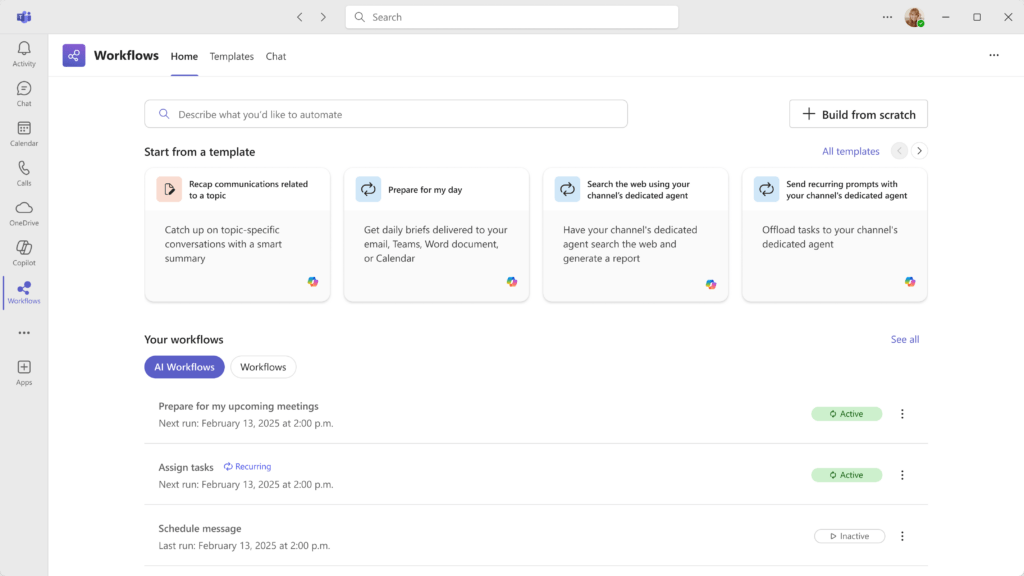
By using predefined templates within the Workflows app, users can now ground their automation in Copilot’s reasoning capabilities. This shift allows for the automation of complex, data-heavy operations that previously required manual oversight, significantly streamlining daily operations.
Key Features of AI Workflows
The AI Workflows in Microsoft Teams update focuses on making intelligent automation accessible to every Copilot-licensed user:
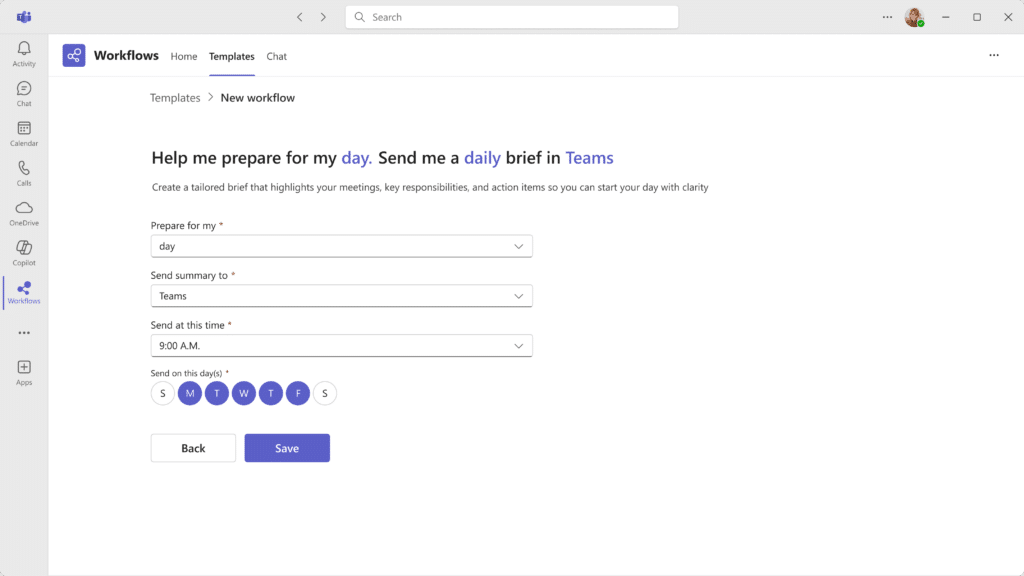
- Scheduled Copilot Prompts: Workflows can be triggered on a schedule, running specific prompts to gather, analyze, or summarize data.
- Predefined Templates: Microsoft provides a library of templates on the Workflows app homepage to simplify the setup process for new users.
- Seamless Teams Integration: These workflows live directly within the Teams Workflows app, ensuring they are easy to find and manage.
- Platform Support: The update applies to Teams for Web and Mac, as well as the Windows desktop client.
Administrative Setup and Governance
For IT administrators, managing AI Workflows in Microsoft Teams requires understanding the connection between Copilot and optional connected experiences:
- Default Status: The feature is OFF by default unless the Workflows app is explicitly enabled in your tenant.
- Enabling the Feature: Admins must allow access to the Workflows app within Microsoft Teams to give users these capabilities.
- Disabling AI Workflows: If an organization prefers to restrict this, they can use Cloud Policy to disable ‘optional connected experiences’ in Office. Note that this will also disable scheduled prompts globally in Microsoft 365 Copilot.
- Prerequisites: Users must hold a valid Microsoft 365 Copilot license to access and run these AI-powered templates.
Strategic Tips for Your AI Workflows in Microsoft Teams Strategy
As a Microsoft MVP, I recommend starting with ‘Insight-Gathering’ workflows. Instead of asking your team for status updates, use AI Workflows in Microsoft Teams to have Copilot summarize the last 24 hours of activity in a project channel every morning.
Because these templates use ‘scheduled prompts,’ you can ensure that your leadership teams receive consistent, high-quality summaries without anyone having to remember to run the query. This moves AI from a personal assistant to an organizational asset, helping to justify the investment in Copilot across the tenant.
FAQ: AI Workflows in Microsoft Teams
Does this require a separate Power Automate license? The AI Workflows are part of the Workflows app in Teams, but the advanced AI capabilities specifically require a Microsoft 365 Copilot license.
Can I create my own AI templates from scratch? While Microsoft provides predefined templates to simplify setup, the Workflows app generally allows for customization of automated triggers and actions.
Is my data shared when using scheduled prompts? No, AI Workflows respect the same enterprise-grade data protection and compliance standards as all other Microsoft 365 Copilot interactions.