
TL;DR: Microsoft is launching Agent Mode in PowerPoint for the web, moving from one-off prompts to an iterative, conversational workflow. While this is a major productivity boost, European clients must manually opt-in to enable the Anthropic models that power many of these advanced features. This should be rolling out in February according to Microsoft.
Introduction to Agentic Design
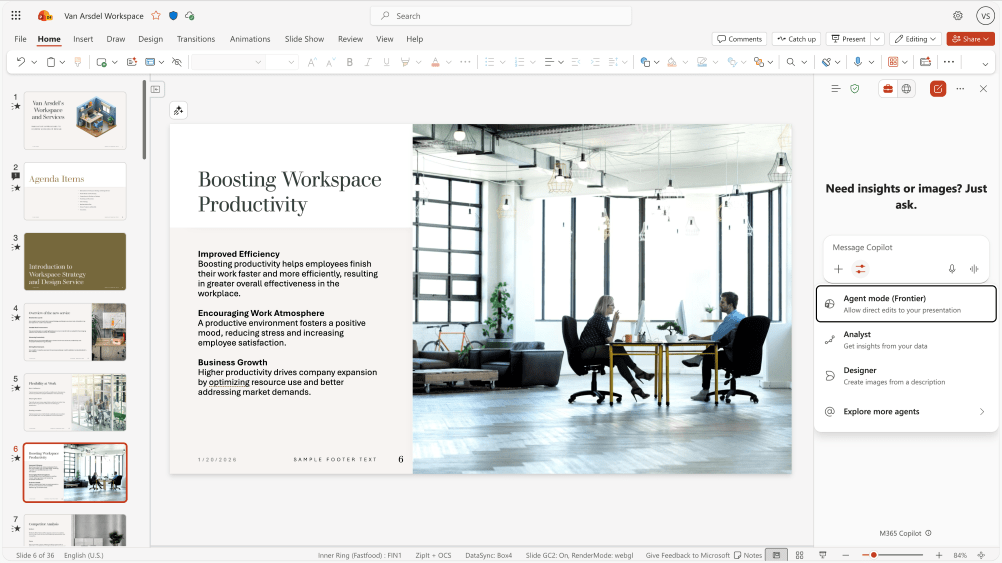
Traditionally, AI assistants have followed a ‘one-shot’ model: you prompt, it generates, and you hope for the best. Agent Mode in PowerPoint changes this by introducing ‘Agentic’ behavior—the ability for the AI to plan, execute, and refine tasks through a back-and-forth dialogue.
The Anthropic Factor and the EU Opt-in
A major part of the Agent Mode experience is the ability to use Anthropic’s Claude models alongside OpenAI. While Anthropic is now a Microsoft subprocessor, there is a significant hurdle for organizations in the European Union (EU), EFTA, and the UK.
Because Anthropic models are currently excluded from the EU Data Boundary, Microsoft has set the default to OFF for these regions.
Admin Action Required: To use these features in Europe, a Global Administrator must:
- Go to the Microsoft 365 Admin Center.
- Navigate to Settings > Copilot.
- Under Data Access, locate the toggle for AI providers operating as Microsoft subprocessors.
- Explicitly enable Anthropic.
Key Features of PowerPoint Agent Mode
Preserved Branding and Structure
Agent Mode is designed to strictly adhere to your existing corporate formatting. It polishes content without overriding the underlying template your design team established.
Enterprise Asset Integration
By grounding the AI in your enterprise data, Agent Mode ensures that the numbers, charts, and insights in your presentation reflect the most current business information available in your tenant.
Live Preview and Refinement
Users can watch as the Agent plans its steps. This transparency allows you to ‘steer’ the process in real-time.
Technical Details and FAQ
| Feature | Standard Copilot | Agent Mode (Frontier) |
| Workflow | One-shot (Prompt & Result) | Iterative (Back-and-forth) |
| Model Choice | OpenAI (Fixed) | OpenAI or Anthropic (Switchable) |
| EU Status | Enabled by Default | Opt-in Required (for Anthropic) |
| Data Boundary | Within EU Boundary | Excluded from EU Boundary |
When will Agent Mode be available? This should be rolling out in February 2026 according to Microsoft.
Why is it off by default in Europe? To comply with strict data residency expectations, Microsoft requires a conscious decision from EU admins to allow data processing via Anthropic, as it currently happens in data centers outside the EU.
What happens if I don’t opt-in? You will still have access to standard Copilot features powered by OpenAI, but the ‘Agentic’ multi-step reasoning and model-switching capabilities may be limited or unavailable.