
TL;DR: Microsoft is introducing a new security feature for Teams Calling that detects and warns users about brand impersonation from external callers. Starting in mid-March 2026, this ‘on-by-default’ update will help mitigate vishing and social engineering risks. This should be rolling out in March according to Microsoft.
The Evolution of Voice-Based Phishing
In the modern workplace, the telephone is often the weakest link in the security chain. While email filters have become incredibly sophisticated, voice calls (vishing) remain a high-success path for attackers. Using VoIP, bad actors can easily spoof names or simulate the environment of a trusted organization.
With Roadmap ID 543239, Microsoft is bringing its vast threat intelligence into the Teams Calling experience to flag these deceptive practices in real-time.
How Brand Impersonation Protection Works
The feature functions as an intelligent filter for inbound VoIP calls. It is specifically tuned to analyze ‘first-contact’ external callers. These are individuals or entities that have not previously interacted with the user or the organization.
Technical Detection and Warning
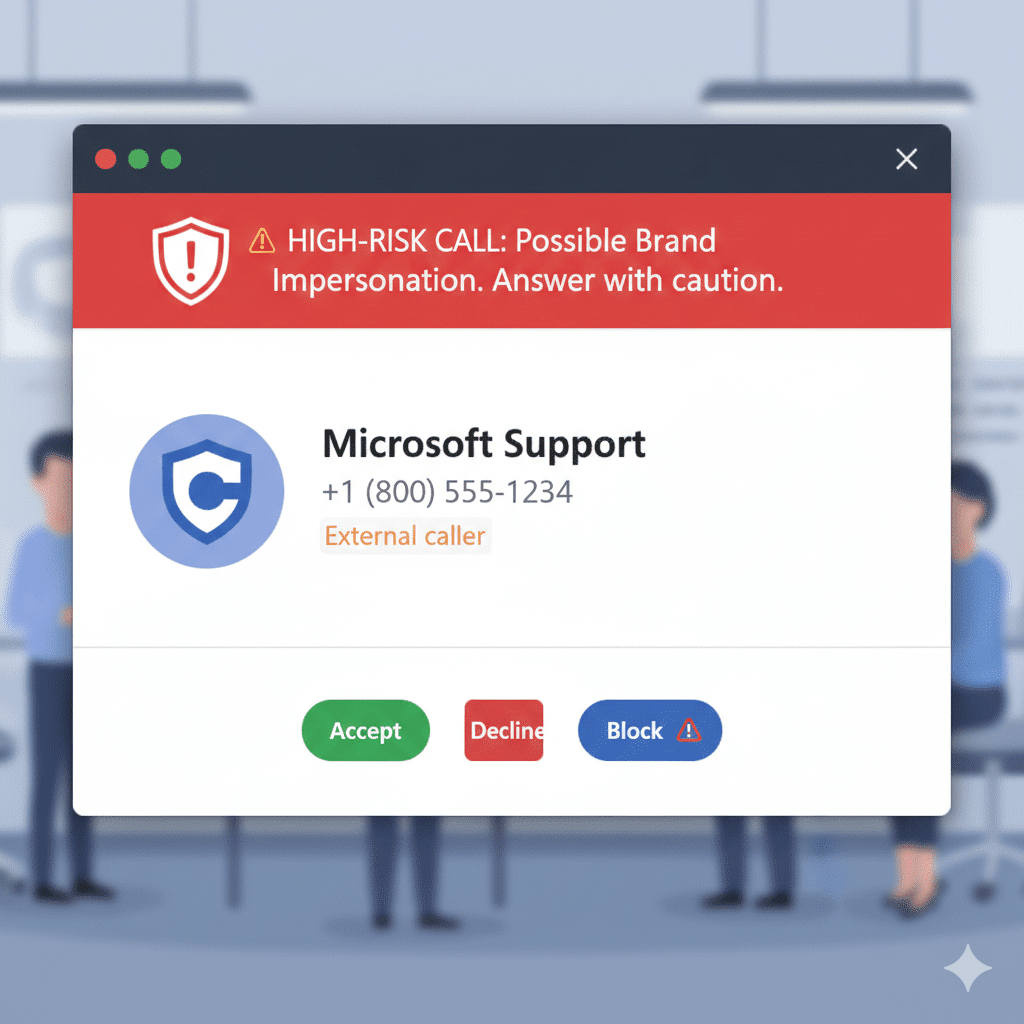
When a call is identified as high-risk, Teams provides a visual warning banner. This notification appears:
- On the incoming call toast: Allowing the user to make a choice before answering.
- During the active call: If risk signals persist, the banner stays visible to remind the user to be cautious with the information they share.
Users have three clear options when these warnings appear: Accept, Block, or End the call. This empowers the employee to be the final gatekeeper of the organization’s security.
Administrative Setup and Governance
For IT administrators, the implementation of this feature is designed to be seamless.
- Enabled by Default: Microsoft will activate this for all Teams Calling tenants automatically.
- No Policy Changes: Your existing calling and caller ID policies remain intact. This is a security overlay, not a replacement for current controls.
- No Admin Action Required: Unless you need to update internal documentation or train your helpdesk, there is no technical configuration to perform in the Teams Admin Center.
Why ‘First-Contact’ Analysis is Critical
Attackers rely on the ‘element of surprise’. By targeting the first interaction, the Brand Impersonation Protection system hits the most vulnerable point of the social engineering lifecycle. By the time a second or third call happens, a relationship (even a fraudulent one) has been established. Flagging the very first call is the most effective way to break the attacker’s momentum.
FAQ: Common Questions for IT Admins
Does this feature block calls automatically? No. It provides a warning and gives the user the option to block. This prevents legitimate business calls from being accidentally dropped while still providing safety.
Is there a way to turn this off? Microsoft indicates this is enabled by default to ensure a higher security baseline. Admins should monitor the Teams Admin Center for any granular controls that may appear during the General Availability phase.
Does this require a Teams Phone Standard license? The feature applies to organizations using Teams Calling (VoIP). If your users can receive external VoIP calls, they will benefit from this protection.