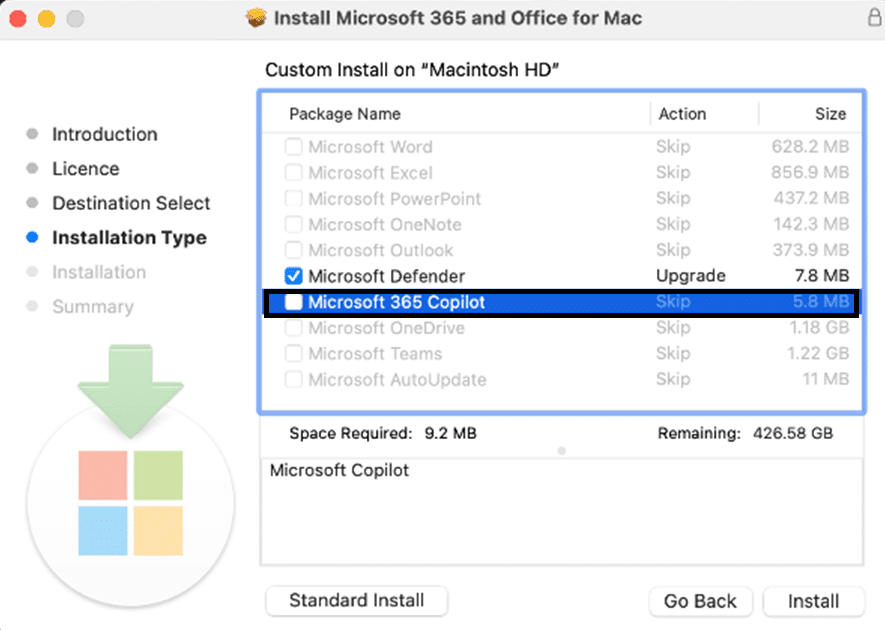
TL;DR: Starting February 2026, Microsoft is adding a ‘shim’ (placeholder) for the Microsoft 365 Copilot app for Mac into the standard suite installer. This allows for easier deployment and user-led installation, provided devices meet the macOS 14.0+ requirement.
Deploying software in a mixed-OS environment has always been a challenge for IT managers. When it comes to the Microsoft 365 Copilot app for Mac, the challenge has historically been the double-deployment: first the Office suite, then the standalone Copilot app. Microsoft is addressing this pain point by introducing a ‘shim’ app—a small placeholder—directly into the ‘Microsoft 365 apps for Mac’ suite installer.
Understanding the Microsoft 365 Copilot app for Mac Shim
A ‘shim’ in this context is not the full application. It is a lightweight entry point that appears in the macOS Applications folder. When a user clicks it, the shim triggers a download of the full, feature-rich Copilot app. This method balances the need for visibility with the desire to keep initial installer sizes manageable.
Technical Requirements for Admins:
- OS Version: macOS 14.0 (Sonoma) or later is mandatory.
- AutoUpdate: Microsoft AutoUpdate (MAU) must be enabled and unmanaged.
- Network: Devices must have a clear path to Microsoft’s CDN to pull the full app binary.
How to Manage the Microsoft 365 Copilot app for Mac Deployment
For most IT organizations, the default behavior will be the best path. However, if you need to control this strictly via Mobile Device Management (MDM), you have two primary methods.
Method 1: Customizing the Installer During the manual download of the suite package, you can click ‘Customize’ on the installation type page and uncheck the Copilot option. This is ideal for small-scale deployments or imaging.
Method 2: Using Configuration Profiles For enterprise-scale management, you can use a Boolean key in your MDM (like Jamf or Intune).
- Domain:
com.microsoft.m365copilot - Key:
InstallCopilot - Value: Set to
falseto prevent the shim from appearing.
Comparison: Shim vs. Full App Push
While the shim is great for organic adoption, some organizations may still prefer to push the full Microsoft 365 Copilot app for Mac binary separately. The shim is best for organizations that want to see which departments are actually ready to embrace AI before committing to large-scale support training.
FAQ Section
Q: Does the shim consume a Copilot license? A: No, the shim itself is just a downloader. A license is only required when the user signs into the full application.
Q: What happens if I have macOS 13 or older? A: The shim will not function. You must ensure your fleet is updated to at least macOS 14.0 to support the modern Copilot experience.
Q: Can I remove the shim after it has been installed? A: Yes, it can be managed via standard macOS app removal or by deploying the ‘false’ Boolean key via your MDM provider.