
TL;DR: Microsoft is introducing the External Domains Anomalies Report to help Teams admins detect unusual communication patterns with external organizations. By using behavioral analysis to flag spikes in 1:1 and group chats, it provides early visibility into phishing and data exfiltration risks. This should be rolling out in March according to Microsoft.
Closing the ‘Guest Access’ Blind Spot
As organizations adopt hybrid work, external collaboration has skyrocketed. While this boosts productivity, it also expands the attack surface. Attackers often use compromised external tenants to initiate ‘first-contact’ outreach, knowing that these messages often bypass traditional email security filters.
Roadmap ID 536572 introduces a behavioral lens to this problem, providing admins with a way to distinguish between a busy partner and a malicious campaign.
Key Features of the Anomalies Report
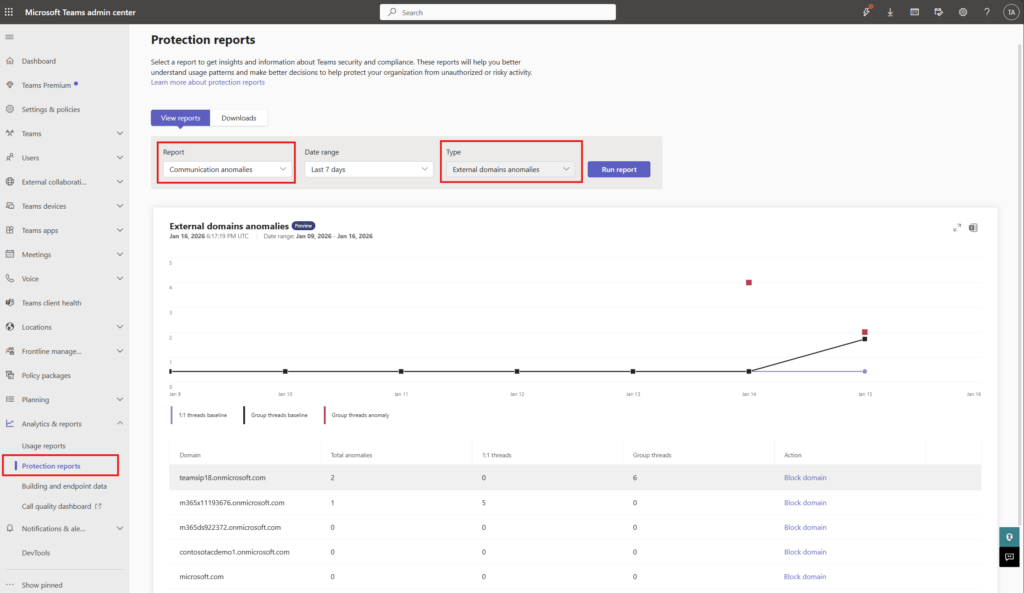
Located in the Teams Admin Center (TAC) under Protection Reports, this tool offers a deep dive into cross-tenant messaging trends.
1. Behavioral Pattern Analysis
Rather than relying on static lists, the report establishes a baseline of ‘normal’ communication. It highlights:
- Sudden Spikes: Large volumes of messages to or from a specific external domain.
- New Threads: An unusual number of new 1:1 or group chat threads created by an external party.
- First-Time Contact: Identification of domains that have never interacted with your tenant before.
2. Actionable Insights
The report provides a clear table view, including:
- External domain name.
- Total anomalies detected.
- Counts of new 1:1 and group threads.
- The ‘Block’ Button: A direct shortcut to mitigate risk immediately.
How to Enable Proactive Alerting
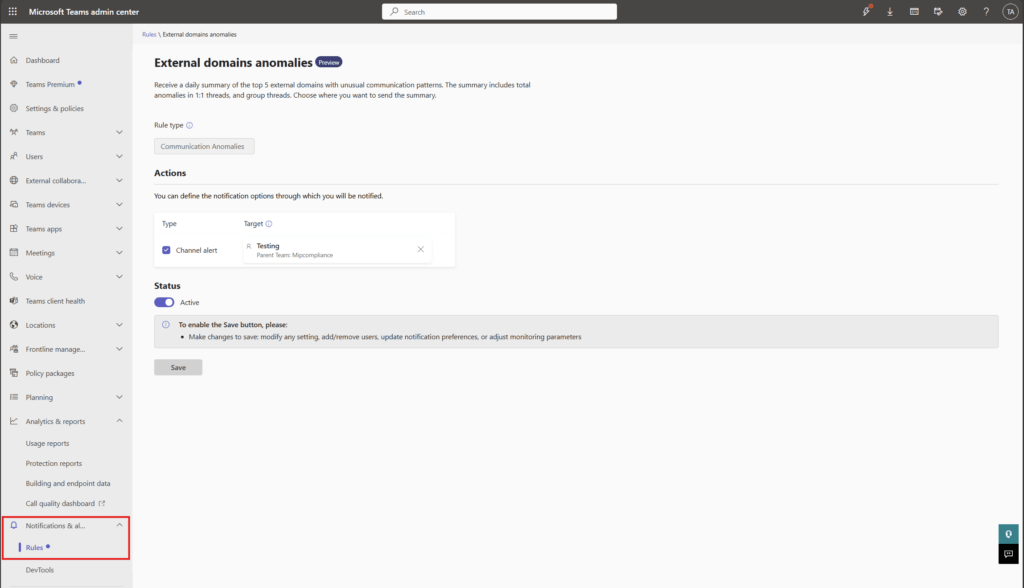
Checking a report manually is good; getting a notification is better. Admins can automate this by navigating to Notifications & Alerts > Rules in the TAC and setting the External domains anomalies status to ‘Active’. This provides a daily summary of the top five suspicious domains, which can even be sent to a specific Teams channel for your SOC team to review.
FAQ: External Domain Anomalies
Does this report cover guest users or just federated chat? The report focuses on cross-tenant communication patterns (federated chat), which is often used for the initial stages of a social engineering attack.
Is any action required to get the report? No action is needed to access the report once it rolls out. However, you must manually enable the ‘Alerts’ if you want proactive notifications.
Does blocking a domain here affect the global block list? Yes, the ‘Block’ option in the report is designed to manage external domains at the tenant level, helping you enforce security without jumping between different settings pages.