
TL;DR: Microsoft is launching a new capability that combines Microsoft Forms and SharePoint to generate standardized documents. This feature requires a Microsoft 365 Copilot license for creators and focuses on maintaining template consistency and compliance across the organization. This should be rolling out in February according to Microsoft.
Introduction to Structured Document Generation
The manual creation of repetitive documents often leads to formatting errors, the use of outdated templates, and a general lack of compliance. Microsoft is addressing this by introducing structured document generation. By using a form-driven interface, users can now input data that automatically populates an approved template stored in SharePoint.
This approach ensures that the output is always professional and meets the organization’s legal and branding requirements. For IT Managers and Adoption Specialists, this represents a move toward ‘ guardrail-based ‘ productivity, where users are empowered to create content within a safe, pre-defined structure.
How it Works: Forms meets SharePoint
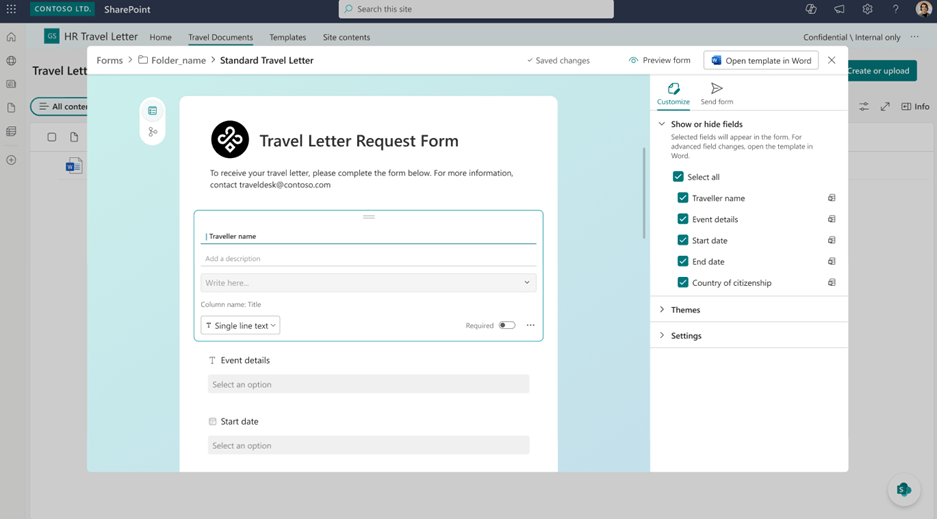
The process begins with a user who has a Microsoft 365 Copilot license. This user can create a structured document form linked to a specific SharePoint template.
- Template Selection: Link the form to an approved corporate document.
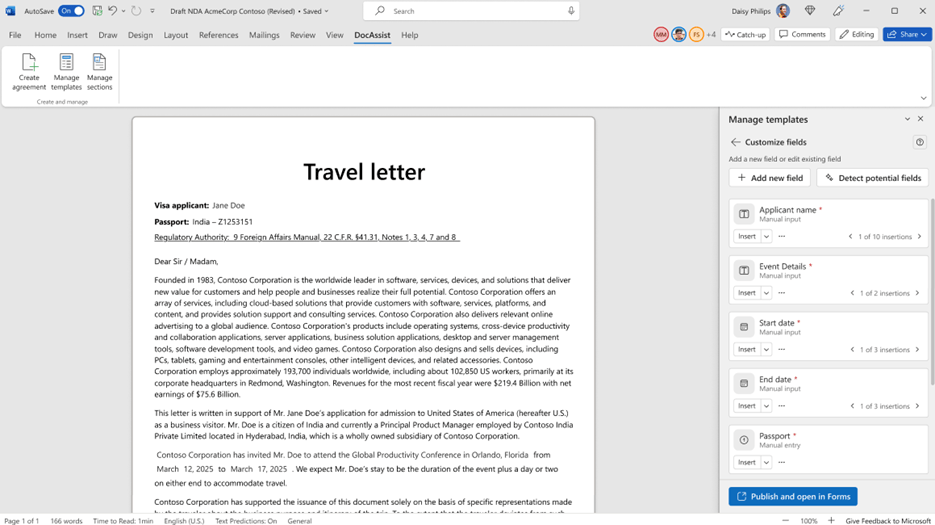
- Field Mapping: Define which form fields map to specific areas in the Word document.
- AI Assistance: Copilot helps in suggesting and refining fields to ensure the form captures all necessary data points.
- Conditional Logic: Advanced customizations allow for conditional sections in Word, meaning the document can change its layout based on the form responses.
Governance and Security
A primary concern with automated document generation is security. Microsoft has confirmed that existing SharePoint permissions and information management controls will continue to apply. If a user does not have permission to access a specific library or template, the form-driven experience will respect those boundaries.
Because the feature is on by default, IT departments do not need to perform complex backend configurations to enable the basic functionality. However, the strategic value lies in how business teams manage their template libraries.
Licensing Requirements
It is important to note the licensing structure for this feature. While the generation of documents through published forms is available to users based on standard SharePoint permissions, the creation and configuration of these forms require a Microsoft 365 Copilot license. This makes it a specialized tool for power users and process owners who oversee document workflows.
Strategic Impact for IT Organizations
Standardizing document workflows reduces the support burden on IT teams. Instead of fixing broken formatting in manually edited files, teams can focus on maintaining the integrity of the SharePoint templates. This shift also supports Digital Transformation goals by moving away from legacy ‘ save-as ‘ workflows toward modern, data-driven document creation.
FAQ
When will structured document generation be available? This should be rolling out in February 2026 according to Microsoft, with full global availability for the public preview expected by the end of March 2026.
Do all users need a Copilot license? No. Only the users who create and configure the structured document forms require a Microsoft 365 Copilot license. Users who simply fill out the forms to generate documents do not require the license, provided they have the necessary SharePoint permissions.
Does this replace Power Automate document generation? Not necessarily. While this feature provides a more user-friendly, ‘ no-code ‘ interface for document generation via forms, Power Automate remains the superior choice for complex, multi-step system integrations and background processing.
Is there any admin action required to enable this? No, this feature will be on by default for all Microsoft 365 tenants using SharePoint Online.