
TL;DR: Microsoft is expanding AI-generated audio capabilities across Viva Connections and SharePoint. Users with a Copilot license can now listen to personalized news briefings and site page summaries in multiple languages. This should be rolling out in February according to Microsoft.
Breaking the ‘Screen Barrier’
For years, internal communication has been a visual-first medium. We write posts, design pages, and hope users find the time to read them. However, as work becomes more mobile and fast-paced, the ‘eyes-on-screen’ requirement has become a bottleneck. Roadmap ID 535423 officially introduces an audio alternative powered by Microsoft 365 Copilot.
The Viva Connections News Reader
The update significantly enhances the ‘News’ experience within Viva Connections. For non-DoD users, Copilot can now generate a personalized audio briefing.
- The ‘Top 10’: Copilot scans the user’s news feed and creates a summary of the ten most relevant items.
- Language Support: The AI now supports a broader range of languages, matching the user’s profile or device settings.
- Availability: This works across both Teams Desktop and Teams Mobile, making it the perfect ‘morning commute’ tool.
SharePoint Knowledge Agent Integration
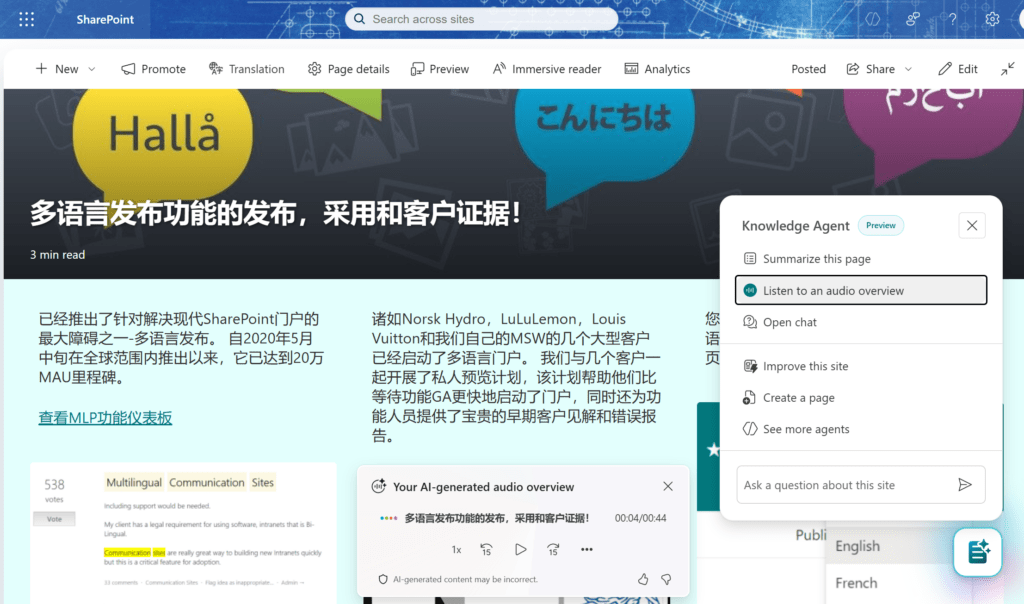
Beyond the general news feed, individual SharePoint pages are getting smarter. When the SharePoint Knowledge agent is enabled on a site, users will see an option to ‘Listen’ to a summary of the specific page or news post they are viewing.
This is particularly useful for long-form documentation, policy updates, or technical site pages where a quick audio overview can provide the necessary context before diving into the full text.
Technical Implementation for Admins
The best news for IT Admins is that this feature is on by default.
- Zero Configuration: If you already have Copilot and Viva Connections set up, there are no new toggles to flip.
- Policy Consistency: Existing SharePoint and Viva admin settings regarding news distribution and site permissions are strictly honored.
- Data Privacy: The AI generates these summaries ‘on the fly’ using the same enterprise-grade protection as other Copilot features. No data is used to train public models.
MVP Advice: Encouraging Adoption
As this completes its rollout in late February, I recommend a ‘Mobile-First’ internal campaign. Show your employees how to access the news reader from the Teams mobile app. It’s the most natural use case for audio summaries and helps prove the value of the Copilot investment to the average worker.
FAQ: AI Audio Summaries
Can I choose which news items are summarized? The Viva Connections briefing is personalized by the Microsoft Graph based on your activity, interests, and department. It selects the top 10 items it deems most relevant to you.
Do I need a special ‘voice’ license? No. This is part of the standard Microsoft 365 Copilot licensing suite.
What happens if the Knowledge agent is disabled? On SharePoint pages, the ‘Listen’ button for the AI-generated summary will not appear. The Knowledge agent must be active on the site for this specific functionality to work.
Pingback: SharePoint Page Templates: New, Smarter, Easier in 2026