
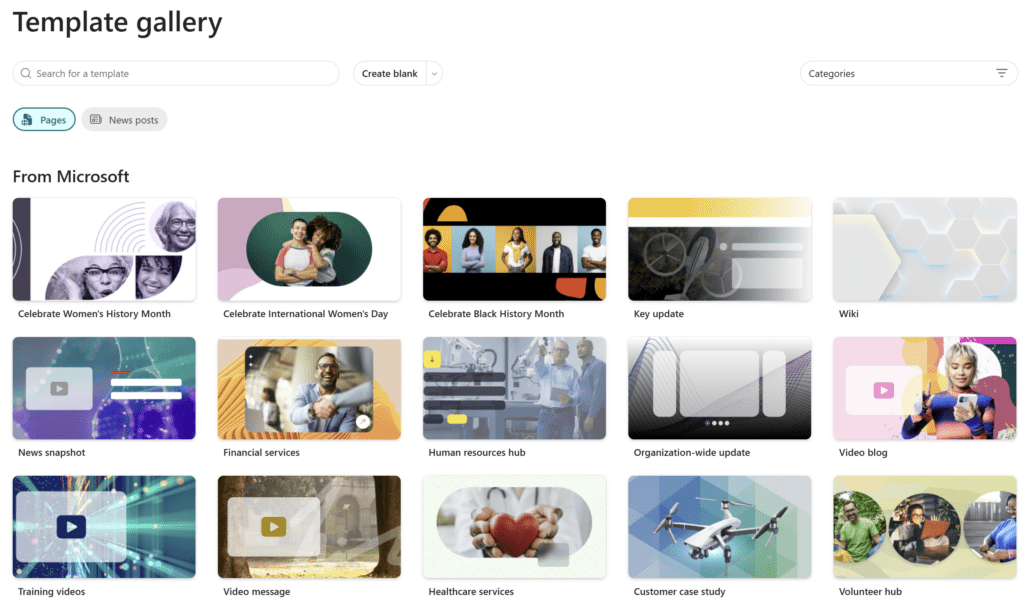
SharePoint page templates are getting the biggest refresh they have had in years, with 31 new designs, a unified gallery for Pages and News, and entry points that finally meet users where they are. If you have ever watched a site owner stare at a blank SharePoint page and ask ‘where do I start’, this update is for you. Microsoft is rolling out a redesigned page template gallery that combines better discovery, filtering, and search with 31 brand new templates that work across announcements, storytelling, video, and news scenarios.
This message is associated with Microsoft 365 Roadmap ID 490565(opens in new window).
What Is New with SharePoint Page Templates
The headline is simple. SharePoint page templates are no longer hiding inside the page authoring canvas. Microsoft is surfacing the gallery in the places site owners actually go, and giving them tools to find the right template quickly.
Here is what changes:
- Expanded entry points. The SharePoint page template gallery now appears in Site settings, in Site contents under ‘+ New’, in the ‘Next steps’ onboarding card on freshly created sites, and from the Stream video app when a user clicks ‘Create video news post’ under Share.
- Filtering by category. Templates can be filtered by category, such as announcements, storytelling, video, or news. Multiple filters can be applied at the same time and easily cleared.
- Persistent context. Selected filters persist when switching between Pages and News views, so users do not lose their place when exploring options.
- Unified Pages and News experience. A single gallery now supports both page and news post creation. Templates open in the correct creation mode automatically.
- Search inside the gallery. Users can search templates by name and combine that search with filters.
- 31 new templates. A fresh batch of modern SharePoint page templates is enabled by default.
Why the SharePoint Page Templates Refresh Matters
For years, the biggest barrier to consistent intranet design has not been bad templates, it has been bad discovery. Site owners knew templates existed somewhere, but the path was buried under three clicks and one assumption. Most users defaulted to the blank page and rebuilt the same hero, three-column layout every time.
By moving the SharePoint page templates gallery into Site settings, Site contents, and onboarding flows, Microsoft is shifting design from an opt-in choice to the default starting point. The Stream entry point is especially interesting, because it brings video-first creators directly into a curated set of news templates without sending them through the Pages library.
The unified Pages and News experience also closes a long-running gap. Until now, choosing a ‘page’ versus a ‘news post’ template required users to know the difference before they even started. With the new gallery, the template itself decides which creation mode opens, removing one of the most common support questions for site owners.
If your organization has invested in adjacent SharePoint capabilities like the SharePoint Knowledge agent for AI audio summaries(opens in new window), this template refresh becomes even more valuable. Better page structure means better summaries, better navigation, and better Copilot grounding across the board.
Rollout Timeline for SharePoint Page Templates
| Release Type | Region | Start | Expected Completion |
|---|---|---|---|
| Targeted Release | Worldwide | Early March 2026 | Mid March 2026 |
| General Availability | Worldwide | Late March 2026 | Early April 2026 |
According to Microsoft, this should be rolling out around March and April 2026.
How to Use the New SharePoint Page Templates
The flow is intentionally lightweight. There is nothing to install and no admin toggle.
- Open any modern SharePoint site.
- Click ‘+ New’ in Site contents and select ‘Page’, or open Site settings and choose the page template gallery option.
- The new gallery opens with two pivot buttons, Pages and News.
- Use the category filters (announcements, storytelling, video, news) to narrow the list.
- Use the search box to find a template by name.
- Click a template to open it in the correct creation mode automatically.
For video creators, the same gallery is reachable from the Stream app under Share > Create video news post.
What Does IT Need to Know About SharePoint Page Templates
No Tenant Configuration Required
The new SharePoint page templates gallery is enabled by default. There are no SharePoint Admin Center toggles, no PowerShell scripts, and no Microsoft 365 Apps for Enterprise policies to update. If your tenant is on the standard release ring, your users will see the new experience automatically.
Permissions Are Unchanged
Existing SharePoint permissions are respected. Users only see templates and creation options on sites where they have edit rights. No new sharing surface is introduced.
License Requirement
A standard SharePoint Online license (any plan that includes modern sites) is sufficient. The new SharePoint page templates do not require a Microsoft 365 Copilot license. If you are also rolling out Copilot grounding features such as SharePoint Lists Copilot through Context IQ(opens in new window), those continue to require their own Copilot licensing.
Compliance Posture
This update changes the entry point and selection experience for page creation. It does not change how customer data is stored, processed, or governed in SharePoint. Existing data residency, retention, and DLP policies continue to apply.
Admin Tips for Rolling Out SharePoint Page Templates
- Tell your site owners first. The most common reaction to the new gallery will be confusion, not delight. A short note before March kicks off, explaining that ‘+ New > Page’ will now open a gallery instead of a blank canvas, prevents a wave of helpdesk tickets.
- Audit your existing custom templates. If your organization has built custom SharePoint page templates, review them now. Some of the 31 new defaults may overlap with what you have, and a single curated list is far better than a confusing mix of branded and generic options.
- Update internal documentation. Anywhere your knowledge base says ‘click New > Page to start with a blank page’, update it. The default flow is now template-first.
- Pilot the Stream entry point with comms teams. Internal communicators are the most likely group to benefit from the video news post path. A 30-minute walkthrough with that team will pay back in better-looking news posts within a week.
- Watch the filter persistence behavior. Because filters carry across Pages and News views, a user who set ‘storytelling’ for News may not realize the same filter is active when they switch to Pages. Train accordingly.
The Paul-Take on SharePoint Page Templates
Most SharePoint page templates updates are cosmetic. This one is structural. The shift from ‘blank page by default’ to ‘gallery by default’ changes the behavior of every user who clicks New, and that is what actually moves intranet quality forward.
Honest opinion, the 31 new templates are the least interesting part of this announcement. Templates have always existed, and most organizations had access to enough variety to do good work. The real win is the unified Pages and News gallery and the entry points in Site settings, Site contents, onboarding, and Stream. That is where the friction lived. That is where adoption stalled.
If you manage a SharePoint estate, do not treat this as a ‘just an update’ email. Treat it as a small change-management moment. Get a screenshot, send a one-paragraph note to your site owners, and update the two pages of internal documentation that reference the old flow. That is the entire playbook. Do it in March and you will avoid a ‘why does New look different’ wave in April.
Long term, this also sets up a cleaner path for governance. When everyone starts from the same gallery, you can actually measure which templates get used, deprecate the ones nobody touches, and curate a real internal design system. That conversation has been impossible until now because there was no shared starting point. After April, there is.
MVP Reference List
- Microsoft 365 Roadmap ID 490565: SharePoint page template gallery improvements(opens in new window)
- Microsoft Learn: Page templates in SharePoint(opens in new window)
- Microsoft Learn: Create and use modern pages on a SharePoint site(opens in new window)
- Related KbWorks read: SharePoint Lists Copilot: Smarter Prompts, Finally(opens in new window)
- Related KbWorks read: From Reading to Listening: AI Audio Summaries Land in SharePoint and Viva
Pingback: SharePoint News Filmstrip: The Smarter New Layout