
Copilot Cowork is the part of Microsoft Copilot that does the work instead of helping you with it. That sounds like marketing, so in this post I will show what it means in practice: what Copilot Cowork can do that Copilot chat and the Office apps cannot, why it can write to files, why its skills go deeper, and what that means for GDPR.
I made an interactive PowerPoint for this, because the details are what most people are missing. Everyone knows Cowork is for tasks. Fewer people know why it can do more than a skill in PowerPoint or Excel. You can download the deck at the bottom of this post.
What Copilot Cowork does that the others do not
Someone told me this week: ‘A skill in PowerPoint is simple. In Cowork it can do so much more.’ He was half right. The skill is the same kind of file, an instruction file. What changes is the toolbox around it.
Here is the short version, based on Microsoft’s own documentation:
| Office apps | Copilot chat | Copilot Cowork | |
|---|---|---|---|
| Creates and edits files | The open file only | New files | New and existing files |
| Plans the steps itself | You steer | You steer | Plans and runs |
| Keeps going without you | Per request | Per request | Runs in the cloud |
| Uses many tools in one task | The document | Search and files | Mail, files, Teams and more |
| Reusable skills with reference files | Thin documentation | Not documented | SKILL.md plus 20 files |
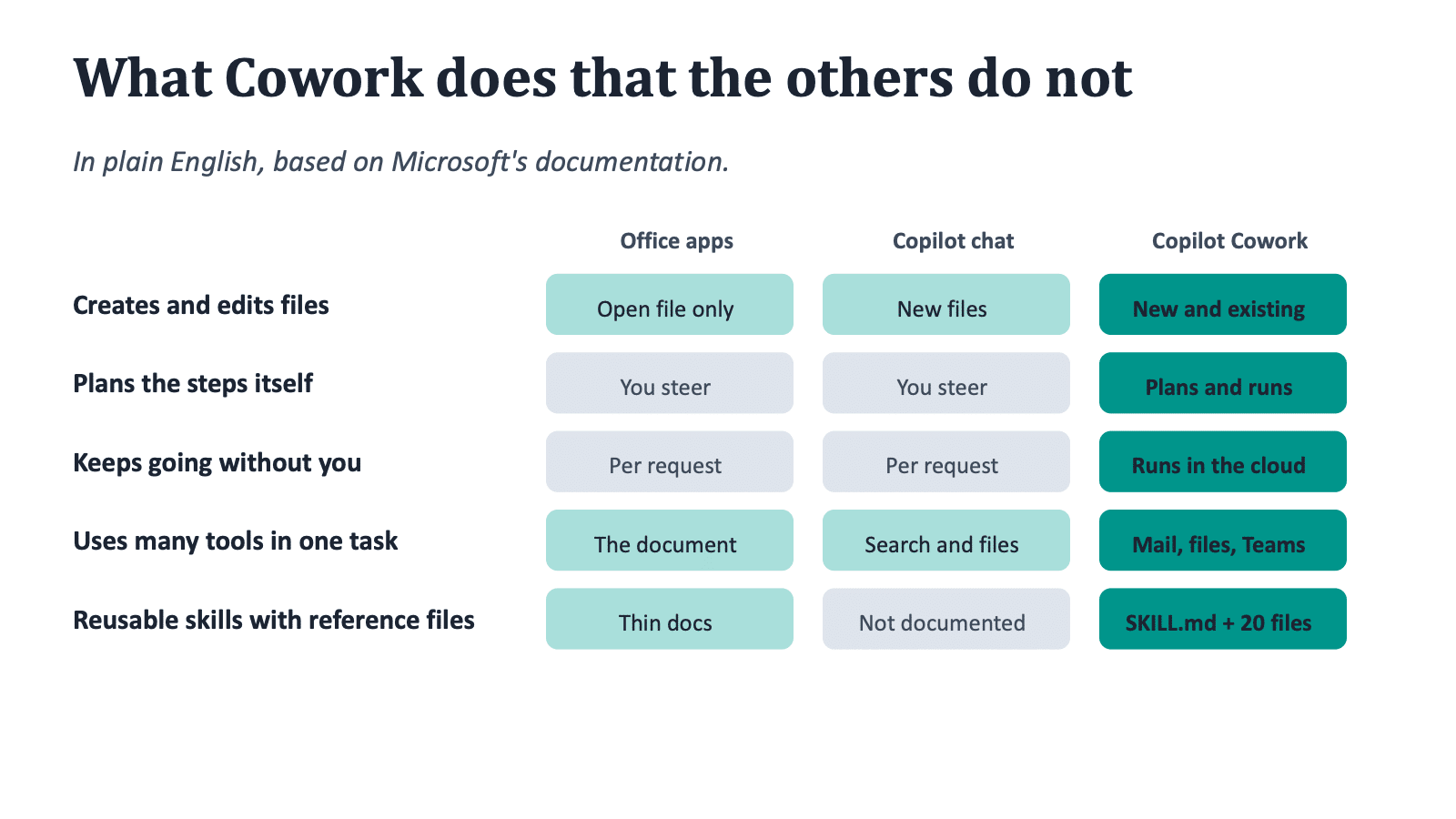
A note on the cells that say ‘per request’ and ‘thin documentation’. They mean I could not find Microsoft documentation that says otherwise. If you know of any, tell me and I will update this post.
Why Copilot Cowork can write to files
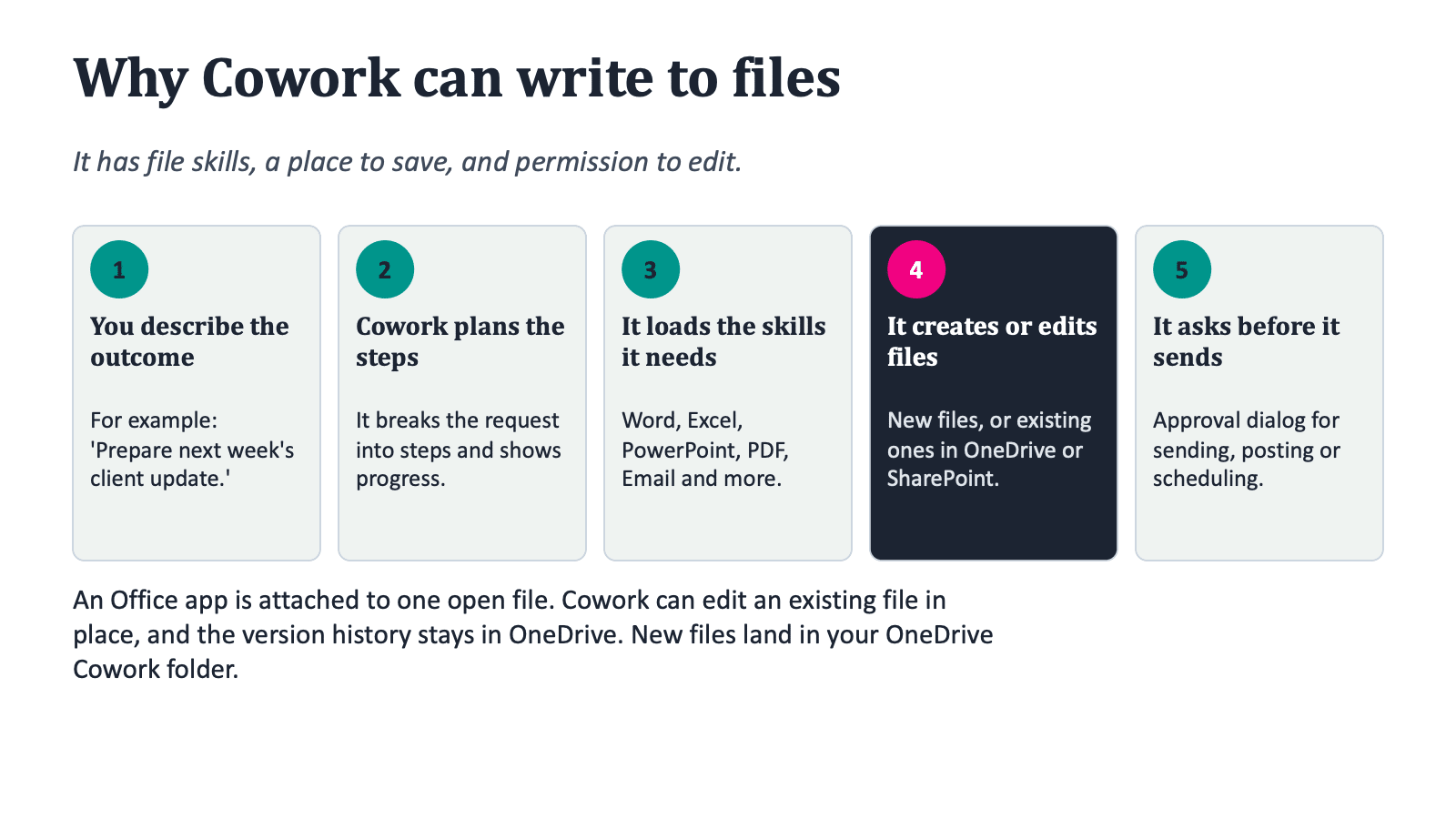
This is the question I get most. The answer is not magic. Copilot Cowork has three things an Office app does not have: file skills, a place to save, and permission to edit.
Microsoft describes the flow in its application card. You give Copilot Cowork a request in plain language. It plans the steps and loads the skills it needs. Those built-in skills include Word, Excel, PowerPoint and PDF, but also Email, Scheduling, Calendar Management, Meetings, Daily Briefing, Enterprise Search, Communications and Deep Research. For each step it executes the action and shows progress in the conversation. Before sensitive actions such as sending, posting or scheduling, it shows an approval dialog with a preview. At the end it returns the response and any files it created.
An Office app is attached to one open file. Copilot Cowork is attached to your Microsoft 365 account. That is the difference.
How Copilot Cowork edits existing files
Copilot Cowork can edit an existing Word, Excel or PowerPoint file in OneDrive or SharePoint. You attach the cloud file, describe the change, and approve edit access once or for the whole conversation. The changes are saved to the same file, and the version history stays available in OneDrive or SharePoint. New files appear in an output folder in the side panel, and you can find them in your OneDrive Cowork folder. You can download them one by one, or as one zip of up to 50 files and 500 MB.
You can also give it context: attachments up to 200 MB per file, from your device, OneDrive, SharePoint or Teams, and prompts up to 250,000 characters.
Why Copilot Cowork skills go deeper
A skill in Copilot Cowork is a folder in your OneDrive, under Documents/Cowork/skills, with a SKILL.md file inside. The file has a name, a description and the instructions in Markdown. It looks like this:
---
name: Weekly Report
description: Generates a weekly status report from my recent emails and calendar.
---

Gather my sent emails and calendar events from the past week, then create
a summary document organized by project.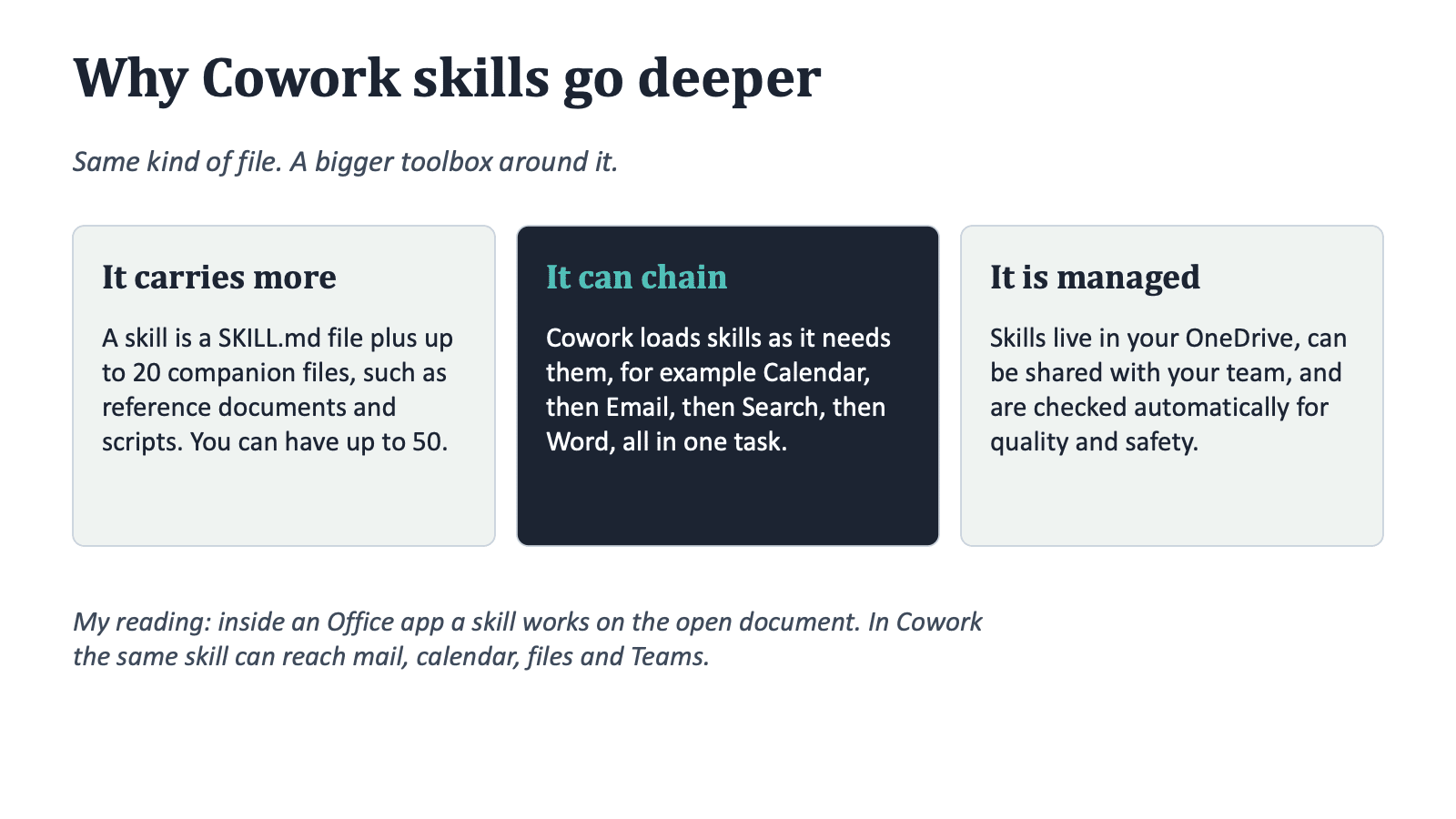
That example comes from Microsoft Learn. Three things make these skills deeper than a skill inside an Office app.
They carry more. A skill can have up to 20 companion files, such as reference documents and scripts, with a total of 10 MB per skill. You can have up to 50 custom skills. That is enough to capture a real process, including the reference material.
They can chain. It loads skills dynamically as it works. One task can run Calendar, then Email, then Enterprise Search, then Word. A skill in an Office app works on the open document. That is my reading of the documentation, and Microsoft does not say it in those words.
They are managed. You can share a skill with specific people in your organization. Cowork also evaluates every skill automatically: structure, safety, whether it triggers at the right time, and conflicts with other skills. The depth of the check grows with the skill’s reach and risk level.
Copilot Cowork skills in practice
Two practical points. First, if a skill never fires, the description is the first thing to check. Microsoft lists a missing trigger phrase and a description that is too broad as the common causes. Second, custom skills are not supported in Cowork on mobile, so build them on desktop.
Same request, three answers
Take a request like ‘Prepare next week’s client update’. This is an illustration of the documented behaviour, not a recorded demo.
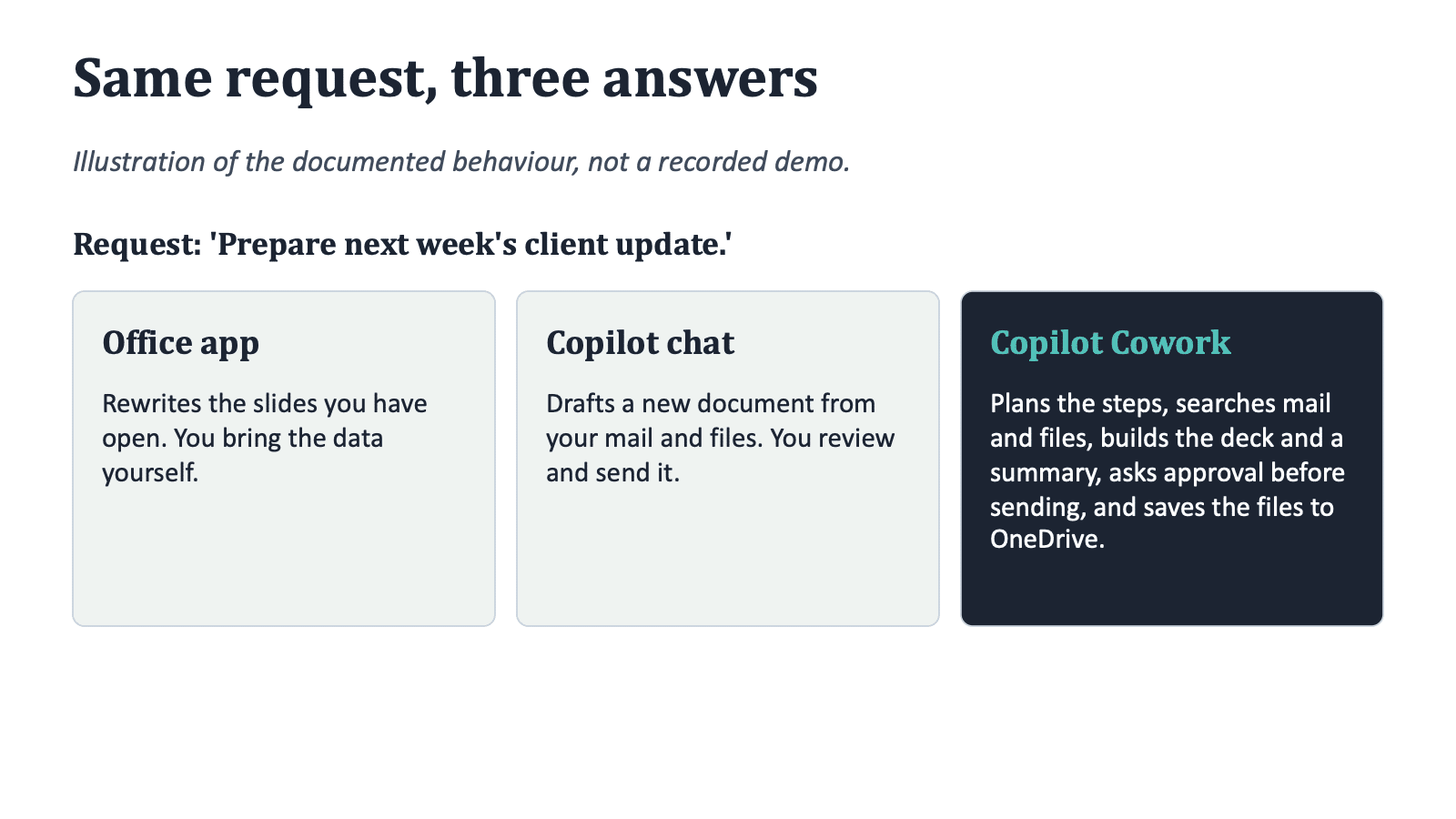
In an Office app, it rewrites the slides you have open, and you bring the data yourself. In Copilot chat, it drafts a new document from your mail and files, and you review and send it. In Copilot Cowork, it plans the steps, searches mail and files, builds the deck and a summary, asks for approval before sending, and saves the files to OneDrive.
It also works without you at the keyboard. Copilot Cowork runs in the cloud, so tasks keep running when your laptop is closed. The My tasks view shows what needs your input, what is in progress, and your automations, which include scheduled prompts and event-driven tasks.
The depth ladder
I scored the products on five things: writing files, skills, working on its own, reach beyond the file, and admin control. The scores are my own estimate on a scale of 0 to 4, not official numbers.
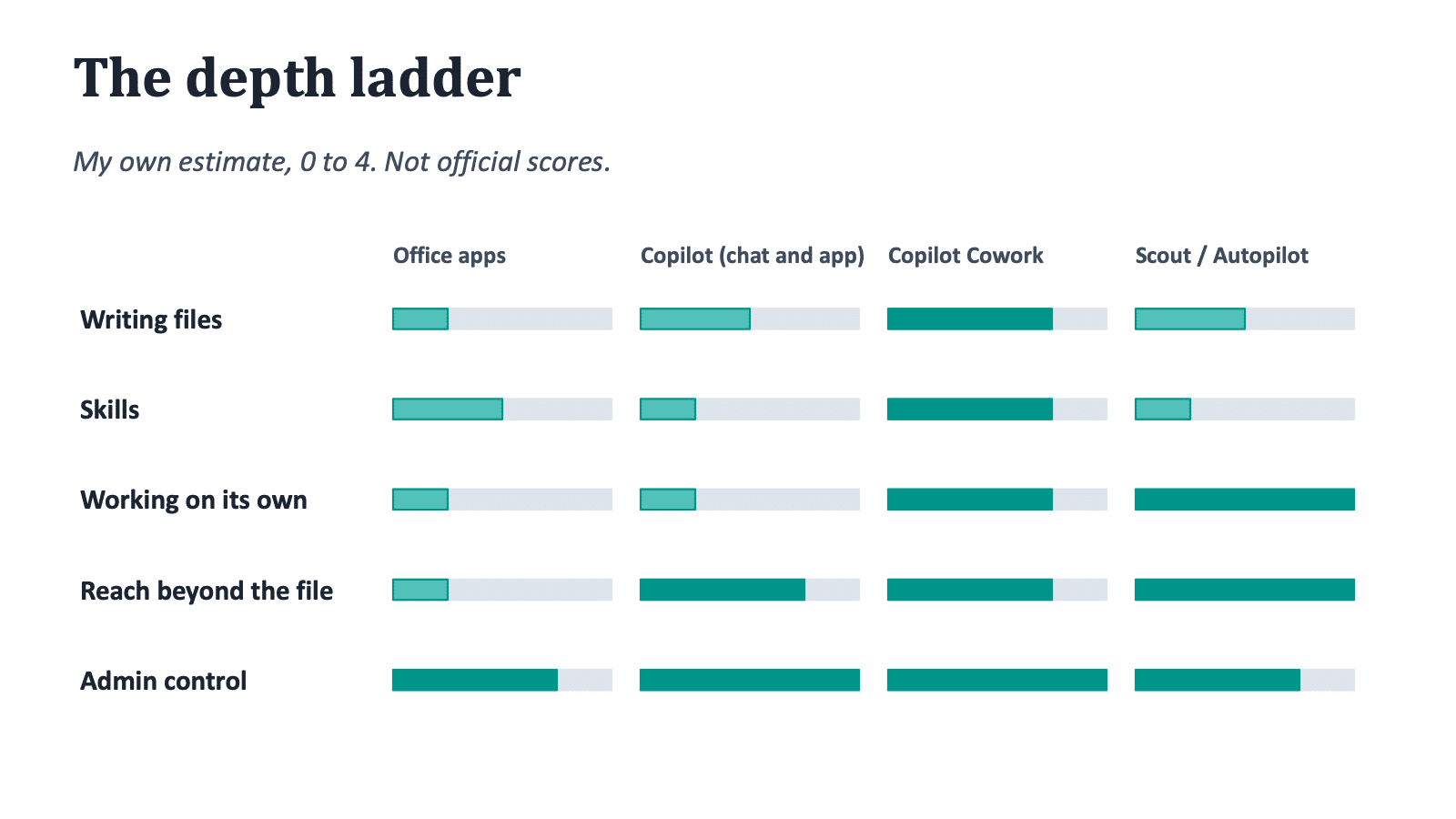
Copilot Cowork scores high on working on its own and on reach. Office apps score highest, relatively, on admin control, simply because they run under your existing tenant policy. For admin control, a high score means more control for the organization, not more freedom for the user.
Scout and Autopilot
Microsoft Scout was announced in June 2026 as an always-on personal agent. On 25 September 2026 it was renamed Autopilot, and it is in private preview. Microsoft’s own page says Scout was built on OpenClaw open-source technology, that each agent runs under its own Microsoft Entra identity, and that Purview labels and loss prevention policies apply before anything is sent or written.
Treat the rest with care. Descriptions of Autopilot as cloud-hosted come from third parties, not from Microsoft. I found no Skills system described for it. I put it on the ladder as the most autonomous option, and also as the least documented one.
Copilot Cowork and GDPR: the baseline is the same
Now the GDPR view, because I think that is where the real differences are. Let me start with what is the same.
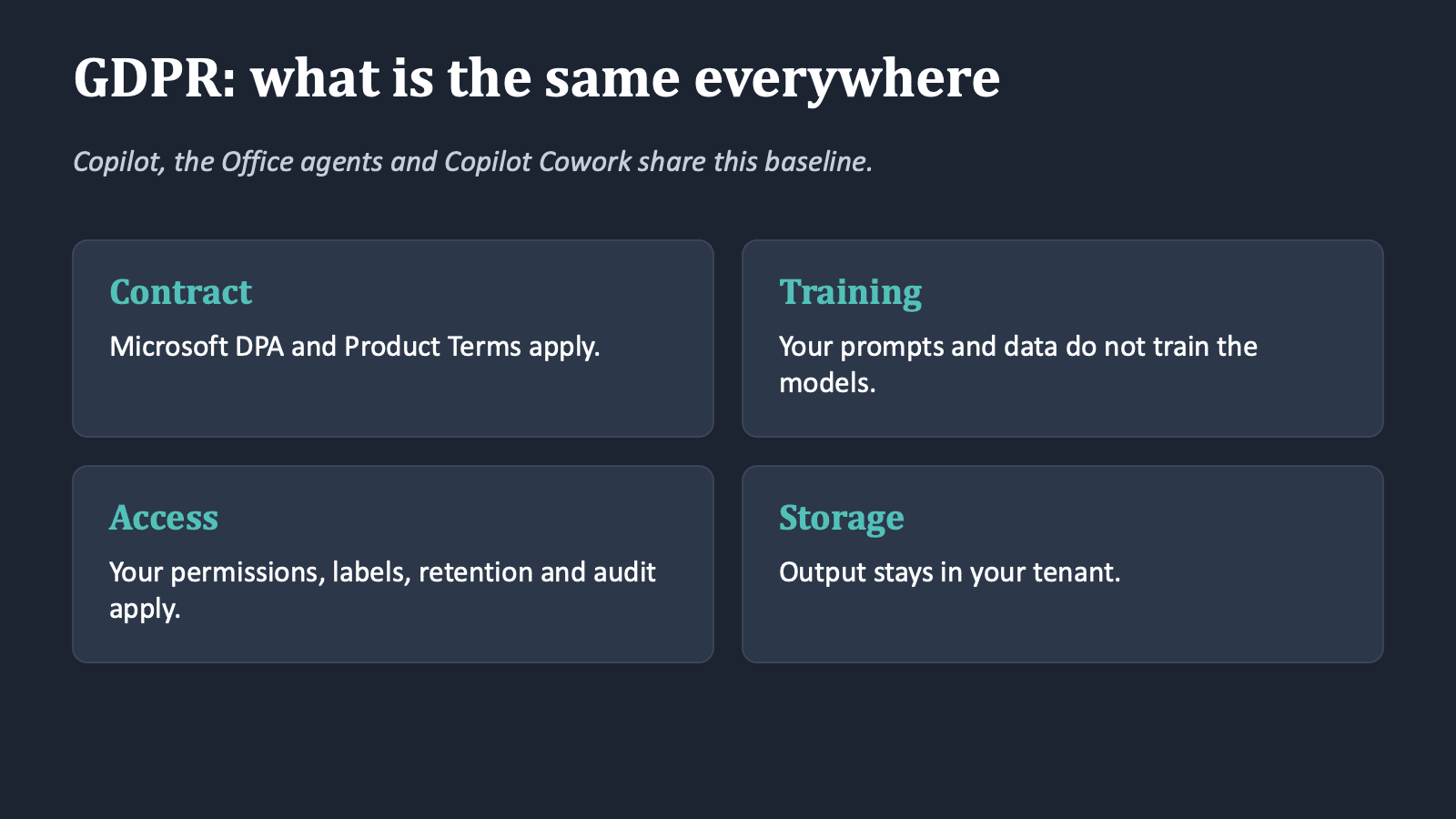
Microsoft states that Microsoft Copilot is compliant with its commitments to commercial customers, including GDPR and the EU Data Boundary. Prompts, responses and data accessed through Microsoft Graph are not used to train the foundation models. Copilot only retrieves what the user is allowed to see, and sensitivity labels, retention and audit apply. Files created by the agents are stored in OneDrive in your tenant. So on contract and access, Copilot, the Office agents and Copilot Cowork look alike.
Copilot Cowork and the Anthropic question
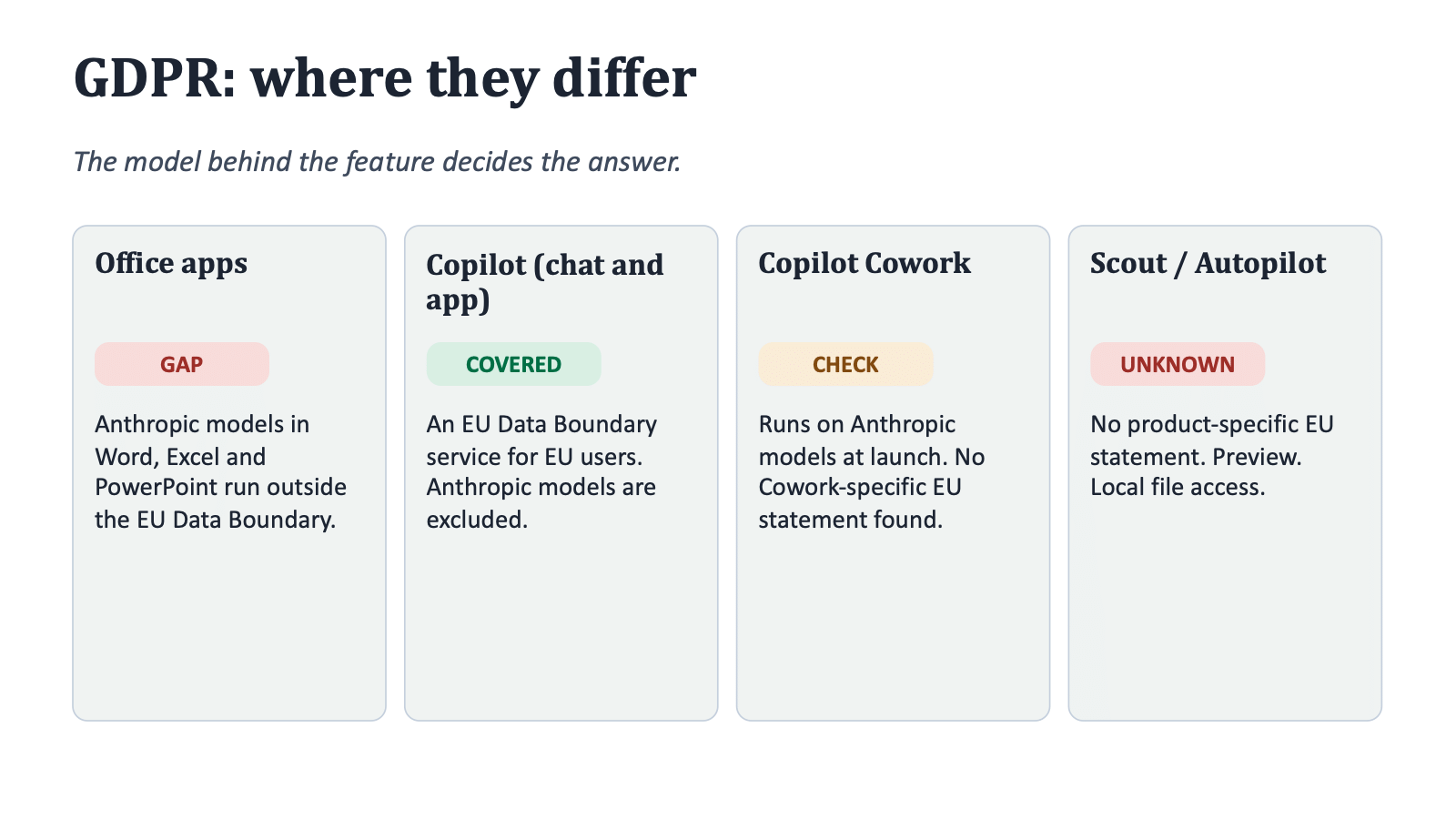
The difference is the model behind the feature. Microsoft’s documentation says Anthropic models are currently excluded from the EU Data Boundary, and that Anthropic operates as a Microsoft subprocessor under the Microsoft Data Protection Addendum. Customers in the EU Data Boundary and in the UK have Anthropic models disabled by default.
Now the part that matters for this post. Microsoft says Copilot Cowork runs on Anthropic’s Opus 4.8 and Sonnet 4.6 at general availability, and on GPT 5.5 in Frontier. I found no Cowork-specific statement on data location, and nothing on whether an EU tenant with the Anthropic setting switched off can use it at all. I do not know the answer, and I would not guess.
The deck puts it in three sizes:
- Small: contract and access model. Same DPA, permissions, labels and tenant storage.
- Medium: model choice and location. Anthropic models sit outside the EU Data Boundary. Microsoft documents that some other subprocessor models can process inside it.
- Large: Scout and Autopilot. No product-specific EU Data Boundary statement, local file access in the Scout desktop app, and still a preview.
One more thing from the documentation: during peak demand, Copilot prompts and grounding data can be processed outside the EU Data Boundary, for tenants that allow flex routing. Check whether that is active in your tenant.
Admin tips
- Copilot Cowork is off by default. Admins decide who gets it, so start with a small pilot group.
- To see the Anthropic setting, sign in to the Microsoft 365 admin center as an AI Administrator. Go to Copilot, then Settings, then View all, then AI providers operating as Microsoft subprocessors.
- Data Lifecycle Management for Copilot Cowork became available on 22 June. Microsoft said Data Loss Prevention was coming soon at launch, so check where it stands today.
- Set spending limits per tenant, group and user, and turn on usage alerts.
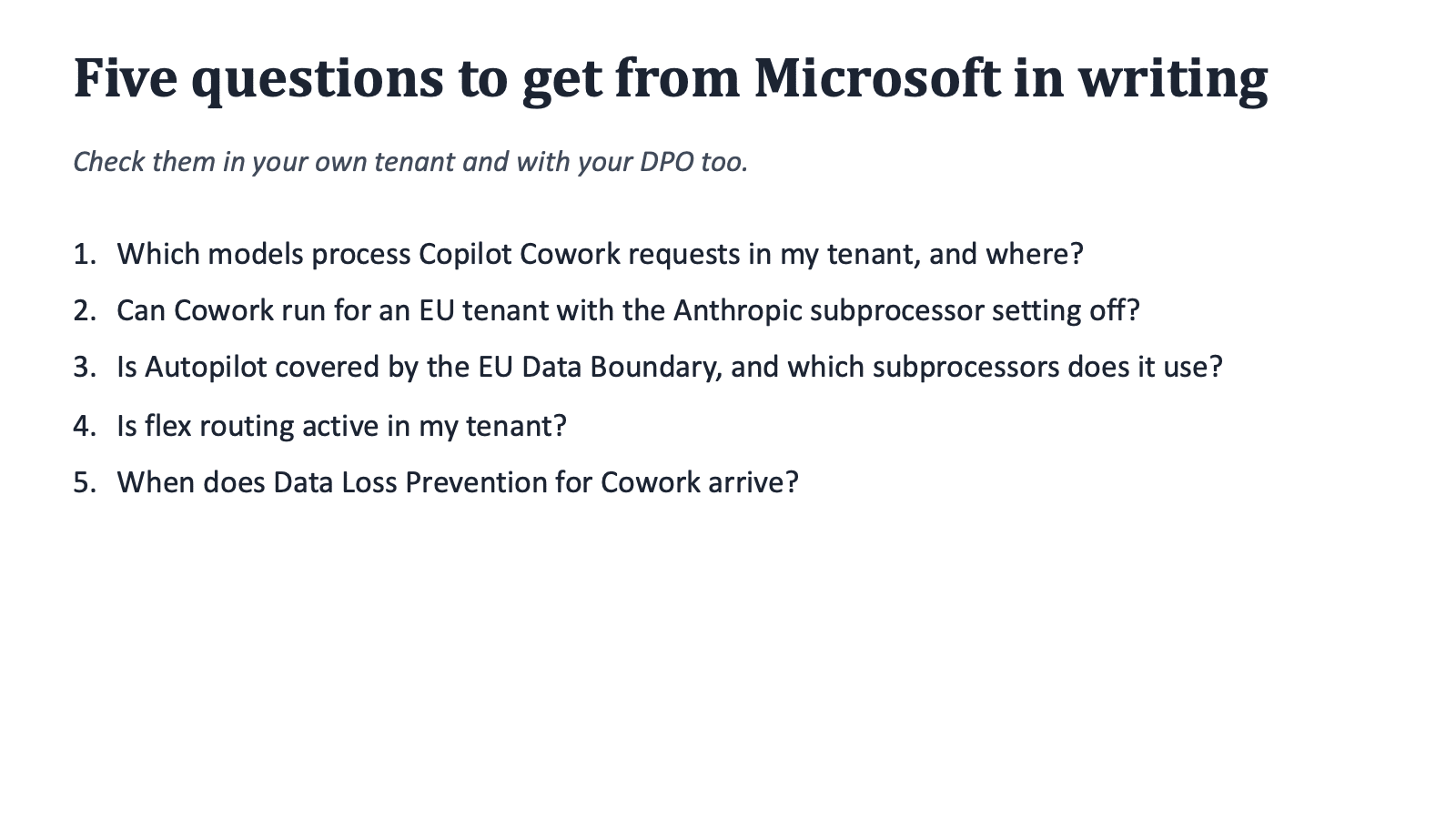
- Put the five questions below to Microsoft in writing, and involve your DPO.
- Which models process Copilot Cowork requests in my tenant, and where?
- Can Copilot Cowork run for an EU tenant with the Anthropic subprocessor setting off?
- Is Autopilot covered by the EU Data Boundary, and which subprocessors does it use?
- Is flex routing active in my tenant?
- When does Data Loss Prevention for Copilot Cowork arrive?
License and cost
It requires the Microsoft 365 Copilot user license. On top of that it is billed on usage, in Copilot Credits. Pay-as-you-go is $0.01 per Copilot Credit, with a committed-volume option that offers a discount. The price of a task depends on model use, context retrieval, tool calls and runtime. Users see the cost per task. I wrote about how Copilot Credits work in SharePoint in this earlier post. If you are new to Copilot licensing, my free Microsoft 365 Copilot whitepaper is a good start. And for a smaller Copilot feature that already changes how people work, see Copilot in the Teams chat list.
Download the interactive PowerPoint
I built the whole comparison as an interactive PowerPoint. Click the tiles and rows, and you see what is behind each score.
- Download the interactive PowerPoint: copilot-cowork-interactive.pptx
- Download the PDF version: copilot-cowork-guide.pdf
It is built for PowerPoint on desktop. Open it, press F5 (Slide Show) and click the buttons. In normal edit view, hold Ctrl and click, or Cmd on a Mac. It does not work well in PowerPoint on the web, phone apps, Keynote or Google Slides. The PDF is a static version of the main slides, without clicks.
This is a research summary, not legal advice. The status is 15 October 2026, and several details come from third-party sources, as noted above. Check the settings in your own tenant.
The Paul-Take
The GDPR baseline is the same. The model is the difference. Before you roll out Copilot Cowork in the EU, find out where the model runs and get it in writing.
And on depth: the skill is just the instructions. The toolbox around it is where Copilot Cowork pulls ahead of the Office apps. It can write to files because it has file skills, a place to save and permission to edit. It can go deeper because its skills carry reference files, chain across tools, and can be shared and checked. If someone tells you a skill in PowerPoint is the same as a skill in Cowork, they are half right. Now you know which half.
What do you run into when you roll out Copilot Cowork? Let me know in the comments.
MVP Reference List
- Data, privacy, and security for Microsoft Copilot (Microsoft Learn)
- Anthropic models in Microsoft Online Services (Microsoft Learn)
- Copilot in Microsoft 365 apps with Anthropic models (Microsoft Learn)
- Use Copilot Cowork (Microsoft Learn)
- Application card: Microsoft Copilot Cowork (Microsoft Learn)
- EU Data Boundary: services with ongoing partial transfers (Microsoft Learn)
- Copilot Cowork is now generally available (Microsoft 365 blog, 16 June 2026)
- Introducing Microsoft Scout (Microsoft Copilot blog, 2 June 2026)