
M365 profile cards are getting a meaningful update in 2026. Microsoft is now surfacing Awards and Certifications data directly on the profile card, the small popup that appears when you hover over or click someone’s name in Teams, Outlook, SharePoint, and other Microsoft 365 apps.
If your organisation populates the Awards and Certifications properties in the Microsoft 365 profile schema, those values will now be visible to everyone who opens a profile card. This change is already rolling out worldwide and requires no configuration from IT. But before you tell your users to expect new badge sections, there is one thing you need to check first.
What Changed on M365 Profile Cards
Until now, M365 profile cards showed basic user information: job title, department, contact details, and skills. The Awards and Certifications data existed in the Microsoft 365 profile schema for years but was never shown on the card itself.
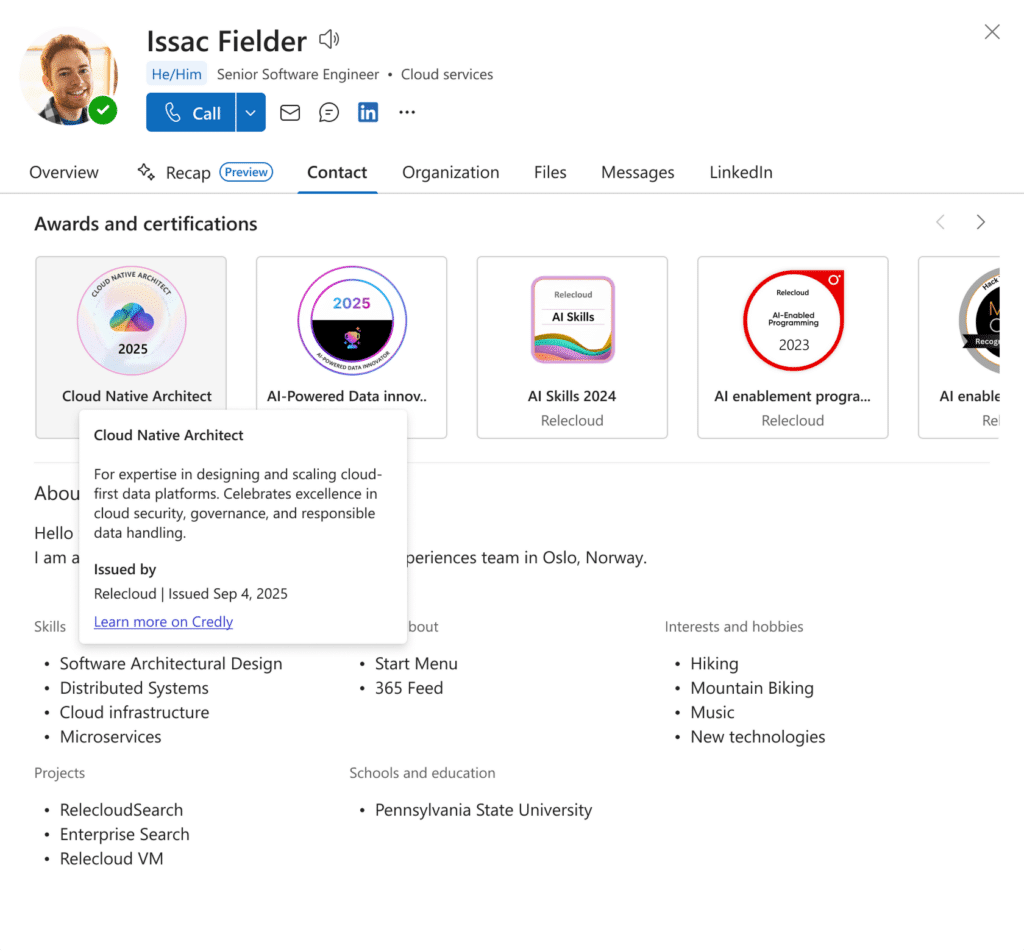
With this update, M365 profile cards now include a dedicated Awards and Certifications section. It appears in the overview and contacts tab, positioned below the skills section. Each badge entry shows the title and issuer by default. Clicking or tapping a badge opens a detail panel with the description and the date it was awarded.
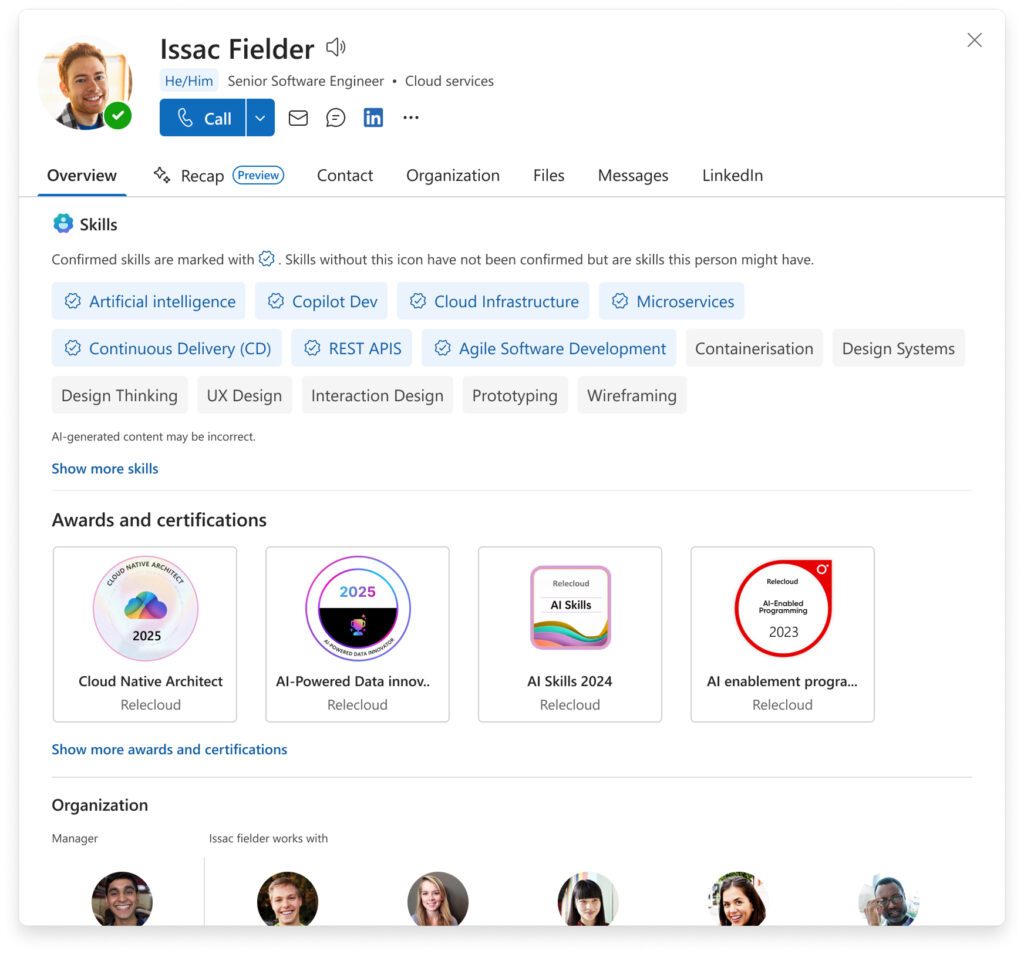
If a badge was issued within the last 30 days, it gets a highlight on the card to surface it more prominently. This is useful for recognition, especially in organisations that actively track certifications.
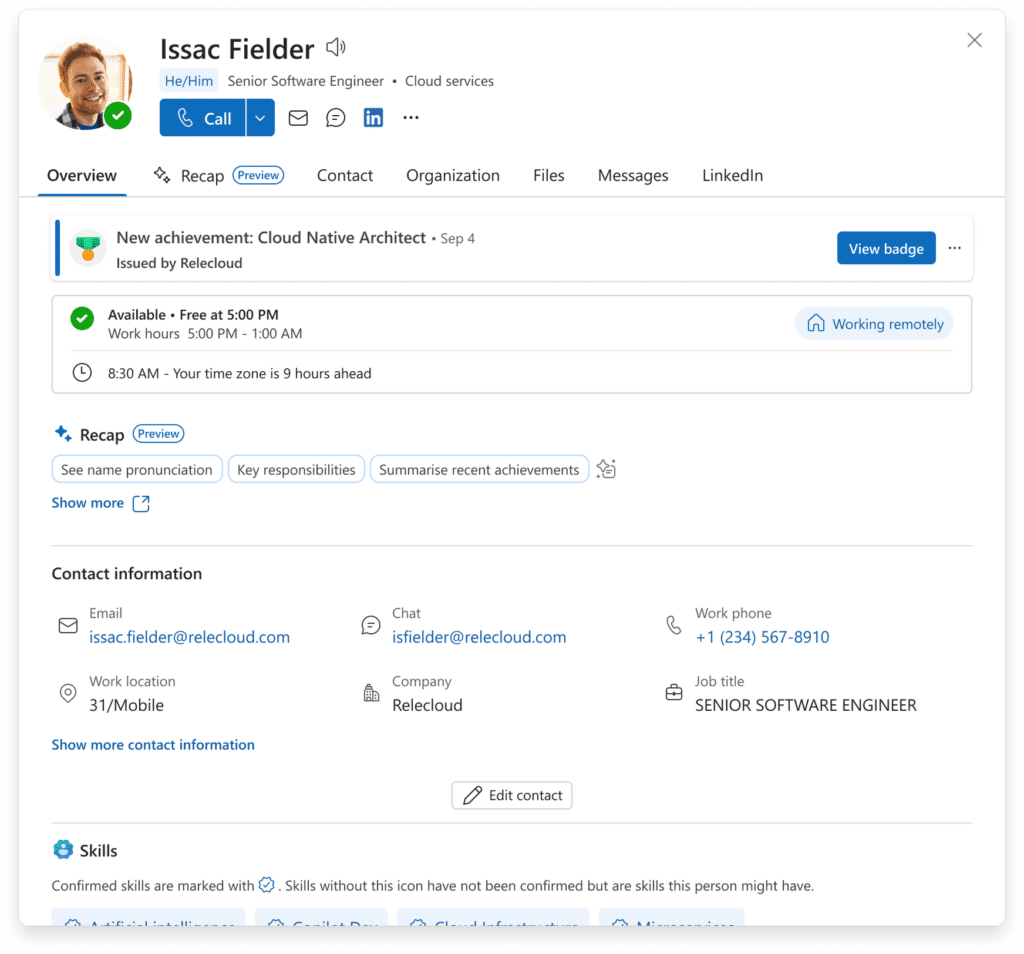
One important point: M365 profile cards are read-only for this feature. Users cannot add or edit badges from within the card. All management happens at the source, whether that is the Microsoft Graph API, an HR system sync, or a third-party platform like Credly.
How M365 Profile Cards Display Badge Details
The experience is designed to be clean and progressive. Users see the summary layer first, title and issuer, then drill into the details if they want more. The same behaviour applies whether you are in Teams, Outlook on the web, Outlook desktop, or SharePoint.
What M365 Profile Cards Show for Each Badge
Each badge entry includes the title and the name of the issuer at a glance. Selecting the badge reveals the full description and the exact date the award was issued. If it was issued in the last 30 days, M365 profile cards will feature it as a highlight to improve discoverability within the organisation.
Changes made at the source platform can take up to 24 hours to appear on M365 profile cards, depending on the crawl frequency configured by your admin.
Rollout Timeline
| Phase | Audience | Start | End |
|---|---|---|---|
| General Availability (Worldwide) | All users in orgs with data populated | Mid-March 2026 | Early April 2026 |
According to Microsoft, this should be rolling out around March 2026. There is no preview phase. The feature went straight to general availability worldwide.
Who Is Affected
Not every organisation will see this change. M365 profile cards only display the Awards and Certifications section if the relevant properties in the Microsoft 365 profile schema are actually populated.
If your organisation has never set up those fields, nothing changes. The new section simply does not appear on M365 profile cards in your tenant.
If your organisation does populate these fields, whether through the Graph API, an HR sync tool, or a third-party connector, your users will start seeing this section automatically. No configuration required.
How to Check Your Organisation’s Profile Data
Not sure whether your organisation uses these fields? Here is how to verify.
- Open the Microsoft Entra admin center and go to Users.
- Select a user account and review their profile properties.
- Check whether the ‘Awards’ and ‘Certifications’ fields contain any data.
- Alternatively, query the Microsoft Graph API using
GET /users/{id}and check the extended profile properties. - If those fields are empty across your user base, no action is required.
If you find they are populated, check the data quality. Old, inaccurate, or test data will now be visible to everyone through M365 profile cards.
Admin Tips
The feature is read-only and needs no admin configuration, but a few things are worth checking before your users start asking questions.
Verify the data quality first. If Awards and Certifications fields are populated in your tenant, review what is actually in there. Outdated or incomplete data will now be visible on every profile card.
Think about the 30-day highlight. New badges issued within the last month get surfaced prominently on M365 profile cards. This is a low-effort win for organisations with active certification or recognition programmes. Worth flagging to your HR or L&D team.
Communicate the data latency. Changes made at the source platform can take up to 24 hours to reflect on M365 profile cards, depending on how frequently your admin has configured the sync.
For a related update on how Microsoft is refining visibility and access controls across Microsoft 365, see Restricted Content Discovery: The Smart New Admin Delegation.
How This Connects to Microsoft Teams
This update applies to M365 profile cards everywhere they appear, including Microsoft Teams. When someone hovers over a colleague’s name in a chat or channel, the profile card that pops up will now include the Awards and Certifications section if the data exists.
For organisations investing in Teams as a central collaboration hub, this adds useful context to the people experience. You can see what certifications a colleague holds without leaving Teams or searching a separate directory.
For more on how Microsoft Teams continues to evolve its collaboration features, see Teams Channel Agent: The Smart New Way to Collaborate in Microsoft Teams.
Does This Apply to M365 Profile Cards in Outlook and SharePoint?
Yes. The update applies to M365 profile cards across all surfaces, including Outlook on the web, Outlook desktop, SharePoint, and any other Microsoft 365 application that renders the profile card experience.
License Requirements
No additional license is required. This feature is available as part of a standard Microsoft 365 subscription. The only prerequisite is that the Awards and Certifications properties must be populated in your organisation’s Microsoft 365 profile schema.
The Paul-Take
Here is the thing about M365 profile cards and this particular update: it sounds more impactful than it will be for most tenants.
The Awards and Certifications fields in the Microsoft 365 profile schema have existed for years. But unless someone actively set up a sync from an HR system, a learning platform, or a tool like Credly, those fields are empty. And if they are empty, M365 profile cards simply show nothing new. The section does not appear at all.
The organisations that will actually benefit are those running structured certification or recognition programmes, where an external platform feeds badge data into Microsoft Graph. If that is your organisation, this is a genuinely useful improvement. Certifications become visible without any effort from the user, and recent badges get highlighted automatically.
But before you announce this to your L&D team or put it in an internal newsletter, do the quick check. Query a few user profiles in the Entra admin center or via the Graph API. If the fields are empty, manage expectations early. If they are not, this is worth communicating to your organisation.
Read more about the feature directly in the Microsoft Support article.
MVP Reference
| Item | Detail |
|---|---|
| Rollout | March 2026, GA worldwide |
| Microsoft Support article | View awards and certification badges on your profile card |
| Microsoft Learn | Access your transcript, certificates, and badges |