Microsoft Roadmap, messagecenter and blogs updates from 13-11-2026

het nieuws van Microsoft message center roadmap en blogs - KbWorks - SharePoint and Teams Specialist

13-November-2026 Below you will find a collection of news published yesterday. This news consists of Microsoft’s Roadmap when it is updated it will be below with items. Then there will be a section with the message center, if there is anything new there, this will be automatically included. And it contains a piece from blogs that I follow myself and would like to share with you. If I miss something in the blogs that do have an RSS feed, please let me know.

This entire post was automated via Microsoft Flow
have fun reading!

The blogs of this day are:

What’s new in Microsoft 365 and Copilot? November 2026From Linkedin
Fake-download campaign uses trojanized installers to deliver monetization payloadsvan @MSFTSecurity
Microsoft named a Leader in the 2026 Gartner® Magic Quadrant™ for AI Agent Management Platforms  van @MSFTSecurity
Die neuste OneDrive VersionFrom Linkedin
Agentic AI engineering: I steer, the agents orchestrateFrom Linkedin
Your app needs documents. Do you really want to build a document platform?van Linkedin
The newest OneDrive VersionFrom Linkedin
When the meeting room starts helping you – Logitech’s new Rally devices and AI in meetingsFrom Linkedin
How to Build an Intranet in SharePoint (Step by Step)van nogintevullen
What’s new for SharePoint – October 2026From Linkedin
Microsoft Entra ID is Retiring SMS & Voice Authentication for SSPR From Linkedin
[Publications]: November 2026 updates for Microsoft 365 for IT Pros just released!From Linkedin
From Token Maxing to Token MinimisingFrom Linkedin
Is AI Making Our Next Techs Smarter or Just Faster?From Linkedin
PowerApps OnStart Navigate to Screen: Use App.StartScreen Insteadvan nogintevullen
How to secure passkey registration in Entra IDFrom Linkedin
The Model Matters Less Than the HarnessFrom Linkedin
How to Configure Grok Bot to Close Sentinel and Defender Incidents Safely: A Step-by-Step Guide for MSPsFrom Linkedin
Cleanup Inactive Agent IDs with Lifecycle Workflows in Microsoft Entra From Linkedin
Copilot Prioritize My Inbox Fades Away by March 2027From Linkedin
Your voice shapes SPFx: take our developer surveyvan Linkedin
Getting Started With HubSpot Meeting SchedulerFrom Linkedin
Agent Assets Document LibraryFrom Linkedin
Deprecation notice: Low-trust SharePoint add-ins in SharePoint Server Subscription Editionvan Linkedin
Microsoft 365: Recopilatorio de enlaces interesantes (LXXIX)!From Linkedin
How to Use the SharePoint Migration Tool (SPMT) Step by Stepvan nogintevullen
How I’m writing this series with ClaudeFrom Linkedin
Agentic AI engineering: What the humans do, what the agents do, and where the hard lines areFrom Linkedin
Using Grok Bot with a Conditional Access Geo-BlockFrom Linkedin
Power Apps OnStart vs OnVisible: Which One Runs When (Tested)van nogintevullen
Decide What Stays in Your HeadFrom Linkedin
How to Create your own Personal / Custom Skill in Copilot ChatFrom Linkedin
Is the AB-400 Harder Than the PL-400? A PL-400 Trainer Weighs InFrom Linkedin
SharePoint Online Extends Auto-Labeling of Sensitivity Labels to Cover Older FilesFrom Linkedin
Ask Copilot in SharePoint from your own web part, with a tiny scriptFrom Linkedin
New investments to reduce on-premises security riskvan @MSFTSecurity
​​​​What’s new in Microsoft Security: November 2026van @MSFTSecurity
Email threat landscape: Q3 2026 trends and insightsvan @MSFTSecurity
Customizing Modern Power Pages Lists using Client APIsFrom Linkedin
How to Migrate File Shares to SharePoint (Bulk CSV with SPMT)van nogintevullen
Agentic AI engineering: Why instructions aren’t enough for coding agentsFrom Linkedin
Microsoft 365: Compilation of interesting links (LXXIX)!From Linkedin
CIAOPS Need to Know Microsoft 365 Webinar – NovemberFrom Linkedin
Power Apps: Set a Dropdown Default Value to a Variable (and Make It Stick)van nogintevullen
Models Are Everywhere. Your Context Isn’t. | Microsoft IQFrom Linkedin
If AI Does the Work, Why Am I Paying the Same?From Linkedin
Copilot Projects: keep related chats, tasks and files togetherFrom Linkedin
AzCmply v1.0.8 released!From Linkedin
Threat actors use agentic AI tooling to find and abuse exposed secretsvan @MSFTSecurity
What Happens to MSPs When Grok Bot Can Do the Work?From Linkedin
One Prompt, Three Tenants: The Benefits of Grok Bot Group ChatFrom Linkedin
How Grok Bot Can Resolve Help Desk Issues Through Remote DesktopFrom Linkedin
Work IQ: SharePoint Toolsvan Linkedin
DLP for Copilot Customizes Data Access MessagesFrom Linkedin
How to restrict Content Discovery by Copilot in SharePointFrom Linkedin
Microsoft 365: Building Apps with Copilot Code!From Linkedin
Agentic AI engineering: Multi-agent orchestration across lanes without conflictFrom Linkedin
Claude in Copilot is coming into the EU Data BoundaryFrom Linkedin
SharePoint Migration Checklist (Before, During and After)van nogintevullen
*sshole: Checking Your Linux Hosts and Docker Containers for the OpenSSH musl Password Bypassvan @gvaro
CIA Brief 20261107From Linkedin
How to Set a Combo Box Default Value in Power Apps (Including Blank)van nogintevullen
Your Agents Will Outnumber Your PeopleFrom Linkedin
ARTEX abuse expands as cybercriminals target financial sectorvan @MSFTSecurity
AI Weekly: Cowork Meets Planner, Copilot Studio MCP, and Images 2.6van nogintevullen
Which Microsoft AI Tool Should You Use: Scout, Copilot Cowork, Microsoft 365 Copilot, or Copilot Studio?van @aprildunnam
What Is Copilot Cowork? A New Way to Work with Microsoft 365 Copilotvan @aprildunnam
Power Apps’ Biggest Shift in Years: Vibe.PowerApps.Comvan @aprildunnam
If I Were Starting with the Power Platform Today, Here’s What I’d Actually Dovan @aprildunnam
Smart Paste in Power Apps: A Hidden Gem You Need to Tryvan @aprildunnam
SharePoint Migration Mistakes to Avoid (and How to Fix Them)van nogintevullen
How to create HTML Dashboard in a List as a ViewFrom Linkedin
You’re not falling behind because someone else ships morevan @waldekm
Migrating 65 webinar recordings to YouTube, and the leftoversFrom Linkedin
Need to Know podcast – Episode 373From Linkedin
Power Apps IsBlank Function: Check Text Inputs, Dates, Variables and Form Fieldsvan nogintevullen
Free AI Agents, the E7 Bill and AD vs Entra: The Workplace Ninjas US SpecialFrom Linkedin
Who Owns the Agent When the Employee Walks Out the Door?From Linkedin
AI ShowFrom Linkedin
Microsoft Teams: Novedades en Microsoft Teams (Agosto-Septiembre 2026)!From Linkedin
The Disappearing Application LayerFrom Linkedin
Microsoft 365: Copilot Search comes to SharePoint Online and OneDrive for Business!From Linkedin
How to Create a Folder in SharePoint Online with PowerShell (PnP)van nogintevullen
Teams channel notifications: manage them all in one placeFrom Linkedin
Entra 🆔 News #174 → This week in Microsoft EntraFrom Linkedin
Outlook unified inbox: see all your accounts in one placeFrom Linkedin
Power Apps IsBlank vs IsEmpty: Check an Empty Collection, Record or Text the Right Wayvan nogintevullen
Your Market Needs a Mayor. Why Not You?From Linkedin
MSP Summer School 2027: The AI MSP Make the Successful TransitionFrom Linkedin
How To Use Agent Hooks In Copilot Studiovan nogintevullen
[Eventos]: Materiales de mi sesión en el Microsoft 365 Live 2026!From Linkedin
New routing option in Global Secure Access Private Access: Performance.From Linkedin
Agentic AI engineering: Read-only MCP servers by default, and never run as my own identityFrom Linkedin
Microsoft AI-first Development Weekly: Copilot Managed Runtime audit gap and new app workflowsvan nogintevullen
Entra ID Previews Hard Deletion ProtectionFrom Linkedin
Start Copilot and Workflows with the Button Web PartFrom Linkedin
PowerToys Grew Up While You Weren’t LookingFrom Linkedin
Opal: From AI Chat to Business ExecutionFrom Linkedin
Extending Dynamics 365 Business Central with the Power PlatformFrom Linkedin
What Is Limited Access in SharePoint? (And Why Users Get It)van nogintevullen
Book Review-Sailboat Church: Helping Your Church Rethink Its Mission and Practicevan @RobBogue
Decline a Teams call with a message on mobileFrom Linkedin
Using the Classic theme in New Outlook/Outlook on the webFrom Linkedin
How to Set Up MCP Connectors in Grok Bot with Microsoft LearnFrom Linkedin
Power Apps Remove vs RemoveIf: Which One to Use (Tested on a Collection)van nogintevullen
FORGE Lab uses agentic tools to identify memory safety issues in Rustvan @MSFTSecurity
Want to Know Where You’re Heading? Look BackFrom Linkedin
Scheduling a Webinar or Town Hall meeting from the Microsoft Teams calendarFrom Linkedin
Locking the taskbar position and sizeFrom Linkedin
Block Uploading Certain File Types in Microsoft TeamsFrom Linkedin
Before Anyone Uses Cowork, Set Up Copilot Usage-Based BillingFrom Linkedin
Copilot Spending Policies: Keep Usage-Based Billing Under ControlFrom Linkedin
New Audit Events Capture User Access to Purview SolutionsFrom Linkedin
New Skill in Copilot for PowerPoint: Add Explainer VideosFrom Linkedin
How to Delete a Folder in SharePoint Online with PowerShell (PnP)van nogintevullen
Automate Guest Cleanup with Entra Guest Lifecycle Policies   From Linkedin
Microsoft 365: Opciones de Vive Coding en Microsoft 365 y Power Platform!From Linkedin
Power Apps Set Function: Text, Numbers, Booleans, Records and Blank Valuesvan nogintevullen
Microsoft Is Retiring Its SMS and Voice MFA: What the Dates Actually MeanFrom Linkedin
How to Use Grok Bot to Monitor MSP News and Security UpdatesFrom Linkedin
Important: Blocking of Orphaned Remote Event Receivers postponed to March 2027 CUFrom Linkedin
SharePoint security fixes released with November 2026 PU and offered through Microsoft UpdateFrom Linkedin
Important: SharePoint 2010 Workflows and InfoPath Forms Services will be removed with July 2027 CUFrom Linkedin
November 2026 CU for SharePoint Server Subscription Edition is available for downloadFrom Linkedin
November 2026 CU for Office Online Server is available for downloadFrom Linkedin
When the difference is greater than the baseFrom Linkedin
Detecting sleeper agents hiding in AI model neuronsvan @MSFTSecurity
Add search capabilities to a pro-code Declarative AgentFrom Linkedin
Connecting Microsoft Teams Webinars to HubSpot: A Practical GuideFrom Linkedin
M365Permissions Cloud v2 released!From Linkedin
How to Fetch Large Volumes of Entra Sign-In EventsFrom Linkedin
10 Jahre nach meiner letzten ZigaretteFrom Linkedin
How to Find Unlicensed OneDrive AccountsFrom Linkedin
New Copilot Skill in Excel – Skill BuilderFrom Linkedin
DWG’s 2027 predictions for the digital workplaceFrom Linkedin
SharePoint Administrator Role: What It Does and How to Assign Itvan nogintevullen
Build the Parts of Your Agent Once, Not Once per Copilot SurfaceFrom Linkedin
AI security engineering: the same failures, but new ways to attackFrom Linkedin
Unified Roles Experience in the Microsoft Entra Admin Center  From Linkedin
SharePoint HTML Pages: How to Use the Built-in LibrariesFrom Linkedin
[Eventos]: No os perdáis los AI Virtual Days 2026!From Linkedin
What’s new in Power Platform: October/November 2026 feature updatevan Linkedin
Dashboard in PnP Modern Searchvan nogintevullen
How Grok Bot Simplifies Security Checks and InvestigationsFrom Linkedin
Power Apps Distinct Function: Get Unique Values From a SharePoint Listvan nogintevullen
Make business content ready for AI with M-Files – SharePoint Embedded partner spotlightvan Linkedin
The global socket: how threat actors are weaponizing GSocket for stealthy C2van @MSFTSecurity
Keeping Everything Forever Is Hurting Your Security and Your AIFrom Linkedin
When Your AI Assistant Follows the Wrong Instructions: Skill Poisoning in Copilot CoworkFrom Linkedin
Lessons from 59 Linux Kernel Bug Reportsvan @MSFTSecurity
Exobe är Microsoft Partner of the Year Sweden 2026From Linkedin
An unexpected, but yet expected, Winget challengeFrom Linkedin
Now available: Next-generation Autopilot BrandingFrom Linkedin
Using Exchange Custom Attributes for Groups Through the Microsoft GraphFrom Linkedin
An Interesting Find: Agent Session Risk in Microsoft Entra Conditional Access   From Linkedin
Microsoft 365: Creating Apps with Copilot Studio!From Linkedin
New Copilot PowerPoint Skill: Reimagine This SlideFrom Linkedin
Migrating my courses off Circle: rescuing the content and uploading 217 videosFrom Linkedin
How to Create a News Post in SharePoint (Step by Step)van nogintevullen
Microsoft Ignite 2026: Find Me in San FranciscoFrom Linkedin
Copilot Cowork Governance: Who Controls Plugins and Connector Write Actions?From Linkedin

Items from the MessageCenter in Microsoft 365

(Updated) Microsoft Defender for Office 365: Localized default mark and notify email template
Category:Microsoft Defender XDR
Nummer:MC1387578
Status:stayInformed

Updated November 12, 2026: We have updated the timeline. Thank you for your patience. 

[What and Why]

Microsoft Defender for Office 365 is introducing localization support for the default “Mark and notify” email template used in admin review and automated notification flows for user-reported messages.

This update ensures that users receive notification emails in their preferred language based on their Outlook settings, improving clarity and understanding of review outcomes. This helps improve engagement and supports stronger security practices.

This message is associated with Microsoft 365 Roadmap ID 557558.

[Rollout Schedule]

General Availability 

  • Worldwide: Rollout begins in June 2026 and is expected to complete by end of September 2026 (previously late July).
  • GCC, GCC High, DoD: Rollout begins in late November 2026 (previously mid-July) and is expected to complete by end of December 2026 (previously end of October).

[Impact on Your Organization]

Who is affected

  • Organizations using Microsoft Defender for Office 365
  • Admins and users participating in user-reported message workflows
  • Applies only when the default notification template is used

Platforms/Services

  • Microsoft Defender for Office 365
  • Microsoft 365 Defender portal (web)
  • Exchange Online

What will happen

  • Default “Mark and notify” email templates will be localized.
  • Notifications will be delivered in the user’s preferred language based on Outlook settings.
  • Feature is enabled by default when auto-notification is turned on.
  • Notifications will have consistent formatting and messaging across supported languages.
  • No changes to message verdicts or classification logic.
  • No changes to automated investigation behavior.
  • No changes to custom notification templates configured by admins in the user reported settings page.
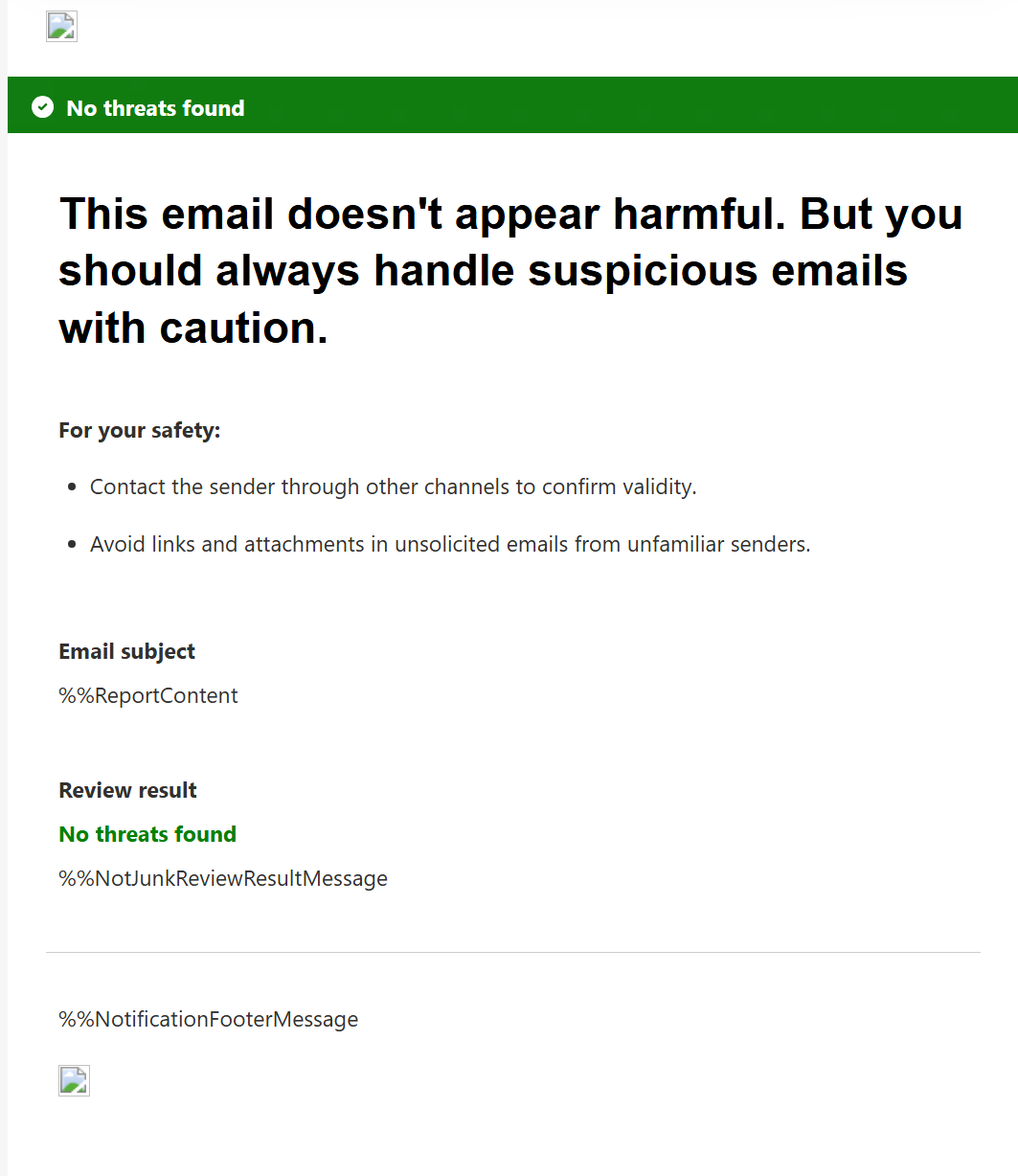
  • Default ‘safe’ message template will also use softer, clearer wording while continuing to advise users to exercise caution:
    • This email doesn’t appear harmful. But you should always handle suspicious emails with caution.
    • The safe-message template will also advise users to:
      • Contact the sender through another channel to confirm the message’s validity.
      • Avoid links and attachments in unsolicited emails from unfamiliar senders.

Screenshot 1 – Before localization view: 

224a0d5a0eb5810a4b7e038e7a3543ba8acde6a5 - KbWorks - SharePoint and Teams Specialist

Screenshot 1 – Localized template view:

 b01e9a671e896490e1623ae09fdfd4caa9517139 - KbWorks - SharePoint and Teams Specialist

Screenshot 2 – Default safe message:

20816 3 - KbWorks - SharePoint and Teams Specialist

[Action Required/Recommendations]

No action is required.

You may consider the following:

  • Inform users that notification emails may now appear in their preferred language.
  • Review notification settings in Microsoft Defender: Settings > Email and collaboration > User reported settings.
  • Update internal documentation or helpdesk guidance if this workflow is documented.

Learn more: Notify users about admin submitted messages to Microsoft – Use the Submissions page to submit suspected spam, phish, URLs, legitimate email getting blocked, and email attachments to Microsoft | Microsoft Defender for Office 365 | Microsoft Defender | Microsoft Learn

[Compliance considerations]

No compliance considerations identified. Review as appropriate for your organization.

(Updated) Microsoft Teams: Facilitator proactively detects and resolves knowledge gaps in meetings
Category:Microsoft Teams Microsoft Copilot (Microsoft 365)
Nummer:MC1409304
Status:planForChange

Updated November 12, 2026: We have updated the timeline. Thank you for your patience. 

[What and Why]

We are introducing a new Microsoft Teams Facilitator capability that proactively detects and resolves knowledge gaps during meetings. Facilitator can identify when participants ask questions or express uncertainty and retrieve and share relevant answers using web search in the meeting chat. This enhancement helps improve meeting productivity by reducing interruptions and enabling teams to stay focused on goals while accessing needed information. If a participant asks a factual question and no one responds, Facilitator can provide an answer directly in the meeting chat.

This message is associated with Microsoft 365 Roadmap ID 558341.

[Rollout Schedule]

  • Targeted Release: Beginning early February 2027 (previously early December) and expected to complete mid-February 2027 (previously mid-December)
  • General Availability (Worldwide): Beginning mid-February 2027 (previously mid-December) and expected to complete early March 2027 (previously mid-January)

[Impact on Your Organization]

Who is affected

  • Users in Microsoft Teams meetings where Facilitator is enabled with Microsoft 365 Copilot (Premium)

Platforms/Services

  • Microsoft Teams (meetings)
  • Microsoft 365 Copilot

What will happen

  • Facilitator will monitor meeting conversations in real time to detect implicit or explicit information needs.
  • When a knowledge gap is identified, Facilitator performs a web search and posts a response in the meeting chat: 
  • 9e4ce4f4d1ad3b3833711798fa733dc60fb4fa2c - KbWorks - SharePoint and Teams Specialist
  • Responses are infrequent in practice and typically occur less than once per meeting.
  • Responses are limited to questions relevant to the meeting discussion based on agenda signals and conversational context.
  • Facilitator must be manually added to the meeting and is not enabled by default.
  • A user with a Microsoft 365 Copilot (Premium) license must enable Facilitator for the meeting. Other participants do not need to be licensed to receive responses.
  • Admins can disable Facilitator at the tenant level. The feature depends on the Copilot web search setting. If web search is disabled, responses are not generated.
  • Users can stop the behavior at any time by removing Facilitator from the meeting.
  • The feature is supported in standard Teams meetings only and not supported in calls, webinars, or town halls.
  • The experience is supported in meetings that include external or cross-tenant participants.

[Action Required/Recommendations]

No immediate action is required.

Recommended actions:

  • Review your organization’s Copilot web search and Facilitator configuration settings to confirm alignment with your policies.
  • Inform helpdesk and users about proactive Facilitator responses in meeting chats.
  • Update internal documentation or training materials if you reference Teams meeting experiences.

[Compliance considerations]

QuestionAnswer
Does the change alter how existing customer data is processed, stored, or accessed (for example, meeting conversations)?Yes. The feature processes meeting conversations in real time to detect knowledge gaps and generate responses.
Does the change introduce or significantly modify AI or machine learning capabilities that interact with customer data?Yes. Facilitator uses AI to interpret meeting content and generate contextual responses during meetings.
Does the change provide end users with a new way of interacting with generative AI?Yes. Users receive proactive, AI-generated responses within the Teams meeting chat without needing to prompt the system.
Does the change include an admin control, and can it be controlled through configuration settings?Yes. The feature depends on the Copilot web search setting, which admins can enable or disable to control functionality.
Does the change allow a user to enable or disable the feature themselves?Yes. Users can stop the behavior by removing Facilitator from the meeting.
(Updated) Microsoft Teams: Enhanced channel meeting experience
Category:Microsoft Teams
Nummer:MC1509796
Status:stayInformed

Updated November 12, 2026: We have updated the timeline. Thank you for your patience. 

[What and Why:]

Microsoft Teams is introducing enhancements for channel meetings to make it easier to schedule meetings in the right context and help teams discover relevant meetings across their channels.

Users will be able to create channel meetings directly from the Teams calendar and create and manage channel meetings from classic Outlook for Windows. Channel members will be able to more easily discover meetings associated with their channels, helping teams stay informed about upcoming discussions and participate in relevant conversations. Administrative assistants and delegates will also be able to schedule channel meetings on behalf of others while keeping meetings connected to the appropriate team and channel.

[Rollout Schedule:]

Public Preview (Worldwide): We will begin rolling out in mid-November 2026 (previously early November) and expect to complete by late November 2026.

General Availability (Worldwide): We will begin rolling out in late January 2027 (previously mid-December 2026) and expect to complete by late January 2027.

General Availability (GCC): We will begin rolling out in mid-December 2026 and expect to complete by late July 2027.

General Availability (GCC High): We will begin rolling out in mid-December 2026 and expect to complete by late August 2027.

General Availability (DoD): We will begin rolling out in mid-December 2026 and expect to complete by late September 2027.

[Impact on Your Organization:]

Users will have additional ways to create, manage, and discover channel meetings in Teams and classic Outlook for Windows. This can help meetings stay connected to the relevant team and channel context.

[Action Required/Recommendations:]

No admin action is required. You may want to inform users, meeting organizers, administrative assistants, and delegates about the enhanced channel meeting experience.

[Compliance considerations:]

No compliance considerations identified. Review as appropriate for your organization.

Microsoft Dataverse – Service Update 9.2.26112.00000 for EUR
Category:Microsoft Dataverse
Nummer:MC1550465
Status:stayInformed
We have a minor service update planned for your Microsoft Dataverse environment hosted in EUR.

This service update will occur within your region’s scheduled maintenance timeline, on the scheduled date listed for Microsoft Dataverse.

How does this affect me?
The version number for your Microsoft Dataverse environment will update to version 9.2.26112.00000 or higher.

There is no expected degradation to service performance or availability, however, during this maintenance window users may see short, intermittent impact such as transient SQL errors or a redirect to the login screen.

What action do I need to take?
This message is for awareness and no action is required.
Scheduled prompts in Microsoft 365 Copilot are moving to native Copilot scheduling and the Tasks view
Category:Microsoft Copilot (Microsoft 365)
Nummer:MC1550533
Status:planForChange

[What and why]

We are updating scheduled prompts in Microsoft 365 Copilot to use native Copilot scheduling infrastructure instead of Power Platform. Users can continue scheduling one-time or recurring tasks using natural language, with Copilot executing tasks automatically and returning results to the associated conversation. The new experience operates independently of Power Platform, including where Power Automate is disabled, and processes and stores scheduled task data within the Microsoft 365 compliance boundary.

The existing Power Platform-based scheduled prompts experience will retire on December 31, 2026.

[Rollout schedule]

  • Frontier/TAP: November 11, 2026
  • Worldwide rollout: November 30 through December 31, 2026
  • Retirement of Power Platform-based scheduled prompts: December 31, 2026

Rollout timing may change based on reliability and migration readiness.

[Impact on your organization]

Who is affected

  • Users with a Microsoft 365 Copilot premium license who use scheduled tasks, subject to organizational controls

Platforms and services

  • Microsoft 365 Copilot and Copilot Chat
  • Tasks in the Microsoft 365 Copilot app
  • Web and Windows desktop

What will happen

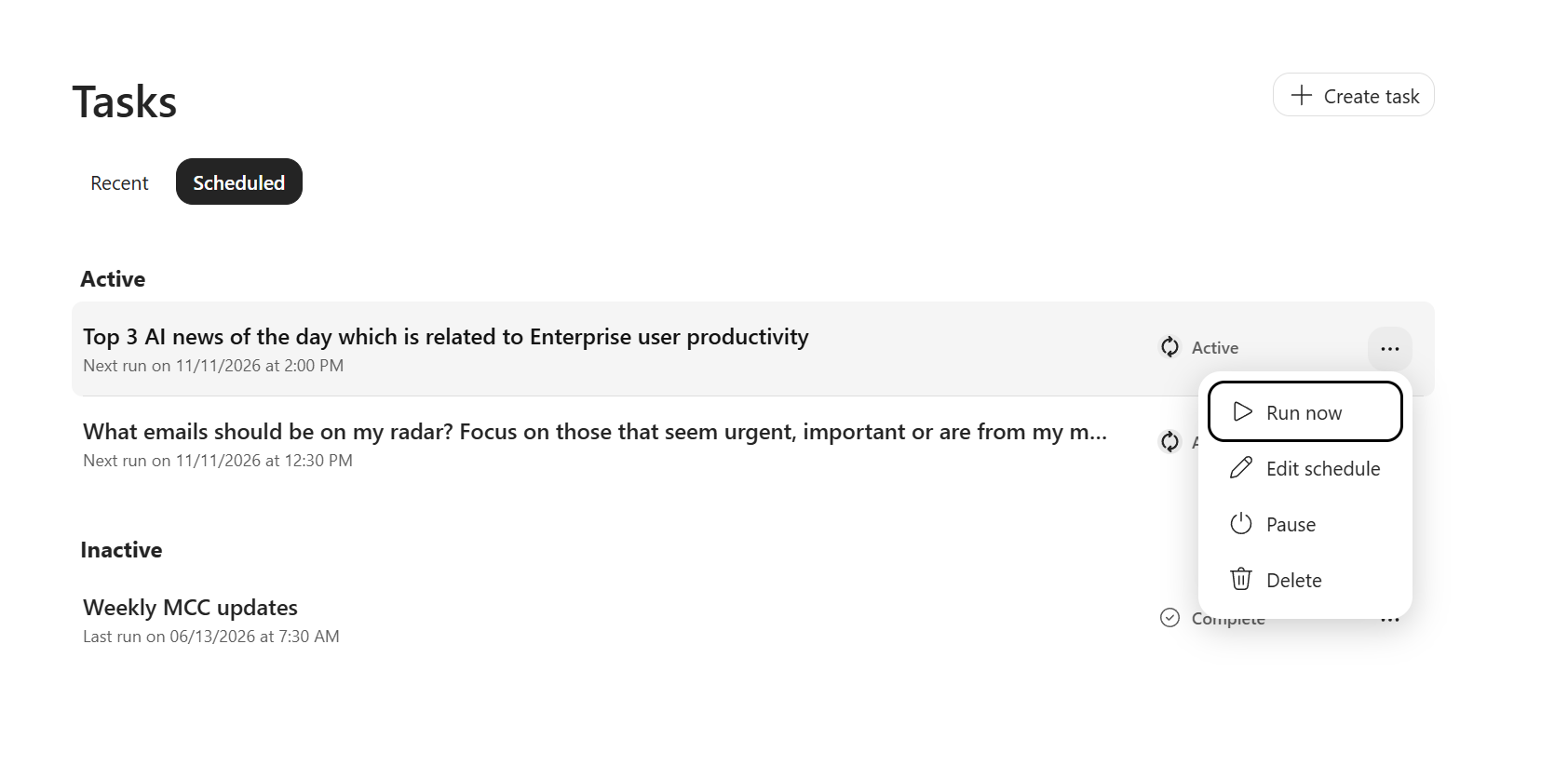
  • Users can schedule one-time or recurring tasks that Copilot executes automatically, even when users are not present.
  • Users can run, edit, pause, resume, or delete scheduled tasks, with limits of 10 active and 50 total schedules per user: 

22500 - KbWorks - SharePoint and Teams Specialist

  • Tasks requiring user approval will pause until the user responds in the associated conversation.
  • Users will manage Copilot Chat schedules from Tasks > Scheduled in the Microsoft 365 Copilot app.
  • For 30 days after the Scheduled tab becomes available to a user, scheduled tasks will be accessible from both the existing shared-header More options (…) menu and Tasks > Scheduled. After this period, the existing menu entry will be removed.
  • Responses from previously completed scheduled runs will remain available.
  • Power Platform-based scheduled prompts will retire on December 31, 2026.

[Action required and recommendations]

We recommend that administrators:

  • Notify users who rely on scheduled prompts about the transition.
  • Advise affected users to recreate schedules that will not migrate automatically before December 31, 2026.
  • Inform users that management of Copilot Chat scheduled tasks is moving to Tasks > Scheduled.
  • Update internal documentation and helpdesk guidance.
  • Review applicable Microsoft 365 Copilot controls and organizational policies.

No action is required to preserve responses from completed scheduled runs.

[Compliance considerations]

QuestionAnswer
Does the change alter how existing customer data is processed, stored, or accessed?Yes. Scheduled tasks will execute through native Microsoft 365 Copilot scheduling infrastructure instead of the existing Power Platform-based scheduling path. Scheduled task data will be processed and stored within the Microsoft 365 compliance boundary.
Does the change introduce or significantly modify AI/ML or agent capabilities that interact with or provide access to customer data?Yes. Copilot can execute one-time or recurring scheduled tasks without requiring users to be present and return results to the associated conversation.
Does the change provide end users with a new way of interacting with generative AI?Yes. Users can delegate future or recurring tasks to Copilot for automatic execution at a specified time or frequency.
Does the change allow users to enable and disable the feature themselves?Yes. Users can pause, resume, edit, manually run, or delete individual scheduled tasks, subject to applicable organizational controls.
Microsoft 365 Copilot: Copilot Workspaces is replacing standalone agent selection with agentic chat
Category:Microsoft 365 apps
Nummer:MC1550540
Status:planForChange

[What and why]

Microsoft 365 Copilot Workspaces (formerly Copilot Notebooks) is moving to an agentic chat experience. As part of this change, Researcher, Analyst, and Designer will no longer be available as standalone agent options within Copilot Workspaces.

Instead of selecting or switching between agents, users can describe what they need in plain language. Copilot will automatically apply the appropriate research, analysis, or design skills based on the request and the workspace content.

This change simplifies the user experience while preserving existing capabilities. Researcher, Analyst, and Designer will remain available as separate agents in the Microsoft 365 Copilot app for users who prefer working with a specific agent.

[Rollout schedule]

  • Frontier preview: Rollout is planned to begin in December 2026. The completion date has not yet been determined.
  • Rollout dates for general availability are still being finalized. We will provide additional information when available.

[Impact on your organization]

Who is affected

  • Users of Microsoft 365 Copilot Workspaces who have access to the Frontier preview

Platforms and services

  • Microsoft 365 Copilot Workspaces (formerly Copilot Notebooks)
  • Microsoft 365 Copilot app

What will happen

  • Standalone agent selection: Researcher, Analyst, and Designer will no longer appear as separate agent options within Copilot Workspaces.
  • Agentic chat: Users can describe research, analysis, and design tasks in natural language. Copilot will automatically apply the appropriate skills based on the request and workspace content.
  • No loss of capabilities: Research, analysis, and design capabilities will remain available within Copilot Workspaces.
  • Simplified workflow: Users will no longer need to select or switch between agents when performing different tasks.
  • Continued access to individual agents: Researcher, Analyst, and Designer will remain available as separate agents in the Microsoft 365 Copilot app.
  • Default behavior: This change will apply automatically when it rolls out to your organization.

[Action required and recommendations]

No admin action is required. We recommend that you:

  • Inform users that Researcher, Analyst, and Designer will no longer appear as separate agent options in Copilot Workspaces.
  • Explain that users can describe their tasks directly in chat, and Copilot will apply the appropriate capabilities.
  • Update internal training and support materials that instruct users to select specific agents within Copilot Workspaces.
  • Direct users who prefer working with individual agents to Researcher, Analyst, and Designer in the Microsoft 365 Copilot app.
  • Monitor Message center for additional rollout information.

[Compliance considerations]

This change introduces an agentic chat experience in Copilot Workspaces, allowing users to interact with research, analysis, and design capabilities through natural language rather than selecting individual agents.

Organizations should review this change as appropriate for their compliance requirements.

Microsoft Teams: Updated recording and transcript access setting behavior for town halls and webinars
Category:Microsoft Teams
Nummer:MC1550542
Status:preventOrFixIssue

[What and why]

We are updating how the Who has access to the recording or transcript option appears for Microsoft Teams Events scheduling through the Events App including town halls and webinars. Currently, when AllowCloudRecording is set to false, this option does not appear for these events. After this change, the option will appear only when the applicable RecordingForTownhall or RecordingForWebinar setting in CsTeamsEventsPolicy is enabled.

[Rollout schedule]

  • General Availability (Worldwide, GCC, GCC High, DoD): Beginning in early-November 2026 and expected to complete by mid-November 2026

[Impact on your organization]

Who is affected

  • Microsoft Teams organizers of Events created via the Events App including town halls and webinars

Platforms and services

  • Microsoft TeamsEvents created via the Events App including town halls and webinars

What will happen

The Who has access to the recording or transcript option will be based on the applicable RecordingForTownhall or RecordingForWebinar setting. It will no longer be based on the AllowCloudRecording setting.

[Action required and recommendations]

No action is required to enable this change.

We recommend updating your internal documentation to reflect this change.

[Compliance considerations]

No compliance considerations identified. Review as appropriate for your organization.

Leave a Comment

Your email address will not be published. Required fields are marked *

Scroll to Top

Get The Paul Take

My no-fluff read on Microsoft 365, Teams, SharePoint and Copilot. Real lessons from real rollouts, and what I would actually do. Once every two weeks.

No spam. Unsubscribe anytime.