Microsoft Roadmap, messagecenter and blogs updates from 22-11-2026

het nieuws van Microsoft message center roadmap en blogs - KbWorks - SharePoint and Teams Specialist

22-November-2026 Below you will find a collection of news published yesterday. This news consists of Microsoft’s Roadmap when it is updated it will be below with items. Then there will be a section with the message center, if there is anything new there, this will be automatically included. And it contains a piece from blogs that I follow myself and would like to share with you. If I miss something in the blogs that do have an RSS feed, please let me know.

This entire post was automated via Microsoft Flow
have fun reading!

The blogs of this day are:

Understanding the cost of OneDrive and SharePoint archivingFrom Linkedin
How to Set Up a PowerShell Bot in Grok Bot as a Shared ToolFrom Linkedin
A Personal Message to My ReadersFrom Linkedin
How to Delete All Items in a SharePoint List From Power Apps (With a Confirm Step)van nogintevullen
It’s Not the Model Anymore, It’s the HarnessFrom Linkedin
Trained to betray: How post-training supply chain attacks hijack coding agentsvan @MSFTSecurity
We have a new LLM in Copilot winner: Opus 5.5 edges Fable 5.2From Linkedin
Adopting AI inside an organization that has to pass a compliance auditFrom Linkedin
Run Vally evals on GitHub Copilot in VS Codevan @waldekm
I Lead My Agents Instead of Prompting ThemFrom Linkedin
Microsoft Revamps Exchange Online Admin API PermissionsFrom Linkedin
How to Create Indexed Columns and Filtered Views in SharePointFrom Linkedin
Run Vally evals on Claude Code CLIvan @waldekm
Build Spotlight Slides with Copilot in PowerPointFrom Linkedin
Vacancy – Business Development ExecutiveFrom Linkedin
How to Use Microsoft Planner in Copilot Coworkvan nogintevullen
SharePoint Intranet Examples: 10 Built-In Designs and When to Use Eachvan nogintevullen
CIA Brief 20261114From Linkedin
Microsoft 365: Creando Apps con Copilot Studio (I)!From Linkedin
SCKit abuses ScreenConnect to deploy remote access and target technician sessionsvan @MSFTSecurity
How Grok Bot Can Watch Microsoft 365 Status and Alert You When Something BreaksFrom Linkedin
How I used Grok Bot to watch the 13 November 2026 Microsoft 365 outageFrom Linkedin
Coping With Change Is the New Competitive AdvantageFrom Linkedin
Power Apps Concat Function: Convert a Table or Collection to a Stringvan nogintevullen
ClaudeBrowserTray: Which Chrome Profile Is Browser 3?van @gvaro
AI Weekly: Copilot Connector Write Actions and Claude Fable 5.2van nogintevullen
Which Passkey Should Your Users Get? The FIDO Alliance CTO on Passkeys and Post-Quantum CryptographyFrom Linkedin
Microsoft Entra @ IgniteFrom Linkedin
Grok Bot versus Claude, and Why Your Copilot Model Picker Just Got InterestingFrom Linkedin
You can’t generate evals on autopilotvan @waldekm
How to Create a SharePoint Newsletter and Send It by Emailvan nogintevullen
How to Recording a Skill in Excel with CopilotFrom Linkedin
How to Manage Copilot Builder Agent Ownership as an AdminFrom Linkedin
Modeling online courses in Hugo: learning paths, modules, and lessonsFrom Linkedin
Turning 217 course videos into lesson articles with Whisper and ClaudeFrom Linkedin
Microsoft 365: Creando Apps con Copilot Studio (II)!From Linkedin
What MSPs should understand about Grok Bot security and customer Microsoft 365 dataFrom Linkedin
Power Apps Exception Handling: IfError, Errors(), Patch Error Handling and App.OnErrorvan nogintevullen
Using GitHub Copilot with a (free) local LLMFrom Linkedin
AI Doesn’t Replace You, It Replaces the Previous AIFrom Linkedin
AI SHOWFrom Linkedin
Musical Sampler, Volume 9From Linkedin
Planner Plugin: get your tasks done in Copilot CoworkFrom Linkedin
Entra 🆔 News #175 → This week in Microsoft EntraFrom Linkedin
What’s new in Power Platform: October/November 2026 feature updateFrom Linkedin
How to Use Migration Manager in SharePoint to Move a File Sharevan nogintevullen
[Eventos]: Materiales de mi sesión en el AI Virtual Days 2026!From Linkedin
Microsoft Ignite 2026 – Empfehlungen für Sessions und Workshopsvan @Ra_Koellner
Grok Bot Privacy Mode: what it does, how to change it, and what that means for MSPsFrom Linkedin
How to Delete a Content Type in SharePoint Online with PowerShell (PnP)van nogintevullen
AI With a Human in Control Beats AI On Its OwnFrom Linkedin
I let LLMs play a 1988 detective gamebook 646 timesvan @waldekm
Video: M365 Agents Toolkit: Connect MCP Server To Declarative Agentvan nogintevullen
PowerShell 7.7 is released — as an MSIXFrom Linkedin
What if your eval rubric is the problem?van @waldekm
Governing SharePoint Skills and Agents: Your Webinar Questions AnsweredFrom Linkedin
Agent Governance Is a Team Sport: Who Owns Copilot Studio Agents?From Linkedin
Microsoft AI-first Development Weekly | Who pays to run a Copilot Managed Runtime app?van nogintevullen
The Great Exchange Online Meltdown of November 2026From Linkedin
How to embed Excel Charts in a SharePoint PageFrom Linkedin
What I’d take from last week’s Microsoft 365 outageFrom Linkedin
Google Workspace to Microsoft 365 Migration: A Step-by-Step GuideFrom Linkedin
Book Review-The Hidden Power of Social Networks: Understanding How Work Really Gets Done in Organizationsvan @RobBogue
Microsoft 365 Developer Program updates: new sandbox options and retirement of legacy sandboxesvan Linkedin
AzCmply v1.0.9 released!From Linkedin
Fix “Connect-SPOService Is Not Recognized” in PowerShellvan nogintevullen
VFS365 v0.9.0: SharePoint columns support!From Linkedin
Remote Lock for Windows Devices in Microsoft Intune (Preview) From Linkedin
Microsoft 365: Copilot Search llega a SharePoint Online y OneDrive for Business (I)!From Linkedin
Microsoft 365 Outages: Why Business Continuity Planning MattersFrom Linkedin
How to Delete a OneDrive Folder with PowerShell (PnP, Tested)van nogintevullen
With AI, You Need to Be a ManagerFrom Linkedin
Changing network settings as standard user using Endpoint Privilege ManagementFrom Linkedin
When Outlook.com Went Down: What the Outage Meant at HomeFrom Linkedin
What the Microsoft 365 Outage Taught Us About Running a CompanyFrom Linkedin
Your Grok Bot can have its own email address. Claim it carefully.From Linkedin
High volume phishing campaign uses Microsoft 365 outage lures to target multiple industry sectorsvan @MSFTSecurity
Microsoft Entra PIM now Supports App Roles From Linkedin
Building Apps in Copilot Cowork: From No Code to Pro Code with Damien BirdFrom Linkedin
New Capabilities for Building Digital Teammates in Microsoft Teamsvan Linkedin
Teams App Security Assessment Using the Evaluation Score From Linkedin
Teams Gains More Protection Against ImpersonationFrom Linkedin
The risks of device code authentication for AI coding agentsvan @MSFTSecurity
Rethinking total rewards so care finds your employeesFrom Linkedin
How to Move Files in SharePoint Online with PowerShell (PnP)van nogintevullen
Better instructions, better agents: what a PTO agent taught me about promptingFrom Linkedin
Introducing the Starter Pack for Work IQvan Linkedin
I ran MAI Image 2.7 through my usual espresso machine testFrom Linkedin
How to Delete a Microsoft Team with PowerShell (and Permanently Delete Channels)van nogintevullen
AI Doesn’t Take Your Job, It Extends Your WingspanFrom Linkedin
Microsoft Ignite 2026 – Todas las novedades en el Book of News!From Linkedin
Satya Nadella Just Gave the Best Agent Governance Advice I’ve Heard All YearFrom Linkedin
Anthropic Claude Models in Microsoft 365 Copilot soon in EU Data Boundary and enabled by defaultFrom Linkedin
Security for the agentic era, powered by Microsoft Perception van @MSFTSecurity
How to set up voice in Grok Bot, and what is limited from AustraliaFrom Linkedin
SPFx Dev Skills for SPFx 1.24.1: tested across agents and modelsvan Linkedin
Microsoft Entra Replaces the MemberOf Rule Operator with MemberOf NextFrom Linkedin
Manage Windows Servers Alongside PCs with Microsoft Intune (Preview) From Linkedin
Microsoft Introduces App Intelligence for SharePoint and OneDrive From Linkedin
Microsoft Teams Channels Get Backup and Restore Support From Linkedin
HubSpot Duplicate Management: What Are Your Options?From Linkedin
Tenant configuration management updates part #3 (applyOnce monitors/configuration deployments)From Linkedin
Tenant configuration management updates part #2 (remediating drift)From Linkedin
Tenant configuration management updates part #1 (monitor validation and configuration templates)From Linkedin
Protect Unpatched Systems with Vulnerability Shielding in Microsoft Defender From Linkedin
Multi-tenant Management in Microsoft 365 Admin Center From Linkedin
Tenant Governance updates from Ignite 2026From Linkedin
Server-Side Auto-Labeling for Old Microsoft Office FilesFrom Linkedin
Multi-tenant Management for Agent 365, Copilot and Microsoft 365From Linkedin
How to overcome the 5,000-item view limit in SharePointFrom Linkedin
Power Apps LookUp Function (7 Practical Examples)van nogintevullen
Frontier Tuning opens to more customers, with new tools for your teamsvan Linkedin
SharePoint Admin Center Sharing Settings: A Step-by-Step Guidevan nogintevullen
Ignite 2026: The Next Chapter of Microsoft’s Baseline Security ModeFrom Linkedin
Is Your AI Infrastructure Cost Problem Actually a Data Problem?van 
From Moonshot to Mission: Why AI Trust Is the Next Imperative for the Public Sectorvan nogintevullen
Cloud Security Enrichment: The Context Your Security Stack Is Missingvan nogintevullen
Active Directory Domain Migration: A Practical Plan for Users, Groups, Contacts, and OUsvan nogintevullen
How Much Is Ungoverned AI Agent Sprawl Costing You?van nogintevullen
How to Measure AI ROI: An Enterprise Guidevan nogintevullen
Backup Security, Data Sovereignty, and Immutable Storage in an AI-Driven Worldvan nogintevullen
Microsoft Entra ID Tenant-to-Tenant Migration: How to Migrate Users and Security Groupsvan nogintevullen
AI FinOps Explained: AI Cost Optimization Guide for 2026van nogintevullen
Why Can’t Users Open Files After a Tenant-to-Tenant Migration?van nogintevullen
Monetising the AI Challenge: The 3 Service Lines for MSPsvan nogintevullen
How MSPs Can Operationalize Agentic AI Governance Across Multiple Tenantsvan nogintevullen
AvePoint Elements October 2026 Release: Powering Managed Services Through Visibility, Automation, and Controlvan nogintevullen
AvePoint Confidence Platform October 2026 Updates: Strengthening AI Governance, Cyber Resilience, and Controlvan nogintevullen
The Growing Infrastructure Resilience Opportunity for MSPsvan nogintevullen
Data Lifecycle Management Hasn’t Changed — AI Has Raised the Stakesvan nogintevullen
AvePoint and Google Workspace: Meeting Migration Requirements Togethervan nogintevullen
Redington Partners with AvePoint to Strengthen Data Resilience, Governance and AI Readiness Across APACvan nogintevullen
How Do MSPs Turn Infrastructure Services Into Recurring Revenue?van nogintevullen
Modernise, Govern, and Innovate: What AvePoint on G-Cloud 15 Means for the UK Public Sectorvan nogintevullen
How to let Grok Bot make outbound phone calls with Bland.aiFrom Linkedin
Microsoft Ignite 2026 – All the latest updates in the Book of News!From Linkedin
Hur skyddar du organisationens digitala identiteter?From Linkedin
Microsoft 365 Pulse Roadmap webcast – Episode 303From Linkedin
GPT 6.2 Astra beats Sol and Opus 5.5 in my latest Cowork evaluationFrom Linkedin
Microsoft-Decision-1.1van @helloitsliam
Microsoft Is Finally Making Server Core Secure by Defaultvan @helloitsliam
How to Force Delete a Microsoft 365 Group with PowerShell (Soft Delete + Purge)van nogintevullen
How to Update All Apps on a Windows Device with WingetFrom Linkedin
The new SharePoint Resources web part: one set of links, every pageFrom Linkedin
How to Find, Keep and Promote Community Event SponsorsFrom Linkedin
A Guide to Good SharePoint Intranet DesignFrom Linkedin
What happens to likes and comments when you cross-post SharePoint news to Viva Engage?From Linkedin
Would you check an agent skill’s nutritional label before installing it?van @waldekm
Entra ID Launches New MemberOf Operator for Dynamic Membership GroupsFrom Linkedin

Items from the MessageCenter in Microsoft 365

Sync between Copilot desktop app and Microsoft Edge
Category:Microsoft Copilot (Microsoft 365) Microsoft 365 Copilot Chat
Nummer:MC1562269
Status:planForChange

[What and Why:]

This release adds optional browser data sync between the Copilot desktop app (Windows and Mac) and Microsoft Edge. After opt-in, selected data (passwords, personal info, settings, and browsing history) stays synced across both apps for the signed-in account; payment info is not synced.

[Rollout Schedule:]

General Availability (Worldwide): We will begin rolling out in mid-December 2026 and expect to complete by end of December 2026.

[Impact on Your Organization:]

For users, this reduces friction: they can move between Edge and Copilot with familiar browsing data already available, which saves time and improves continuity.

For organizations, it can improve adoption and productivity by lowering setup overhead for users, while still supporting control and transparency because sync is optional, account-based, and excludes payment info.

[Action Required/Recommendations:]

Review your browser/data governance posture and decide whether users should be allowed to use this optional sync behavior.

Learn more details will be available when external rollout begins in mid-December.

[Compliance considerations:]

QuestionExplanation
Does the change alter how existing customer data is processed, stored, or accessed?Yes – once a user opts in, selected browser data (passwords, personal info, settings, and browsing history) syncs between the Copilot desktop app and Microsoft Edge for the signed-in account. Payment info is explicitly excluded from sync.
Does the change allow a user to enable and disable the feature themselves?Yes – sync is opt-in and account-based; users choose whether to enable it.
New Contact Support Experience in Outlook for iOS, Android and Mac
Category:Exchange Online
Nummer:MC1562272
Status:planForChange

[What and Why:]

We’re introducing a new Contact Support experience in Outlook for iOS, Outlook for Android, and Outlook for Mac. This update brings a more consistent way to get help from within the app, aligned with the Contact Support experience available in new Outlook for Windows.

The existing Contact Support policy for new Outlook, “Allow access to Contact Support in the new Outlook” (outlooknew;L_ContactSupport), will also control Contact Support in Outlook for iOS, Outlook for Android, and Outlook for Mac. No new policy is required.

[Rollout Schedule:]

General Availability (Worldwide): We will begin rolling out in late November 2026 and expect to complete by early January 2027.

[Impact on Your Organization:]

The existing Contact Support experience has been replaced with a newer one that improves how users discover solutions for resolving issues on their own. The chat experience provided through Contact Support has not changed, so users can still reach a support agent as they do today. In addition, the Contact Support experience in Outlook for iOS, Outlook for Android and Outlook for Mac now adheres to the same cloud service policy used for New Outlook for Windows.

[Action Required/Recommendations:]

Contact Support remains available by default when the policy is enabled or not configured, and administrators who disable the policy will remove access to Contact Support in all of these Outlook clients.

IT admins who have already set the existing policy to “Disabled” will need to redeploy their policy once the updated policy becomes available in the Office Cloud Policy Service (OCPS). Redeploying allows the policy to be updated to include the iOS, Android, and Mac endpoints. If the cloud policy is not redeployed, the Contact Support policy will continue to apply only to new Outlook.

No action is required for organizations that have not configured the policy or have it enabled.

[Compliance considerations:]

No compliance considerations identified. Review as appropriate for your organization.

Microsoft 365 Copilot app: New search experience for Microsoft 365 users without a Microsoft 365 Copilot license
Category:Microsoft Copilot (Microsoft 365)
Nummer:MC1562275
Status:planForChange

[What and why]

We are introducing an updated search experience in the Microsoft 365 Copilot app for users with a Microsoft 365 license who do not have a Microsoft 365 Copilot license. The updated experience provides modern search controls to help users find, refine, and navigate search results more easily.

[Rollout schedule]

  • General Availability (Worldwide): Rollout will begin in late November 2026 and is expected to complete by mid-December 2026.
  • Deferred Release (Worldwide): Rollout will begin in late December 2026 and is expected to complete by mid-January 2027.

[Impact on your organization]

Who is affected

  • Users with a Microsoft 365 license who do not have a Microsoft 365 Copilot license.

Platforms and services

  • Microsoft 365 Copilot app

What will happen

  • The updated search experience will be enabled by default for users in Standard release tenants.
  • Users can return to the classic search experience by using the toggle on the search results page.

disable the new search experience

  • With the updated search experience, users can continue to find files using keywords, use modern search controls to refine and navigate results, and search supported connected third-party content when their organization has configured connected sources.
  • Search results will continue to display only content that users have permission to access.

[Action required and recommendations]

We recommend that you:

  • Inform users and your help desk about the updated interface and how it differs from the classic search experience.
  • Explain how users can return to the classic search experience using the toggle on the search results page.

[Compliance considerations]

No compliance considerations identified. Review as appropriate for your organization.

Microsoft Teams: Copilot in channels provides channel-wide context
Category:Microsoft Teams
Nummer:MC1562277
Status:stayInformed

[What and why]

We are introducing a channel-level entry point for Copilot in Microsoft Teams. This enhancement allows users to ask questions and summarize conversations across posts and replies within a channel, rather than a single thread. This enhancement will be available in Microsoft Teams and Teams mobile.

[Rollout schedule]

  • Public Preview (Worldwide): Rollout will begin in early December 2026 and is expected to complete by the end of December 2026.
  • General Availability (Worldwide): We will publish a separate announcement once we’ve determined a rollout schedule for General Availability.

[Impact on your organization]

Who is affected

  • Users of Copilot in Microsoft Teams channels.

Platforms and services

  • Copilot
  • Microsoft Teams
  • Microsoft Teams mobile

What will happen

  • Users can open Copilot from the top-right corner of any Teams channel, ask questions, and generate summaries based on the most recent posts and replies in a channel, rather than a single thread.

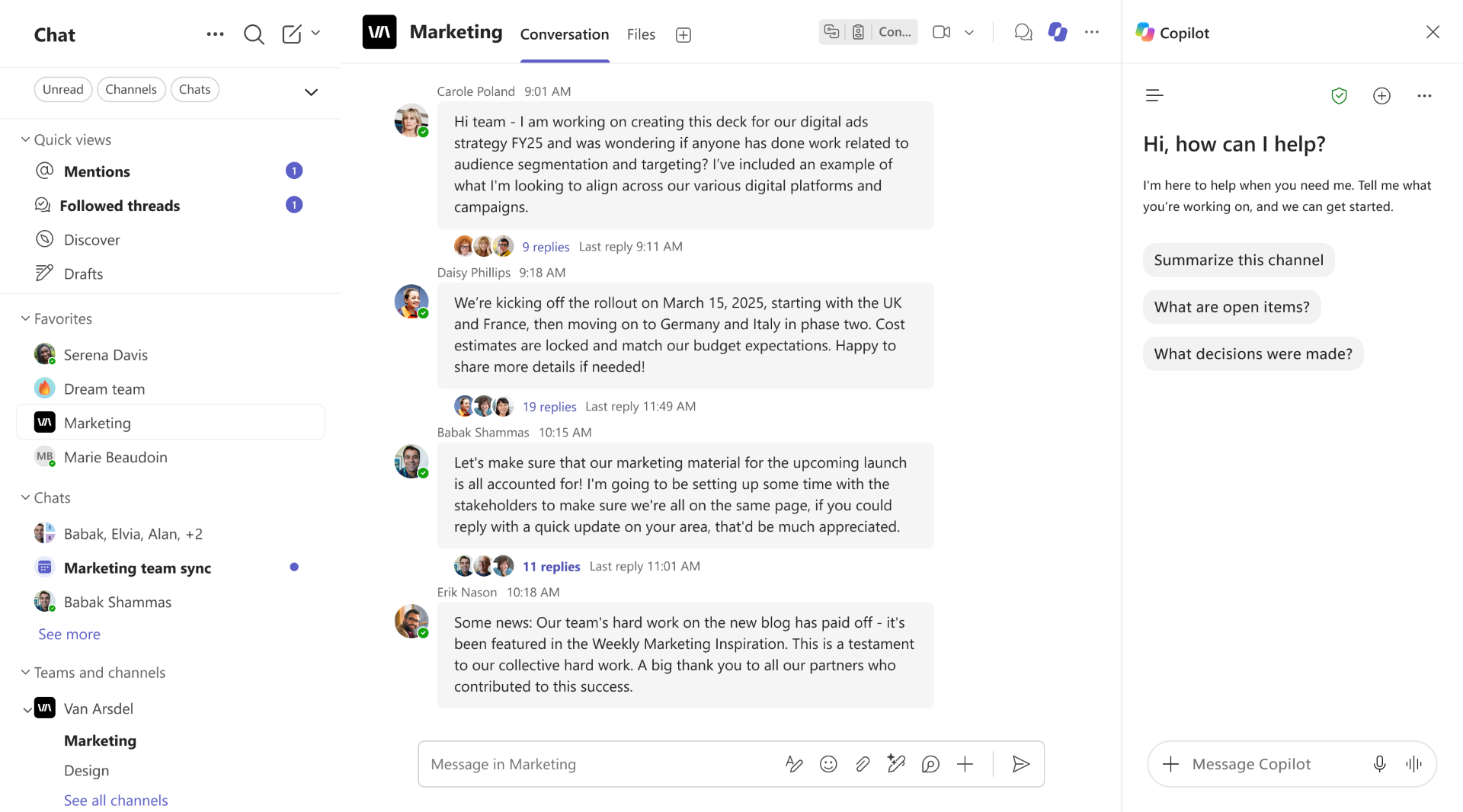
Copilot chat in Teams with options to summarize the channel or ask questions

  • Copilot responses will include citations that link directly to the source posts or replies.

[Action required and recommendations]

No additional action is required.

[Compliance considerations]

Does the change provide end users any new way of interacting with generative AI?

  • Yes. This change introduces a new way for users to interact with generative AI in Microsoft Teams by allowing Copilot to answer questions and summarize the most recent posts and replies in a channel. 
Microsoft Teams: Expanded Markdown support in the compose box
Category:Microsoft Teams
Nummer:MC1562278
Status:stayInformed

[What and why]

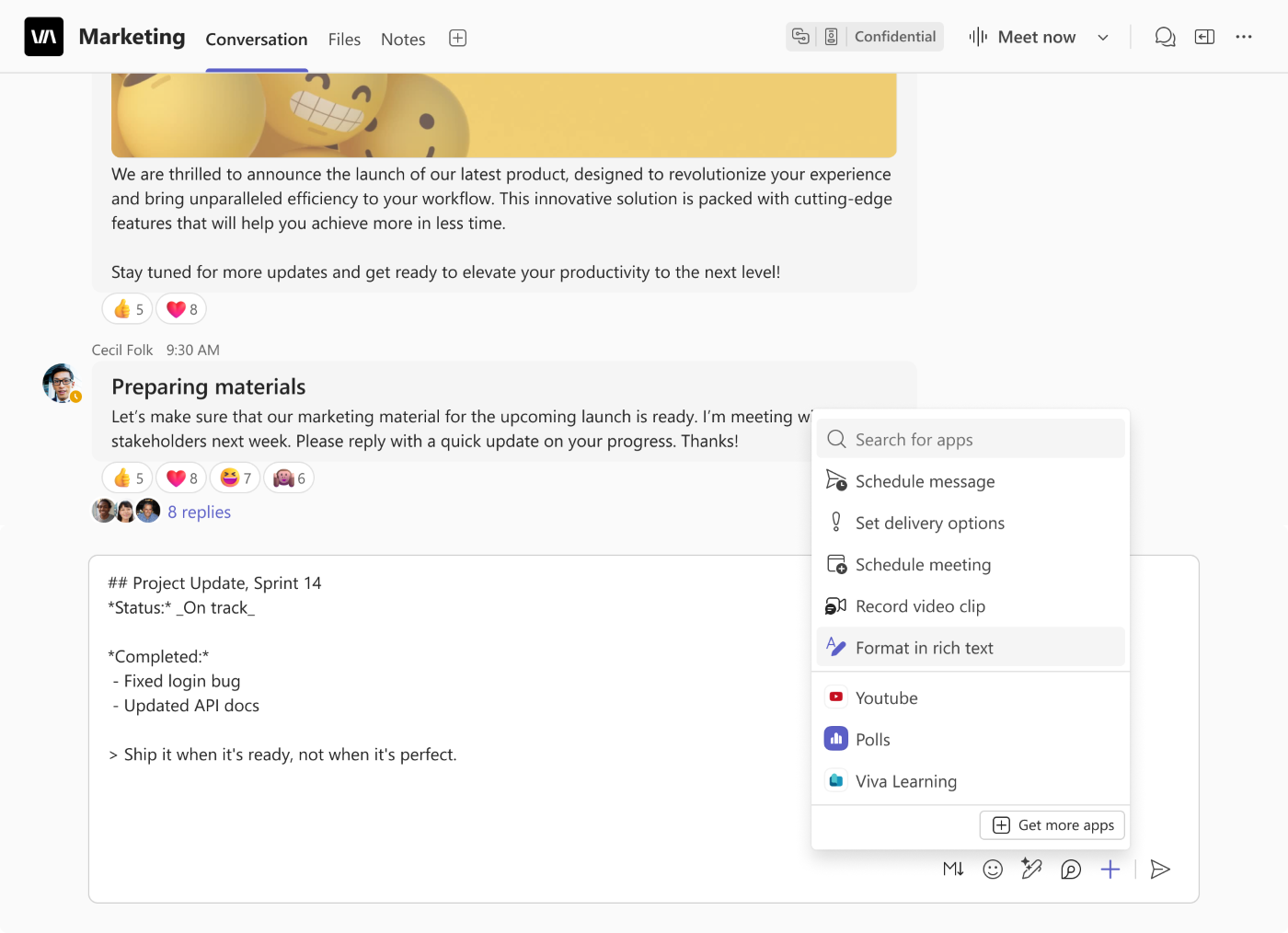
Microsoft Teams is introducing an updated Markdown compose experience with expanded formatting support. Users can write and edit with Markdown syntax intact, without formatting automatically rendering as they type. A dedicated Markdown toolbar helps users insert formatting syntax, preview the rendered message before sending, and switch between Markdown and rich text.

[Rollout schedule]

  • General Availability (Worldwide, GCC, GCC High, DoD): Beginning in early December 2026 and expected to complete by mid-December 2026

[Impact on your organization]

Who is affected

  • Microsoft Teams users who compose messages in chats and channels on supported platforms

Platforms and services

  • Microsoft Teams for Windows, Mac, and web

What will happen

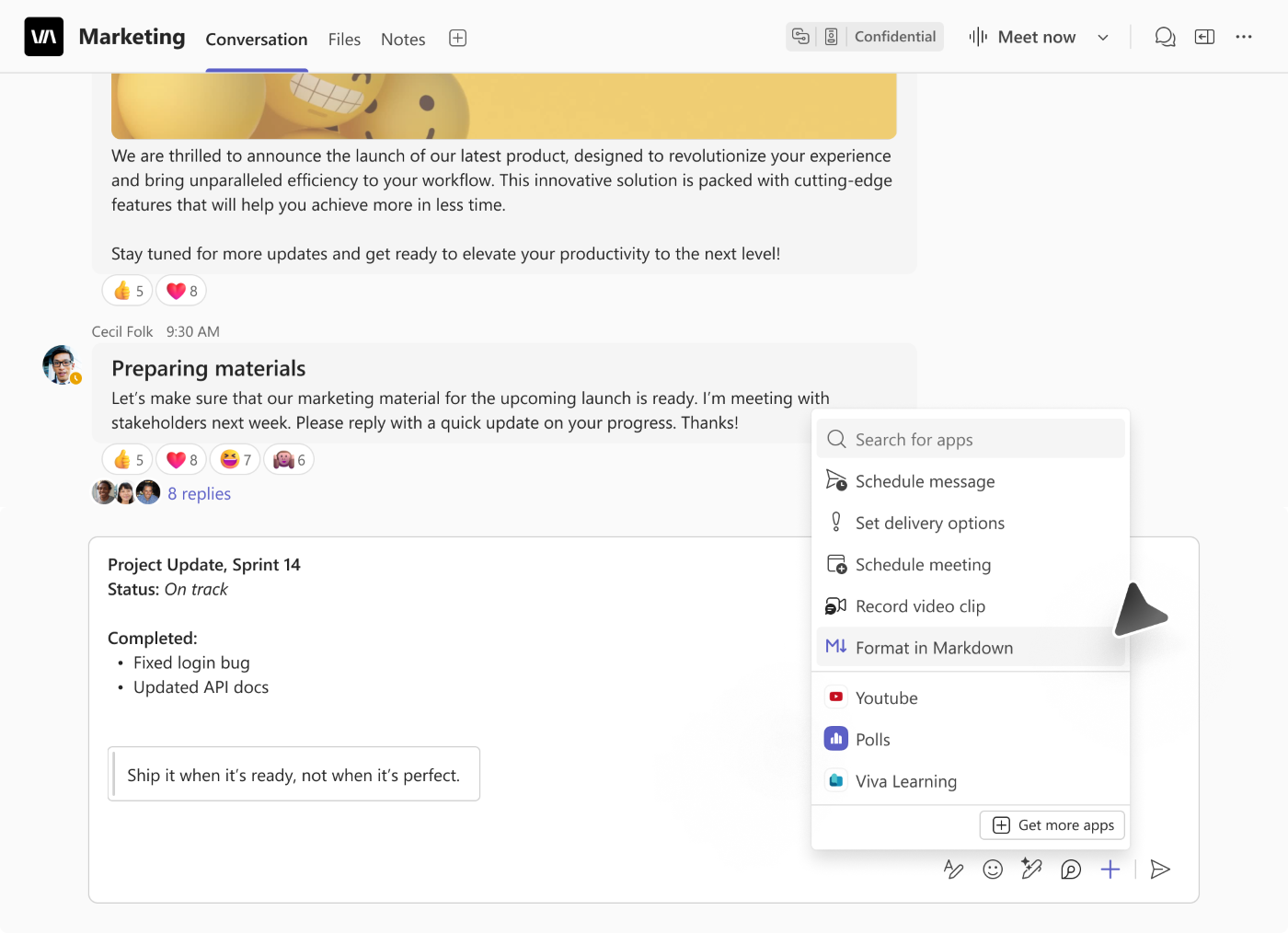
Users will be able to select Format in Markdown from the compose box’s Actions and apps (+) menu (Screenshot 1).

22311 5 - KbWorks - SharePoint and Teams Specialist

The updated experience includes:

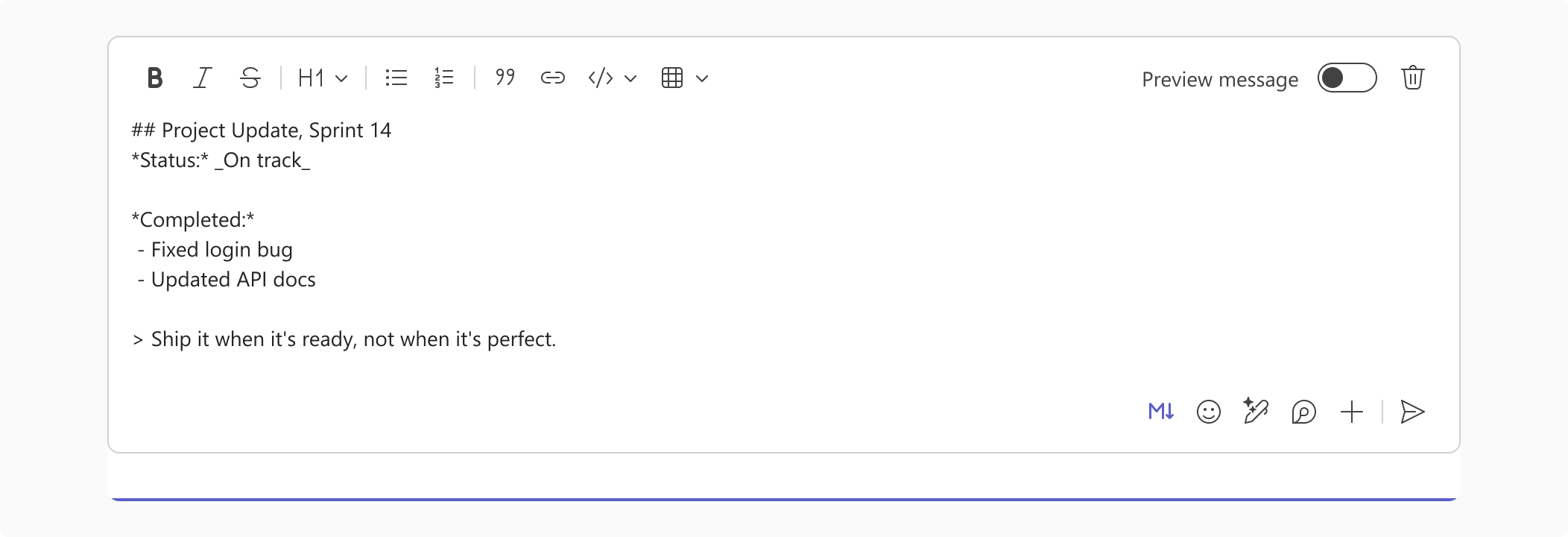
  • Markdown authoring without live rendering: Syntax remains visible and editable while users write.
  • A dedicated Markdown toolbar: Users can insert syntax for formatting (Screenshot 2).

22311 6 - KbWorks - SharePoint and Teams Specialist

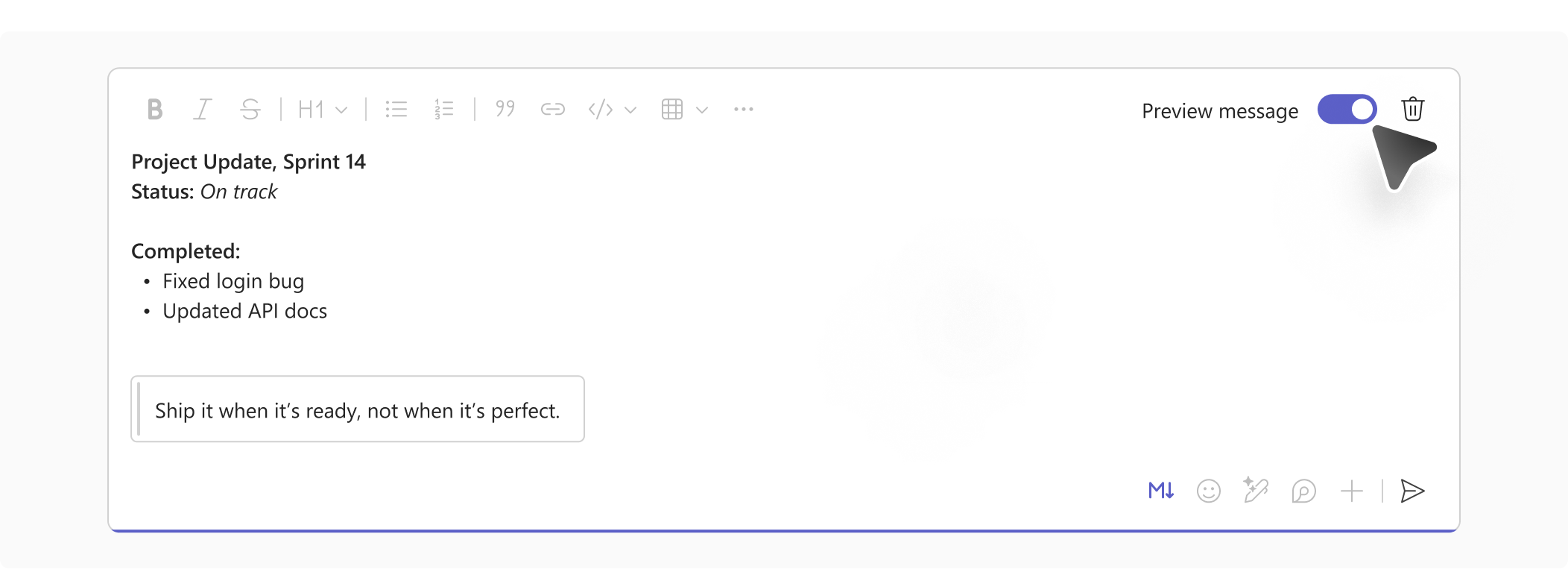
  • Message preview: Users can turn on Preview message to see the rendered formatting before sending (Screenshot 3).

22311 8 - KbWorks - SharePoint and Teams Specialist

  • Switching between compose modes: Users can select Format in rich text from the same menu to return to rich text authoring (Screenshot 4).
    • 22311 7 - KbWorks - SharePoint and Teams Specialist

Teams will remember the user’s selected compose mode and apply it across chats and channels until the user switches modes.

Learn more

[Action required and recommendations]

No admin action is required to prepare for this feature.

[Compliance considerations]

No compliance considerations identified. Review as appropriate for your organization.

Microsoft Teams: View files and conversations side by side
Category:Microsoft Teams
Nummer:MC1562279
Status:stayInformed

[What and Why:]

Microsoft Teams is introducing a side-by-side experience that helps users review shared files without losing conversation context. When users open a PDF, Markdown, or HTML file from a chat or channel message, the conversation appears alongside the file at the message where it was shared.

This update will be available in Microsoft Teams on Windows, Mac, and the web.

[Rollout Schedule:]

General Availability (Worldwide, GCC, GCC High, DoD): We will begin rolling out in late December 2026 and expect to complete by early January 2027.

[Impact on Your Organization:]

When users open a supported file from a chat or channel message, a conversation pane opens alongside the file preview. Users can read the related discussion and send messages or replies without leaving the file preview. Files opened from a file list without an originating message will not show the conversation pane.

[Action Required/Recommendations:]

No admin action is required. Consider notifying help desk staff and end users, and update internal guidance to explain how users can review files and respond to related conversations side by side.

[Compliance considerations:]

No compliance considerations identified. Review as appropriate for your organization.

Leave a Comment

Your email address will not be published. Required fields are marked *

Scroll to Top

Get The Paul Take

My no-fluff read on Microsoft 365, Teams, SharePoint and Copilot. Real lessons from real rollouts, and what I would actually do. Once every two weeks.

No spam. Unsubscribe anytime.