
Restricted Content Discovery just became a lot easier to manage at scale. Microsoft has released a public preview of a new delegation model inside SharePoint Advanced Management (SAM) that lets SharePoint admins hand RCD control directly to site admins, while keeping governance intact through justification logging.
If you manage a large SharePoint tenant and Copilot is in the picture, this update deserves your attention.
What Is Restricted Content Discovery?
Restricted Content Discovery is a SharePoint Advanced Management feature that controls whether content from a specific site appears in organisation-wide search results and in Microsoft 365 Copilot experiences. It is not about permissions. Users who have access to a site can still go there directly. What Restricted Content Discovery does is prevent that site’s content from being surfaced automatically in search or in Copilot responses across the tenant.
This makes Restricted Content Discovery particularly useful for sites that are in review, contain sensitive information that has not yet been properly governed, or simply should not be discoverable by the broader organisation until further notice.
If you want to understand how SharePoint protection policies connect to broader governance, read our post on Adaptive Scopes for SharePoint DLP in Microsoft Purview.
By default, Restricted Content Discovery is off for all sites. Enabling it does not affect permissions. It only affects discoverability.
The New Delegation Model for Restricted Content Discovery
Until now, only SharePoint admins could manage the Restricted Content Discovery setting at the site level. Every time a site owner wanted to change whether their site was included in search or Copilot results, they had to raise a ticket with the admin team.
That bottleneck is now gone.
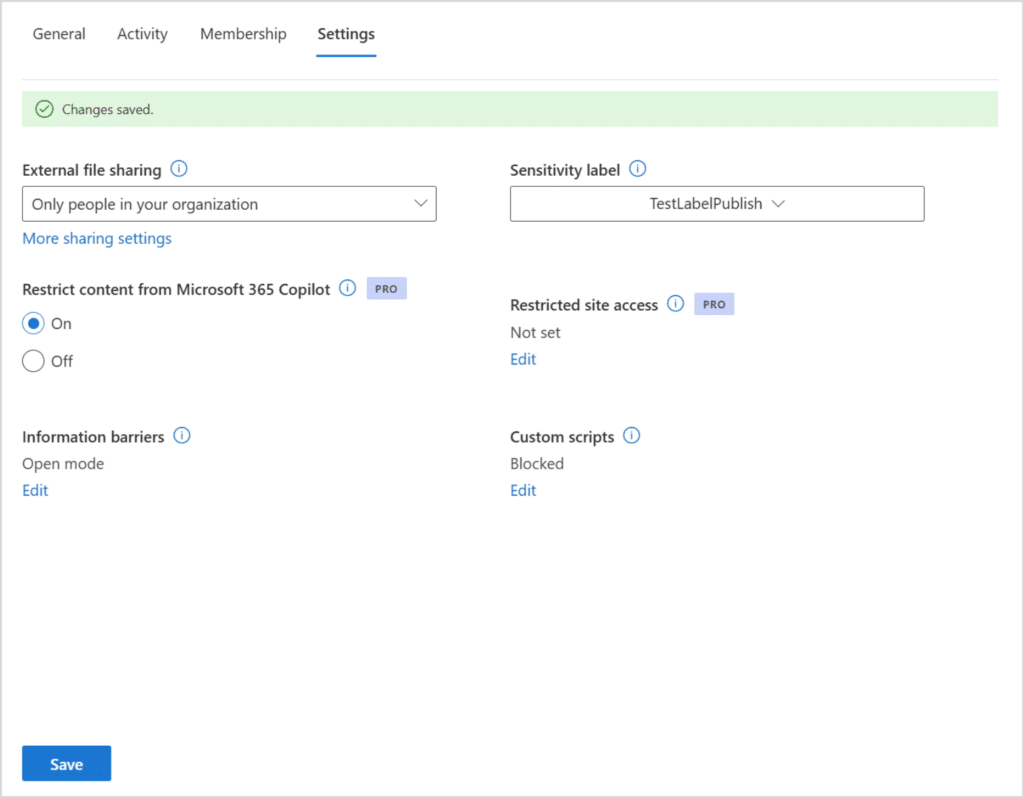
With this update, SharePoint admins can enable Restricted Content Discovery delegation at the tenant level. Once enabled, site admins see the RCD toggle inside the Site Information panel for their own sites. They can turn it on or off, but they must provide a written justification every time they make a change.
That justification requirement is key. It creates an audit trail and forces a conscious decision rather than a casual toggle.
How Restricted Content Discovery Delegation Works for Site Admins
Once a SharePoint admin enables delegation at the tenant level, the experience for site admins changes in three ways.
First, the Restricted Content Discovery setting becomes visible to them in the Site Information panel. Previously this was only visible and editable in the SharePoint admin centre.
Second, site admins can enable or disable Restricted Content Discovery for their site directly from that panel. No admin centre access required.
Third, every change requires a justification. The site admin must type a reason before the change is saved. This is not optional.
For SharePoint admins, this means the day-to-day management of Restricted Content Discovery can move closer to the people who actually know their sites, without creating an uncontrolled free-for-all.
How to Enable Restricted Content Discovery Delegation
Delegation is off by default. You have to enable it at the tenant level before site admins can see or use the RCD setting.
Step 1: Open SharePoint Online Management Shell as a Global or SharePoint Administrator.
Step 2: Run the following command to enable delegation:
powershell
Set-SPOTenant -DelegateRestrictedContentDiscoverabilityManagement $trueStep 3: To verify the current delegation status, run:
powershell
Get-SPOTenant | Select-Object DelegateRestrictedContentDiscoverabilityManagementStep 4: Communicate the change to your site admins. Let them know the RCD toggle is now visible in their Site Information panel and that every change they make requires a justification.
That is it. No reboot, no wait time. Delegation is active as soon as you run the command.
Admin Tips for Restricted Content Discovery Delegation
Before you enable delegation, there are a few things worth considering.
Update your governance documentation first. If your organisation has defined rules around which sites should restrict content discoverability, make sure those rules are written down and communicated to site admins before you give them the control. Otherwise you will get inconsistent Restricted Content Discovery usage across your tenant.
Decide whether all site admins should have this control or only a specific group. Currently, the delegation is tenant-wide, meaning all site admins on all sites gain the ability to manage Restricted Content Discovery for their site. There is no way to scope it to specific site collections at this time.
Review the justification logs regularly. Microsoft logs every change, including the justification provided. Build a process to review these logs, especially in regulated environments where Copilot data grounding is subject to compliance requirements.
Consider pairing Restricted Content Discovery with Restricted SharePoint Search if you are in an early stage of a Copilot rollout and want broader controls while you audit your permissions. For more on how Copilot interacts with SharePoint content and what you can control, read our post on SharePoint Lists Copilot: Smarter Prompts, Finally.
License Requirements
Restricted Content Discovery and the new delegation model are part of SharePoint Advanced Management (SAM). SharePoint Advanced Management is available as a standalone add-on license or is included in Microsoft 365 E5 Compliance.
Without a SAM license, you will not see the Restricted Content Discovery settings in the SharePoint admin centre.
For a full overview of what is included in SharePoint Advanced Management, see the SharePoint Advanced Management overview on Microsoft Learn.
Rollout Timeline
| Phase | Status | Date |
|---|---|---|
| Public Preview | Available now | April 2026 |
| General Available | Not yet announced | TBC |
According to Microsoft, this should be rolling out in April 2026 (Public Preview). There is no confirmed General Available date at the time of writing.
The Paul-Take
Microsoft got this one right. Delegation of Restricted Content Discovery has been a missing piece in SharePoint governance for a while. Site admins know their sites. They know when content should or should not be surfaced in Copilot. Forcing everything through the central admin team was a bottleneck that slowed down good governance decisions.
The justification logging is the part I appreciate most. It is not just a toggle. It creates accountability. When an auditor asks why a site was excluded from Copilot results six months ago, you have an answer.
My recommendation: do not enable delegation and then walk away. Set a review cadence for the justification logs, especially if Copilot is already in production. Restricted Content Discovery affects what Copilot can and cannot see. That is governance-critical.
One thing to watch: Microsoft will likely add more granularity here over time, such as the ability to scope delegation to specific site collections or admin groups. Keep an eye on the roadmap.
MVP Reference List
- MC Announcement: MC1259825
- Learn: Restrict discovery of SharePoint sites and content
- Learn: SharePoint Advanced Management overview
Pingback: M365 Profile Cards: Smart New Way to Show Certifications
Pingback: Copilot in SharePoint: The Smart New Way to Build Faster