11-July-2026 Below you will find a collection of news published yesterday. This news consists of Microsoft’s Roadmap when it is updated it will be below with items. Then there will be a section with the message center, if there is anything new there, this will be automatically included. And it contains a piece from blogs that I follow myself and would like to share with you. If I miss something in the blogs that do have an RSS feed, please let me know.
This entire post was automated via Microsoft Flow
have fun reading!
Office 365 Roadmap Updated: 2026-07-10
Additions : 2
Updates : 6
More Details At: www.roadmapwatch.com
| New Features | Current Status | |||
|---|---|---|---|---|
| Microsoft Copilot Studio: Enable express mode for flows invoked by an agent or app | In Development | |||
| Microsoft Teams: Modernized Gallery view in Teams Rooms on Android | In Development | |||
| Updated Features | Current Status | Update Type | ||
| Outlook: Import emails from PST file to mailbox in new Outlook for Windows | Launched | Status | ||
| Outlook: Read-only access to contacts within a PST file in new Outlook for Windows | Launched | Status | ||
| Outlook: Import calendars and contacts from PST file to mailbox in new Outlook for Windows | Launched | Status | ||
| Outlook: Import calendars and contacts from PST file to mailbox in new Outlook for Windows | Launched | Status | ||
| Microsoft Copilot (Microsoft 365): Frontier and Microsoft agent user request approval flow in Microsoft 365 admin center | Launched | Status | ||
| Outlook: Copilot Settings in classic Outlook for Windows | Rolling Out | Status |
Items from the MessageCenter in Microsoft 365
| (Updated) Microsoft 365 Copilot: Structured document generation with FormsCategory:Microsoft Copilot (Microsoft 365)Nummer:MC1218000Status:stayInformed | Updated July 10, 2026: We have updated the timeline. Thank you for your patience. [Introduction] We are introducing structured document generation with Microsoft Forms in SharePoint. This capability will help organizations generate standardized, compliant documents through simple form-driven experiences. It will reduce manual effort, improve template consistency, and support governance across high-volume document workflows. Creating and configuring structured document forms will require a Microsoft 365 Copilot license. This message is associated with Microsoft Roadmap ID 545896.
[When this will happen] Public Preview: We began rolling out opt-in in mid-February 2026 and completed by end of March 2026. Starting June 15, the public preview will be on by default. General availability (Worldwide): We will begin rolling out September 2026 (previously July) and expect to complete by end of September 2026 (previously end of July). [How this affects your organization] Who is affected:
What will happen:
Screenshot 1 – Review and refine AI-suggested fields before publishing: Screenshot 2 – Edit content and apply advanced template customizations, including conditional sections in Word: [What you can do to prepare] No admin action is required. You may choose to:
Watch the video: Generate documents by filling in the form (18 seconds) [Compliance considerations] No compliance considerations identified. Review as appropriate | ||||||||||||
| (Updated) SharePoint: AI citations analytics for documents and pagesCategory:SharePoint OnlineNummer:MC1247902Status:stayInformed | Updated July 10, 2026: We have updated the timeline. Thank you for your patience. [Introduction] We are adding AI citations analytics to SharePoint to help site owners understand how their SharePoint documents, news posts, and pages are referenced by Microsoft Copilot and other AI agents. These insights will help organizations track content value, identify high‑impact information, and understand how AI‑powered workflows use SharePoint content. Users must have the appropriate Microsoft Copilot licenses to use the AI features that may generate citations. This message is associated with Microsoft 365 Roadmap ID 480725. [When this will happen] General Availability (Worldwide): Rollout will begin start of August 2026 (previously start of July) and will complete by end of August 2026 (previously end of July). [How this affects your organization] Who is affected:
What will happen: The following updates will appear in SharePoint:
Supported agents include Microsoft 365 Copilot, Copilot in Word, Excel, PowerPoint, Teams, Loop, Planner, SharePoint Knowledge Agent, and SharePoint custom agents. This feature will be on by default and will not require admin action to enable. Screenshot 1 – AI citations aggregated across site content in the Site analytics view:
Screenshot 2 – AI citations shown for an individual SharePoint page or news post in Page analytics: [What you can do to prepare] No admin action is required before the rollout. You may want to:
[Compliance considerations] No compliance considerations identified. Review as appropriate for your organization. | ||||||||||||
| (Updated) Microsoft Purview: Migration tool in Unified Catalog to migrate classic glossary termsCategory:Microsoft PurviewNummer:MC1280564Status:stayInformed | Updated July 9, 2026: We have paused rollout of this feature at this time. We will communicate via Message center when we are ready to proceed. We apologize for any inconvenience. [Introduction] Data Governance Admins and Data Stewards can use a built‑in migration tool in Microsoft Purview Unified Catalog to migrate classic glossary terms, associated term templates, and asset and column relationships into Unified Catalog. After migration, glossary terms can be managed in Unified Catalog and associated with business concepts and data assets. This message is associated with Microsoft 365 Roadmap ID 558683. [When this will happen]
[How this affects your organization] Who is affected
What will happen
[What you can do to prepare]
Links to detailed migration documentation will be added to the Unified Catalog glossary terms overview documentation when the feature enters public preview. [Compliance considerations]
| ||||||||||||
| (Updated) Planner is now available in Outlook and Microsoft 365 CopilotCategory:Exchange Online PlannerNummer:MC1309747Status:planForChange | Updated July 10, 2026: We have updated the timeline. Thank you for your patience. [Introduction] We’re making it easier for users to manage tasks where they already work. The Microsoft Planner experience is now available directly in Outlook (web and the new Outlook for Windows) and in the Microsoft 365 Copilot app. This change reduces context switching by allowing users to view and manage tasks and plans alongside email, calendar, and Copilot experiences. This update is based on customer feedback requesting tighter integration between task management and daily productivity workflows. This message is associated with Microsoft 365 Roadmap ID 513278. [When this will happen] General Availability (Worldwide): We expect rollout to start late July 2026 and complete by end of July 2026. [How this affects your organization] Who is affected
What will happen
[What you can do to prepare] No admin action is required. You may consider:
Learn more: Microsoft Planner | Microsoft Support [Compliance considerations] No compliance considerations identified. Review as appropriate for your organization. | ||||||||||||
| (Updated) Microsoft Teams: In‑meeting toggle to turn Meeting AI on or offCategory:Microsoft Teams Microsoft 365 Copilot ChatNummer:MC1319216Status:stayInformed | Updated July 9, 2026: We have updated the timeline. Thank you for your patience. [What and Why] Microsoft Teams will introduce a new in-meeting toggle that allows licensed meeting organizers and presenters to turn Meeting AI (including Copilot, Facilitator, and meeting recap) on or off during a live meeting. This change builds on existing Meeting AI behavior and provides real-time flexibility to control when AI is active. Licensed organizers and presenters can capture insights when discussions are valuable and turn off AI when conversations shift to sensitive topics. The toggle respects existing tenant policies and compliance controls. This message is associated with Microsoft 365 Roadmap ID 558286. [Rollout Schedule]
Who is affected
Existing tenant policies and meeting options are respected:
When Meeting AI is turned off:
Important: Transcription Dependency
No action is required for this rollout. Recommended actions:
No compliance considerations identified. Review as appropriate for your organization. | ||||||||||||
| (Updated) Power BI integration with Microsoft 365 CopilotCategory:Power BI Microsoft Copilot (Microsoft 365)Nummer:MC1323266Status:planForChange | Updated July 9, 2026: We have updated the timeline. Thank you for your patience. [What and Why:] Beginning in mid-June 2026, Microsoft 365 Copilot will be able to answer user questions using Power BI reports and semantic models for customers enrolled in Frontier. Copilot will ground responses in Power BI data, including scenarios where users share a specific report and scenarios where Copilot finds the right report automatically. The experience is built to work within existing security and permission models. [Rollout Schedule:] Starting mid-June 2026, data answering capabilities grounded in Power BI content will be available in Frontier tenants:
[Impact on Your Organization:]
Screenshot: Before and after improvement in Copilot responses with Power BI data grounding:
[Compliance considerations:]
| ||||||||||||
| (Updated) Microsoft Teams: Known issue affecting screen sharing on macOSCategory:Microsoft TeamsNummer:MC1392559Status:planForChange | Updated July 10, 2026: We have updated the timeline. Thank you for your patience. [What and Why:] We are informing you of a known issue affecting screen sharing reliability in Microsoft Teams on macOS under certain system conditions and on older macOS versions (earlier than macOS Tahoe 26.4). Users may experience scenarios such as blank or black screen sharing, unexpected interruptions, or failures to start sharing sessions. To help users recover more quickly and reduce meeting disruption, Teams will begin surfacing in-product guidance when a failure is detected and direct users to relevant documentation and recommended remediation steps, including updating macOS where applicable. [Rollout Schedule:]
[Impact on Your Organization:] Who is affected:
Platforms/Services:
What will happen:
[Action Required/Recommendations:] Action is recommended:
Suggested helpdesk message: If screen sharing in Teams on macOS shows a blank screen, stops unexpectedly, or fails to start, retry sharing and ensure the device is updated to macOS Tahoe 26.4 or later. You can also enable “Use Mac OS native sharing” in Teams under Settings > General > Screen sharing. [Compliance considerations:] No compliance considerations identified, review as appropriate for your organization. | ||||||||||||
| (Updated) Microsoft Teams: New Events templates with “Optimize for large audience” and policy-based behaviorCategory:Microsoft TeamsNummer:MC1401303Status:stayInformed | Updated July 10, 2026: We have updated the timeline. Thank you for your patience. [What and Why:] Microsoft Teams is updating the new Events scheduling experience to ensure that Events continue to respect the existing CsTeamsEventsPolicy. With new Events templates, organizers will see a new option called Optimize for large audience. When enabled, the event uses the familiar Teams town hall attendee experience—designed for large audiences—so events can scale beyond 1,000 attendees while continuing to follow your organization’s policy settings. [Rollout Schedule:]
[Impact on Your Organization:] Who is affected:
Platforms/Services:
What will happen:
[Action Required/Recommendations:] No action is required if you want Events to behave the same way your organization currently uses town halls and webinars.
Learn more: Set-CsTeamsEventsPolicy | Microsoft Learn (will be updated before GA rollout) [Compliance considerations:] No compliance considerations identified, review as appropriate for your organization. [FAQ:] Question: Will this feature effect regular meetings? Question: Can an organizer enable ‘Optimize for large audience’ for their event if the town hall policy is Disabled? Can they enable that option if they use the Webinar template? Question: Is the ‘Optimize for Large Audience’ available on the Events scheduling form? | ||||||||||||
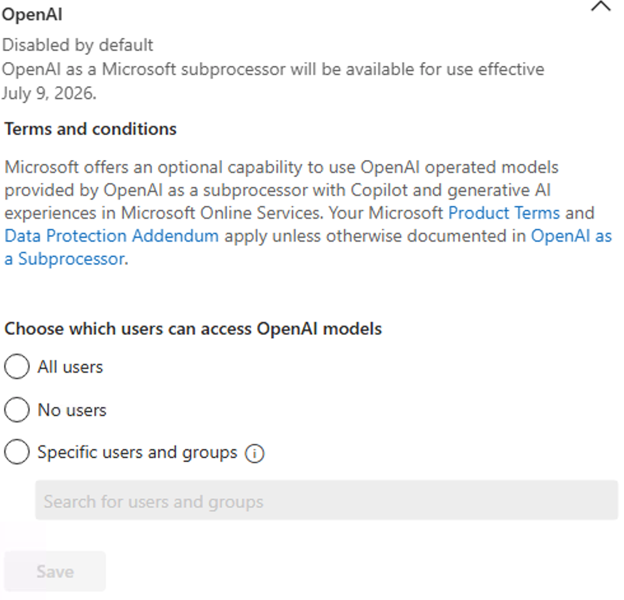
| OpenAI models will soon be available as a subprocessor in Microsoft 365 CopilotCategory:Microsoft 365 suite Microsoft Copilot (Microsoft 365) Microsoft 365 Copilot ChatNummer:MC1422074Status:planForChange | [What and why:] To enable OpenAI-operated models in Microsoft 365 Copilot, Microsoft has onboarded OpenAI as a subprocessor, creating the foundation for more model flexibility and quicker access to new AI model innovations. This includes OpenAI’s new family of models, beginning with GPT-5.6, which is now available in Microsoft 365 Copilot. These models are governed by the Microsoft Product Terms and the Data Protection Addendum (DPA), with the same enterprise-grade security, compliance, and data protection commitments you already rely on, except as otherwise disclosed in Microsoft Learn documentation. This setting does not apply to OpenAI models operated by Microsoft Azure OpenAI. The setting will initially be disabled by default on July 9, 2026. Admins can review and configure the setting at any time in the Microsoft 365 admin center. For eligible customers, if no action is taken prior to July 24, 2026, the setting will be automatically enabled. Admins who do not wish to enable access to OpenAI-operated models should select “No users” before the setting is enabled. OpenAI-operated models in the Microsoft 365 admin center are designed to provide administrators with the option to access new AI model capabilities as they become available. [Rollout schedule:]
[Impact on your organization:] Who is affected
Platforms / services
What will happen
[Action required / recommendations:] Admin action required. If no action is taken prior to July 24, 2026, the setting will be automatically enabled. If you prefer to enable OpenAI as a subprocessor, follow the steps in OpenAI as a subprocessor in Microsoft Online Services to enable the setting. Learn more |