| (Updated) Clearer RSVP selection in Outlook MobileCategory:Exchange OnlineNummer:MC1269211Status:stayInformed | Updated July 10, 2026: We have updated the timeline. Thank you for your patience. [Introduction]
We’re improving the RSVP experience in Outlook Mobile by visually highlighting the response a user has selected (Yes, Maybe, or No). This makes it easier for users to quickly see how they’ve responded to a meeting invitation. [When this will happen:]
General Availability (Worldwide, GCC, GCC High): Rollout begins August 2026 (previously end of June) and is expected to complete by end of August 2026 (previously end of July).
[How this affects your organization:]
Who is affected:
- All users who access Outlook Mobile on iOS or Android
- Applies to Worldwide, GCC, and GCC High tenants
What will happen:
- The selected RSVP option (Yes, Maybe, or No) will be visually highlighted

- Users can quickly confirm how they responded to a meeting invitation and edit as needed

- The feature is enabled by default
- No changes to existing meeting workflows or policies
- No impact to Outlook on the web or Outlook desktop clients
[What you can do to prepare:]
- No admin action is required; the update will roll out automatically
- Consider notifying helpdesk staff of the visual change
- Update internal documentation if needed
[Compliance considerations:]
No compliance considerations identified, review as appropriate for your organization. |
| M365 Copilot usage reports – updated reporting experience, faster refresh, and more Copilot usage metrics in Graph APICategory:Microsoft Copilot (Microsoft 365)
Microsoft 365 Copilot ChatNummer:MC1423101Status:stayInformed | [What and Why:]
We’re improving the Microsoft 365 Copilot and Copilot Chat usage reporting experience to provide more timely usage data, better report organization, and expanded access to usage metrics through Microsoft Graph APIs. These changes help organizations monitor Copilot adoption more effectively, align reporting experiences across Microsoft analytics tools, and support custom dashboards and reporting solutions through programmatic access to usage data.
[Rollout Schedule:]
General Availability (Worldwide): This feature will begin rolling out in mid-July 2026 and is expected to be fully available by late July 2026.
[Impact on Your Organization:]
Who is affected:
- Microsoft 365 administrators with access to usage reports.
- Reporting and adoption stakeholders who monitor Microsoft 365 Copilot usage.
- Organizations using Microsoft Graph APIs to consume Copilot usage data.
- Users with existing permissions to view usage reports.
Platforms/Services:
- Microsoft 365 admin center
- Microsoft 365 Copilot usage report
- Microsoft 365 Copilot Chat usage report
- Microsoft 365 Copilot Agents usage report
- Microsoft Graph API
- Viva Insights
What will happen:
- Reports will refresh within 48 hours after usage data is collected, improving from the previous 72-hour refresh time.
- The default reporting window will change from 30 days to 28 days to align with the default timeframe used in the Copilot Dashboard in Viva Insights.
- Agent-related metrics will no longer appear in the Microsoft 365 Copilot usage report.
- Agent-related metrics will be available in the dedicated Microsoft 365 Copilot Agents usage report.
- Microsoft Graph API Copilot usage endpoints will be updated to include all metrics currently available in the Microsoft 365 Copilot usage report in the Microsoft 365 admin center.
- Newly available Graph API metrics include user-level prompt count and active day count metrics.
- Metrics for the Copilot Chat (unlicensed) usage report are not yet available through Graph API and will be added in a future release.
- These updates are available to users with the appropriate admin roles for viewing usage reports.
- Existing reporting permissions are not affected.
- No administrative action is required to enable these updates.
[Action Required/Recommendations:]
No action is required to receive these updates. To take full advantage of this release, consider taking the following steps:
- Review the updated Microsoft 365 Copilot and Copilot Chat usage reports after rollout.
- Update any internal dashboards, saved views, or documentation that reference a 30-day reporting window.
- Update any dashboards, reports, or documentation that reference Agent metrics within the Microsoft 365 Copilot usage report.
- Review Microsoft Graph API integrations and determine whether the new usage metrics should be incorporated into existing reporting solutions.
- Inform reporting, analytics, and adoption stakeholders about these changes.
Learn more:
[Compliance considerations:]
| Compliance Consideration |
Explanation |
| Does the change alter how admins can monitor, report on, or demonstrate compliance activities? |
The update enhances Microsoft 365 Copilot reporting through faster data refresh, expanded reporting metrics, a dedicated Microsoft 365 Copilot Agents usage report, and additional Microsoft Graph API reporting capabilities. Organizations may need to update dashboards, reporting processes, and governance documentation that rely on existing report structures or metrics. |
| Does the change include an admin control and can it be controlled through Entra ID group membership? |
Access to the updated reports and reporting data continues to be governed by existing Microsoft 365 admin roles and reporting permissions. No new administrative controls are introduced, and existing permission models remain in effect. |
|
| Copilot Notebooks now supports Markdown (.md) files as grounding sourcesCategory:Microsoft 365 appsNummer:MC1423103Status:stayInformed | [What and Why:]
Microsoft is expanding Copilot Notebooks to support Markdown (.md) files as notebook reference sources. This enhancement enables users to ground Copilot conversations in technical documentation, README files, runbooks, wikis, and AI-generated Markdown content without converting files to other formats. By broadening the types of content that can be used as notebook references, Microsoft is helping organizations make better use of existing knowledge repositories and improve the quality and relevance of Copilot-generated responses.
[Rollout Schedule:]
- General Availability (Worldwide): Beginning in mid-July 2026; expected to complete by late July 2026
[Impact on Your Organization:]
Who is affected:
- Users who have access to Copilot Notebooks.
- Teams that maintain knowledge assets in Markdown (.md) format.
- Organizations using Markdown-based documentation repositories such as technical runbooks, README files, and wiki exports.
Platforms/Services:
- Microsoft Copilot Notebooks
- Microsoft 365 Copilot
- Supported SharePoint and OneDrive locations
What will happen:
- Users will be able to add Markdown (.md) files as notebook reference sources.
- Copilot responses can use information contained within Markdown files as grounding content.
- Copilot can reference structural elements within Markdown documents.
- Existing Markdown-based documentation can be used without file conversion.
- Citations to source content continue to be available.
- The feature is enabled automatically.
- No admin configuration is required.
- Existing permissions and access controls continue to apply.
[Action Required/Recommendations:]
No action is required. Recommended activities:
- Review internal guidance for users who maintain Markdown-based documentation.
- Communicate the update to Copilot Notebook users.
- Update adoption and training materials as appropriate.
- Validate documentation governance processes for Markdown repositories.
[Compliance Considerations:]
| Consideration | Explanation |
|---|
| Does the change alter how existing customer data is processed, stored, or accessed? | Copilot Notebooks can now access and process Markdown (.md) files as grounding sources. This expands the types of content that Copilot can reference when generating responses. | | Does the change introduce or significantly modify AI/ML or agent capabilities that interact with or provide access to customer data? | Copilot can now reason over, cite, and generate responses based on information contained in Markdown documents, extending AI grounding capabilities to an additional file format. | | Does the change provide end users any new way of interacting with generative AI? | Users can add Markdown (.md) files directly to Copilot Notebooks and interact with Copilot using content from those files as grounding material. | | Does the change allow a user to enable and disable the feature themselves? | Users decide whether to include Markdown files as notebook references. The capability is available by default, but usage is controlled by the user when creating or editing notebooks. |
|
| Introducing Auto-Attendant Call Flow Visualizer in Teams Admin CenterCategory:Microsoft TeamsNummer:MC1423105Status:stayInformed | [What and Why:]
We are introducing the Call Flow Visualizer in Teams Admin Center, a new interactive experience that provides a visual representation of Auto Attendant and Teams Phone agent call routing. This enhancement simplifies management of complex call flows, reduces configuration errors, and accelerates troubleshooting while improving admin productivity.
[Rollout Schedule:]
- General Availability (Worldwide, GCC): Began early June 2026; completed by late June 2026
- General Availability (GCC High, DoD): Will begin mid-August 2026; expected to complete by mid-September 2026
[Impact on Your Organization:]
Who is affected: Admins managing Auto Attendants and Teams Phone agents
Platforms/Services:
What will happen:
- A new “Call flow visualizer” option will be available on the Auto Attendants page.
- Admins can select an Auto Attendant or Teams Phone agent and select “Call flow visualizer” to view.
Screenshot: The Call flow visualizer option is available from the Auto attendants page in Teams admin center: 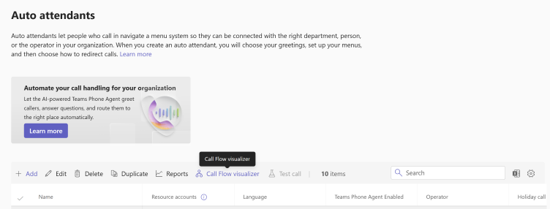
- Admins can view call routing in a tree-like, interactive diagram.
- The visualizer will display:
- Resource account assignments
- Greetings
- Business hours routing
- After-hours routing
- Holiday call flow branches
- Interactive controls such as zoom and pan will be supported.
- Upstream and downstream call routing relationships will be visible in a single view.
- Admins can select hierarchical call flows to dig deeper.
- The feature will be enabled by default; no configuration is required.
[Action Required/Recommendations:]
No action is required. Recommended next steps:
- Review the new Call flow visualizer in Auto attendants page in Teams Admin Center.
- Update internal documentation or training materials for administrators.
- Inform helpdesk teams about the new troubleshooting capability.
[Compliance considerations:]
No compliance considerations identified, review as appropriate for your organization. |
| Introducing cross-tenant message recall in Exchange OnlineCategory:Exchange OnlineNummer:MC1423106Status:planForChange | [What and Why:]
We’re introducing Cross-tenant Message Recall in Exchange Online, enabling organizations to allow trusted external Microsoft 365 tenants to recall messages sent to their users. Previously, Message Recall only worked within the same tenant. This enhancement improves organizational collaboration and control, allowing administrators to extend recall capabilities across partner or affiliated tenants while maintaining explicit governance through an allow list. This message is associated with Roadmap ID 561330.
[Rollout Schedule:]
- General Availability (Worldwide, GCC, GCC High, DoD): Rollout begins mid-August 2026; expected to complete by early September 2026
[Impact on Your Organization:]
Who is affected:
- Exchange Online administrators
- Organizations collaborating with external Microsoft 365 tenants
Platforms/Services:
- Exchange Online
- Outlook (web, desktop, mobile)
What will happen:
- The feature is disabled by default.
- Admins can enable cross-tenant recall using Exchange Online PowerShell.
- Admins can control an allow-list of external tenant IDs.
- Once enabled:
- External senders from allow-listed tenants can recall messages sent to your users.
- Recipients experience recall the same as intra-tenant recall.
- If recipient recall notifications are enabled, they apply to cross-tenant recalls.
- Recall attempts from tenants not on the allow-list will fail.
- Each tenant independently controls which external organizations are allowed.
[Action Required/Recommendations:]
No action is required to keep the default behavior (disabled). If you plan to enable this feature:
- Review with messaging and security teams.
- Enable or disable the feature using Exchange Online PowerShell:
Set-CrossTenantRecallConfiguration -CrossTenantRecallEnabled $true
Set-CrossTenantRecallConfiguration -CrossTenantRecallEnabled $false
- Manage the allowed tenant list (add or remove):
Set-CrossTenantRecallConfiguration -AllowedSenderTenantIds @{Add="tenantId1","tenantId2"}
Set-CrossTenantRecallConfiguration -AllowedSenderTenantIds @{Remove="tenantId1","tenantId2"}
- Update internal documentation and notify helpdesk.
Learn more: Cross-Tenant Message Recall in Exchange Online [Compliance considerations:]
| Area |
Explanation |
| New cross-tenant communication capability |
Enables external tenants to recall messages into your organization when explicitly allow-listed, introducing a new controlled interaction between tenants. |
| Processing of existing customer email data |
The recall feature operates on existing email messages and may trigger deletion actions in recipient mailboxes, but does not fundamentally change how data is stored. |
| Admin control over feature behavior |
Admins can enable or disable the feature using PowerShell and explicitly allow or remove trusted tenant IDs. |
| End-user experience changes |
If enabled, users may see message recall activity originating from external tenants, similar to intra-tenant recall behavior. |
|
| Microsoft Entra: Improved restore experience for Authenticator passkeys on iOSCategory:Microsoft EntraNummer:MC1423108Status:planForChange | [What and Why] We are improving the restore experience for device-bound passkeys in the Microsoft Authenticator app on iOS. This update provides a clearer and more guided restore flow when users move to a new device. It also improves user understanding of cross-device sign-in with passkeys. This update is designed to reduce friction during device migration while maintaining strong security protections. [Rollout Schedule] General Availability (Worldwide): August 2026 [Impact on Your Organization] Who is affected - Users with iOS devices who use Microsoft Authenticator with passkeys
- Users restoring Authenticator on a new iOS device
Platforms/Services - iOS
- Microsoft Authenticator
- Microsoft Entra
What will happen - This change applies to iOS devices only. Android is not included in this release and will be supported later.
- Users with iCloud and iCloud Keychain backup enabled, and passkeys stored on their previous device, will see the updated experience during device restore.
- Users restoring Authenticator on a new device will see an updated restore experience.
- The restore flow will include:
- A new user interface that guides users based on whether they are setting up a new device or restoring from an existing one
- Improved guidance for using Authenticator passkeys with cross-device sign-in
- The feature is enabled by default.
- No changes to existing admin configurations or policies.
[Action Required/Recommendations] No action is required. Consider the following recommendations: - Inform users about the improved restore experience on iOS devices.
- Update internal helpdesk documentation if you provide guidance for device migration or Authenticator restore scenarios.
[Compliance considerations] No compliance considerations identified. Review as appropriate for your organization. |
| Support for the “Get Diagnostics” feature visibility option within M365 Cloud Policy Service for Outlook Mobile and MacCategory:Microsoft 365 appsNummer:MC1423109Status:stayInformed | [What and Why:]
To improve manageability and provide a consistent diagnostics experience across Outlook clients, Microsoft is extending support for the Microsoft 365 Cloud Policy Service setting “Configure Get Diagnostics feature’s visibility in the Help Ribbon in Office applications and control the feature’s mode of operation” to Outlook for iOS, Outlook for Android, and Outlook for Mac. This enhancement gives administrators centralized control over how users collect, save, and share diagnostic logs while supporting enterprise governance and support workflows.
[Rollout Schedule:]
- General Availability (Worldwide): Rollout begins mid-August 2026; expected to complete by early September 2026.
[Impact on Your Organization:]
Who is affected:
- Microsoft 365 administrators managing Cloud Policy Service settings.
- Users of Outlook for iOS, Outlook for Android, and Outlook for Mac.
- Organizations using diagnostic log collection during support engagements.
Platforms/Services:
- Outlook for iOS
- Outlook for Android
- Outlook for Mac
- Microsoft 365 Cloud Policy Service
What will happen:
- Outlook for iOS, Outlook for Android, and Outlook for Mac will begin honoring the existing Microsoft 365 Cloud Policy Service setting for Get Diagnostics.
- If an administrative policy is already configured (that is, set to an option other than “Not configured”), admins will need to review and reapply the policy in the Microsoft 365 Cloud Policy Service to ensure it applies to Outlook for iOS, Outlook for Android, and Outlook for Mac.
- The feature behavior will vary based on the configured policy:
- Not configured (default):
- Get Diagnostics remains available.
- Users can upload diagnostic logs to Microsoft while working with Support.
- Disabled:
- Get Diagnostics is unavailable.
- Users cannot collect or share logs through this feature unless another policy option is configured.
- Upload Diagnostic Logs to Microsoft:
- Get Diagnostics remains available.
- Users can upload diagnostic logs directly to Microsoft during support engagements.
- Capture diagnostic logs in a local archive, don’t upload logs to Microsoft:
- Outlook for iOS and Android displays Share Diagnostics instead of Get Diagnostics.
- Outlook for Mac displays Download Diagnostics instead of Get Diagnostics.
- Diagnostic logs are saved locally rather than uploaded to Microsoft.
- Mobile users can save logs locally or share logs through device sharing capabilities, subject to applicable Intune controls.
- No changes are made to the diagnostic collection process for Outlook clients already supporting this policy setting.
[Action Required/Recommendations:]
No action is required unless your organization wants to manage how diagnostic logs are collected, saved, or shared. Recommended actions:
- Review your Microsoft 365 Cloud Policy Service configuration before rollout completion in September 2026.
- Verify whether existing Get Diagnostics policies should apply to Outlook for iOS, Android, and Mac users.
- Communicate any changes in diagnostic logging procedures to Help Desk and Support teams.
- Update internal support documentation if it references diagnostic collection steps for Outlook Mobile or Outlook for Mac.
[Compliance Considerations:]
| Area |
Explanation |
| Does the change alter how existing customer data is processed, stored, or accessed? |
Diagnostic logs may be uploaded to Microsoft or saved locally depending on administrator policy selection. The change expands policy-based control of existing diagnostic data handling to new endpoints. |
| Does the change add an admin control and can it be controlled through policy? |
Administrators can manage feature visibility and operational mode through Microsoft 365 Cloud Policy Service settings. |
|
| Create, view, and edit Markdown files in OneDrive mobileCategory:Microsoft OneDriveNummer:MC1423113Status:stayInformed | [What and Why:]
Microsoft is introducing support for creating, viewing, and editing Markdown (.md) files directly within the OneDrive mobile app for iOS and Android. This enhancement aligns the mobile experience with the web experience and enables users to work with Markdown content from anywhere without downloading files or switching applications.
[Rollout Schedule:]
- General Availability (Worldwide): Rollout begins mid-July 2026; expected to complete by late July 2026.
[Impact on Your Organization:]
Who is affected:
- Users accessing Markdown (.md) files in OneDrive mobile applications.
- Organizations using OneDrive on iOS and Android devices.
Platforms/Services:
- OneDrive for iOS
- OneDrive for Android
- OneDrive mobile applications
- OneDrive storage services
What will happen:
- Users can create Markdown (.md) files directly in OneDrive mobile.
- Users can open Markdown files without downloading them.
- Markdown files will display using a mobile-optimized formatted view.
- Users can edit Markdown content directly within the mobile app.
- The mobile experience will align with the existing OneDrive web experience.
- The feature is enabled by default.
- No additional admin configuration has been announced.
[Action Required/Recommendations:]
No admin action is required. We recommend that you:
- Review the updated OneDrive mobile experience.
- Inform help desk and support teams of the new capability.
- Update internal documentation and training materials.
- Communicate the feature to users who frequently work with Markdown files.
- Monitor adoption and user feedback during rollout.
[Compliance Considerations:]
No compliance considerations identified, review as appropriate for your organization. |
| Microsoft Teams: Stricter external access controls for federated chatsCategory:Microsoft TeamsNummer:MC1423114Status:planForChange | [What and Why] We’re introducing two new Microsoft Teams PowerShell controls that help organizations enforce external access and federation policies more consistently in federated group chats: - External Access Restrictions for Chat Participants (EnableExternalAccessRestrictionsForChatParticipants)
- Mutual Federation for Chat Participants (EnableMutualFederationForChatParticipants)
These controls are independent from each other and help ensure federated chat participation strictly aligns with configured external access policies. They help reduce indirect exposure to unapproved external organizations and provide admins with greater control over cross-tenant communications. [Rollout Schedule] - General Availability (Worldwide): Beginning late July 2026 and expected to complete late September 2026
- External Access Restrictions for Chat Participants available: July 31, 2026
- Mutual Federation for Chat Participants available: September 30, 2026
[Impact on Your Organization] Who is affected - Microsoft Teams administrators managing external access and federation settings
- Organizations using federated group chats with external tenants
- Users assigned External Access Policies that restrict federation access
Platforms/Services - Microsoft Teams
- Teams PowerShell
What will happen - The new controls are disabled by default.
- The change only affects organizations that choose to enable the controls.
- The controls are configured through the existing Set-CsTenantFederationConfiguration PowerShell cmdlet.
When EnableExternalAccessRestrictionsForChatParticipants is enabled: - Users whose External Access Policy has EnableFederationAccess set to False cannot be added to federated group chats with external users.
- Those users are automatically removed from existing active federated group chats that include external participants.
- This setting does not change behavior controlled through the CommunicationWithExternalOrgs setting in External Access Policies.
When EnableExternalAccessRestrictionsForChatParticipants is disabled: - Users whose External Access Policy has EnableFederationAccess set to False can still participate in federated group chats if the chat was created by a user in their organization who is allowed to use federation.
When EnableMutualFederationForChatParticipants is enabled: - All federated group chat participants from tenants that have this setting enabled must be allowed to federate with the domains of the other tenants in the chat.
- Users who do not meet mutual federation requirements with all other participants cannot be added to or join the chat (not even facilitated through a third-party tenant that they are allowed to federate with)
Participants can be automatically removed from active chats when federation requirements are no longer met. When EnableMutualFederationForChatParticipants is disabled (default): - Only the user being added (or joining) and the chat initiator must have a valid federation relationship. Other existing chat participants might not meet the user’s effective external access requirements.
- Supported scenarios include:
- Creating external federated group chats.
- Adding users to external federated group chats.
- Enforcing updated federation requirements after external access or federation policies change.
Additional details: - Automatic participant removal applies only to active group chats (a chat that has had a message sent within the previous two hours). Users in inactive group chats are evaluated when new activity occurs.
- The user who initiated the chat is never automatically removed.
- These two new controls do not affect:
- Meetings with external users and meeting chats
- Shared Channels
[Action Required/Recommendations] No immediate action is required. If you plan to enable these controls: - Review your organization’s external access requirements and federation strategy.
- Verify that your Allowed Domains configuration is complete and current.
- Review External Access Policies to identify users or groups with EnableFederationAccess set to False.
- Assess business processes that rely on federated group chats involving multiple external organizations.
- Communicate potential impacts to helpdesk staff and affected stakeholders.
- Review the Microsoft Teams PowerShell documentation for Set-CsTenantFederationConfiguration.
Organizations may observe users being removed from existing federated group chats after either they or a partner organization enable these controls and federation requirements are no longer satisfied. Learn more: Set-CsTenantFederationConfiguration | Microsoft Teams | Microsoft Learn [Compliance considerations] | Question | Answer | | Does the change provide a new way of communicating between users, tenants, or subscriptions? | Yes. The change modifies how existing federated group chat communications are governed by enforcing participant eligibility and mutual federation requirements across tenants. | | Does the change include an admin control and can it be controlled through Entra ID group membership? | Yes. Two new administrator controls are introduced through Teams PowerShell: EnableExternalAccessRestrictionsForChatParticipants and EnableMutualFederationForChatParticipants. User impact depends on External Access Policy assignments, which can be administered through existing policy assignment mechanisms. |
|
| PDF annotation for sensitivity-label protected PDFs in the OneDrive apps (iOS and Android)Category:Microsoft OneDriveNummer:MC1423115Status:stayInformed | [What and Why:]
We’re enabling PDF annotation for sensitivity-label protected PDFs in the OneDrive apps for iOS and Android. Today, when a PDF carries a sensitivity label that applies encryption, annotation tools are unavailable and users must open the file in a separate desktop application to mark it up. With this update, users who have the appropriate usage rights can annotate these protected PDFs directly on their mobile device. The annotation pipeline decrypts the file locally in the client, applies the markup, and re-encrypts it under the original label—helping maintain security while improving mobile productivity.
This message applies to the Microsoft OneDrive apps for iOS and Android. It does not apply to OneDrive or SharePoint on the web. This message is associated with Roadmap ID 566697.
[Rollout Schedule:] -
General Availability (Worldwide, GCC, GCC High, DoD): We will begin rolling out in mid-August 2026 and expect to complete by late August 2026.
-
Note: This is a gradual rollout, so not all users will see the feature at the same time.
[Impact on Your Organization:]
Who is affected: Users who open sensitivity-label protected PDFs and whose usage rights permit editing.
Platforms/Services: Microsoft OneDrive apps for iOS and Android (not available in OneDrive or SharePoint on the web).
What will happen:
- Users can annotate encrypted, sensitivity-label protected PDFs directly within the OneDrive mobile apps.
- Annotation tools include ink, highlight, free text, notes, signatures, image/shape/date stamps, bookmarks, and form fields.
- Annotate without stripping protection: Users no longer need to remove the label or open a separate application.
- The sensitivity label, encryption, and usage rights remain intact after saving annotated files.
- Users with view-only permissions will continue to see the file as read-only and cannot annotate.
- The feature is enabled by default for eligible users; no opt-in is required.
- Annotation honors existing Microsoft Purview sensitivity labels and usage rights; no new admin controls are introduced.
[Action Required/Recommendations:]
No admin action is required before rollout. You may want to:
- Inform users—especially those who review labeled or regulated documents—that they can now annotate protected PDFs on mobile devices.
- Confirm your sensitivity label and usage-rights configuration aligns with your organization’s editing and viewing policies.
- Update internal documentation and helpdesk guidance for handling protected PDFs.
Learn more: Features available for PDFs in OneDrive in Web and mobiles/iPads – SharePoint in Microsoft 365 | Microsoft Learn [Compliance considerations:]
No compliance considerations identified, review as appropriate for your organization. |
| Microsoft Outlook for iOS and Android: Clearer Copilot availability in multi-account experiencesCategory:Exchange OnlineNummer:MC1423116Status:stayInformed | [What and Why] We’re updating Outlook for iOS and Android so the Copilot button more clearly reflects when Copilot chat is available for users with multiple accounts connected to the app. The Copilot button will appear in multi-account views (unified message list and calendar) if at least one connected account supports Copilot chat. It will be hidden in single-account views where Copilot chat is not supported. This change does not affect Copilot eligibility, licensing, or feature availability; it is a UI update that better reflects existing support. This change improves clarity and helps users better understand when Copilot is available. It does not change Copilot eligibility, licensing, or feature availability. [Rollout Schedule] - General Availability (Worldwide, GCC, GCC High, and DoD): Beginning in early July 2026 and expected to complete by late July 2026.
[Impact on Your Organization] Who is affected - Users of Outlook for iOS and Android with multiple accounts configured in the app
- Organizations with users licensed for Microsoft Copilot features in Outlook
- Platforms/Services
- Outlook for iOS
- Outlook for Android
- Microsoft Copilot
What will happen - The Copilot button will appear in unified mail and calendar views when at least one connected account supports Copilot chat.
- The Copilot button will be hidden when users are viewing an individual account that does not support Copilot chat.
- Copilot support, licensing requirements, and feature availability are unchanged.
- No tenant-level configuration changes are required.
- The experience is enabled automatically as part of the rollout.
[Action Required/Recommendations] No action is required. Recommended actions: - Inform help desk and support teams about this UI update.
- Update internal documentation or training materials that reference Copilot availability in Outlook mobile apps, if applicable.
- Communicate to users that this change improves visibility of existing Copilot availability and does not change licensing or feature entitlements.
[Compliance Considerations] No compliance considerations identified, review as appropriate for your organization. |
| Thumbnail view for PDFs is available in OneDrive and SharePoint on the webCategory:SharePoint Online
Microsoft OneDriveNummer:MC1423117Status:stayInformed | [What and Why:] We are improving PDF navigation in OneDrive and SharePoint on the web by adding a thumbnail view in the PDF viewer. Users will be able to open a thumbnail panel to visually browse pages in a PDF and jump directly to a selected page. This update helps users navigate long PDFs more quickly, especially when they need to find a visual section, page layout, chart, image, or form page without scrolling page by page. This message is associated with Roadmap ID 566696. [Rollout Schedule:] -
Targeted Release (Worldwide): Beginning early August 2026; expected to complete by mid-August 2026
-
General Availability (Worldwide, GCC, GCC High, DoD): Beginning mid-August 2026; expected to complete by late August 2026
[Impact on Your Organization:]
Who is affected: All users who view PDFs in OneDrive and SharePoint on the web
Platforms/Services: -
OneDrive (Web)
-
SharePoint (Web)
What will happen:
[Action Required/Recommendations:]
No admin action is required. Recommended actions:
- Inform helpdesk and support teams about this user experience improvement
- Update internal training materials or documentation if they reference PDF navigation workflows
- Consider notifying users who frequently work with long or complex PDF files
[Compliance considerations:]
No compliance considerations identified, review as appropriate for your organization. |
| OneDrive for the web: Document library views now available in OneDriveCategory:Microsoft OneDriveNummer:MC1423118Status:stayInformed | [What and Why:] We’re enhancing the OneDrive experience by enabling users to access and manage SharePoint document library views directly within OneDrive. This update improves team productivity by allowing users to organize, filter, and view shared content without switching between services. By bringing familiar SharePoint capabilities into OneDrive, Microsoft is streamlining workflows and helping teams surface the most relevant information faster. This message is associated with Roadmap ID 566313.
[Rollout Schedule:]
- Targeted Release (Worldwide): Beginning early July 2026 and expected to complete by mid-July 2026
- General Availability (Worldwide): Beginning mid-July 2026 and expected to complete by late July 2026
[Impact on Your Organization:]
Who is affected: All users who access SharePoint document libraries through OneDrive
Platforms/Services: -
OneDrive (web)
- SharePoint Online
What will happen:
- Users will see a new view picker when accessing SharePoint document libraries in OneDrive.
- The default view configured in the SharePoint library will appear as the default view when accessed in OneDrive.
- Users can:
- Switch between existing library views configured in SharePoint.
- Create new custom views (filter, sort, group content).
- Edit and manage views directly within OneDrive.
- The feature will be enabled by default.
- Existing permissions and configurations are respected.
- There are no changes to underlying data or storage locations.
Screenshot 1: Users will continue to see the default view when they initially navigate to a Document Library in OneDrive: 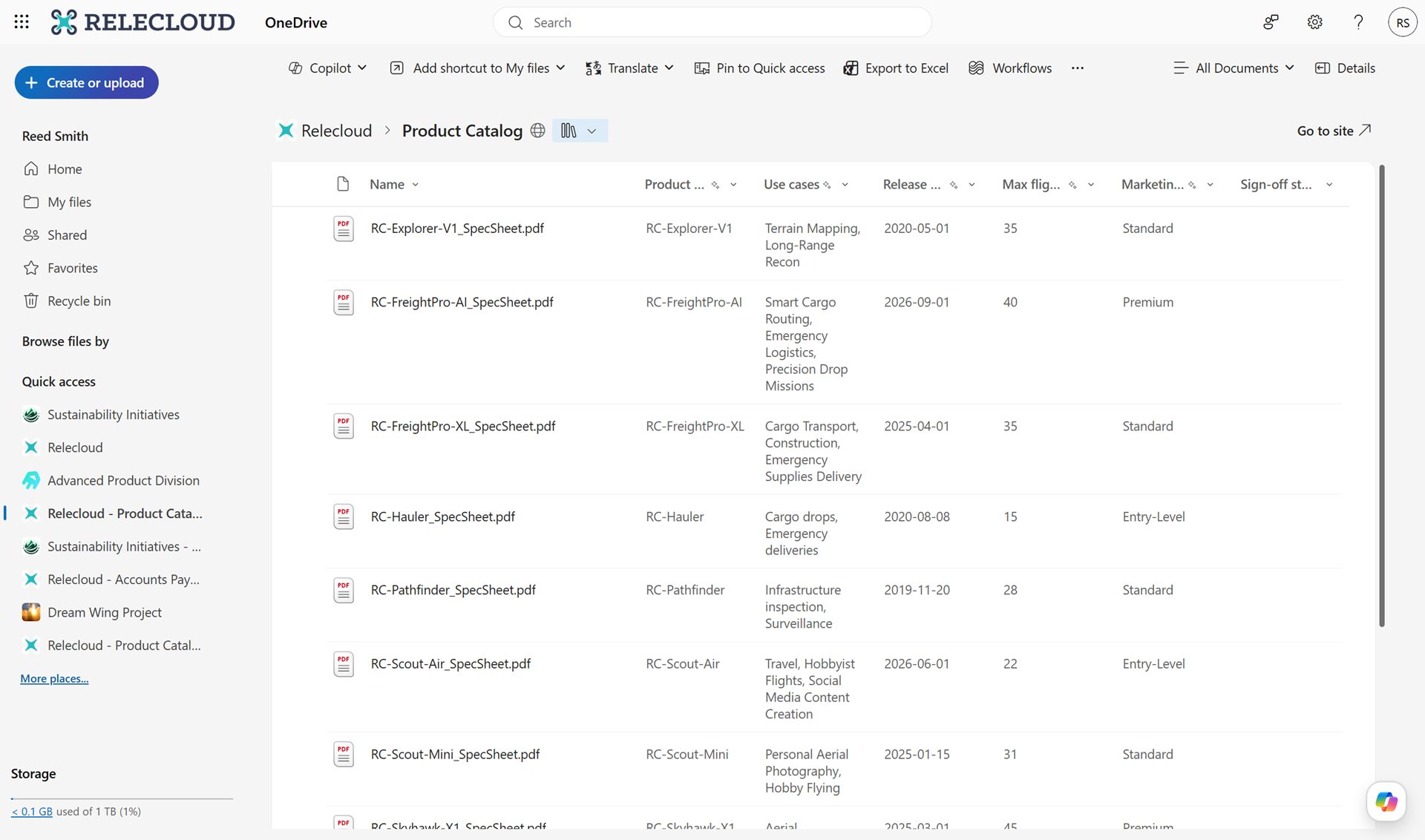
Screenshot 2: Users can now switch between views or create custom views in their Document Libraries in OneDrive: 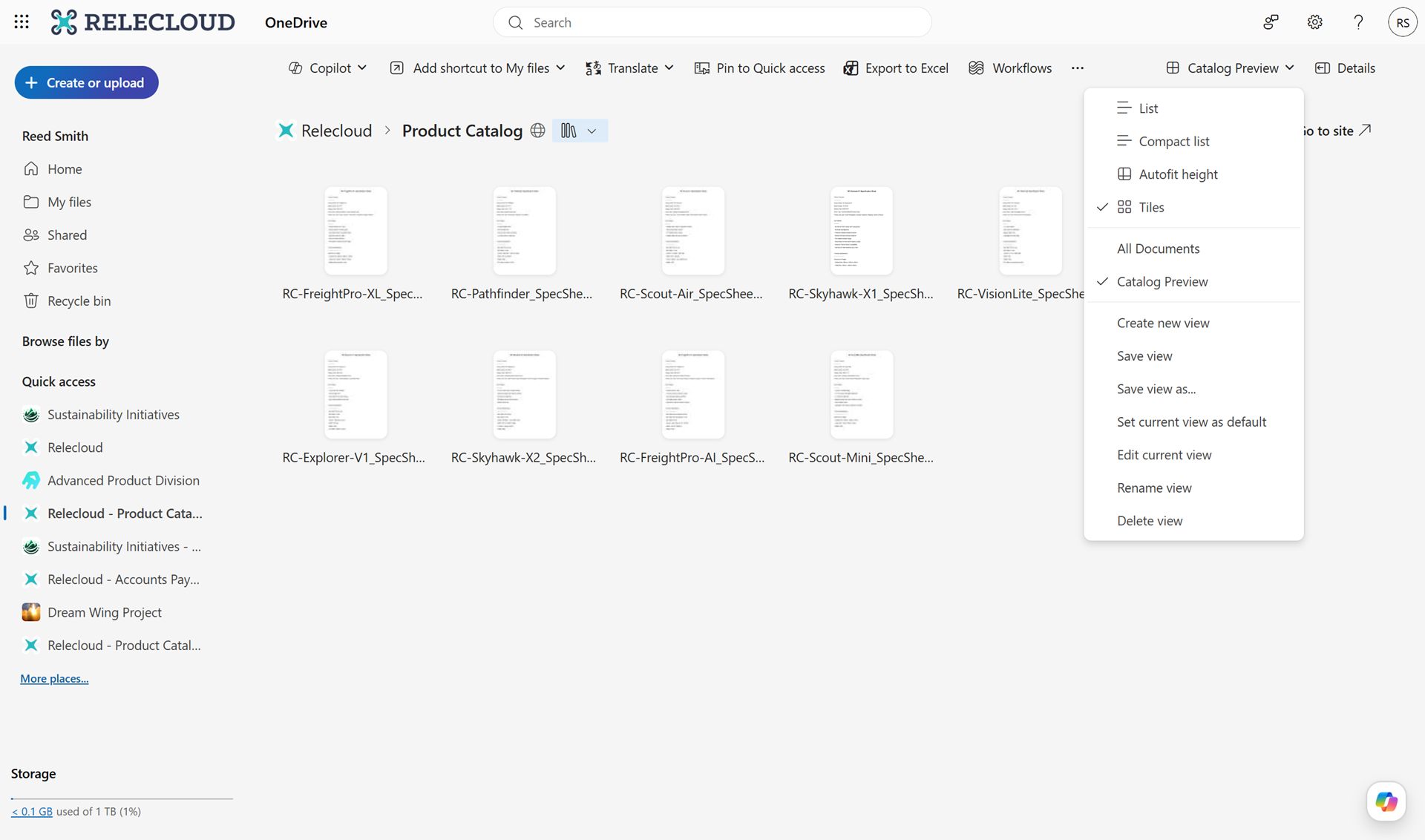
[Action Required/Recommendations:]
No action is required However, you may consider the following:
- Inform users about this new capability to improve document organization and discoverability.
- Update internal training or support documentation to include guidance on using views in OneDrive.
- Review existing SharePoint library views to ensure they meet team needs.
[Compliance considerations:] No compliance concerns beyond changes to how users view and access existing data. |