| (Updated) M365 Copilot: Tell Copilot what you need directly from the Copilot button in Word, Excel, and PowerPointCategory:Microsoft 365 apps
Microsoft Copilot (Microsoft 365)
Microsoft 365 Copilot ChatNummer:MC1470885Status:planForChange | Updated November 11, 2026: We have updated the content. Thank you for your patience. [What and Why:] Microsoft is making Copilot more accessible within Word, Excel, and PowerPoint by adding a new prompt input directly to the Copilot button and providing contextual prompt experiences when users select content. This update helps users engage with Microsoft 365 Copilot without leaving their workflow, enabling faster content creation, editing, and task completion. This change supports personal and team productivity by bringing Copilot assistance directly into the document experience. [Rollout Schedule:] - General Availability (Worldwide): Rollout begins September 2026 and is expected to complete by the end of December 2026.
- Available in Word, Excel, and PowerPoint on Windows desktop, macOS, and web.
- Rollout may occur on different platforms at different times.
[Impact on Your Organization:] Who is affected: - Microsoft 365 users eligible for Microsoft 365 Copilot using Word, Excel, or PowerPoint on Windows desktop, macOS, or web.
Platforms/Services: - Microsoft 365 Copilot
- Word
- Excel
- PowerPoint
- Windows desktop
- macOS desktop
- Web
What will happen: - Users will see a new button and prompt in the top right (by default).
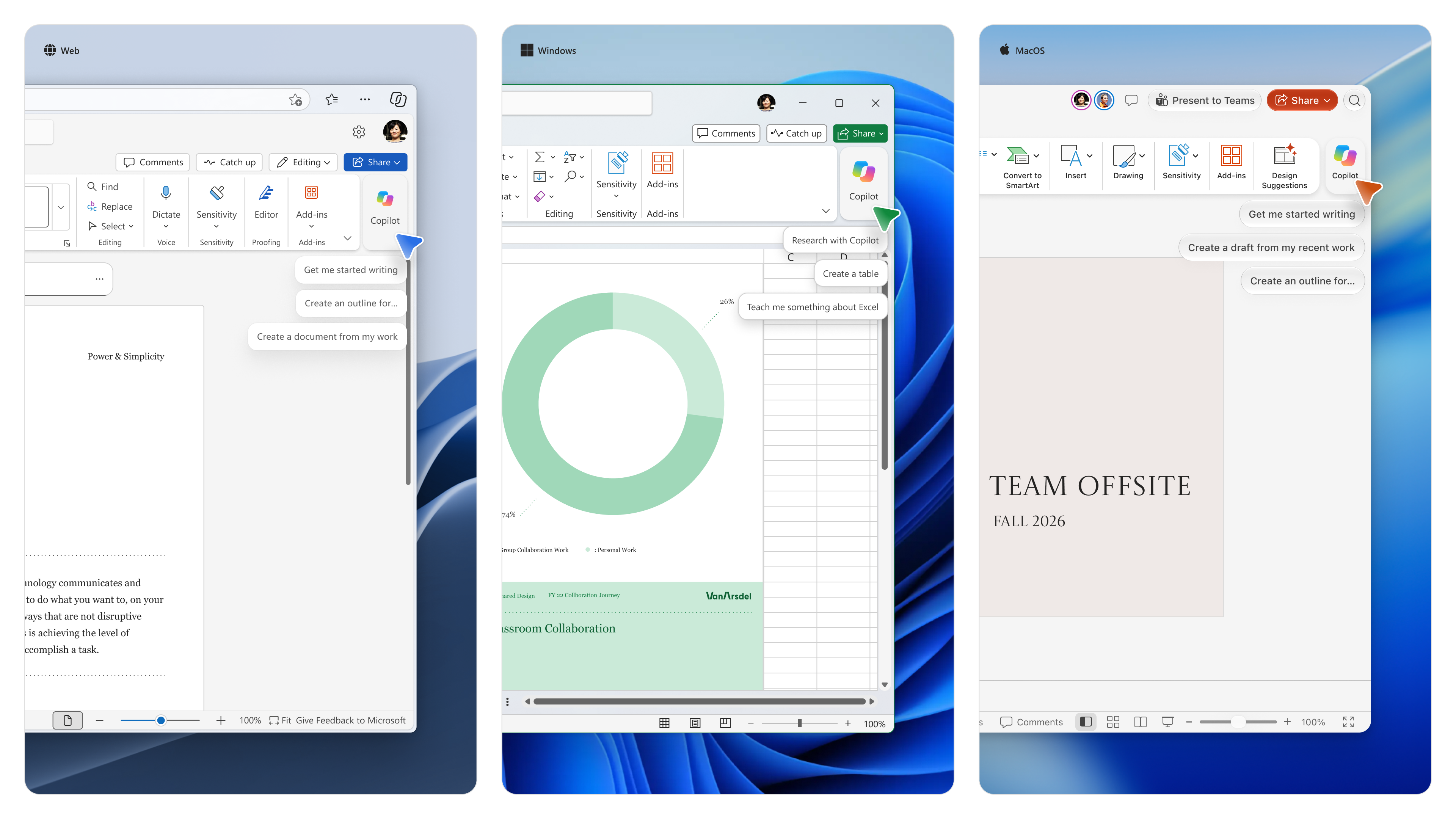 - Users can type or dictate prompts without opening the Copilot pane.
- Users can reference Microsoft 365 content directly from the prompt input experience.
- When content is selected in Word or PowerPoint, a contextual Copilot input will appear.
- Suggested actions such as Rewrite and Shorten will be shown when appropriate.
 - Windows shortcut: Alt + C.
- Mac shortcut: Command + Control + I.
- The feature is enabled by default for eligible users.
- Existing Copilot administration controls continue to apply.
- No separate admin control is available for the prompt input experience.
[Action Required / Recommendations:] No admin action is required. [Compliance Considerations:] - New generative AI interaction entry points are introduced.
- The update expands how users invoke existing Copilot capabilities.
- Existing admin controls remain available through the Pin Microsoft 365 Copilot Chat setting.
|
| (Updated) Microsoft Sales Agent: Semantic model support for Salesforce CRM dataCategory:Microsoft Copilot (Microsoft 365)
Microsoft Copilot (Power Platform)Nummer:MC1489925Status:stayInformed | Updated November 10, 2026: We have updated the rollout schedule with details for General Availability. [What and why] Microsoft is enhancing Sales Agent with Semantic Model capabilities that help the agent better understand CRM data structure, relationships, metadata, and business terminology. This provides richer business context and helps Sales Agent deliver more accurate and relevant responses to seller questions. Semantic Model enables administrators to configure CRM data, metadata, relationships, views, and glossary terms that Sales Agent can use when grounding responses. This helps improve response quality, especially in environments with custom CRM schemas, business processes, and complex data relationships. [Rollout schedule] - Dynamics 365 customers (Public Preview): Available now
- Salesforce customers (Public Preview): Beginning in late October 2026
- General Availability: we will begin rolling out in early December 2026 and expect to complete in late December 2026.
[Impact on your organization] Who is affected - Administrators managing Microsoft Sales Agent connected to Dynamics 365.
- Administrators managing Microsoft Sales Agent connected to Salesforce.
- Organizations using Microsoft Sales Agent with CRM data sources.
Platforms and services - Microsoft Sales Agent
- Dynamics 365
- Salesforce
- Power Apps Maker Portal
- Power Platform Admin Center
What will happen - Beginning in late October 2026, Microsoft plans to enable Semantic Model support for Salesforce customers, expanding Semantic Model capabilities beyond Dynamics 365 environments.
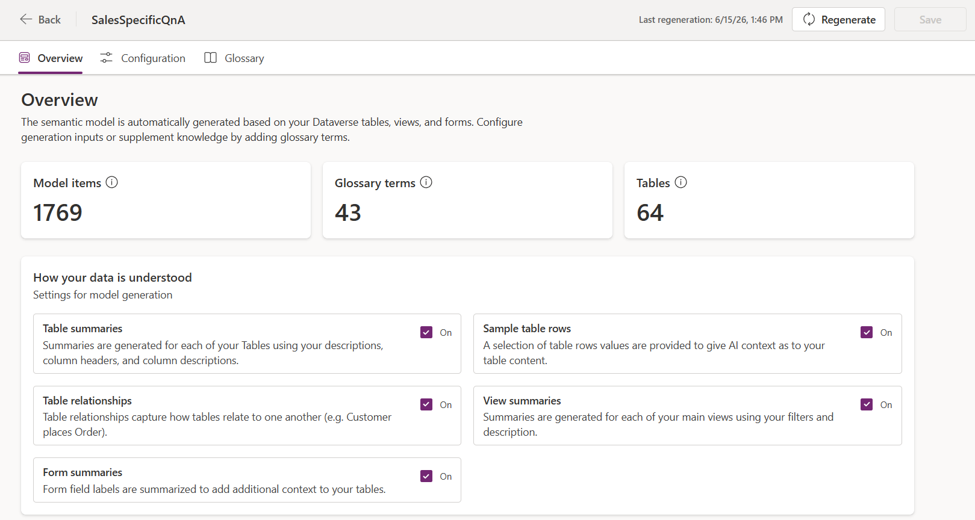
- Sales Agent can use configured CRM metadata, relationships, views, glossary terms, and business terminology to improve grounding and retrieval.
- Semantic Model capabilities are already available in Public Preview for Dynamics 365 customers.
- Salesforce administrators will be able to configure additional CRM signals, including relationships and views, to improve response quality.
- The feature requires administrator configuration before Sales Agent can use Semantic Model data.
- Existing Sales Agent functionality will continue to operate without changes if Semantic Model is not configured.
[Action required and recommendations] No action is required to maintain existing Sales Agent functionality. To take advantage of Semantic Model capabilities: - Dynamics 365 administrators
- Enable Dataverse intelligence in the Power Platform admin center.
- Review Semantic Model configuration in the Power Apps Maker Portal.
- Select additional tables, views, relationships, and metadata that are important to your sales processes.
- Validate that business-critical entities and CRM customizations are represented appropriately.
- Salesforce administrators
- Review your CRM configuration before the late October 2026 rollout.
- Identify business objects, views, relationships, and glossary terms that should be included in the Semantic Model.
- After the feature becomes available, configure and fine-tune Semantic Model settings in the Power Apps Maker Portal.
- Validate that important business context is available to Sales Agent.
We recommend informing CRM administrators and support teams about this capability and updating any internal documentation related to Sales Agent configuration. Learn more [Compliance considerations] | Question | Answer | | Does the change alter how existing customer data is processed, stored, or accessed? | Yes. Semantic Model processes CRM metadata, relationships, views, glossary terms, and related CRM context to improve Sales Agent grounding and retrieval capabilities. | | Does the change introduce or significantly modify AI/ML or agent capabilities that interact with or provide access to customer data? | Yes. Sales Agent uses Semantic Model data to better interpret CRM structures and business context when generating responses. | | Does the change add any integration to third-party software products? | Yes. Public Preview support is being introduced for Salesforce CRM environments. |
|
| (Updated) New Dynamics 365 Sales and Customer Service experiences across Teams, Copilot, and OutlookCategory:Microsoft Copilot (Microsoft 365)Nummer:MC1492151Status:stayInformed | Updated November 10, 2026: We have updated the timeline. Thank you for your patience. [What and why] Microsoft is introducing new Dynamics 365 Sales and Customer Service experiences that bring customer context, business processes, and agent capabilities into Microsoft Teams, Microsoft 365 Copilot, Outlook, and other Microsoft 365 applications. These updates help sellers and service representatives access customer information, take actions, and collaborate without switching between applications. The release includes: - Sales and Service skills for Copilot experiences such as Cowork, Code, and Autopilot
- Dynamics 365 CRM integration with Teams Channel Agent
- Sales Development Agent
[Rollout schedule] Beginning October 8, 2026: - Dynamics 365 Sales and Dynamics 365 Service skills for Copilot experiences:
- General Availability (Cowork)
- Frontier (Code)
- Private Preview (Autopilot)
- Dynamics 365 CRM in the flow of Teams enters Public Preview.
- Sales Development Agent enters Public Preview (Frontier enablement continues to be required until December 1).
[Impact on your organization] Who is affected - Organizations using or evaluating Dynamics 365 Sales, Dynamics 365 Customer Service, Microsoft Teams, or Microsoft 365 Copilot, and administrators responsible for agent deployment.
Platforms and services - Dynamics 365 Sales
- Dynamics 365 Customer Service
- Microsoft Teams
- Microsoft 365 Copilot
- Microsoft 365 Apps
- Outlook
- Cowork
- Code
- Autopilot
What will happen Sales and Service Skills for Cowork, Autopilot, and Code (General Availability for Cowork, Frontier program for Code, and Private Preview for Autopilot) Thirty sales and service skills package Dynamics 365 business expertise into reusable building blocks for Cowork, Autopilot, and Code. These skills help sellers and service representatives identify opportunities and risks, update CRM data, resolve service issues, and take actions grounded in customer data and business processes. Organizations can also use these skills with custom agents to support workflows enterprises build themselves. Learn more about the Sales and Service skills. Dynamics 365 CRM in the flow of Teams (Public Preview) Dynamics 365 CRM in the flow of Teams helps sellers and service representatives work from shared customer context in Teams conversations, bringing customer updates and supported actions into the channel so they can collaborate on accounts and cases without switching applications. Learn more about the Channel Agent for Microsoft Teams and how to use it with Dynamics 365 CRM. - Deployment requires licensing for Microsoft 365 Copilot, Dynamics 365 Customer Service, and Microsoft Teams.
- Requires administrator activation of the Channel Agent.
Sales Development Agent (Public Preview, Frontier enablement continues to be required until December 1). Sales Development Agent helps sellers build and qualify pipeline by researching prospects, personalizing outreach, managing follow-up conversations, and advancing qualified opportunities before handing them to a seller. It is managed in Teams, sends email from its own Exchange account, and can connect to customer-authorized CRM platforms. Learn more about the Sales Development Agent and review deployment guidance - Beginning December 1, 2026, Sales Development Agent will be billed on usage-based billing through Copilot Credits. Additional details, including consumption estimates and licensing guidance, will be shared closer to the transition date.
[Action required and recommendations] No action is required unless your organization plans to deploy or continue using these capabilities. To prepare: - Configure spending policies for applicable AI experiences before December 1, 2026.
- Review deployment guidance for Sales Development Agent prior to activation.
- Review deployment guidance and prerequisites for Teams Channel Agent.
- Communicate billing and deployment requirements to administrators responsible for Copilot and Dynamics 365 environments.
Learn more [Compliance considerations] | Question | Answer | | Does the change introduce or significantly modify AI/ML or agent capabilities that interact with customer data? | Yes. Introduces new agent-based experiences including Sales Development Agent, Sales and Service skills, and Dynamics 365 CRM integration in Teams. | | Does the change provide users a new way of interacting with generative AI? | Yes. Users can interact with Dynamics 365 sales and service capabilities through Copilot experiences, Teams Channel Agent, and Sales Development Agent. | | Does the change alter how existing customer data is processed, stored, or accessed? | Yes. Dynamics 365 customer data becomes accessible within Teams, Copilot, and Microsoft 365 experiences to support customer workflows and agent actions. | | Does the change include an admin control? | Yes. Administrators must activate Channel Agent, and Sales Development Agent. | | Can users enable or disable the feature themselves? | Yes. Use of the experiences depends on administrator enablement, licensing, and policy assignment. Administrators remain the primary control point. |
|
| (Updated) Microsoft Windows: Updates to address compromised eMudhra certificate authority keysCategory:Microsoft 365 suiteNummer:MC1529467Status:planForChange | Updated November 11, 2026: On November 16, 2026, an update will be released for Microsoft Edge and WebView2, delivered via the PKI Metadata component, which will fully remove default trust for the remaining roots (emSign Root CA – G1, emSign Root CA – C1, emSign ECC Root CA, and emSign Root TLS CA – G1). Devices check for PKI Metadata updates every 10 hours and shortly after each new app launch. For more information, see Microsoft Response to eMudhra Certificate Authority Key Compromise. [What and why] Microsoft is responding to an issue involving eight eMudhra intermediate certificate authority (CA) private keys, six associated with TLS and two with code signing. Because these keys could be recovered, they could potentially be used to create certificates or sign content that appeared to come from a trusted CA. The issue arose in eMudhra’s certificate hierarchy and was not a compromise of Microsoft systems. Microsoft is updating certificate trust to block affected certificate authorities and remove certificates associated with the affected hierarchies. [Rollout schedule] - General Availability (Worldwide, GCC, GCC High, DoD): Beginning in late October 2026 and expected to complete by late October 2026
[Impact on your organization] Who is affected - Organizations using Windows, Microsoft Edge, or WebView2, particularly organizations with certificates that chain to one of the eight certificates being removed
- Organizations managing disconnected Windows devices or disconnected Azure devices may need to take additional action
Platforms and services - Windows
- Microsoft Edge
- WebView2
- Azure virtual machines
What will happen - Microsoft has published an update to the Windows Disallowed Certificate Trust List to block the affected certificate authorities.
- Microsoft has deployed a separate CRLSet update for Microsoft Edge and WebView2 to block affected TLS certificates signed by the affected certificate authorities.
- The Microsoft Edge and WebView2 update is delivered automatically through the component update mechanism. Customers do not need to install a new browser version.
- Microsoft has released updates to Windows and Microsoft Edge to remove certificates associated with the affected hierarchies from their trust lists.
- After these updates reach a device, the affected certificates will no longer be trusted by default through the respective trust lists.
[Action required and recommendations] - Keep updates flowing. Allow automatic Windows certificate trust updates and Microsoft Edge component updates to reach your devices.
- Check disconnected Windows devices. If you manage Windows devices that do not receive automatic updates, make sure your update process delivers the updated Disallowed Certificate Trust List and upcoming trust-list changes. See the Microsoft Learn guidance in Learn more for information about distributing certificate trust lists in disconnected environments.
- Review disconnected Azure devices. Review disconnected Azure devices running on Virtual Machine Scale Sets (VMSS) or single-instance VMs. Updated images are available in Azure Marketplace, and customers can deploy them to protect against this vulnerability.
- Replace dependent certificates. If any of your certificates chain to one of the seven certificates being removed, identify those dependencies and obtain replacement certificates or an alternative trusted chain before the changes reach your devices.
Learn more [Compliance considerations] No compliance considerations identified. Review as appropriate for your organization. |
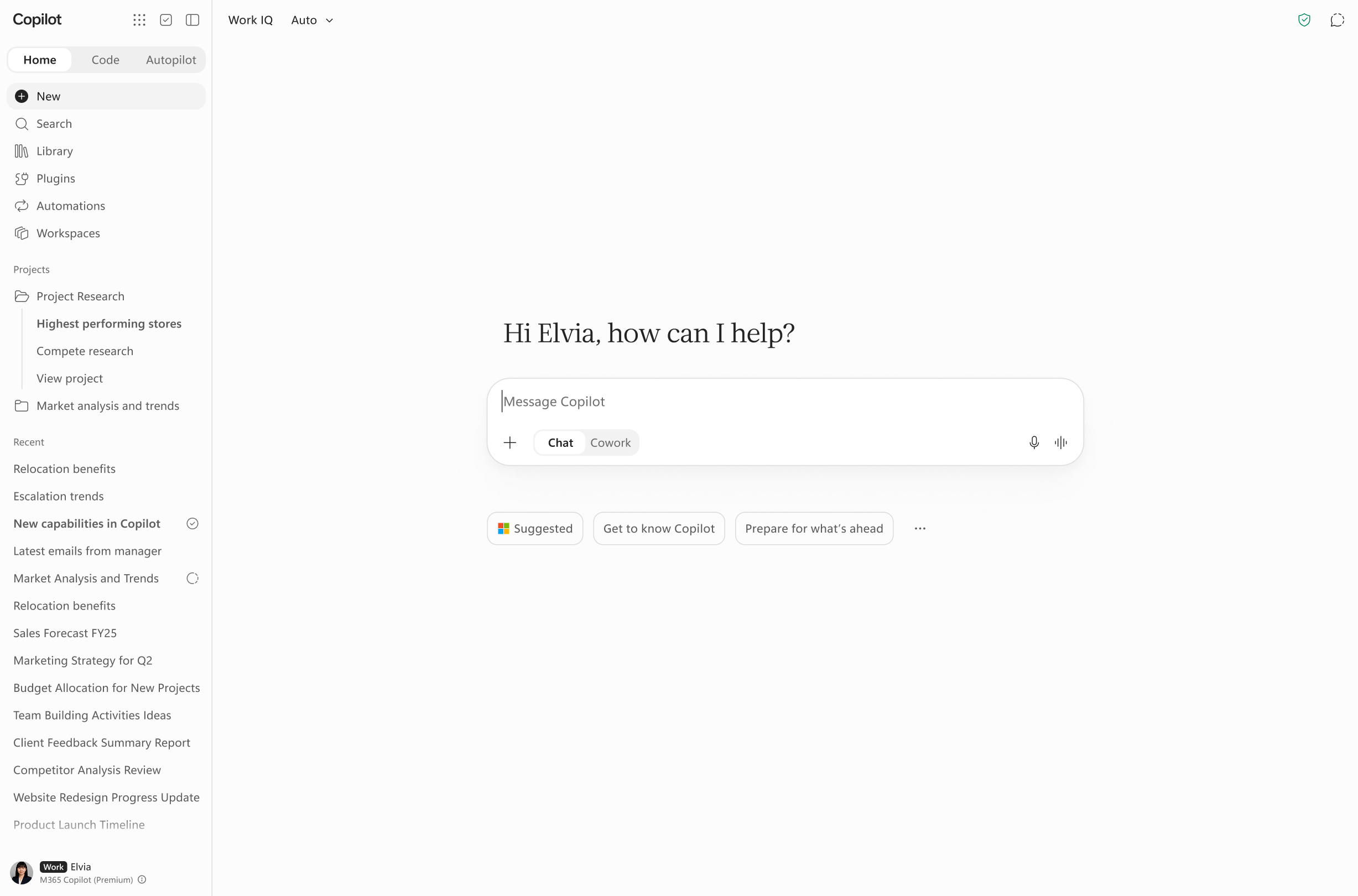
| (Updated) Microsoft Copilot app: Updates to Home and navigationCategory:Microsoft Copilot (Microsoft 365)Nummer:MC1535647Status:stayInformed | Updated November 11, 2026: We have updated the workspaces timeline. Thank you for your patience. [What and why] In MC1479277 about updates to the Microsoft Copilot app, we introduced Home as the new starting point that brings Chat and Cowork together, so users can get chat assistance and delegate multi-step tasks in one view. This post builds on that announcement with worldwide rollout timing and the addition of Projects and Workspaces to the Home experience. [Rollout schedule] - Standard release begins late October 2026
- Deferred release begins late November 2026
[Impact on your organization] Who is affected - Users of the Microsoft Copilot app. Access to Cowork and Cowork-related capabilities depends on Microsoft 365 Copilot licensing and your organization’s usage-based billing configuration.
Platforms and services - Microsoft Copilot web, desktop, and mobile app.
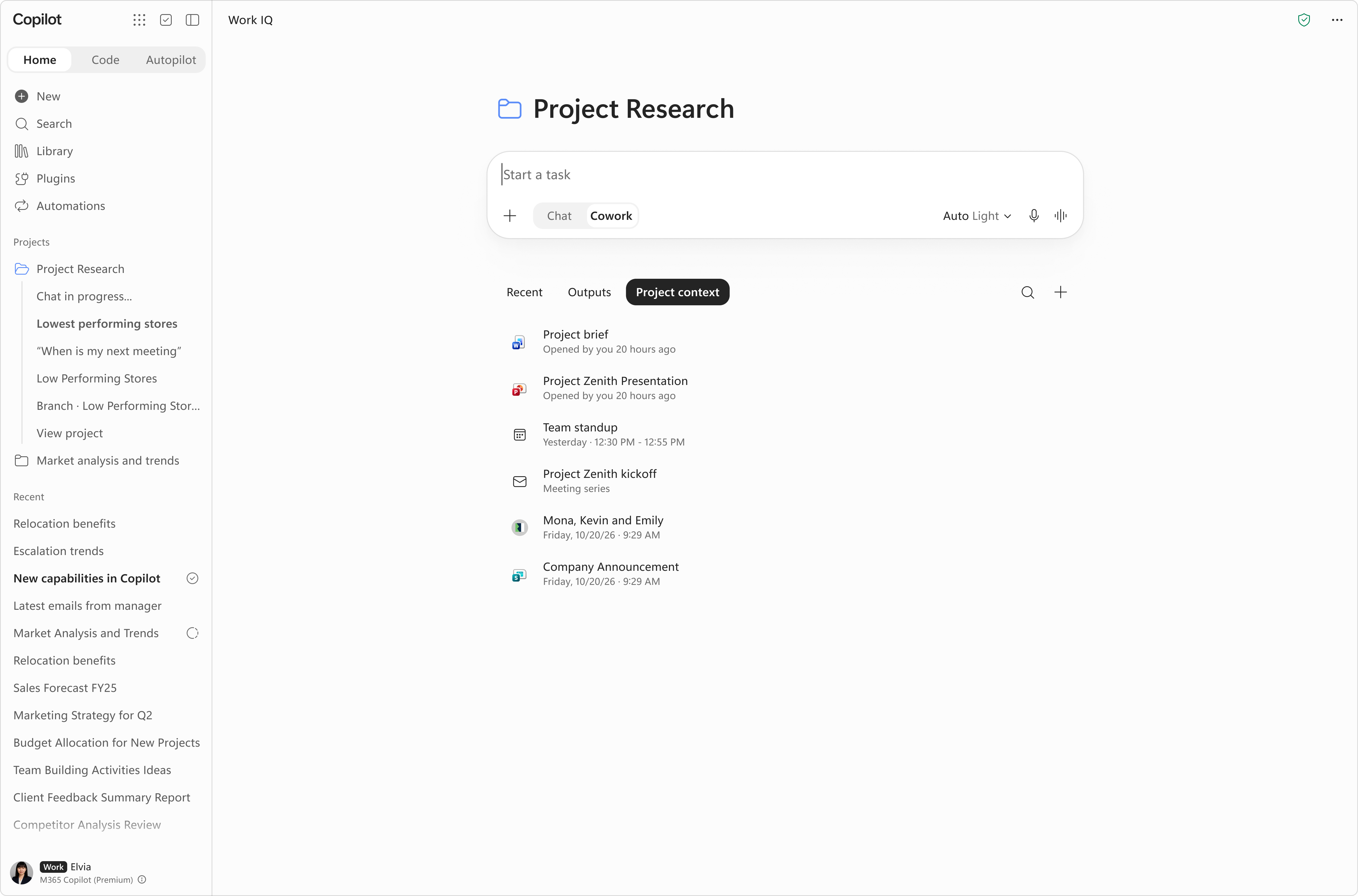
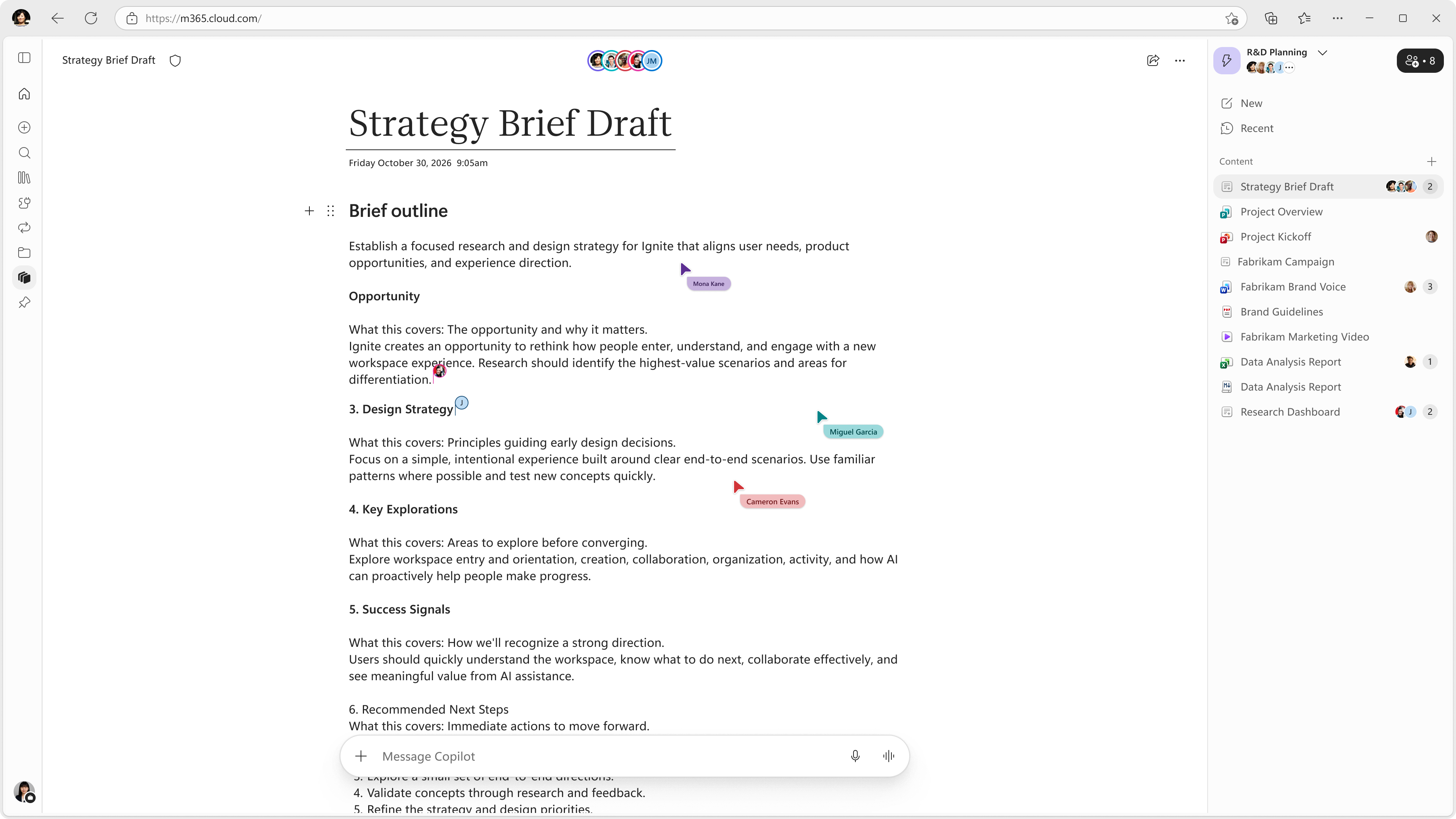
What will happen Projects: - In addition to what was communicated in MC1479277, Projects provides a dedicated space in Home for organizing related chats, Cowork tasks, and everything they share: files, instructions, and outputs. From there they can create a new project, add files and context, and start chats or Cowork tasks inside it. Responses are grounded in the project’s context first, then in the user’s broader Microsoft 365 work context. Projects are accessible from the Home navigation pane.
- Projects doesn’t store content itself, and files stay in OneDrive under the same permissions, sensitivity labels and retention policies you already use. Word, Excel and PowerPoint files that Copilot creates are saved to the user’s OneDrive.
- Projects are available on Windows, Mac, & Web apps across tier 1 languages. It is coming soon to mobile apps.
Workspaces: - Users will see “Notebooks” become “Workspaces” in the left navigation of the Copilot app as Copilot Notebooks evolves into Copilot Workspaces. Workspaces give teams a shared space to bring together context, team members, and working files to work alongside Copilot on an ongoing workstream.
- Existing notebooks will convert into “workspaces,” retaining all previously added or made content. Read FAQs on our Support Page.
- This change will roll out to all users with access to Copilot Notebooks first in the Frontier program. Workspaces will rollout to standard release by January 2027, and deferred release by February 2027. Access to individual capabilities in Copilot Workspaces will vary by license.
[Action required and recommendations] - Review which users are included in a spending policy that grants Cowork access and confirm your intended usage-based billing configuration.
|
| (Updated) ‘Add explainer video’ Skill in PPT CopilotCategory:Microsoft 365 apps
Microsoft Copilot (Microsoft 365)Nummer:MC1546430Status:stayInformed | Updated November 11, 2026: Rollout is currently paused. We will communicate via Message center when we are ready to proceed. We apologize for any inconvenience. [What and Why:] Use the “Add explainer video” skill in Copilot for PowerPoint. This is a built-in skill rolling out as an experimental skill to Frontier users. Available on desktop, Mac, and web. [Rollout Schedule:] Frontier/Insider (Worldwide): We will communicate via Message center when we are ready to proceed. [Impact on Your Organization:] Ability to convert a static slide into an animated explainer video. [Action Required/Recommendations:] No admin action is required. [Compliance considerations:] No compliance considerations identified. Review as appropriate for your organization. |
| Microsoft 365 Copilot Chat: Filter responses by content sourceCategory:Microsoft Copilot (Microsoft 365)Nummer:MC1548004Status:stayInformed | [What and why] We’re introducing content source filters in Microsoft 365 Copilot Chat. This feature allows users to scope a prompt to specific content sources so that Copilot grounds its response only in the sources they select. This helps users focus responses on the most relevant Microsoft 365 content, as well as connected or available third-party sources, while maintaining existing permission and access controls. [Rollout schedule] - General Availability (Worldwide): Rollout will begin in mid-November 2026 and is expected to complete by mid-November 2026.
[Impact on your organization] Who is affected - Users licensed for Microsoft 365 Copilot.
Platforms and services - Microsoft 365 Copilot Chat
What will happen - Users will see a source selection control in the Copilot Chat prompt area.
- Users can select one or more available content sources to limit retrieval and grounding for a specific prompt to those sources.
- Available sources reflect the content sources enabled in your tenant, including Graph connectors and federated connectors available to users.
- This feature changes where Copilot retrieves information for a prompt and does not change what content a user is permitted to access. Data access, compliance boundaries, and tenant data handling remain unchanged.
- If no source is selected, Copilot Chat behavior remains unchanged and will use its default orchestration across available sources.
- Responses will continue to include citations that reflect the selected sources.
- Source selection applies only to the current prompt and does not persist across sessions.
- This feature is enabled by default for users with a Microsoft 365 Copilot license.
Copilot source selection 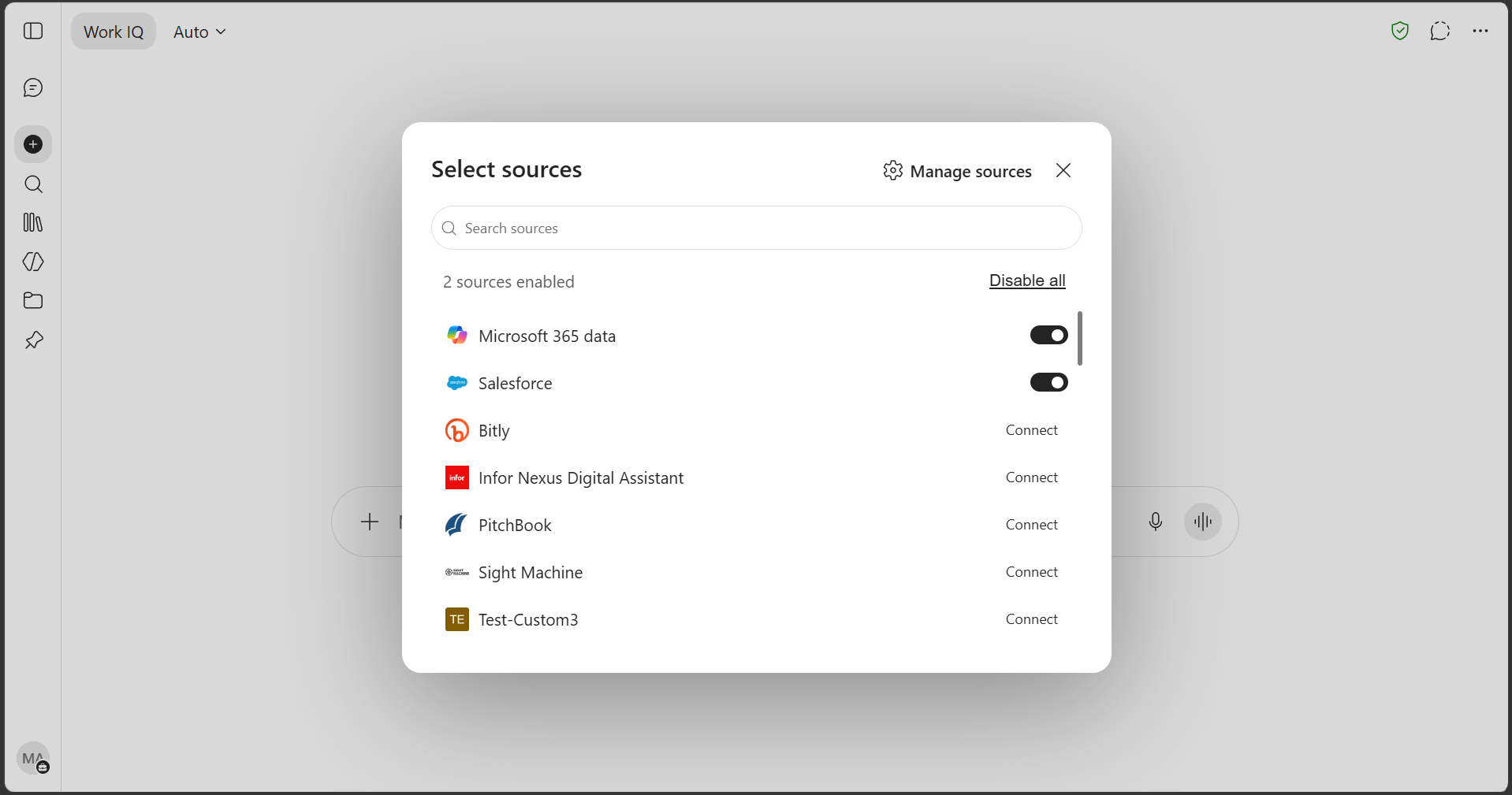
[Action required and recommendations] No action is required. We recommend that you: - Review the display names of published Graph connectors, ensuring that they are clear and recognizable, as these names will appear in the source selection experience for users.
- Verify the health and search permissions of connectors that should be available to users. Connectors in an error or unpublished state will not appear.
[Learn more] [Compliance considerations] No compliance considerations identified. Review as appropriate for your organization. |
| Copilot Studio – Set up third-party agent connections in conversationsCategory:Microsoft Copilot (Power Platform)Nummer:MC1548034Status:planForChange | We are announcing improvements to the experience of setting up connections in chats with Copilot Studio agents. These improvements will reach general availability by December 31, 2026.
How does this affect me?
Previously, users needed to leave their conversation, go to a separate connection-management experience, complete setup, and then restart their interaction. This feature is introducing a more seamless way for users to connect agents to third-party services. When an agent requires a connection, users will be guided through a focused setup experience without leaving the conversation or being redirected to the full connection-management portal. When possible, the agent will reuse an existing valid connection.
With this update:
- Users can establish a required third-party connection from their agent conversation.
- Users complete only the setup required for the service they are using.
- Users return directly to the conversation after connecting.
- An eligible existing connection can be reused instead of configuring another connection.
- Users can continue working with connected agents across Microsoft Copilot, Microsoft Teams, and Web Chat.
- Existing organizational controls that govern which connectors and connections users can access will continue to determine availability.
Please note that developers of agents published through a custom web UI using the Standard harness will be required to make changes to support the new connection experience.
What action do I need to take?
To prepare for this change, we recommend that you:
- Inform support teams and agent users about the improved connection experience.
- Review your existing organizational controls for connectors and connections.
For agents published through a custom web UI using the Standard harness, update your implementation to:
- Open the new connection window.
- Continue the conversation after connection setup succeeds.
If you would like more information on this feature, please visit Support connection setup in a custom canvas. |
| Updates available for Microsoft 365 Apps for all channelsCategory:Microsoft 365 appsNummer:MC1548054Status:stayInformed | We’ve released updates to the following update channels for Microsoft 365 Apps:
- Current Channel
- Monthly Enterprise Channel
- Semi-Annual Enterprise Channel
[When this will happen:]
We’ll be gradually rolling out these updates of Microsoft 365 Apps to users on those update channels starting November 10th, 2026 (PST).
[How this will affect your organization:]
If your Microsoft 365 Apps clients are configured to automatically update from the Office Content Delivery Network (CDN), then no action is required.
If you manage updates directly you can now download these latest updates and begin deployment.
[What you need to do to prepare:]
To get more details about these updates view the following release notes:
|