20-November-2026 Below you will find a collection of news published yesterday. This news consists of Microsoft’s Roadmap when it is updated it will be below with items. Then there will be a section with the message center, if there is anything new there, this will be automatically included. And it contains a piece from blogs that I follow myself and would like to share with you. If I miss something in the blogs that do have an RSS feed, please let me know.
This entire post was automated via Microsoft Flow
have fun reading!
Office 365 Roadmap Updated: 2026-11-19
Additions : 5
Updates : 8
More Details At: www.roadmapwatch.com
Office 365 Roadmap Updated: 2026-11-20
Additions : 2
Updates : 1
More Details At: www.roadmapwatch.com
| New Features | Current Status | |||
|---|---|---|---|---|
| Microsoft Teams: Configure a list of allowed external meeting notetaker bots for your Teams meetings | In Development | |||
| Microsoft Edge: Smarter and faster update application | In Development | |||
| Updated Features | Current Status | Update Type | ||
| Power Apps: Expand model access and Maker Studio availability for generative pages via GitHub | In Development | Description |
Office 365 Roadmap Updated: 2026-11-20
Additions : 1
Updates : 1
More Details At: www.roadmapwatch.com
| New Features | Current Status | |||
|---|---|---|---|---|
| Microsoft Teams: Pick up where you left off in channels on desktop | In Development | |||
| Updated Features | Current Status | Update Type | ||
| Microsoft Copilot Studio: PPAC Reporting API | In Development | Description |
Items from the MessageCenter in Microsoft 365
| (Updated) Microsoft Defender for Cloud Apps: Permission changes for select App Governance Entra rolesCategory:Microsoft Defender XDRNummer:MC1479503Status:planForChange | Updated November 19, 2026: We have updated the timeline. Thank you for your patience. [What and Why:] We are introducing Microsoft Defender XDR Unified role-based access control (Unified RBAC) support for App Governance. As part of this rollout, App Governance permissions associated with select Microsoft Entra roles will change. This update helps align App Governance access with Defender XDR role management and provides more consistent permission handling for organizations using Microsoft Defender for Cloud Apps. [Rollout Schedule:] General Availability (Worldwide): We will begin rolling out in early December 2026 (previously mid-November) and expect to complete by late December 2026 (previously late November). [Impact on Your Organization:] Who is affected:
Platforms/Services:
What will happen:
[Action Required/Recommendations:] Before the enforcement date, we recommend that admins:
[Compliance considerations:]
| ||||||||||||||||||
| (Updated) Microsoft Teams: Onboarding workflow for new team membersCategory:Microsoft TeamsNummer:MC1518033Status:stayInformed | Updated November 18, 2026: We have clarified the supported channel types and updated the rollout timeline. Thank you for your patience. [What and Why:] Microsoft Teams is introducing an onboarding workflow that helps new team members get started faster by automatically connecting them to relevant channels when they join a team. This can improve engagement, accelerate onboarding, and make important information easier to find from the start. This message is associated with Microsoft 365 Roadmap ID 573452. [Rollout Schedule:]
[Impact on Your Organization:] Today, new team members may need to manually discover and join the channels that are most relevant to their work. With this update, team owners can automatically add new members to relevant channels through the onboarding workflow when they are added to a team. [Action Required/Recommendations:] No admin action is required. You may want to inform team owners about this upcoming improvement so they understand how to connect new members to relevant channels more efficiently during onboarding. [Compliance considerations:] No compliance considerations identified. Review as appropriate for your organization. | ||||||||||||||||||
| (Updated) Enhanced Copilot and AI controls for meetingsCategory:Microsoft Teams Microsoft Copilot (Microsoft 365)Nummer:MC1532253Status:planForChange | Updated November 19, 2026: We have updated the content. Thank you for your patience. [What and Why:] Microsoft Teams is updating how administrators and meeting organizers configure AI for Teams meetings. The existing Copilot meeting policy is being replaced by two more specific policies:
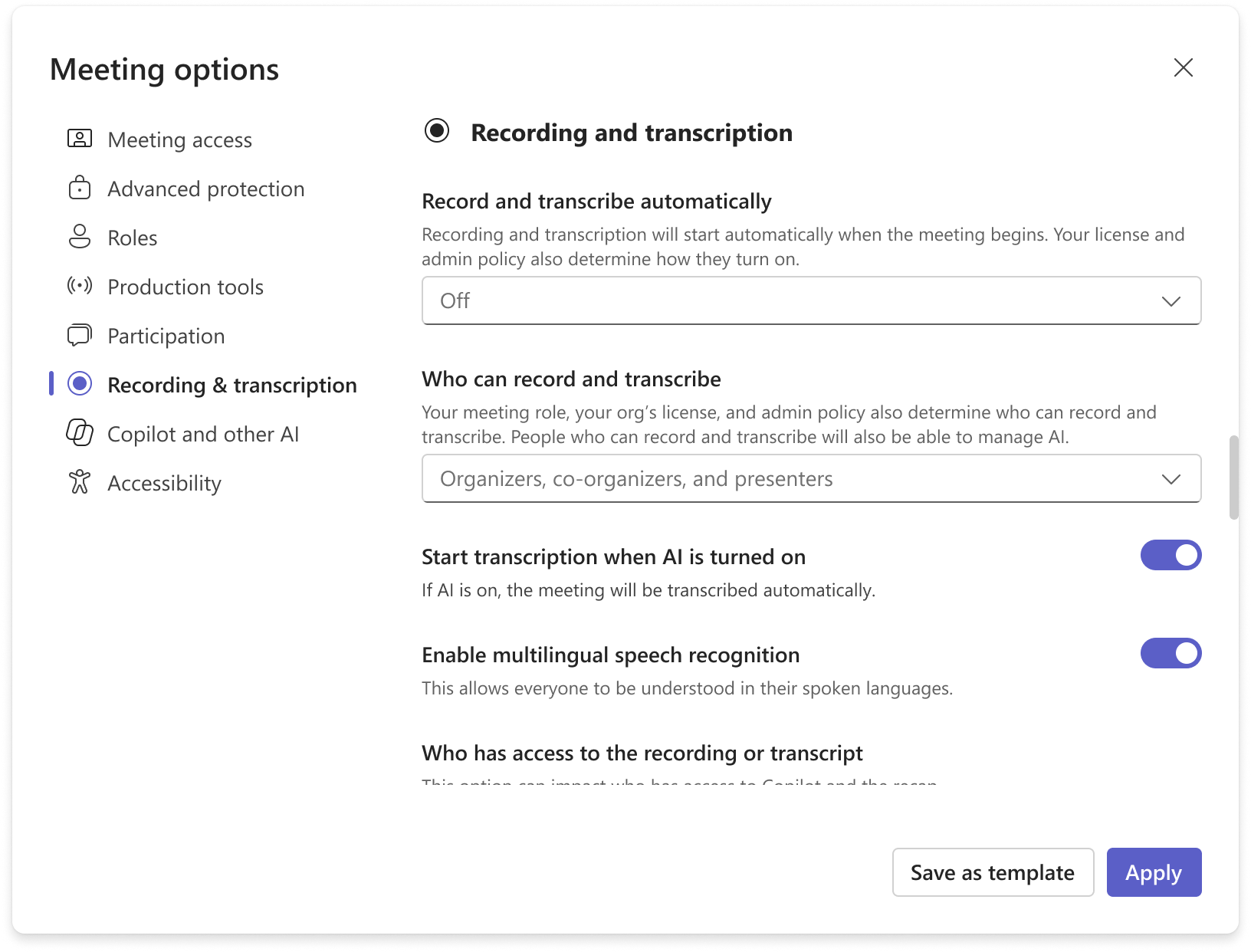
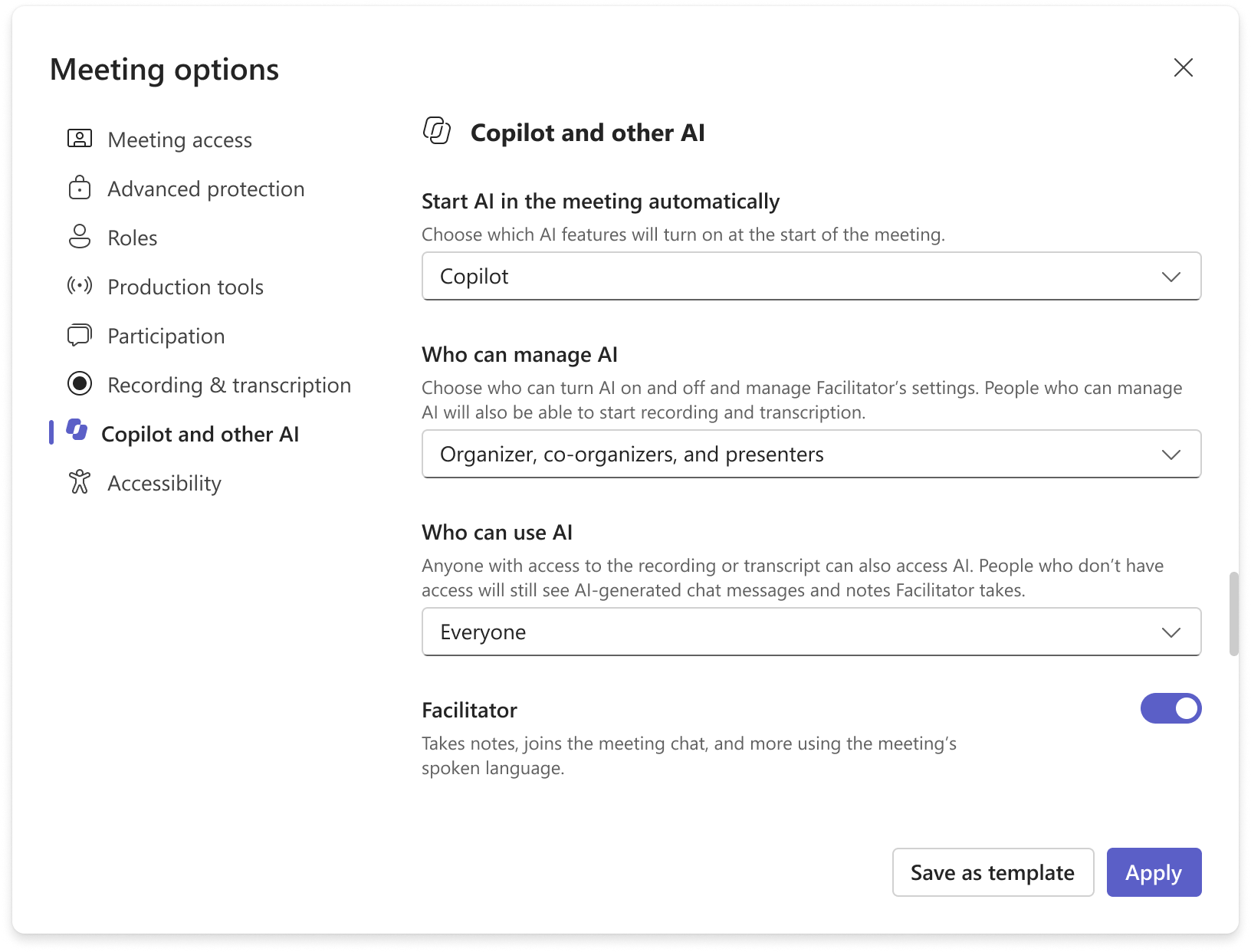
This gives administrators clearer, more predictable control over whether AI is available and whether it requires (or works without) transcription, including the ability to enforce Copilot off. Organizers also gain more visibility into, and in some cases control over, these settings directly from the meeting options. Meeting options are also being updated to make AI controls easier to understand and to provide more granular control over who can enable, manage, and use AI capabilities, including a new who can manage option that replaces the existing Allow Copilot and Facilitator meeting option:
[Rollout Schedule:] Targeted Release (Worldwide): We will begin rolling out in early December 2026 (previously mid-November) and expect to complete by mid-December 2026 (previously early December). General Availability (Worldwide): We will begin rolling out in early January 2027 (previously late November 2026) and expect to complete by mid-January 2027 (previously early December 2026). [Impact on Your Organization:] Today, the Copilot policy combines whether AI is available in a meeting with whether a saved transcript is required. After this update, these behaviors are represented by two separate settings:
To keep the experience predictable and avoid invalid combinations: if MeetingAI is set to enforced off, transcription will also be turned off; if transcription is then turned back on, MeetingAI will no longer be enforced off. In PowerShell, administrators will use What happens to existing configurations: Microsoft will perform a one-time update mapping each existing Copilot value to the corresponding
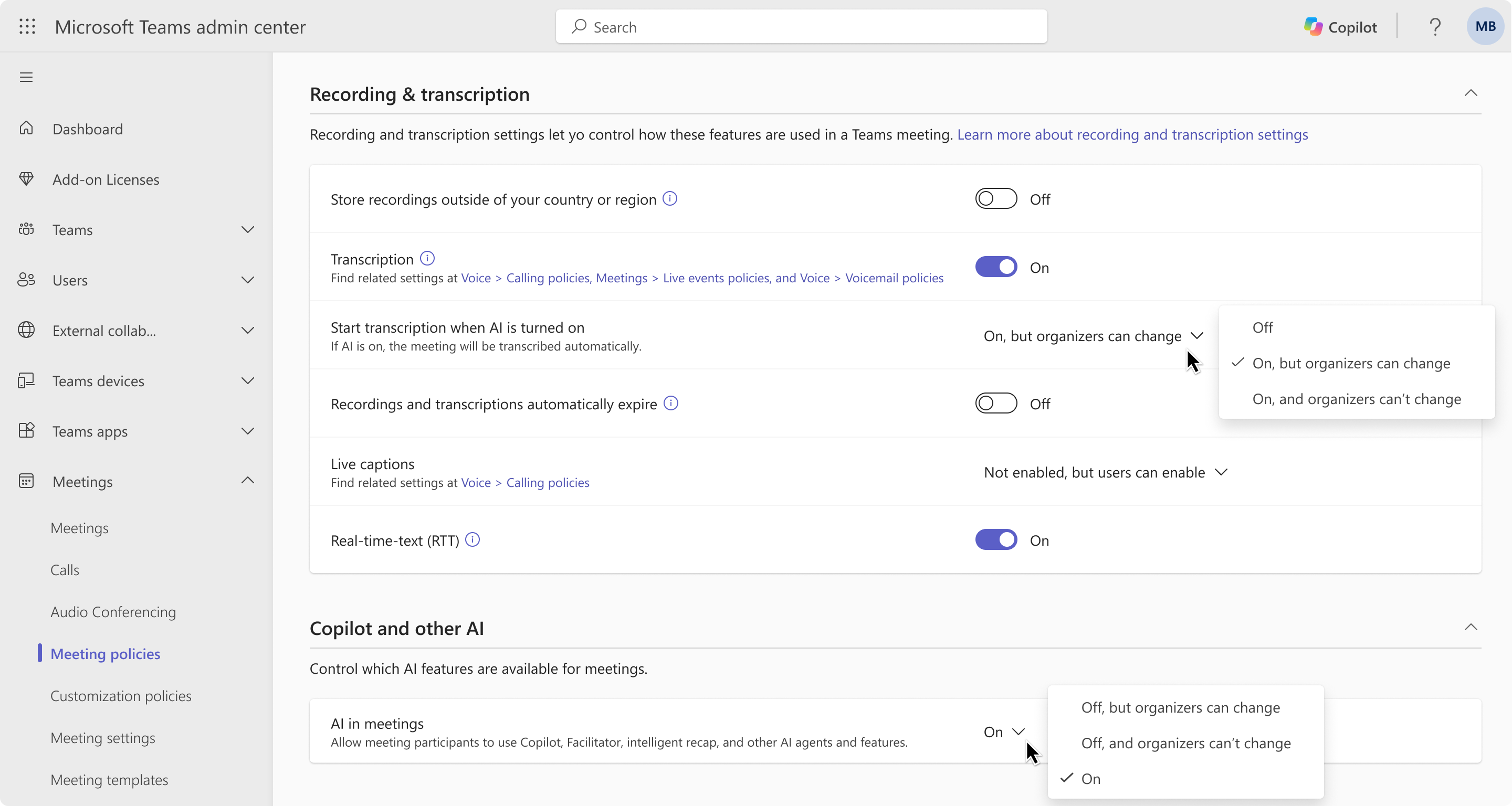
The The new settings will appear in the Teams admin center meeting policy under Recording and transcription and Copilot and other AI: Screenshot 1 – Teams Admin Center: Meeting Policies
Screenshot 2 – Meeting options: Recording & Transcription
Screenshot 3 – Meeting options: Copilot and other AI
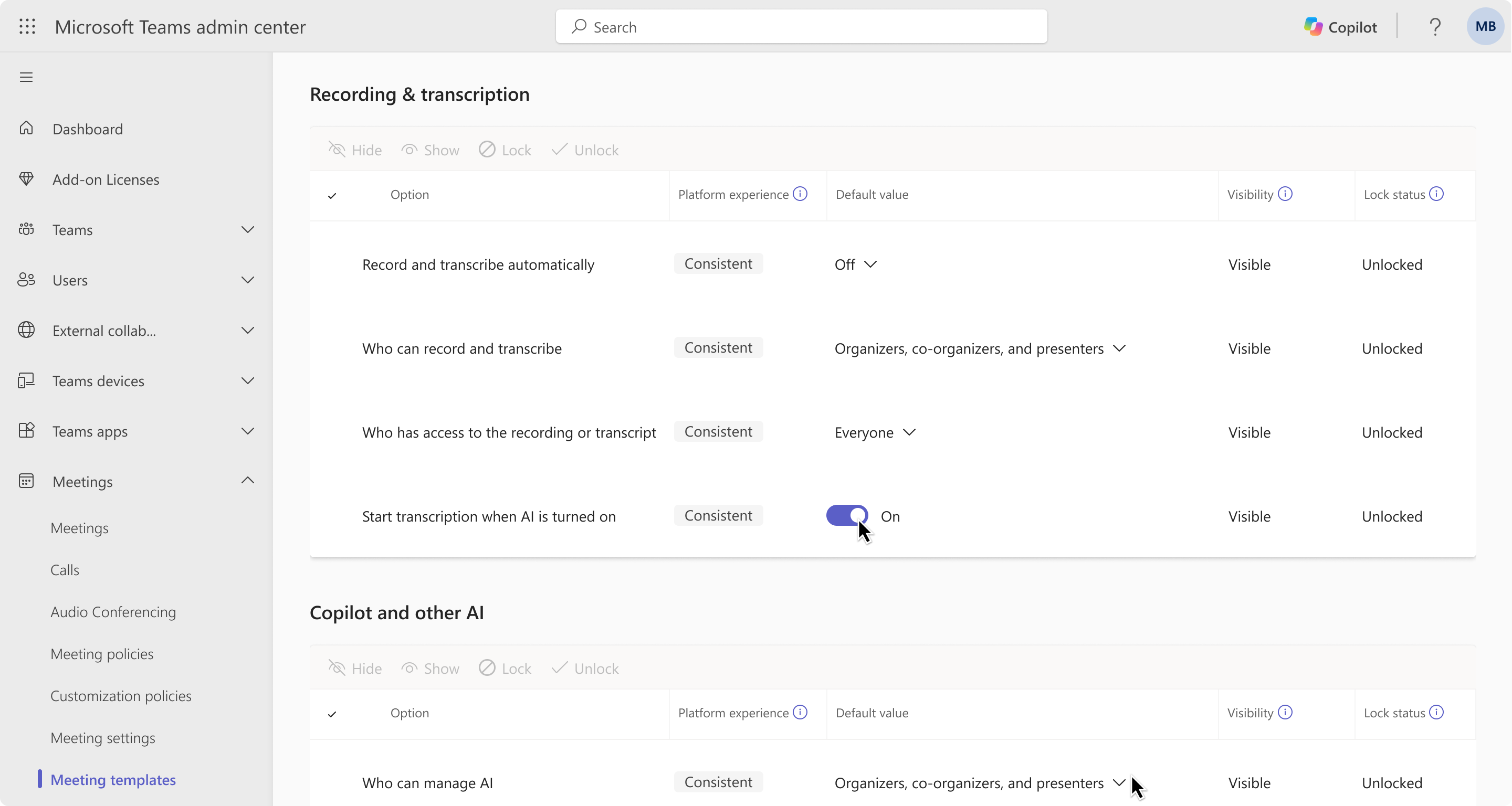
Screenshot 4 – Teams Admin Center: Meeting Templates
These screenshots show the new Start transcription when AI is turned on control and Allow AI in all meetings control, including the Teams Admin Center options administrators can use to set defaults or prevent organizers from changing the configured behavior. [Action Required/Recommendations:] No admin action is required to migrate existing configurations. Before rollout, we recommend admins:
If you do not use PowerShell or custom automation to manage Teams meeting policies, no action is required. Existing configurations will be mapped automatically. [Compliance considerations:] This change affects administrative controls over AI and transcription availability in meetings but does not alter how existing customer data is processed or stored. Review AI and transcription governance policies for your organization as appropriate. | ||||||||||||||||||
| Microsoft Teams: Retirement of Translate slides in PowerPoint LiveCategory:Microsoft 365 appsNummer:MC1532259Status:planForChange | [What and why] Starting November 30, 2026, attendees in Microsoft Teams meetings will no longer be able to translate slides into another language in PowerPoint Live by using Change view > Translate slides. Other PowerPoint Live features for presenters and attendees are not affected. [Rollout schedule]
[Impact on your organization] Who is affected
Platforms and services
What will happen
[Action required and recommendations] No action is required to prepare for this change. Translate slides will be removed automatically for all attendees on November 30, 2026. We recommend that you:
[Compliance considerations] No compliance considerations identified. Review as appropriate for your organization. | ||||||||||||||||||
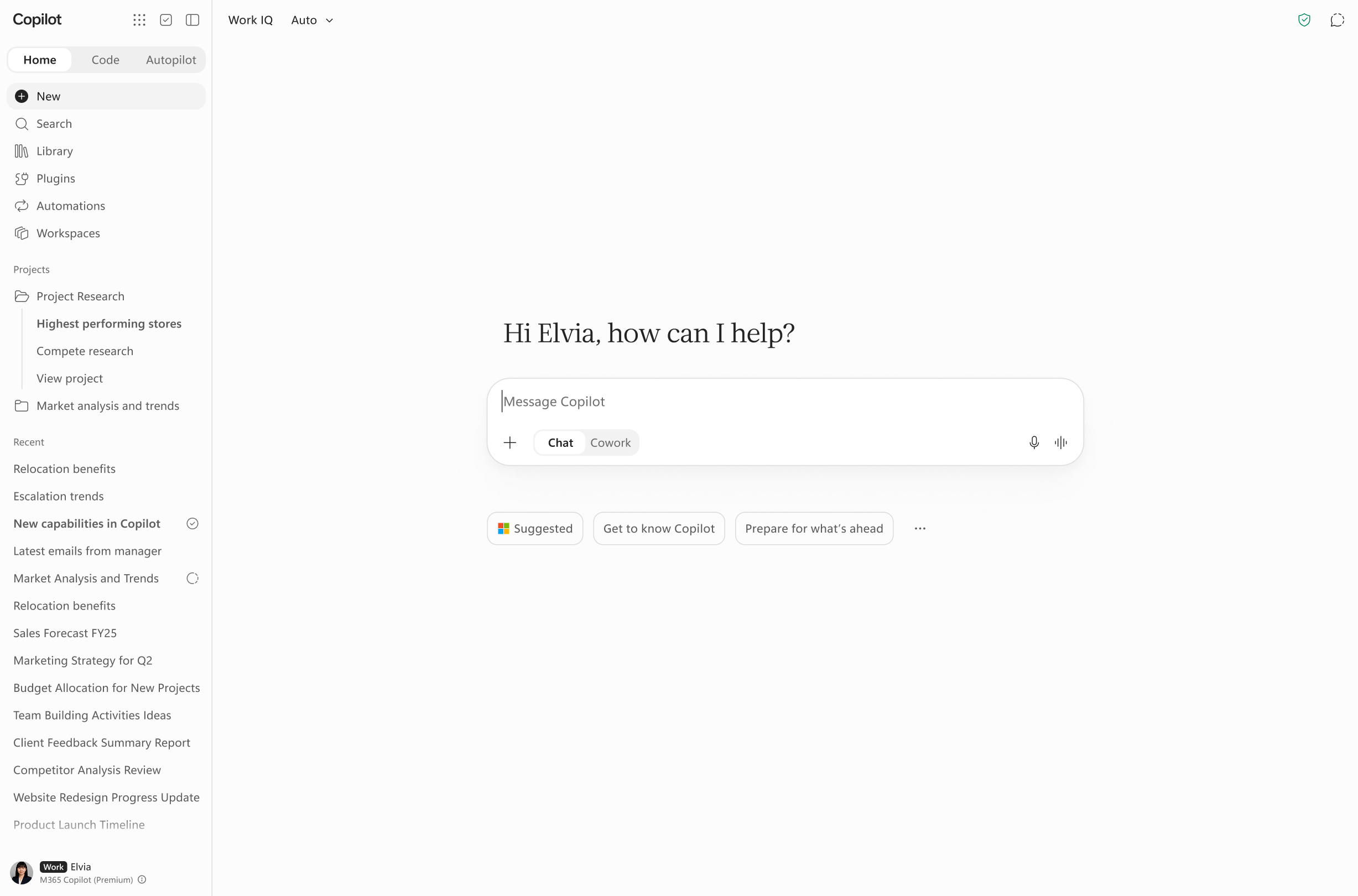
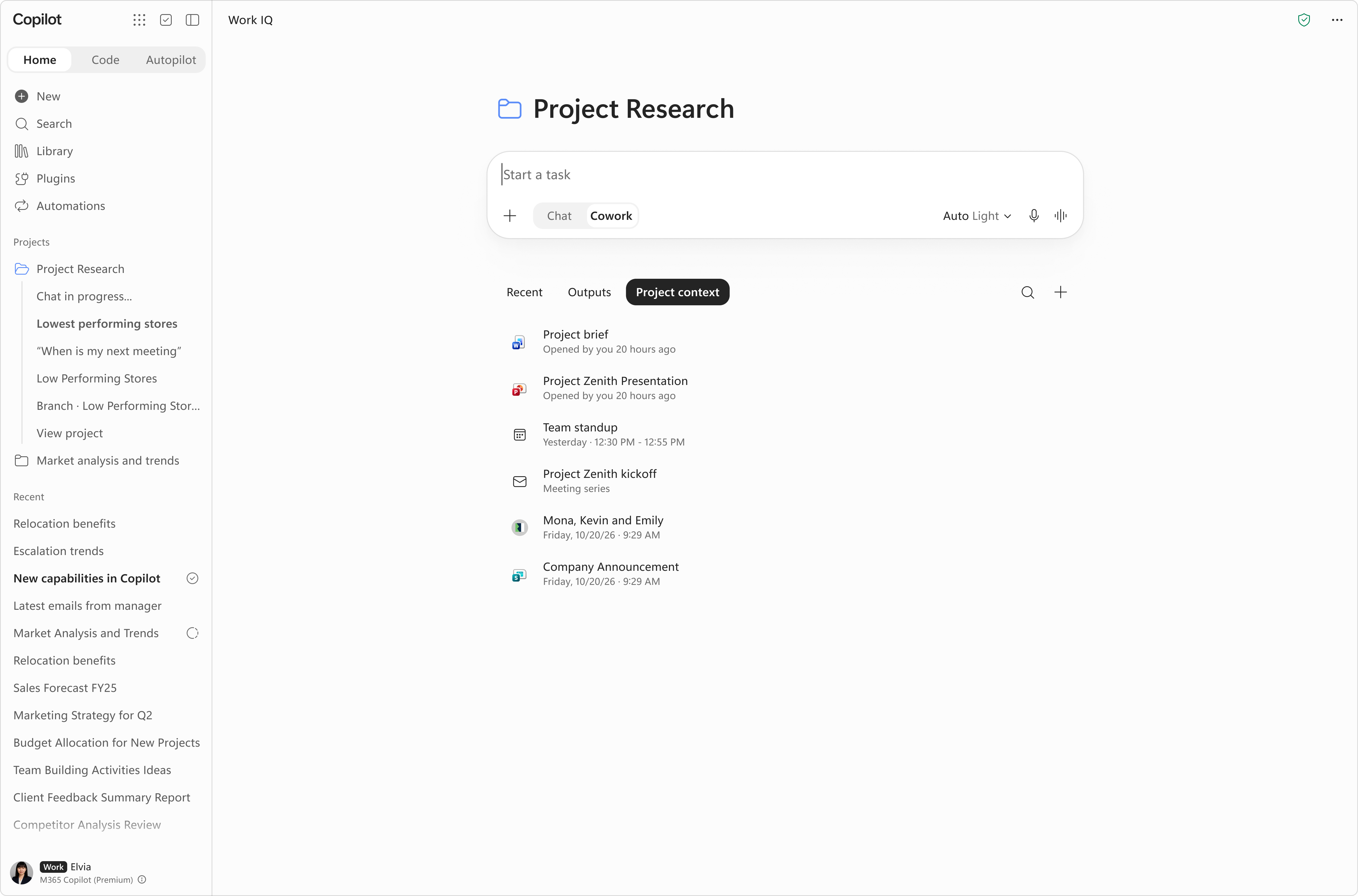
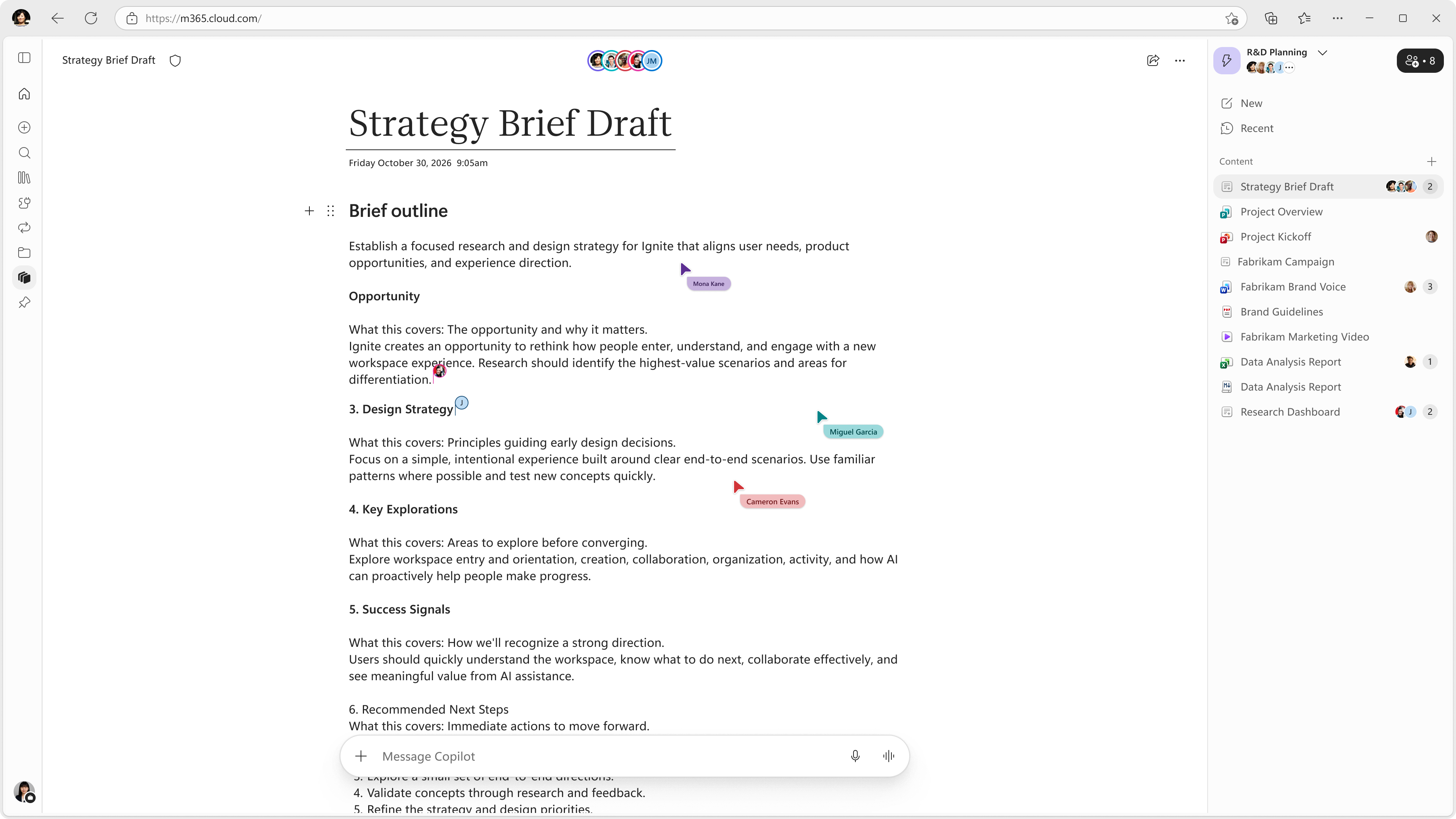
| (Updated) Microsoft Copilot app: Updates to Home and navigationCategory:Microsoft Copilot (Microsoft 365)Nummer:MC1535647Status:stayInformed | Updated November 19, 2026: Copilot Workspaces will rollout to standard release in December 2026, and deferred release by January 2027. Thank you for your patience. [What and why] In MC1479277 about updates to the Microsoft Copilot app, we introduced Home as the new starting point that brings Chat and Cowork together, so users can get chat assistance and delegate multi-step tasks in one view. This post builds on that announcement with worldwide rollout timing and the addition of Projects and Workspaces to the Home experience. [Rollout schedule]
[Impact on your organization] Who is affected
Platforms and services
What will happen Projects:
Workspaces:
[Action required and recommendations]
| ||||||||||||||||||
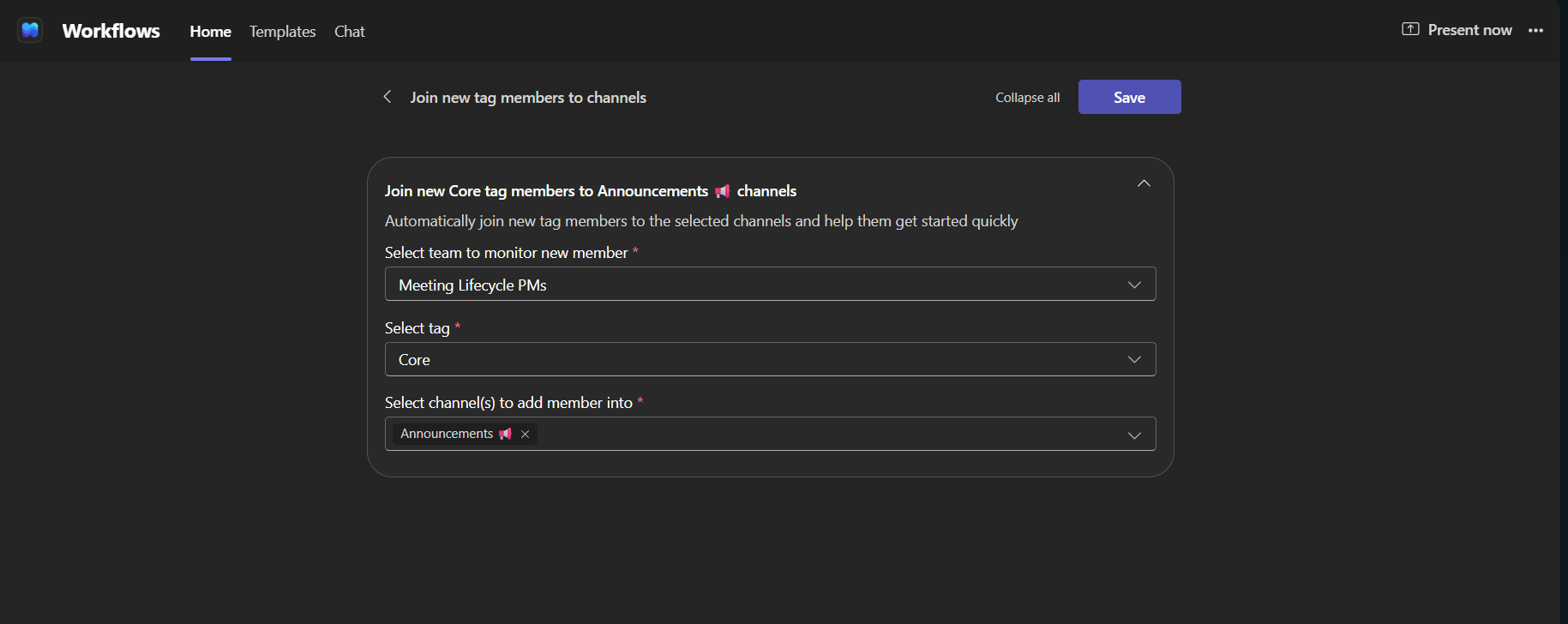
| (Updated) Microsoft Teams: Automatically add tag members to channels with WorkflowsCategory:Microsoft TeamsNummer:MC1540351Status:stayInformed | Updated November 18, 2026: We have clarified the supported channel types and updated the rollout timeline. Thank you for your patience. [What and why] We are introducing the Join member to channel when user is added to tag template in the Workflows app to automatically add users to selected channels when they are added to a team tag. Once configured, the workflow runs whenever a user is added to the tag, eliminating the need to add members to each channel manually. This is especially useful for location-based or project-based groups where tags correspond to specific sites, regions, or projects, helping new members access relevant channels promptly. This applies to channels that all team members can access by default: standard channels and shared channels that are shared with everyone on the team. [Rollout schedule]
[Impact on your organization] Who is affected
Platforms and services
What will happen
Joining new tag members to channels
[Action required and recommendations] No action is required. If your organization plans to use this template, we recommend reviewing your Power Automate and Workflows policies to confirm that it is permitted. Team owners can configure the workflow at any time if desired. [Compliance considerations] No compliance considerations identified. Review as appropriate for your organization. | ||||||||||||||||||
| (Updated) Microsoft Entra ID: Risk-based anti-bot verification (CAPTCHA) for SMS and voice multi-factor authenticationCategory:Microsoft EntraNummer:MC1551151Status:preventOrFixIssue | Updated November 19, 2026: We have updated the content. Thank you for your patience. [What and why] Microsoft Entra ID is adding safeguards to protect telephony-based multifactor authentication (MFA) from automated fraudulent activity. Some users who use SMS or voice for MFA may be asked to complete a risk-based anti-bot verification step (CAPTCHA) before Microsoft sends an SMS verification code or initiates a verification call. If your organization has restrictive network or firewall settings, make sure to follow the guidance covered in this documentation (Risk-based anti-bot verification (CAPTCHA) for telephony-based sign-in – Microsoft Entra ID | Microsoft Learn) to prepare for this change. This change is separate from the planned retirement of SMS and voice authentication and does not affect the retirement timeline. [Rollout schedule]
[Impact on your organization] Who is affected
Platforms and services
What will happen
[Action required and recommendations] We recommend that administrators take the following actions:
Learn more
[Compliance considerations] No compliance considerations identified. Review as appropriate for your organization. | ||||||||||||||||||
| Choose how your presenter view is laid out in PowerPoint Live in Microsoft TeamsCategory:Microsoft TeamsNummer:MC1559628Status:stayInformed | [What and Why:] Presenters using PowerPoint Live in Microsoft Teams can now choose a layout for their presenter view. They can pick the one that best fits how they like to present, whether that’s focusing on speaker notes, moving between slides quickly, looking ahead to what’s next, or keeping the view simple. [Rollout Schedule:] General Availability (Worldwide): We will begin rolling out on mid November 2026 and expect to complete by late November 2026. [Impact on Your Organization:] Presenters can switch between these layouts while they present: Notes and thumbnails (default): Speaker notes and slide thumbnails, the same view presenters have today. Thumbnails on the left: Slide thumbnails along the left side for quick navigation. Next slide preview: A preview of the next slide or animation, so presenters can see what’s coming. Slides only: A simpler view focused on the current slide. To change the layout, the presenter selects “Change layout” while presenting. Layouts only change what the presenter sees. Attendees’ view of the presentation isn’t affected. This feature is available in Teams on Windows, Mac and the web. This feature is on by default. [Action Required/Recommendations:] No admin action is required. You may want to let presenters in your organization know about the new layout options and update any internal training or documentation as needed. [Compliance considerations:] No compliance considerations identified, review as appropriate for your organization. | ||||||||||||||||||
| Copilot Workspaces: Updated workspace memoryCategory:Microsoft Copilot (Microsoft 365)Nummer:MC1559632Status:planForChange | [What and Why:] Copilot in Workspaces now retains useful workspace context to provide more relevant, consistent responses across sessions. Saved workspace memory can include evolving work context inside the workspace, recurring instructions, and working preferences to reduce repeated setup. [Rollout Schedule:] Public Preview (Worldwide): began in November 2026. General Availability (Worldwide): expected to begin in December 2026 and continue through early 2027. [Impact on Your Organization:] Users with eligible Copilot licensing will see improved continuity in Copilot responses within Workspaces due to retained workspace memory. This can improve productivity and consistency for recurring workspace tasks. [Action Required/Recommendations:] No admin action is required. We recommend informing users of updated memory behavior in Workspaces. [Compliance considerations:] No compliance considerations identified, review as appropriate for your organization. | ||||||||||||||||||
| Microsoft SharePoint: Agent Chat web part to bring Copilot agents into SharePoint pagesCategory:SharePoint Online Microsoft Copilot (Microsoft 365)Nummer:MC1559633Status:stayInformed | [What and Why:] We’re introducing the Agent Chat web part in SharePoint, allowing organizations to embed their existing Microsoft 365 Copilot agents directly into SharePoint pages. This helps organizations make agents easier to discover and use by bringing conversational AI into familiar intranet experiences, alongside relevant information, instructions, and resources. [Rollout Schedule:] Public Preview (Worldwide): We will begin rolling out in mid-November 2026 and expect to complete by late January 2027. General Availability (Worldwide): We will begin rolling out in mid-January 2027 and expect to complete by late March 2027. General Availability (GCC): We will begin rolling out in mid-January 2027 and expect to complete by late March 2027. General Availability (GCC High): We will begin rolling out in mid-January 2027 and expect to complete by late March 2027. General Availability (DoD): We will begin rolling out in mid-January 2027 and expect to complete by late March 2027. [Impact on Your Organization:] Who is affected: SharePoint page authors who want to embed Copilot agents. Users with a Microsoft 365 Copilot license and access to the configured agent. Platforms/Services: SharePoint Online, Microsoft 365 Copilot, Microsoft Copilot Studio. What will happen: SharePoint page authors can add the Agent Chat web part to pages using the standard page editing experience. Authors can select published agents already available to them in Microsoft 365 Copilot. Users can interact with agents directly from SharePoint pages and continue conversations in a full-screen chat experience. Organizations can place agents alongside relevant SharePoint content to help users discover and engage with them. Existing SharePoint page permissions and agent access permissions remain independent. Adding an agent to a page does not automatically grant users access to that agent. SharePoint page content is not automatically passed to the agent. [Action Required/Recommendations:] No admin action is required before rollout. The Agent Chat web part becomes available as part of the rollout.We recommend informing SharePoint page authors and support teams about this capability and reviewing the documentation: Use Agent Chat web part in SharePoint. [Compliance considerations:] No compliance impact is expected for this change. SharePoint does not store Copilot agent chat data or change how agent data is processed. | ||||||||||||||||||
| Microsoft Teams: Real-time queue metrics in the Queues app on MobileCategory:Microsoft TeamsNummer:MC1559637Status:stayInformed | [What and Why:] For calling representatives and supervisors, staying informed about call queue activity is important to managing incoming calls and maintaining timely customer service. However, when working away from their desks, they may not have visibility into current queue conditions, such as how many calls are waiting or how effectively calls are being handled. Without this information, it becomes harder to respond to changing call volumes and make informed decisions about queue participation. We’re introducing real-time call queue metrics in the Queues app on Microsoft Teams Mobile. Calling representatives and supervisor leads can now monitor key operational metrics directly from their mobile devices, giving them greater visibility into queue activity and performance while on the go. Users can quickly understand the state of their queues, monitor incoming call demand, and make informed decisions about their availability and queue participation without needing to switch to desktop. [Rollout Schedule:] General Availability (Worldwide): We will begin rolling out in early December 2026 and expect to complete by mid-December 2026. [Impact on Your Organization:] Once available, eligible calling representatives and supervisor leads will be able to view real-time call queue metrics directly from the Queues app on Mobile. Users will be able to:
The metrics available to users will depend on their role and existing permissions. Calling representatives will have visibility into the metrics available to them, while supervisor leads will have access to additional queue information based on their permissions. This feature extends the existing real-time queue metrics experience to Mobile and does not change how call queues are configured or managed. [Action Required/Recommendations:] No new admin action is required before rollout. We recommend that you:
[Compliance considerations:] No compliance considerations identified. Review as appropriate for your organization. | ||||||||||||||||||
| New capabilities in Copilot WorkspacesCategory:Microsoft Copilot (Microsoft 365)Nummer:MC1559638Status:planForChange | [What and Why:] Copilot Notebooks is evolving into Copilot Workspaces with new collaboration capabilities that help teams coordinate work context and progress more effectively. This update adds collaborative workspace features including an activity feed, suggested workspaces, team presence, group ownership, and adding a Project as a reference files. [Rollout Schedule:] Frontier Public: began in November 2026. General Availability (Worldwide): expected to begin in December 2026. [Impact on Your Organization:] Users with access to Copilot Workspaces in Frontier will see expanded collaboration capabilities and updated workspace behaviors. This can affect user workflows and adoption/training materials where Copilot Notebooks guidance is currently documented. [Action Required/Recommendations:] No immediate admin action is required. We recommend notifying impacted users about the Workspaces evolution and updating enablement documentation as needed. [Compliance considerations:] No compliance considerations identified, review as appropriate for your organization. | ||||||||||||||||||
| New Copilot experience in OneNoteCategory:Microsoft 365 apps Microsoft Copilot (Microsoft 365)Nummer:MC1559641Status:planForChange | [What and Why:] We are introducing a refreshed Copilot experience in OneNote with expanded edit and reasoning capabilities across notebook content, including ink, annotations, and embedded files. This update helps users find and synthesize information across notes, reorganize content, and create related documents directly from OneNote with Copilot. [Rollout Schedule:] Frontier Public: began in November 2026. General Availability (Worldwide): we expect rollout to begin in January 2027. [Impact on Your Organization:] Eligible users will have broader Copilot capabilities in OneNote on supported app versions on Windows and iPad, including richer cross-note reasoning and content creation workflows. OneNote on Mac, iPhone, Android, and web is not included in this rollout and will receive this update later. [Action Required/Recommendations:] No immediate admin action is required. We recommend informing impacted users and updating internal OneNote + Copilot guidance and training materials. [Compliance considerations:] No compliance considerations identified, review as appropriate for your organization. | ||||||||||||||||||
| Continuous interpreter visibility with pop out video in TeamsCategory:Microsoft TeamsNummer:MC1559642Status:stayInformed | [What and Why:] Users who work with sign language interpreters in Microsoft Teams meetings will be able to pop out their paired interpreters’ video into a separate window. The window can be resized and moved anywhere on the screen, including to another monitor. Interpreters stay in view while users multitask, share content, or change meeting layouts. This is designed for Deaf and hard-of-hearing (D/HH) users, for whom losing sight of an interpreter means losing access to the conversation. [Rollout Schedule:] Targeted Release (Worldwide): We will begin rolling out on early December 2026 and expect to complete by late December 2026. General Availability (Worldwide): We will begin rolling out on mid January 2027 and expect to complete by late January 2027. [Impact on Your Organization:] This applies to Teams desktop on Windows and Mac. After this rollout, users can:
The pop-out window only changes the user’s own view, and interpreters stay in the main meeting gallery for everyone else. The window isn’t visible to other participants when the user shares their screen. [Action Required/Recommendations:] You don’t need to do anything to prepare. Consider telling D/HH users and the interpreters who support them about this feature, and update your training and accessibility documentation as needed. To use the feature:
[Compliance considerations:] No compliance considerations identified. Review as appropriate for your organization. | ||||||||||||||||||
| Copilot Studio – Use the Decision model in the Classify node in WorkflowsCategory:Microsoft Copilot (Power Platform)Nummer:MC1560402Status:stayInformed | We are announcing the ability to choose Decision models in Classify nodes within a workflow in Copilot Studio. This feature will reach general availability on November 19, 2026.
How does this affect me? Makers can choose a decision model in the Classify node for more efficient, higher volume classification. You can define categories and descriptions as you do today, and Category-based branching, outputs, and the automatic Other category will continue to work. This change will not affect existing Classify nodes, which will retain their current model and behavior; makers can update these nodes to use the Decision model. What action do I need to take? This message is for awareness, and no action is required. | ||||||||||||||||||
| Microsoft Dataverse – Service Update 9.2.26113.00000 for EURCategory:Microsoft DataverseNummer:MC1560516Status:stayInformed | We have a minor service update planned for your Microsoft Dataverse environment hosted in EUR. This service update will occur within your region’s scheduled maintenance timeline, on the scheduled date listed for Microsoft Dataverse. How does this affect me? The version number for your Microsoft Dataverse environment will update to version 9.2.26113.00000 or higher. There is no expected degradation to service performance or availability, however, during this maintenance window users may see short, intermittent impact such as transient SQL errors or a redirect to the login screen. What action do I need to take? This message is for awareness and no action is required. | ||||||||||||||||||
| (Updated) Unified management of app and agent availability and installation in Teams, Outlook, and the Microsoft 365 appCategory:Microsoft Teams Microsoft 365 appsNummer:MC796790Status:planForChange | Updated November 18, 2026: Unified app and agent installation management is now generally available. For any tenant that unifies app/agent availability through Phase 1, Phase 2, or Phase 3, app and agent installations are also unified across the Microsoft 365 admin center (MAC) and Teams admin center (TAC) within 24–48 hours of completing availability unification. What it is Microsoft is rolling out a new feature to streamline how app and agent availability and installation is managed across Teams, Outlook, and Microsoft 365 Copilot. Until now, IT admins configured availability and installation settings separately in both the Microsoft 365 Admin Center (MAC) and the Teams Admin Center (TAC), which led to mismatches. With this update, you’ll be able to unify availability and installation policies for apps and agents across both portals, making app management more consistent and efficient. This message is associated with Microsoft 365 Roadmap ID 393931, 485712 and 503105. When this will happen:
A: Unify app availability across admin centers 1. Phase 1 – Default Tenant Unification of App/Agent Availability We will begin rolling out this feature at the end of September 2025. This initial phase targets tenants that have never modified their organization-wide defaults, app availability, or block/unblock in either the Microsoft 365 admin center or the Teams admin center. At the end of this phase, agent and app manageability will be unified across both Microsoft 365 admin center and Teams admin center ensuring agent and Microsoft 365 apps availability policies are in alignment for all future administrative changes. This message is associated with Microsoft 365 Roadmap ID 393931. 2.Phase 2 – Modified Tenants Unification of App/Agent Availability This phase targets tenants that have previously modified their organization-wide defaults, app availability, or block/unblock settings in either admin center. These tenants will be transitioned to a unified management experience across both Microsoft 365 and Teams admin centers.
For tenants with agent or app availability differences across both admin centers, a wizard in the Teams admin center will help identify affected agents and apps and guide through resolving discrepancies.
This phase has been fully rolled out to all tenants. Tenants can choose to align through the wizard experience available in Teams admin center. Note: In this phase, no changes will be applied to org-wide settings or app-level settings without administrator action. 3. Phase 3 – Automatic Unification (Future) Tenants that have not taken action to unify availability through the wizard experience released in Phase 1 and Phase 2 will have their availability automatically unified across MAC and TAC as part of this phase. We will inform customers of the timeline and additional details at least 60 days in advance before this phase begins. B: Unified app and agent installation management This capability unifies installation management across the Teams admin center and Microsoft 365 admin center. Administrators can manage supported app and agent installations from either portal, with changes synchronized across both admin centers. Who receives this capability? Tenants whose app and agent availability has been unified through any of the phases described in section A are eligible. Once rollout begins, this capability will be automatically enabled for tenants whose availability is already unified as part of Section A. Tenants that unify their availability later will receive this capability automatically once unified. Note: This capability is separate from availability unification described in section A . It does not automatically unify app or agent availability. When will it roll out? Rollout will begin at the end of September 2026 for eligible tenants. This date applies only to installation management (section B). Is administrator action required? No additional action is required to enable installation unification for eligible tenants. Existing installation assignments for supported apps and agents will be synchronized across both admin centers. Important: App installation is no longer managed through Teams app setup policies. Installations previously made through those policies are not unified as part of this change. |