| (Updated) Microsoft 365 Backup: Full workload backup for SharePoint, OneDrive, and ExchangeCategory:Microsoft 365 suiteNummer:MC1387526Status:planForChange | Updated November 18, 2026: We have updated the timeline. Thank you for your patience. [What and Why:] We are introducing Full Workload Backup for Microsoft 365 Backup, a new capability that allows admins to quickly protect an entire workload (SharePoint, OneDrive, or Exchange) with a single policy. This feature automatically includes all existing and newly created artifacts that are not already covered by custom policies, helping organizations improve data protection coverage, reduce administrative overhead, and ensure continuous backup for critical business data at scale. This enhancement supports enterprise-ready data protection and automation, enabling organizations to safeguard content more efficiently while maintaining control through existing policy configurations. This message is associated with Microsoft 365 Roadmap ID 464990. [Rollout Schedule:] - Public Preview (Worldwide): We will begin rolling out in early July 2026 and expect to complete by mid-July 2026.
- General Availability: We will begin rolling out in January 2027 (previously mid-September 2026) and expect to complete by end of February 2027 (previously mid-October 2026).
[Impact on Your Organization:] Who is affected: - Admins managing Microsoft 365 Backup policies
- Organizations currently using or planning to use Microsoft 365 Backup
Platforms/Services: - Microsoft 365 Backup
- SharePoint Online
- OneDrive
- Exchange Online
What will happen: - A new option to back up all artifacts within a selected workload will be available.
- Admins can enable Full Workload Backup per workload (SharePoint, OneDrive, Exchange).
- All eligible artifacts not covered by existing custom backup policies will be automatically protected.
- Newly created artifacts will be included in backup coverage automatically on subsequent runs.
- Existing custom backup policies will continue to take precedence and remain unchanged.
- Admins can upload a CSV file to exclude specific artifacts.
- The feature is available by default but requires admin configuration to enable.
[Action Required/Recommendations:] No immediate action is required before rollout. After rollout, we recommend that you: - Review your current Microsoft 365 Backup policies and coverage.
- Evaluate whether Full Workload Backup aligns with your data protection strategy.
- Inform backup administrators about this new capability.
- Update internal documentation if you manage backup procedures.
To enable the feature: - Go to the Microsoft 365 Backup dashboard in the Microsoft 365 admin center.
- Select the workload you want to protect and choose the option to back up all artifacts.
- (Optional) Upload a CSV file on the Exclude sites step to exclude specific sites from the scope of the policy.
- Review the coverage summary and confirm to create the Full Workload Backup policy.
Learn more: [Compliance considerations:] No compliance considerations identified, review as appropriate for your organization. |
| (Updated) Microsoft Purview: Data Loss Prevention and auto-labeling support for non-Microsoft applicationsCategory:Microsoft PurviewNummer:MC1449180Status:stayInformed | Updated November 18, 2026: We have updated the timeline. Thank you for your patience. [What and why] Microsoft Purview is expanding Data Loss Prevention (DLP) and Information Protection auto-labeling support for non-Microsoft applications. Administrators will be able to create and manage DLP and auto-labeling policies directly in Microsoft Purview for supported non-Microsoft applications. These capabilities use Microsoft Defender for Cloud Apps connectors to connect supported non-Microsoft applications to Microsoft Purview. This message is associated with Microsoft 365 Roadmap ID 568075. [Rollout schedule] - General Availability (Worldwide): Beginning in mid-March 2027 (previously late December 2026) and expected to complete by late March 2027 (previously late December 2026)
[Impact on your organization] Who is affected - Microsoft Purview administrators
- Organizations using supported non-Microsoft applications
Platforms and services - Microsoft Purview
- Microsoft Defender for Cloud Apps
What will happen After rollout, dedicated application locations will be available in Microsoft Purview for supported non-Microsoft applications. These capabilities use Microsoft Defender for Cloud Apps connectors to connect supported non-Microsoft applications to Microsoft Purview. Administrators will be able to: - Create and manage DLP policies for supported applications.
- Create and manage auto-labeling policies for supported applications.
Supported DLP application locations: - Google Workspace
- Box
- Dropbox
- Salesforce
- ServiceNow
- AWS
- Cisco Webex
Supported auto-labeling application locations: Available policy conditions and actions vary by application and may include content inspection, sensitivity labeling, notifications, quarantine actions, and access controls. Before you create Microsoft Purview policy for any of these non-Microsoft applications, turn off or delete any Microsoft Defender for Cloud Apps file policies for the same non-Microsoft locations. Running both at once can cause unexpected policy enforcement. [Action required and recommendations] No action is required before rollout. To use these capabilities: - Connect the applicable application through Microsoft Defender for Cloud Apps.
- Ensure your organization has the required Enterprise tier Microsoft Purview licensing.
- Review Microsoft Purview At Rest Protection pricing and billing implications before enabling these capabilities. Usage is billed through the Microsoft Purview At Rest Protection pay-as-you-go meter. The unit of measure for at-rest files in non-Microsoft applications is calculated at a rate of 1,000 files = 1 data asset.
Learn more [Compliance considerations] | Question | Answer | | Does this change alter how customer data is processed, stored, or accessed? | Yes. Microsoft Purview will extend Data Loss Prevention (DLP) and auto-labeling capabilities to supported non-Microsoft applications, enabling Microsoft Purview to scan, evaluate, and apply policy actions to data stored in those connected services. | | Does this change modify Purview-related compliance capabilities? | Yes. This update introduces new DLP and auto-labeling policy locations for supported non-Microsoft applications, expanding the scope of Microsoft Purview compliance controls. | | Does this change add an integration with third-party software or services? | Yes. The feature supports integration with non-Microsoft applications, including Google Workspace, Box, Dropbox, Salesforce, ServiceNow, AWS, and Cisco Webex through Microsoft Defender for Cloud Apps connectors. | | Is there an administrative control associated with this feature? | Yes. Administrators can configure, manage, and enforce DLP and auto-labeling policies for supported non-Microsoft applications in Microsoft Purview. |
|
| (Updated) Microsoft Copilot: GPT 6.1 Sol and Claude Sonnet 5.5 beginning to roll out todayCategory:Microsoft 365 apps
Microsoft Copilot (Microsoft 365)Nummer:MC1483844Status:planForChange | Updated November 17, 2026: GPT-6.1 Sol is rolling out worldwide on Microsoft Azure for Copilot Cowork customers who have not enabled OpenAI as a subprocessor. GPT-6.1 Sol will be generally available and replace GPT-5.5 for these customers, with GPT-5.5 being retired and no longer available for Cowork in the Frontier program. No admin action is required. [What and Why:] To give users more choice and flexibility when working with AI in Microsoft Copilot, we’re expanding the set of AI models available in Microsoft Copilot. Starting today, GPT-6.1 Sol and Claude Sonnet 5.5 begin rolling out with usage-based billing in Cowork and Microsoft Copilot Studio. GPT-6.1 Sol and Claude Sonnet 5.5 will also begin rolling out in phases across Word, Excel, PowerPoint, and Chat in the coming week as part of the Microsoft 365 Copilot user subscription license (USL). Limits apply to these models, but they are designed to support broad day-to-day AI usage across organizations and are implemented in such a way that the vast majority of users are not expected to reach them. Users approaching a limit will receive in-product notifications and can continue their work by switching to Auto mode or selecting another available model. [Rollout Schedule:] - General Availability:
- Cowork and Copilot Studio: Rollout begins today, September 30, 2026.
- Word, Excel, PowerPoint and Chat: Phased rollout begins in the coming week.
[Impact on Your Organization: Who is affected: - Cowork and Copilot Studio: Users assigned a user subscription license (USL) with usage-based billing (UBB) enabled.
- Word, Excel, PowerPoint, and Chat: Users assigned a user subscription license (USL).
- Access to Claude Sonnet 5.5 additionally requires the Anthropic subprocessor to be enabled in your organization.
- Access to GPT-6.1 Sol in select surfaces requires the OpenAI subprocessor to be enabled. Learn more: OpenAI as a subprocessor in Microsoft Online Services | Microsoft Learn.
- As a reminder, this setting controls only whether OpenAI models operated by OpenAI (provided by OpenAI as a subprocessor) can be used. OpenAI models operated by Microsoft (Azure OpenAI) aren’t affected and remain available in Copilot regardless of this setting.
Platforms/Services: - (USL) Microsoft 365 Copilot Chat
- (USL) Microsoft Word
- (USL) Microsoft Excel
- (USL) Microsoft PowerPoint
- (UBB) Copilot Cowork
- (UBB) Microsoft Copilot Studio
What will happen: - Users will be able to select GPT-6.1 Sol and Claude Sonnet 5.5 using the model selector from supported Microsoft Copilot experiences.
- The feature is enabled by default for eligible licensed users who meet the applicable configuration requirements.
[Action Required / Recommendations:] No action is required for organizations that want users to access these models. Recommended actions: - Review whether the Anthropic subprocessor is enabled if you plan to make Claude Sonnet 5.5 available to users.
- Review whether the OpenAI subprocessor is enabled if you plan to make GPT-6.1 Sol broadly available to users. If disabled, GPT-6.1 Sol may not be available from all supported Copilot surfaces.
- Review your organization’s AI usage guidance and communicate model availability to end users.
- Inform helpdesk and support teams that users may encounter usage-limit notifications and can continue working using Auto mode or another available model.
- Review the announcement blog for additional details: Available today: OpenAI’s GPT-6.1 Sol and Claude Sonnet 5.5 in Microsoft Copilot | Microsoft Community Hub.
- Update internal user documentation and training materials, as appropriate.
[Compliance Considerations:] | Consideration | Explanation | | Does the change introduce or significantly modify AI/ML or agent capabilities that interact with or provide access to customer data? | GPT-6.1 Sol and Claude Sonnet 5.5 are additional AI models that users can select within Microsoft 365 Copilot experiences to generate responses based on content and context available to the user through Copilot. | | Does the change provide end users any new way of interacting with generative AI? | Users gain access to new model choices, GPT-6.1 Sol and Claude Sonnet 5.5, in supported Microsoft 365 Copilot experiences. | | Does the change include an admin control and can it be controlled through Entra ID group membership? | Access to Claude Sonnet 5.5 depends on administrative configuration of the Anthropic subprocessor. |
|
| (Updated) Microsoft 365 Copilot: new guided Copilot onboarding experienceCategory:Microsoft 365 suite
Microsoft Viva
Microsoft Copilot (Microsoft 365)Nummer:MC1486291Status:stayInformed | Updated November 18, 2026: We have updated this post as a reminder. Thank you for your patience. [What and why] To help organizations increase Microsoft 365 Copilot adoption and build user confidence, we are introducing a new admin-led Copilot onboarding experience for Frontier participants. This guided, in-product experience helps users learn how to use Copilot through role-based activities within the Copilot app. The experience is tailored to the user’s familiarity with Copilot and their license assignment, helping users build confidence through relevant, guided examples while giving organizations control over how onboarding is introduced. This supports Personal and Team Productivity by helping users learn how to use Copilot effectively in their daily work. [Rollout schedule] - Frontier (Worldwide): Rollout begins in late October 2026 and is expected to complete by late November 2026 (previously early November).
[Impact on your organization] Who is affected - Microsoft 365 admins participating in the Frontier program who want to provide guided Copilot onboarding to their users.
- Users for whom the onboarding experience has been enabled and shared.
Platforms and services - Microsoft 365 admin center
- Microsoft 365 Copilot
- Learning Agent
- Viva Learning (reporting)
What will happen - This is a new, optional onboarding experience that does not change, replace, or retire existing Microsoft 365 Copilot functionality.
- The experience is disabled by default and must be enabled by an admin with the Global Administrator, Knowledge Administrator, or AI Administrator role. Admins can enable the experience in the Microsoft 365 admin center under Copilot settings > Microsoft 365 Copilot onboarding and include their organization’s AI policy as part of the onboarding experience.
- After enabling onboarding, admins can share the experience with users by using the provided email template or onboarding deep link. When users open the onboarding deep link, the Copilot app launches in the preferred destination set by the admin that shared the experience, such as the Copilot app for Windows, Copilot on the web, or Copilot in Teams.
- Learning Agent automatically starts the onboarding experience, which takes approximately 5 to 10 minutes to complete, and is personalized based on the user’s role, work context, familiarity with Copilot, and license assignment.
- The Starter journey collects information from the user to personalize the onboarding experience.
- The Premium journey uses available work and role context to provide relevant examples of how the user can apply Copilot to their work. This journey is only available to users with a Copilot Premium license.
- If desired, admins with the Global Administrator or Knowledge Administrator role can access and use Viva Learning reporting to review onboarding completion.
Starter journey Copilot onboarding experience 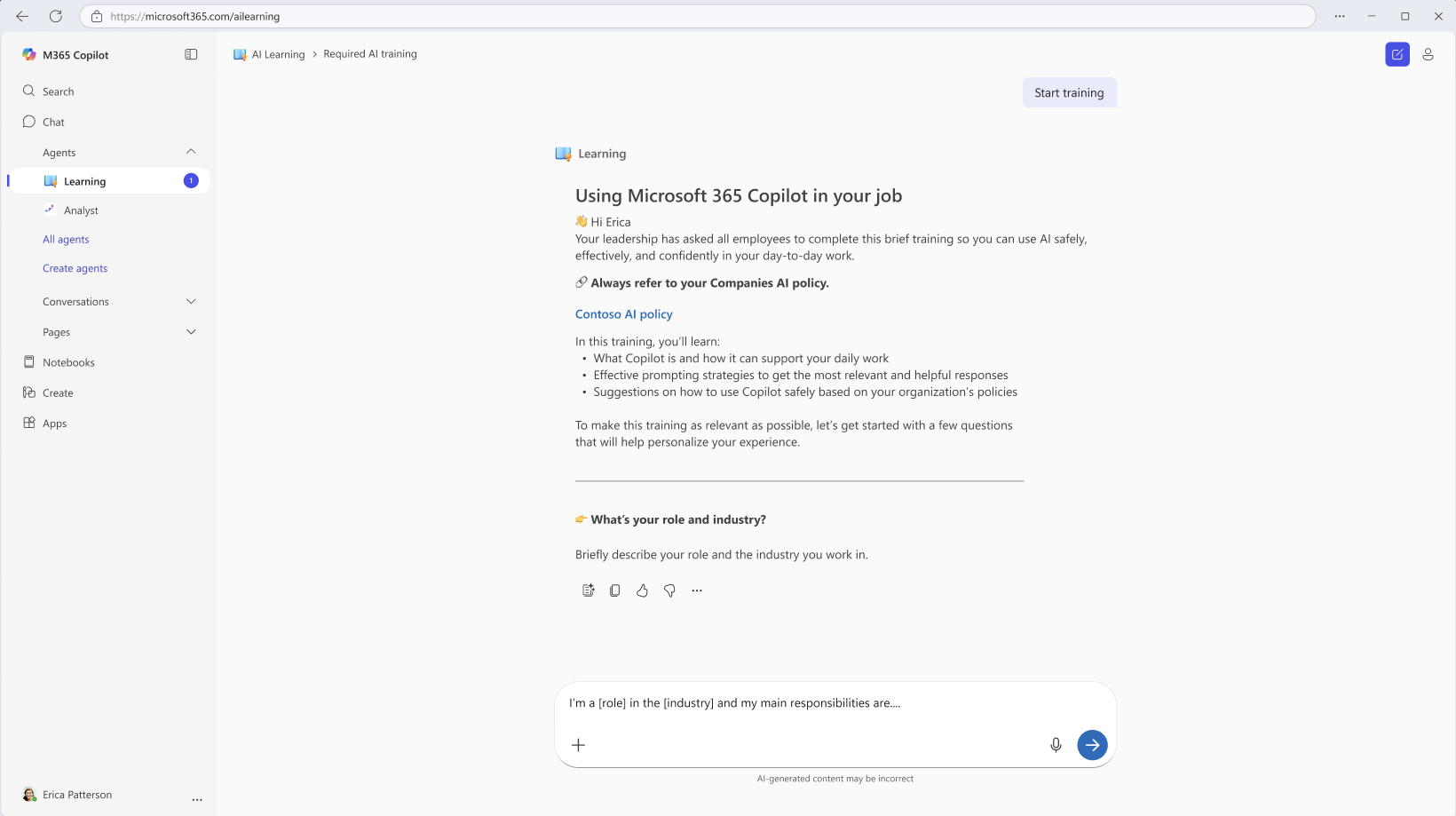
Premium journey Copilot onboarding experience 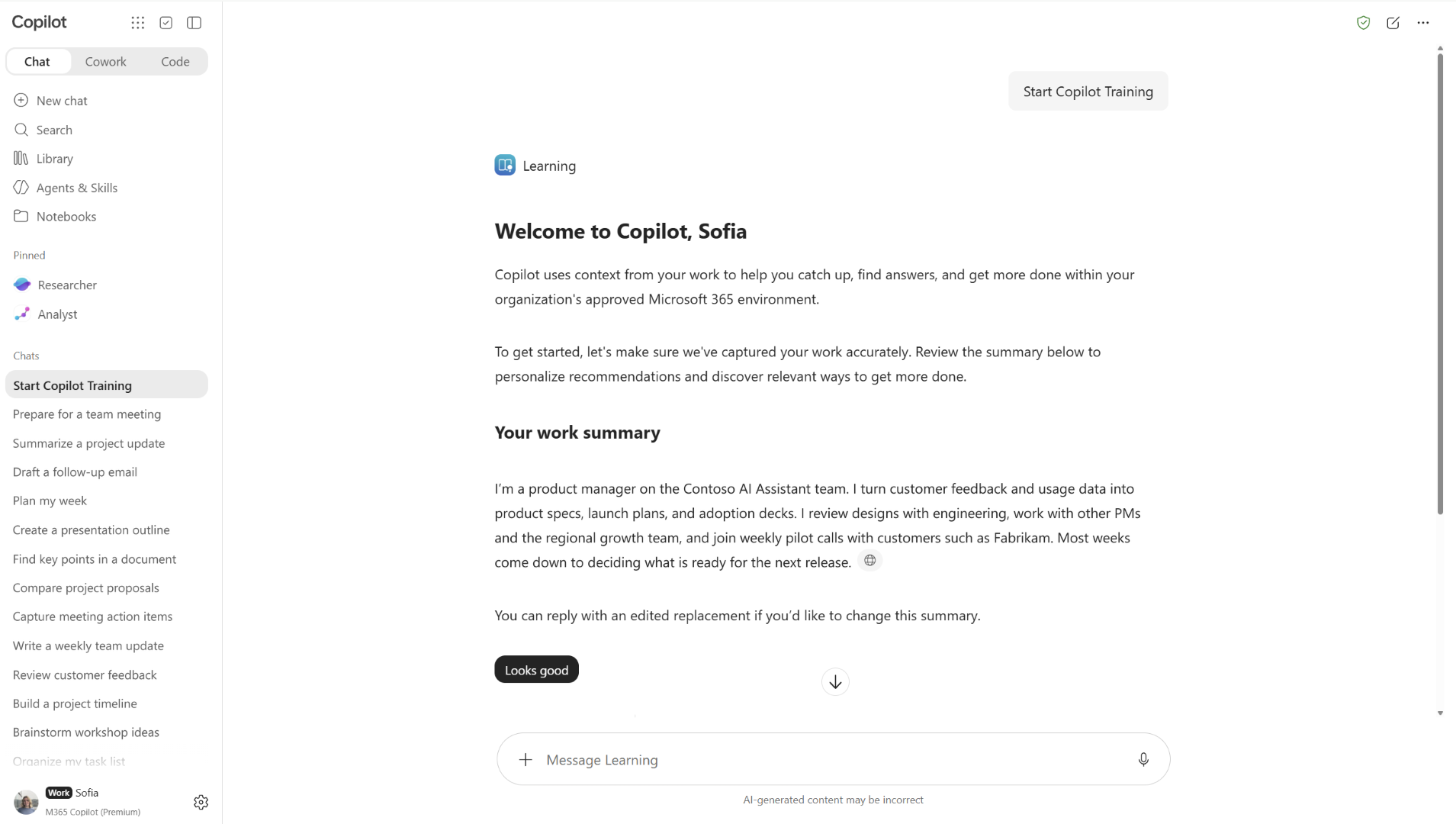
Microsoft 365 admin center Copilot onboarding flyout menu 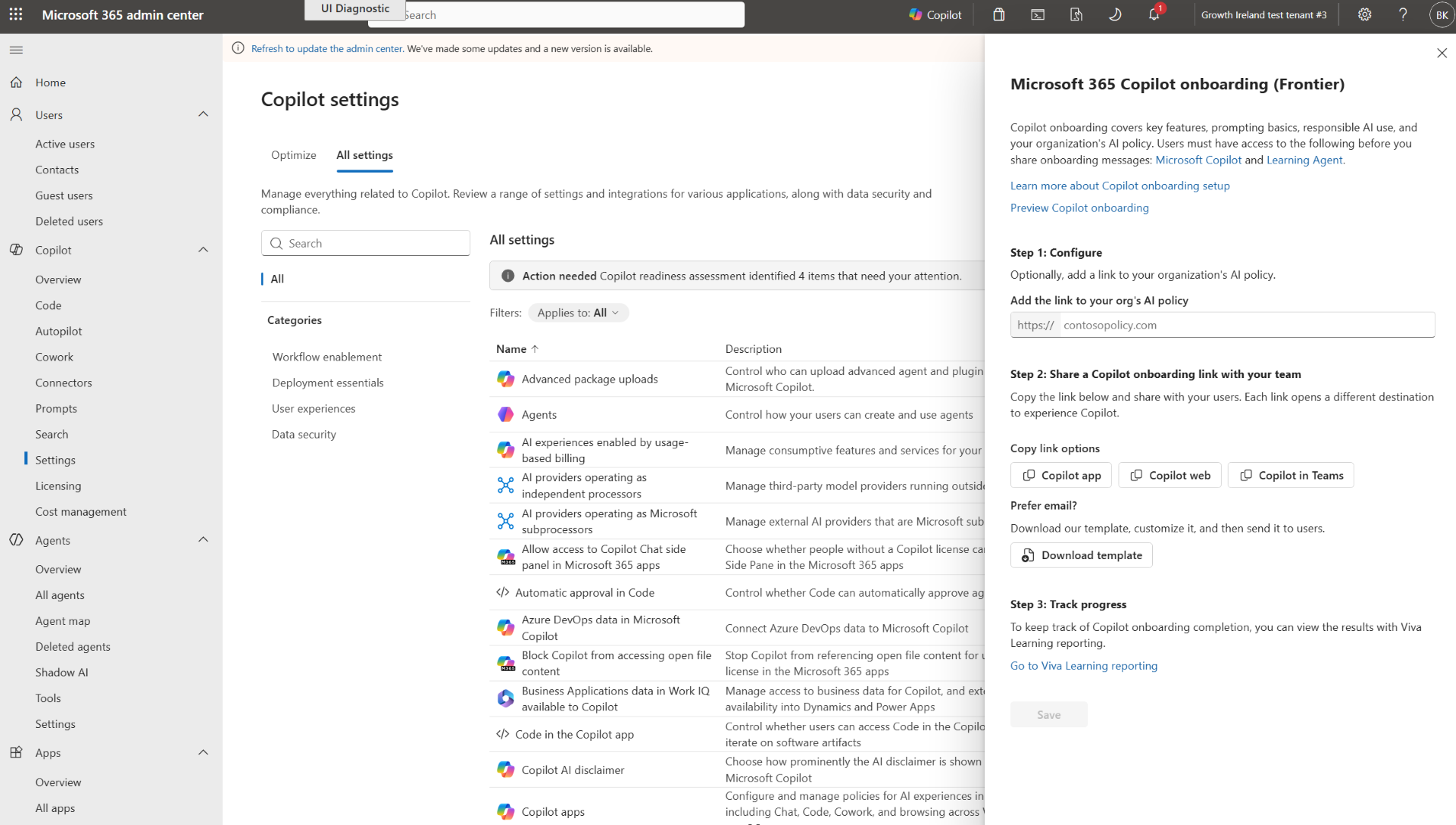
[Action required and recommendations] No action is required unless you want to enable Microsoft 365 Copilot onboarding for your organization during the Frontier rollout. If you plan to use the experience: - Ensure Learning Agent and Microsoft 365 Copilot are enabled for targeted users who will participate in the onboarding experience.
- In the Microsoft 365 admin center, go to Copilot settings > Microsoft 365 Copilot onboarding and enable the experience.
- Review your organization’s AI policy and determine whether you want to include it in the onboarding experience.
- Share the onboarding experience with users by using the provided email template or onboarding deep link. We recommend that you share the onboarding experience with new or inexperienced users to help them learn how to use Copilot in their role.
- If you want to view reporting and have the Global Administrator or Knowledge Administrator role, use Viva Learning reporting to review onboarding completion.
[Learn more] We will update this post with new documentation. [Compliance considerations] No compliance considerations identified. Review as appropriate for your organization. |
| Microsoft Dataverse – Bulk generate prompt column values for existing records (backfill)Category:Microsoft DataverseNummer:MC1488488Status:stayInformed | We are introducing bulk generation of prompt column values for existing Dataverse records. Now, you can have AI-generated values across existing data without requiring record updates to trigger execution. This feature will reach general availability on November 16, 2026.
How does this affect me?
When selected, this capability will run asynchronously as a background job and will consume Copilot or AIB credits. Users can monitor and manage the job and view its credit usage in System Jobs.
Two environment settings in will control this feature:- Allow bulk processing of existing records will be on by default. It must be enabled to run a bulk job.
- Require review before processing imported prompt columns will be on by default. When enabled, an imported job will be paused for review in System Jobs and can be manually started after review. Turn this setting off if jobs should start automatically after import.
What action do I need to take?
Please ensure sufficient Copilot or AIB credit capacity is available in your environment. Review the Require review before processing imported prompt columns setting to determine whether imported jobs should require review before starting, and make sure to start them promptly after import, if you choose to keep the setting enabled.
For more information about this capability, please visit Prompt columns. For information about licensing and credits, please visit licensing and copilot credits or licensing and AIB credits. |
| (Updated) Copilot Code is rolling out in FrontierCategory:Microsoft Copilot (Microsoft 365)Nummer:MC1519871Status:stayInformed | Update November 17, 2026: Copilot Code is expanding to mobile and Mac, and local Sandbox is rolling out for enablement. We’ve also added guidance for admins managing local Sandbox policies and local execution. What’s new - Mobile: Copilot Code is expanding to the Microsoft Copilot mobile app on iOS and Android for Frontier customers. Users can start and continue cloud sessions, follow progress, respond to approval requests, and review results from their mobile device. Local sessions aren’t available on mobile.
- Mac: Copilot Code is expanding to the Microsoft Copilot desktop app on Mac. Admins should validate the supported app and update channel and confirm tenant enablement before deployment.
- Local Sandbox on Windows: Local Sandbox is now available for enablement. It limits Copilot Code and the processes it starts to permitted file and network access. For organizations that haven’t configured a Sandbox policy, Sandbox is initially off by default, and users can change the setting. Beginning in late November 2026, Sandbox will be on by default, and users won’t be able to turn it off. An explicit admin policy takes precedence over these defaults.
- GitHub Copilot CLI: Microsoft 365 Copilot licensed users in the Frontier program can sign in to GitHub Copilot CLI with their Microsoft 365 account, without requiring a GitHub account, and use Copilot Credits to access supported models. The experience is off by default and must be enabled by an admin in Copilot settings in the Microsoft 365 admin center. Usage is billed in Copilot Credits and requires usage-based billing and a spending policy that includes Code.
Resources [What and Why:] Copilot Code is an AI-powered coding experience in Microsoft Copilot that helps people turn ideas into trackers, dashboards, apps, and other solutions using natural language. Work IQ grounds what they build in emails, meetings, documents, chats, and connected data. People closest to a problem can build the solution they need while your organization maintains control. Published apps run on Copilot Managed Runtime and inherit your organization’s governance, security, and management controls. 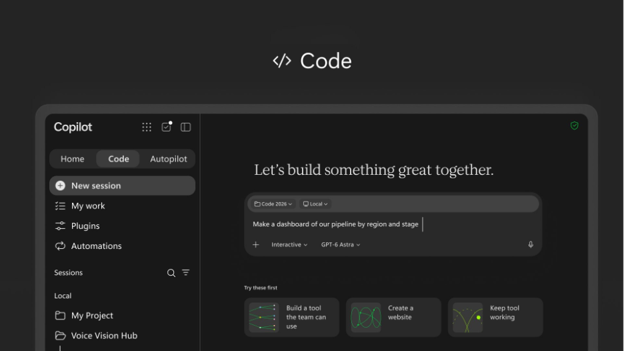
[Rollout Schedule:] - Copilot Code: Begins with the Frontier program in late October 2026.
[Impact on Your Organization:] Who is affected: - Users in the Frontier program who have a Microsoft 365 Copilot license and are enabled for usage-based billing.
- Microsoft 365 admins who manage the Copilot app, spending policies, and usage-based billing.
Platforms/Services: - Microsoft Copilot app on Windows
- Microsoft Copilot on the web
- Microsoft 365 admin center
- Copilot Managed Runtime
- Work IQ
- GitHub, when enabled
What users can do with Copilot Code - Users access Code from the Copilot app navigation pane and describe what they want to build. Copilot can ask clarifying questions and use their work context to build the solution.
- Users can refine what they build through conversation or direct edits. On PC, when local coding is enabled, users can also work with local files and tools or use the terminal.
- Users can publish projects to Copilot Managed Runtime, a Microsoft-managed cloud environment, and share them with others in their organization. Access to underlying data continues to depend on the user’s permissions.
- Users can connect Code to GitHub when the connection is enabled by an admin.
How admin settings control access Copilot Code uses usage-based billing. To use Copilot Code, users need: - A Microsoft 365 Copilot license.
- A spending policy.
By default: - Cloud coding sessions are enabled on web and PC for eligible users with a Copilot spending policy.
- Local coding sessions are disabled by default. Admins can allow local coding on PC by setting Code execution location to Cloud and local in the Microsoft 365 admin center.
- Users covered by a spending policy where the setting “Allow new Agents and services as they become available” is enabled automatically receive access to Code through that spending policy.
For more information about Allow new agents and services setting, see MC1470425. The following settings determine what users see and can use: | Code spending policy | Allow users to discover and use AI experiences enabled by usage-based billing | Code execution location | What users see | | Assigned | No effect | Cloud (default) | Code with cloud coding sessions | | Assigned | No effect | Cloud and local | Code with cloud coding sessions and local coding sessions on PC | | Not assigned | On | No effect | Code entry point and welcome page; Code cannot be used |
[Action Required/Recommendations:] Action is required if you want eligible users to use Copilot Code. - Review the Copilot Code blog.
- Deploy the unified Microsoft Copilot app.
- For Windows devices participating in Frontier, set the Microsoft Copilot target channel to Beta.
- Review your spending policies and confirm that Code is included for the users who should have access. If automatic access to new usage-based services is enabled, review which users will automatically receive Code through their existing spending policy.
- Enable Copilot Credit consumption and configure the appropriate spending policies in the Microsoft 365 admin center under Copilot > Cost management.
- Decide whether users should have cloud-only coding or cloud and local coding. Local coding is off by default.
- Prepare your help desk for the new Code experience, including the in-product experience and your organization’s access-request process.
- Review information about Copilot Managed Runtime.
- Review the Frontier program requirements and guidance.
Resources [Compliance considerations:] | Stores new customer data | Users can create projects/apps and publish them to Copilot Managed Runtime. | | Changes how existing customer data is accessed or processed | Code can use Work IQ, including emails, meetings, documents, chats, and connected data, to ground what users build. | | Introduces new user interaction with organizational data | Apps built with Code can use organizational context, and published apps may be shared with others in the organization subject to underlying data permissions. | | Introduces external/third-party integration | GitHub can optionally be connected when enabled by an admin. | | Introduces admin-controlled usage-based billing | Code uses usage-based billing and requires the applicable spending policy for users to use the experience. | | Introduces local execution/data interaction | Admins can optionally enable local coding sessions on PC, allowing users to work with local files and tools. |
|
| (Updated) Microsoft Teams: External presenter support for event group chatCategory:Microsoft TeamsNummer:MC1528011Status:stayInformed | Updated November 18, 2026: We have updated the timeline. Thank you for your patience. [What and why] We are adding support for external presenters in event group chat, the private chat used by organizers, co-organizers, and presenters for coordination during an event or structured meeting. This change enables presenters who are outside the tenant hosting the meeting or event to participate in the event group chat. [Rollout schedule] - General Availability (Worldwide): Rollout will begin in late March 2027 (previously early December 2026) and is expected to complete by mid-April 2027 (previously early January).
[Impact on your organization] Who is affected - Organizers, co-organizers, and presenters using event group chat in meetings or events, including external presenters.
Platforms and services - Microsoft Teams
- Event group chat
- Meetings and events with the Enable Green room Teams meeting option enabled
What will happen - External presenters will be able to join the event group chat used for coordination during a meeting or event.
- The meeting or event must have the Enable Green room Teams meeting option enabled to use event group chat.
- External user collaboration must be enabled for external presenters to use this functionality.
[Action required and recommendations] If your organization wants external presenters to use event group chat, ensure external user collaboration is enabled in Teams admin center > External collaboration. [Compliance considerations] Does the change store new customer data? - No. Expected changes on the client will only correct the
tenantId to the external federated presenter’s own tenant.
Does the change alter how existing customer data is processed, stored, or accessed (e.g., documents, emails, chats, etc.)? - Yes. External federated presenters can now read and post in the event group chat. That includes messages written before they joined, if the thread shows history. The presenter’s stored
tenantId also changes from the organizer’s tenant to the presenter’s own tenant.
Does the change provide a new way of communicating between users, tenants, or subscriptions? - Yes. We are adding a new cross-tenant chat path between the organizer’s tenant and external presenters. Both tenants must allow external access.
Does the change modify how users can access, export, delete, or correct their personal data within Microsoft 365 services (GDPR Data Subject Rights)? - No. External presenters’ messages fall under existing federated-chat handling.
|
| Microsoft Teams: End of support for iOS 17 and iPadOS 17Category:Microsoft TeamsNummer:MC1556088Status:planForChange | [What and Why:] Microsoft Teams is ending support for upcoming builds on iOS 17 and iPadOS 17. As this change rolls out, new Teams releases will require iOS 18 or later on iPhone and iPadOS 18 or later on iPad. [Rollout Schedule:] General Availability (Worldwide): We will begin rolling out in mid-December 2026 and expect to complete by early January 2027. [Impact on Your Organization:] Users whose devices remain on iOS 17 or iPadOS 17 will not be able to install newer Teams releases that require a newer operating system. Teams versions already installed on these devices will continue functioning without official support. This change does not introduce a block on opening or signing in to those existing installations. [Action Required/Recommendations:] - Identify devices running iOS 17 or iPadOS 17 and notify affected users.
- Advise users to upgrade to a supported operating system, then update Teams through the Apple App Store, to continue receiving supported Teams releases.
- Review any mobile device management (MDM) or app deployment policies that pin or require specific iOS/iPadOS versions, and update them to allow iOS 18/iPadOS 18 so affected devices are not blocked from upgrading.
- Update internal support documentation and helpdesk guidance.
Learn more: Hardware requirements for Microsoft Teams. [Compliance considerations:] No compliance considerations identified. Review as appropriate for your organization. |
| Microsoft OneDrive for Windows and Mac: node_modules folders will be excluded from sync by defaultCategory:Microsoft OneDriveNummer:MC1558030Status:planForChange | [What and why] We are updating the OneDrive sync app for Windows and Mac to exclude new folders named node_modules from syncing by default, beginning December 14, 2026. This change extends OneDrive’s existing default exclusion list, which includes .db-wal files, as mentioned in MC1457838 on October 5, 2026. JavaScript and Node.js projects can generate tens of thousands of small dependency files in node_modules folders. This change is intended to improve sync performance and reduce unnecessary storage and bandwidth usage. Developers can rebuild these folders using their package manager. [Rollout schedule] - General Availability (Worldwide): Rollout will begin on December 14, 2026, and is expected to complete by mid-January 2027.
[Impact on your organization] Who is affected - Users with work or school accounts who create
node_modules folders in OneDrive-synced locations, including Desktop and Documents folders managed through Known Folder Move.
Platforms and services - OneDrive for Windows
- OneDrive for Mac
What will happen - New
node_modules folders: OneDrive will exclude newly created folders named node_modules from syncing by default. These folders will remain on the device and will not upload to OneDrive. - Folder name matching: The exclusion applies to folders named exactly
node_modules, regardless of capitalization. - Existing
node_modules folders: Folders that are already syncing will continue to sync. OneDrive will not remove existing content from the cloud or devices. - User experience: Users will not receive prompts. Excluded folders will continue to function locally but will not be available through OneDrive on the web or other devices.
- Administrative controls: Administrators can use existing OneDrive sync policies to turn off the default exclusion list if their organization needs these folders to sync.
[Action required and recommendations] No action is required if your organization wants to use the new default behavior. If your organization needs node_modules folders to continue syncing, configure the appropriate OneDrive sync policies before December 14, 2026. We recommend that you update your helpdesk and developer guidance to reflect the new default behavior and notify developers who maintain code projects in OneDrive-synced locations. [Learn more] [Compliance considerations] No compliance considerations identified. Review as appropriate for your organization. |
| Microsoft 365 Copilot: Copilot Managed Runtime expands app building at general availabilityCategory:Microsoft 365 suite
Microsoft Copilot (Microsoft 365)Nummer:MC1558033Status:stayInformed | [What and why] Microsoft Copilot Managed Runtime is an IT-governed platform for running code within the Microsoft 365 tenant boundary. It supports app creation in Copilot Cowork, Copilot Studio, Copilot Code, and the Copilot Managed Runtime CLI. Apps can use organizational data through connectors permitted by your organization’s policies, and admins can manage apps through the Microsoft 365 admin center. Microsoft Copilot Managed Runtime, introduced in public preview in September 2026 (MC1469329), will become generally available. App building in Copilot Cowork will no longer be limited to the Microsoft Copilot Frontier Program. [Rollout schedule] - Public Preview: Rollout began in September 2026 and is expected to be complete by mid-November 2026.
- General Availability (Worldwide): Rollout will begin in mid-November 2026 and is expected to be complete by mid-December 2026.
[Impact on your organization] Who is affected - Licensed users who build or run apps hosted on Microsoft Copilot Managed Runtime and admins who manage those apps, environments, governance policies, and Copilot Credits
Platforms and services - Microsoft 365 admin center
- Microsoft Copilot Cowork
- Microsoft Copilot Studio
- Microsoft Copilot Code (Frontier)
- Copilot Managed Runtime CLI
- Power Platform environments
What will happen - Copilot Managed Runtime will no longer be a preview feature.
- Licensed users can build apps in Copilot Cowork without participating in the Microsoft Copilot Frontier Program.
- Makers will continue to build in personal environments that are created when first needed and reused afterward.
- Environment routing is enabled for Copilot Managed Runtime. If your tenant has no routing rules, users are routed to personal environments in the default environment group. Existing routing rules aren’t changed.
- Personal environments inherit the default environment group’s connector, content security, and sharing policies. Makers can’t override these policies. Admins can manage them under Apps > Settings in the Microsoft 365 admin center.
- Sharing an app provides access to the app but doesn’t provide access to its underlying data.
- Draft and published apps appear under Apps > All apps, where admins can review app information and perform lifecycle operations such as blocking and deleting apps.
[Action required and recommendations] Before general availability: - Set up Copilot Credits: In the Microsoft 365 admin center, go to Copilot > Cost management and create a spending policy that covers all users and includes Copilot Managed Runtime. Note: A small per-user monthly limit, such as 100 Copilot Credits (US$1), covers typical use. Add policies with higher limits for groups that use apps more frequently. Users with a Power Apps Premium license can run apps without a spending policy.
- Enable makers: For Copilot Cowork and Copilot Code, include makers in an applicable spending policy. For Copilot Studio, allocate credits to the environments where makers build.
- Review governance: Review policies for personal environments, connectors, content security, and app sharing, as well as apps built during public preview.
- Communicate the change: Let your organization and maker community know that app building in Copilot Cowork and Copilot Code is expanding beyond the Microsoft Copilot Frontier Program.
Learn more [Compliance considerations] | Consideration | Explanation | | Does the change introduce or significantly modify AI/ML or agent capabilities that interact with or provide access to customer data? | Yes. Apps can use organizational data through connectors permitted by your organization’s policies. | | Does the change provide end users any new way of interacting with generative AI? | Yes. App building in Copilot Cowork and Copilot Code is expanding beyond the Microsoft Copilot Frontier Program. | | Does the change include an admin control, and can it be controlled through Entra ID group membership? | Yes. Admins can manage governance policies, environment routing, spending policies, and app lifecycle operations. Spending policies can be assigned to security groups. |
|
| Microsoft Purview | Data Loss Prevention: Protection for local AI agent interactionsCategory:Microsoft PurviewNummer:MC1558037Status:stayInformed | [What and why] Microsoft Purview Data Loss Prevention (DLP) is expanding inline protection to supported local AI agents, helping organizations safeguard sensitive data across human-to-agent and agent-to-tool interactions. Organizations can configure DLP policies with sensitive information type (SIT)-based controls to detect sensitive information in prompt text and files and block policy-violating data movement during prompt processing and at supported tool interaction points. [Rollout schedule] - Public Preview: We will begin rolling out in late January 2027 and expect to complete by late February 2027.
- General Availability: We will begin rolling out in late March 2027 and expect to complete by late April 2027.
[Impact on your organization] Who is affected - Organizations with the required licensing that use Microsoft Purview Data Loss Prevention to protect sensitive information in supported local AI agent interactions
Platforms and services - Microsoft Purview Data Loss Prevention
- Supported local AI agents
- Custom enterprise applications and devices
What will happen - This feature will become available automatically to tenants with the required licensing as it rolls out.
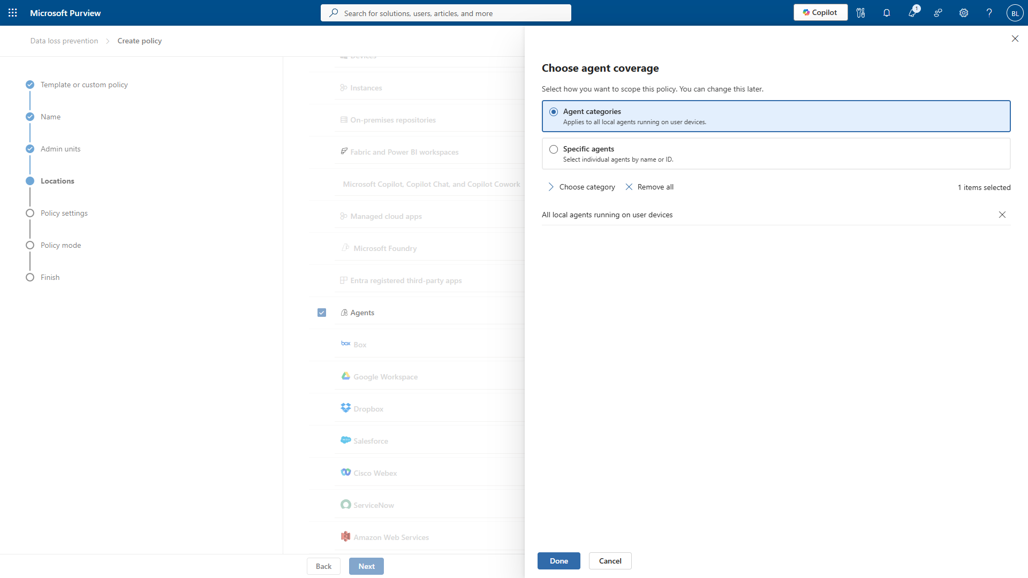
- Administrators will be able to select a new Agents location in custom enterprise applications and devices DLP policies to scope policies to local agents.
- Administrators can apply DLP policies to supported local agents to audit and protect agent-to-human and agent-to-tool interactions.
[Action required and recommendations] No action is required for the feature to become available to eligible tenants. We recommend that administrators: - Review existing DLP policies and determine whether policies should be scoped to supported local agents.
- Review the prerequisites before configuring DLP protection for local agent interactions.
- Determine the appropriate DLP protections for your organization’s sensitive information.
Learn more [Compliance considerations] | Question | Answer | | Does the change alter how existing customer data is processed, stored, or accessed? | Yes. DLP protection is expanded to supported local agent interactions, including prompts, responses, files, and tool interactions. | | Does the change introduce or significantly modify AI/ML or agent capabilities that interact with or provide access to customer data? | Yes. The change adds DLP protection for supported interactions involving local AI agents and enterprise information. | | Does the change modify Purview DLP policies or enforcement? | Yes. Administrators can scope custom enterprise applications and devices DLP policies to a new Agents location and use DLP policies to audit and protect supported local agent interactions. | | Does the change include an admin control? | Yes. Administrators configure the protection through Microsoft Purview DLP policies by selecting the Agents location and applying supported DLP controls. |
|
| Microsoft Purview | Data Loss Prevention: Network data security integration with Azure FirewallCategory:Microsoft PurviewNummer:MC1558038Status:stayInformed | [What and why] Microsoft Purview is expanding network layer data security controls with Azure Firewall. This integration helps organizations detect and protect sensitive data in supported network traffic, including text, files, and AI interactions. Organizations can apply Data Loss Prevention (DLP) policies to traffic from servers, virtual machines, and other endpoints to help prevent unauthorized sharing with cloud applications through browsers, applications, and APIs. [Rollout schedule] - Public Preview: We will begin rolling out in mid-November 2026 and expect to complete by mid-December 2026.
- General Availability (Worldwide): Beginning in late March 2027 and expect to complete by late April 2027.
[Impact on your organization] Who is affected - Organizations using Microsoft Purview Data Loss Prevention and Azure Firewall to protect sensitive data in network traffic
Platforms and services - Microsoft Purview Data Loss Prevention
- Azure Firewall
- Microsoft Purview Insider Risk Management
- Microsoft Defender
What will happen - This integration will become available automatically in your tenant as it rolls out.
- Administrators can configure DLP policies to protect text and files sent and received through supported network traffic from servers, virtual machines, and other endpoints.
- Policies can help prevent unauthorized sharing of sensitive data with cloud applications through browsers, applications, and APIs.
- DLP policies can apply to traffic generated by background services and automated workloads.
- The integration will provide activity signals to Microsoft Purview Insider Risk Management to help identify risky user behavior.
- Alert management and investigation will be supported across Microsoft Purview and Microsoft Defender.
- Existing Microsoft Purview inline web traffic policies applied to the network will continue to work without interruption.
[Action required and recommendations] No action is required for this capability to become available in your tenant. Configuration is required before your organization can use it. Administrators who want to use this capability should: - Review the prerequisites and configuration guidance in the documentation linked below.
- Create DLP policies to protect sensitive data in supported network traffic, as appropriate for their organization.
Learn more [Compliance considerations] This change extends Microsoft Purview DLP capabilities to supported network traffic and introduces additional activity signals for security monitoring and investigation. Organizations should review their existing data protection, monitoring, and compliance requirements before configuring policies. |
| Microsoft OneDrive for iPad: Presentation mode for PDFsCategory:Microsoft OneDriveNummer:MC1558041Status:stayInformed | [What and why] We are introducing presentation mode in the Microsoft OneDrive app for iPad. Users can select a new Presentation button in the PDF viewer to enter a focused, view-only experience that prevents free gesture scrolling between pages, reducing accidental page changes while presenting without requiring users to move the file to another app. This update is based on customer feedback requesting a presentation experience directly in the OneDrive PDF viewer. This feature is not available on iPhone. [Rollout schedule] - General Availability (Worldwide): Rollout will begin in early December 2026 and is expected to complete by late December 2026.
[Impact on your organization] Who is affected - Users who open and present PDF files in the OneDrive app for iPad.
Platforms and services - Microsoft OneDrive for iPad
What will happen - Users can select the Presentation button in the OneDrive PDF viewer to enter presentation mode.
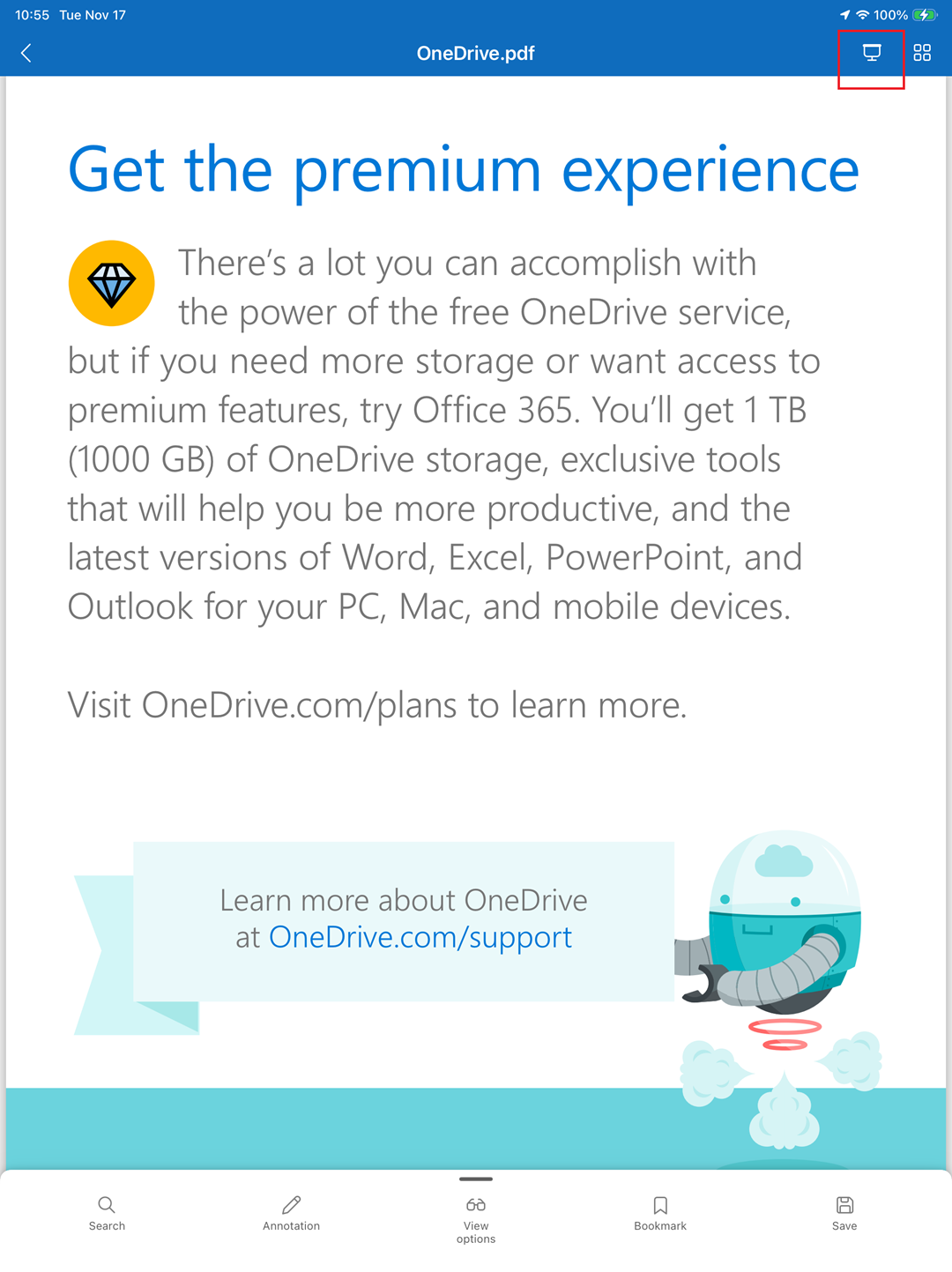
- Presentation mode supports all PDFs, displays them in a view-only experience without editing controls, and does not intentionally change them or create a new copy.
- Free scrolling or swiping between pages is disabled in presentation mode, preventing accidental page changes. Users can switch pages only by selecting the on-screen navigation buttons.
- The feature is enabled by default for all OneDrive for Business customers.
- No admin control or tenant configuration is available for this feature.
- Presentation mode changes how a PDF is displayed during a presentation and does not intentionally change file storage, permissions, sharing, retention, or audit behavior. Existing OneDrive access permissions and protections applied to the PDF continue to apply.
[Action required and recommendations] No administrative action is required before rollout. We recommend that you inform helpdesk and support teams about the new presentation experience and update internal user guidance for presenting PDFs from the OneDrive app for iPad. [Compliance considerations] No compliance considerations identified. Review as appropriate for your organization. |
| Microsoft Defender for Cloud Apps: Unified RBAC support for App Governance to manage NHIsCategory:Microsoft Defender XDRNummer:MC1558114Status:stayInformed | [What and Why:] App Governance in Defender for Cloud Apps will now support Microsoft Defender XDR unified role-based access control (RBAC) in public preview. This capability lets your organization delegate access to App Governance through Defender XDR custom roles, for supported App Governance capabilities. You can align access with administrators’ responsibilities and apply least-privilege permissions when managing Non-Human Identities, including Microsoft Entra applications. [Rollout Schedule:] Public Preview (Worldwide): We will begin rolling out in late November 2026 and expect to complete by mid-December 2026. General Availability (Worldwide): We will begin rolling out in mid-December 2026 and expect to complete by mid-January 2027. [Impact on Your Organization:] Administrators will be able to configure and assign Defender XDR unified RBAC custom roles to users or groups for the following capabilities: - Read access: View App Governance inventory, insights, risk signals, and policies.
- Policy management: Create and edit App Governance policies.
- Service management: Turn the App Governance service on or off.
Users with existing Defender for Cloud Apps unified RBAC roles may also gain App Governance access, depending on their assigned permissions and data sources. Review these assignments to ensure access remains appropriate. Supported Microsoft Entra roles will continue to provide App Governance access, subject to documented role changes. Microsoft Entra application enable and disable actions continue to require the Application Administrator role; this preview does not replace that requirement. [Action Required/Recommendations:] Review existing Defender XDR unified RBAC assignments, particularly roles used for Defender for Cloud Apps. To delegate App Governance access, create or update a custom role in the Microsoft Defender portal under Setup & Configuration > Permissions > Microsoft Defender XDR > Roles. Configure the permissions appropriate to each administrator’s responsibilities. Select the applicable data sources as described in the updated configuration guidance. [Compliance considerations:] No compliance considerations identified. Review as appropriate for your organization. |
| Updates available for Microsoft 365 Apps for Current ChannelCategory:Microsoft 365 appsNummer:MC1558155Status:stayInformed | We’ve released updates to the following update channel for Microsoft 365 Apps:
[When this will happen:]
We’ll be gradually rolling out this update of Microsoft 365 Apps to users on that update channel starting November 17th, 2026 (PST).
[How this will affect your organization:]
If your Microsoft 365 Apps clients are configured to automatically update from the Office Content Delivery Network (CDN), then no action is required.
If you manage updates directly you can now download this latest update and begin deployment.
[What you need to do to prepare:]
To get more details about this update view the following release notes:
|
| Dataverse – Dataverse Data Available in Agent Builder Declarative AgentsCategory:Microsoft DataverseNummer:MC1558817Status:stayInformed | We are announcing the ability to select Power Platform and Dynamics 365 data as a knowledge data source when creating and editing Declarative Agents built in Agent Builder in Microsoft Dataverse. This feature reached general availability on November 17, 2026.
How does this affect me?
With this feature, users will be able to build Declarative agents that can target Dataverse data from Model Driven Power Apps and Dynamics 365 sources. This feature enables fast, natural language-based text querying for data across multiple applications at a time, greatly reducing the time needed for users to access critical business data across apps, forms, and views.
This feature is enabled for environments by turning on the Work IQ feature in the Power Platform admin center. For new, production environments that are not part of Government cloud, EU/EFTA, or FedRAMP, this feature is automatically enabled and ready for use.
What action do I need to take?
This message is for awareness, and no action is required. |