17-November-2026 Below you will find a collection of news published yesterday. This news consists of Microsoft’s Roadmap when it is updated it will be below with items. Then there will be a section with the message center, if there is anything new there, this will be automatically included. And it contains a piece from blogs that I follow myself and would like to share with you. If I miss something in the blogs that do have an RSS feed, please let me know.
This entire post was automated via Microsoft Flow
have fun reading!
Office 365 Roadmap Updated: 2026-11-17
Additions : 0
Updates : 2
More Details At: www.roadmapwatch.com
| Updated Features | Current Status | Update Type | ||
|---|---|---|---|---|
| Microsoft Copilot Studio: Invoke agents as workflow steps with the agent node | Launched | Status | ||
| Microsoft Teams: Near-real-time detection of malicious QR codes in messages | Rolling Out | Status |
Items from the MessageCenter in Microsoft 365
| (Updated) Microsoft Teams: Distinguish invites among Attendee, Presenter, and Co-organizer emailsCategory:Microsoft TeamsNummer:MC1009930Status:stayInformed | Updated November 16, 2026: We have updated the timeline. Thank you for your patience. Microsoft Teams Events invite emails will be separated based on the role of the participant. Event organizers will get an email explaining the specific roles of participants in the event. Similarly, each presenter will get a separate calendar invite, allowing the organizers of town halls to maintain separate invites for attendees. This message is associated with Microsoft 365 Roadmap ID 476488. [When this will happen:] Targeted Release: We will begin rolling out early January 2027 (previously early December 2026) and expect to complete by mid-January 2027 (previously mid-December 2026) General Availability (Worldwide, GCC, GCC High): We will begin rolling out mid-January 2027 (previously mid-December 2026) and expect to complete by late January 2027 (previously mid-January) [How this will affect your organization:] This feature update allows the organizers of town halls to maintain separate invites for attendees. [What you need to do to prepare:] This rollout will happen automatically with no admin action required. You may want to notify your users about this change and update any relevant documentation as appropriate. | ||||||||||||
| (Updated) Microsoft 365 Copilot: Copilot Pages and Notebooks Creation in OneDriveCategory:Microsoft Copilot (Microsoft 365)Nummer:MC1449182Status:planForChange | Updated November 16, 2026: We have updated the timeline. Thank you for your patience. [What and why] We’re changing where newly created Copilot Pages are stored. Going forward, Copilot Pages created in Copilot Chat, the Microsoft 365 Copilot app, and new Copilot Notebooks will be stored in OneDrive for Business instead of their current location. This change enables organizations to manage newly created Copilot Pages using existing OneDrive for Business governance, compliance, data protection, retention, and lifecycle management capabilities. [Rollout schedule]
[Impact on your organization] Who is affected Users who create Copilot Pages in:
Microsoft 365 administrators responsible for governance, compliance, retention, and content management Platforms and services
What will happen After rollout:
In addition to all existing governance and management capabilities, the following additional OneDrive for Business capabilities will apply to newly created Copilot Pages: Compliance and legal
Data protection
Lifecycle management
Monitoring and oversight
Unaffected files
IT Admin controls
[Action required and recommendations] No action is required for the rollout. We recommend that administrators:
[Compliance considerations]
| ||||||||||||
| (Updated) Microsoft Defender for Office 365: New MessageContents table in Advanced Hunting for Microsoft Teams messagesCategory:Microsoft Defender XDRNummer:MC1474106Status:stayInformed | Updated November 16, 2026: We have updated the timeline. Thank you for your patience. [What and why] We’re introducing a new MessageContents table in Advanced Hunting for Microsoft Teams messages. This new table helps security operations teams investigate threats in Teams by providing access to Teams message snippets and associated message metadata during threat investigations. This capability enhances security investigations by allowing authorized analysts to correlate Teams message activity with other security signals available in Advanced Hunting, helping organizations detect, investigate, and respond to threats more effectively. [Rollout schedule]
[Impact on your organization] Who is affected
Platforms and services
What will happen
[Action required and recommendations] No action is required if your organization does not plan to use this capability. If you plan to use this feature:
Learn more [Compliance considerations]
| ||||||||||||
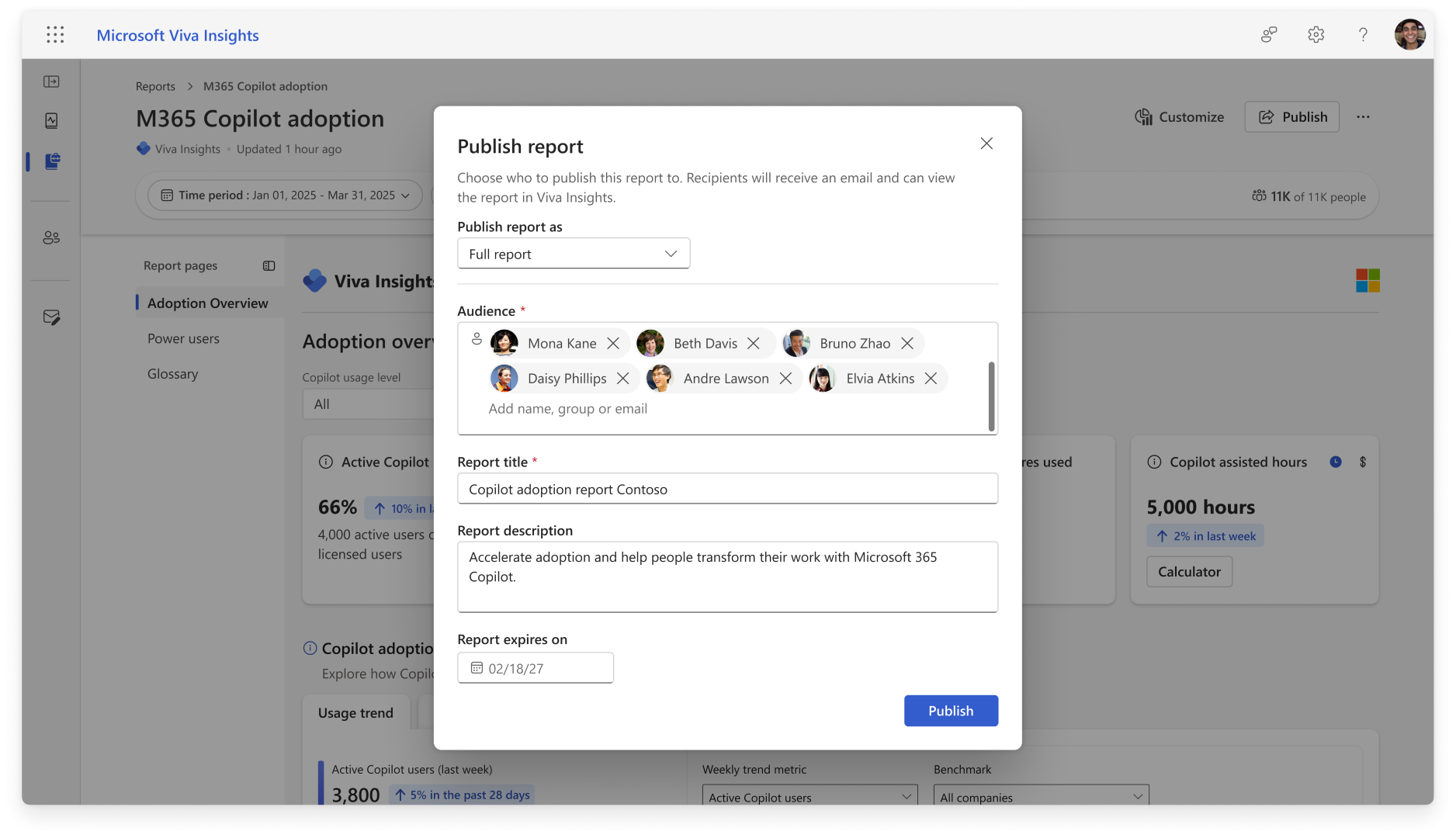
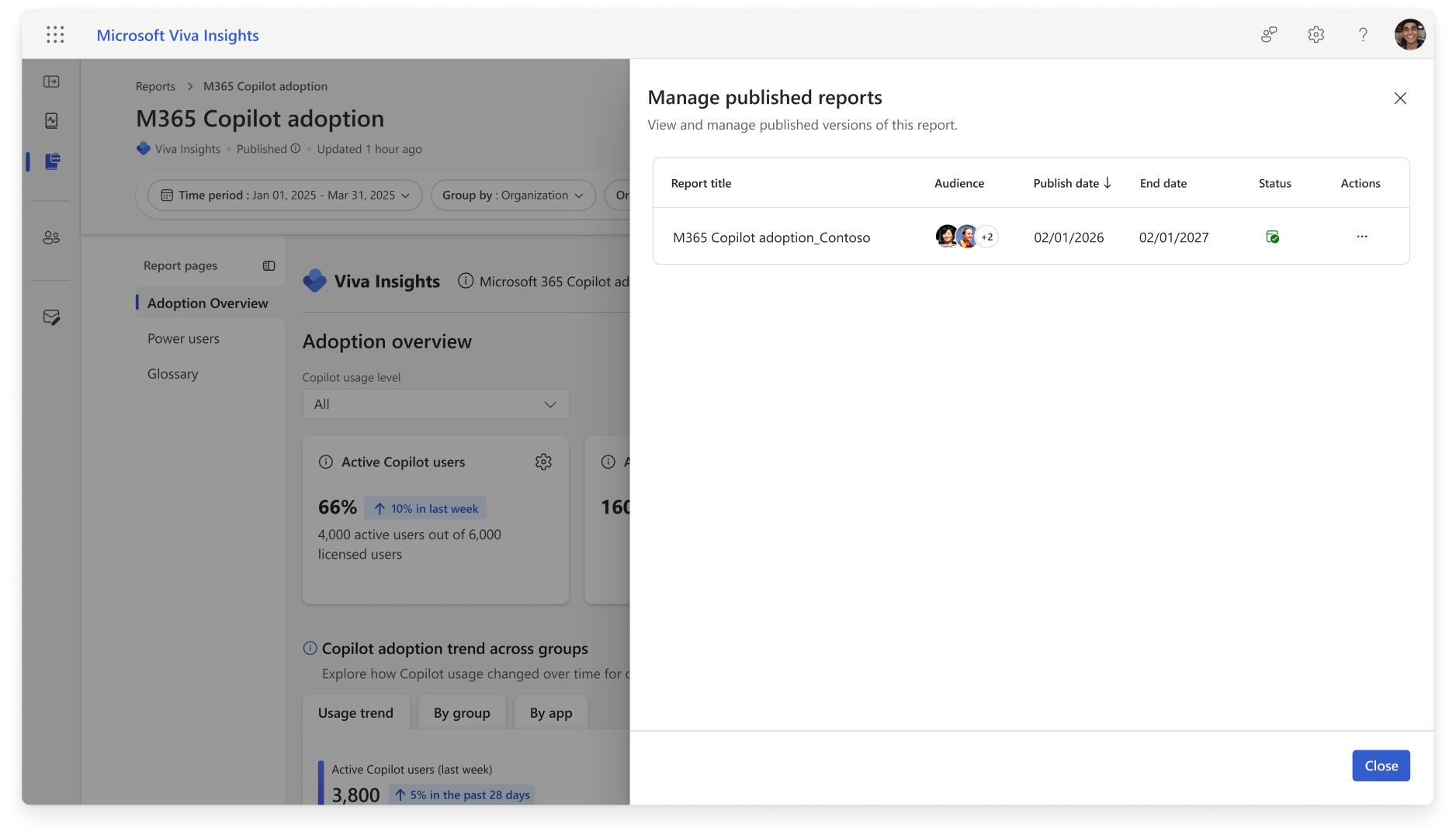
| (Updated) Microsoft Viva Insights: New Power BI report publishing capabilities for leadersCategory:Microsoft VivaNummer:MC1489942Status:planForChange | Updated November 16, 2026: We have updated the timeline. Thank you for your patience. [What and why] We are expanding report publishing capabilities in Microsoft Viva Insights to include leaders, such as chief officers, managers, and their delegates. As part of this update, in Viva Feature Access Management, the Analyst report publish setting will be renamed to Report publish. This setting, which is on by default, will continue to be managed by Global Admins and Insights Admins, and will govern publishing for both analysts and leaders. This update enables leaders to directly publish and distribute curated Power BI reports available in Viva Insights without requiring an analyst to publish on their behalf. [Rollout schedule]
[Impact on your organization] Who is affected
Platforms and services
What will happen
Setting up report properties prior to publishing
View and manage published reports
[Action required and recommendations] No action is required. We recommend that you review your organization’s report publishing governance and processes prior to rollout. [Learn more] [Compliance considerations] No compliance considerations identified. Review as appropriate for your organization. | ||||||||||||
| Microsoft Entra ID: Risk-based anti-bot verification (CAPTCHA) for SMS and voice multi-factor authenticationCategory:Microsoft EntraNummer:MC1551151Status:preventOrFixIssue | [What and why] Microsoft Entra ID is adding safeguards to protect telephony-based multifactor authentication (MFA) from automated fraudulent activity. Some users who use SMS or voice for MFA may be asked to complete a risk-based anti-bot verification step (CAPTCHA) before Microsoft sends an SMS verification code or initiates a verification call. This change is separate from the planned retirement of SMS and voice authentication and does not affect the retirement timeline. [Rollout schedule]
[Impact on your organization] Who is affected
Platforms and services
What will happen
[Action required and recommendations] We recommend that administrators take the following actions:
Learn more
[Compliance considerations] No compliance considerations identified. Review as appropriate for your organization. | ||||||||||||
| Microsoft 365 admin center: Unified release preferences for Standard, Deferred, and FrontierCategory:Microsoft 365 suiteNummer:MC1556082Status:planForChange | [What and Why:] We’re introducing a unified release preferences experience in the Microsoft 365 admin center. This brings together Standard release, Deferred release, and Frontier settings, making it easier to manage when users receive eligible generally available features and who participates in eligible preview experiences. [Rollout Schedule:] General Availability (Worldwide): We will begin rolling out in mid-November 2026 and expect to complete by end of November 2026. [Impact on Your Organization:] Who is affected: Administrators managing release preferences for their organization. Platforms/Services: Microsoft 365 admin center (Settings > Org settings > Release preferences); Microsoft 365 Copilot release preferences; Targeted Release. What will happen:
[Action Required/Recommendations:]
[Compliance considerations:] No compliance considerations identified. Review as appropriate for your organization. | ||||||||||||
| Microsoft Teams: End of support for iOS 17 and iPadOS 17Category:Microsoft TeamsNummer:MC1556088Status:planForChange | [What and Why:] Microsoft Teams is ending support for upcoming builds on iOS 17 and iPadOS 17. As this change rolls out, new Teams releases will require iOS 18 or later on iPhone and iPadOS 18 or later on iPad. [Rollout Schedule:] General Availability (Worldwide): We will begin rolling out in mid-December 2026 and expect to complete by early January 2027. [Impact on Your Organization:] Users whose devices remain on iOS 17 or iPadOS 17 will not be able to install newer Teams releases that require a newer operating system. Teams versions already installed on these devices will continue functioning without official support. This change does not introduce a block on opening or signing in to those existing installations. [Action Required/Recommendations:]
Learn more: Hardware requirements for Microsoft Teams. [Compliance considerations:] No compliance considerations identified. Review as appropriate for your organization. | ||||||||||||
| Plugins in PowerPoint for Microsoft 365 Copilot [Win32]Category:Microsoft 365 apps Microsoft Copilot (Microsoft 365)Nummer:MC1556090Status:stayInformed | [What and Why:] Plugins are coming to PowerPoint for Windows, adding new skills and connectors that extend what Copilot can do. Plugins bring specialized capabilities and information from connected services into presentation workflows. [Rollout Schedule:] General Availability (Worldwide): We will begin rolling out mid-November 2026 and expect to complete by early December 2026. [Impact on Your Organization:] Users will be able to discover and use plugins available to them in Copilot within PowerPoint for Windows, helping them create and refine presentations with capabilities and content relevant to their work. [Action Required/Recommendations:] Admins can review available plugins and manage access for their organization in the Microsoft 365 admin center. [Compliance considerations:] No compliance considerations identified. Review as appropriate for your organization. | ||||||||||||
| Changes to site logo URL metadata in SharePoint search resultsCategory:Microsoft 365 suiteNummer:MC1556092Status:planForChange | [What and Why:] We are making a change to how SharePoint site logo URLs are maintained in search metadata to improve search indexing efficiency and reliability. Going forward, changes to a SharePoint site’s logo URL will no longer automatically update the SiteLogoUrl property on individual files and other items within that site. [Rollout Schedule:] General Availability (Worldwide): We will begin rolling out in early December 2026 and expect to complete by early March 2027. [Impact on Your Organization:] The SiteLogoUrl property will continue to be maintained for SharePoint sites. Individual items may retain a previously indexed SiteLogoUrl value, even after the site’s logo changes. Applications or custom solutions that retrieve this property from individual items through search APIs may receive an outdated value. [Action Required/Recommendations:] In the unlikely case that your organization uses the SiteLogoUrl property from individual search results, we recommend retrieving the current site logo directly from the associated SharePoint site instead. No action is required if your organization does not rely on this property. [Compliance considerations:] No compliance considerations identified. Review as appropriate for your organization. | ||||||||||||
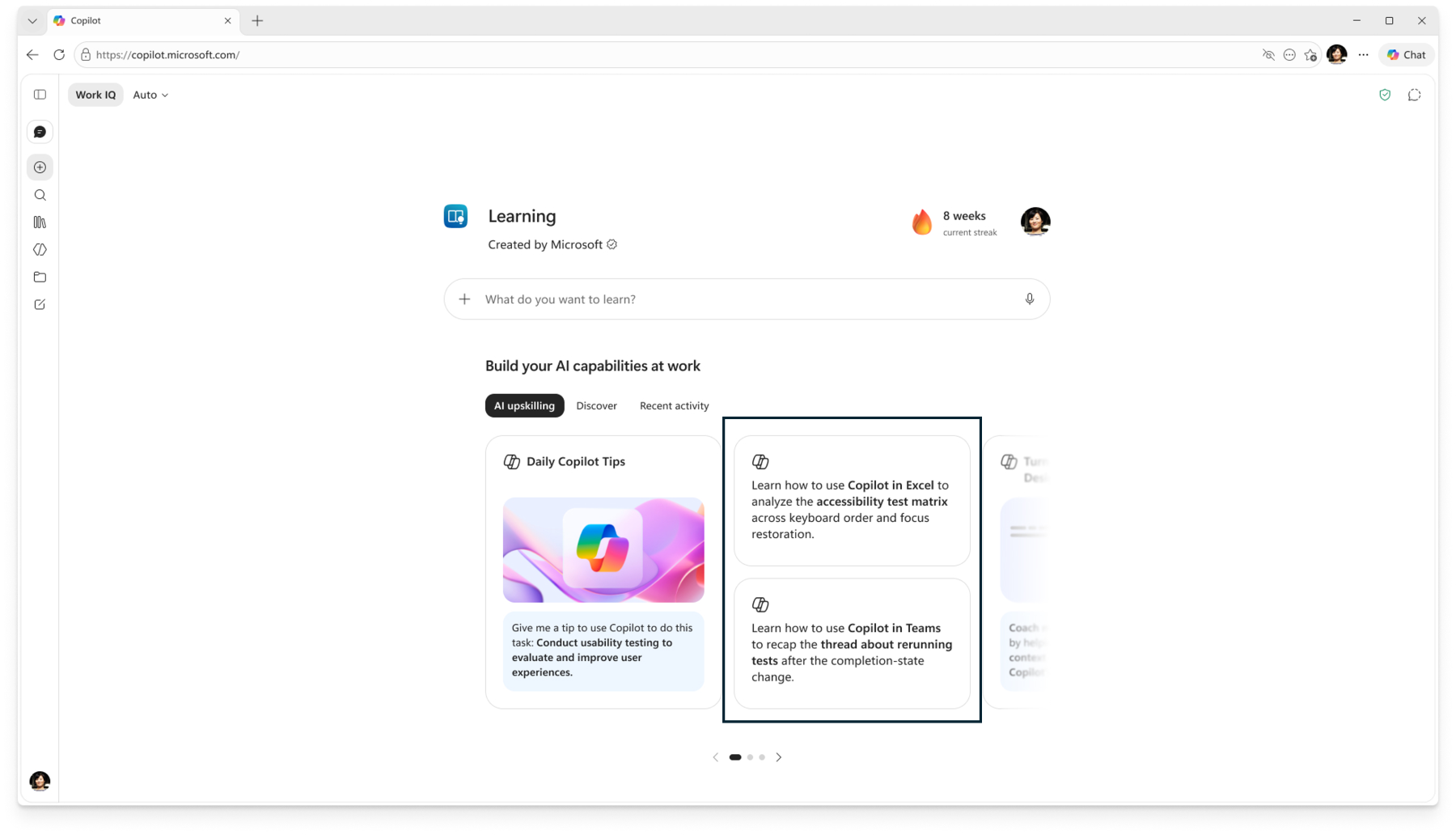
| Microsoft 365 Copilot: Learning Agent introduces personalized upskilling notifications in TeamsCategory:Microsoft Copilot (Microsoft 365)Nummer:MC1556093Status:stayInformed | [What and why] Learning Agent will proactively deliver personalized AI and Copilot upskilling notifications through Microsoft Teams. Tailored to users’ roles, Copilot adoption stages, and usage patterns, these notifications will help users discover relevant learning opportunities and develop practical skills they can apply in their daily work. [Rollout schedule]
[Impact on your organization] Who is affected
Platforms and services
What will happen After rollout:
Notifications will respect the existing Copilot Academy notification setting in Viva Learning. If this setting is disabled at the tenant level, users in the organization will not receive these notifications. [Action required and recommendations] No administrator action is required. This feature will roll out automatically. Administrators can manage notifications using the existing Copilot Academy notification setting in Viva Learning. To review or change this setting:
Learn more [Compliance considerations] The feature uses users’ roles, Copilot adoption stages, and usage patterns to personalize learning notifications. Review this change as appropriate for your organization’s compliance requirements. | ||||||||||||
| Microsoft 365 Copilot: Learning Agent introduces personalized learning experiencesCategory:Microsoft Copilot (Microsoft 365)Nummer:MC1556094Status:stayInformed | [What and why] Microsoft 365 Copilot Learning Agent is introducing personalized learning experiences based on users’ work context, including Teams chats, emails, and meeting transcripts. The agent will provide a personalized homepage, learning prompts, and recommendations to help users develop Copilot skills relevant to their roles, projects, and daily work. [Rollout schedule]
[Impact on your organization] Who is affected
Platforms and services
What will happen Learning Agent will provide personalized learning experiences based on users’ roles, work activities, and professional needs.
Users will benefit from:
The feature will roll out automatically without additional admin intervention. To enable personalized learning experiences, the organizational and user settings described below must be enabled. [Action required and recommendations] To enable personalized learning experiences:
Learn more [Compliance considerations] Learning Agent introduces personalized learning experiences that use information from users’ work activities, including Teams chats, emails, and meeting transcripts. | ||||||||||||
| Plugins in PowerPoint for Microsoft 365 Copilot [Mac]Category:Microsoft 365 appsNummer:MC1556095Status:stayInformed | [What and Why:] Plugins are coming to PowerPoint for Mac, adding new skills and connectors that extend what Copilot can do. Plugins bring specialized capabilities and information from connected services into presentation workflows. [Rollout Schedule:] General Availability (Worldwide): We will begin rolling out mid-November 2026 and expect to complete by early December 2026. [Impact on Your Organization:] Users will be able to discover and use plugins available to them in Copilot within PowerPoint for Mac, helping them create and refine presentations with capabilities and content relevant to their work. [Action Required/Recommendations:] Admins can review available plugins and manage access for their organization in the Microsoft 365 admin center. [Compliance considerations:] No compliance considerations identified. Review as appropriate for your organization. | ||||||||||||
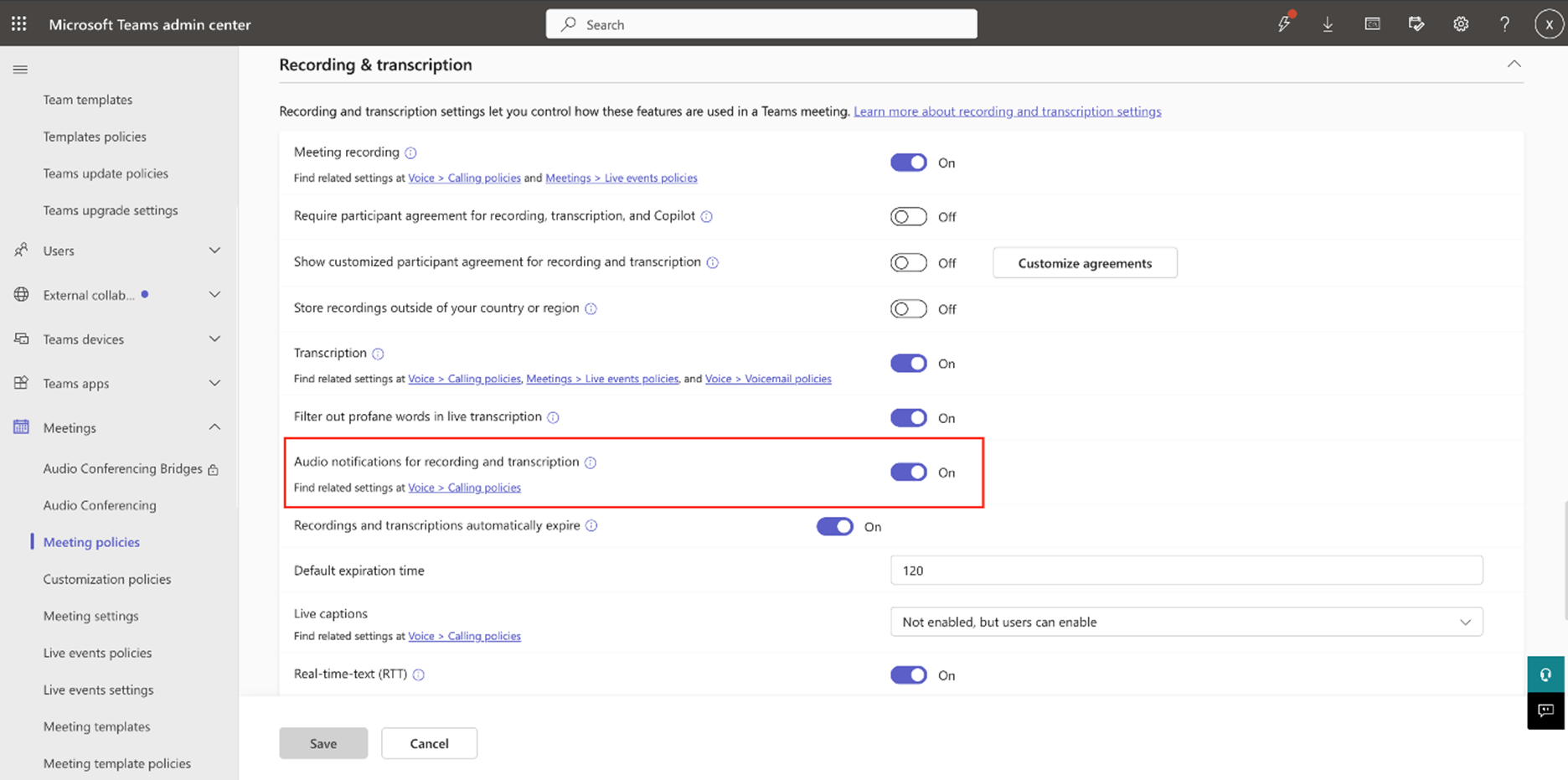
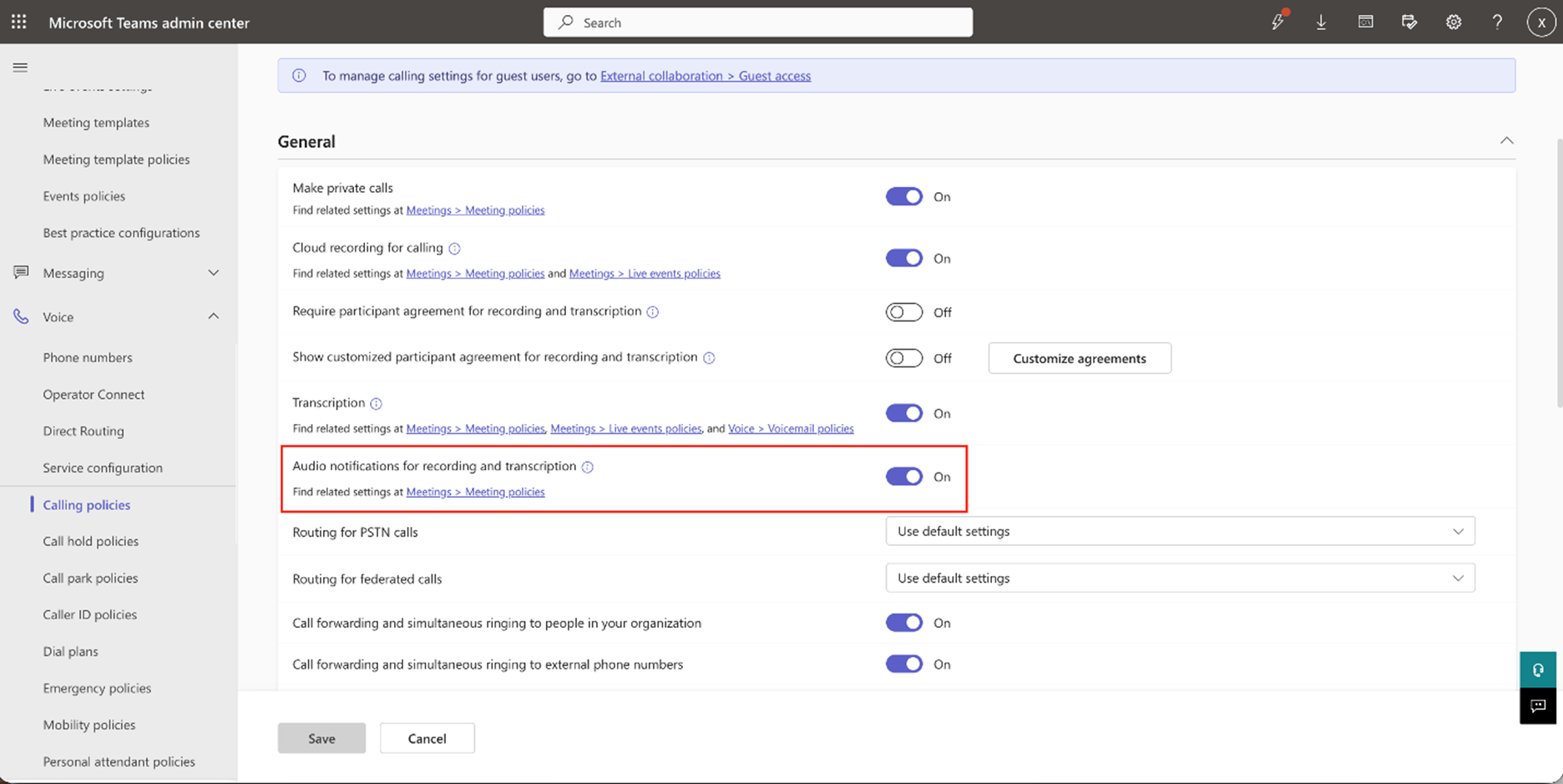
| Microsoft Teams: Audio announcement for Recording and TranscriptionCategory:Microsoft TeamsNummer:MC1556096Status:stayInformed | [What and Why:] The recording feature in Microsoft Teams now supports an audio announcement for Teams meetings and calls. With this new functionality, admins can enable a policy that plays an audio announcement when recording or transcription starts. This can be applied tenant-wide or to specific groups. The announcement helps ensure allowed participants who are permitted by policy are informed and improves accessibility awareness. This setting is available in both Meeting Policy and Calling Policy.
[Rollout Schedule:] Public Preview (Worldwide): We began rolling out on early May 2026 and expect to complete by mid-December 2026. General Availability (Worldwide): We will begin rolling out on mid-December 2026 and expect to complete by early January 2027. General Availability (GCC): We will begin rolling out on mid-December 2026 and expect to complete by late January 2027. General Availability (GCC High, DoD): We will begin rolling out on mid-December 2026 and expect to complete by late January 2027. [Impact on Your Organization:] None. [Action Required/Recommendations:] No admin action is required. The default audio announcement policy is OFF; it can be turned on as needed. [Compliance considerations:] Confirmed that compliance recording is not supported with this feature. Review as appropriate for your organization. | ||||||||||||
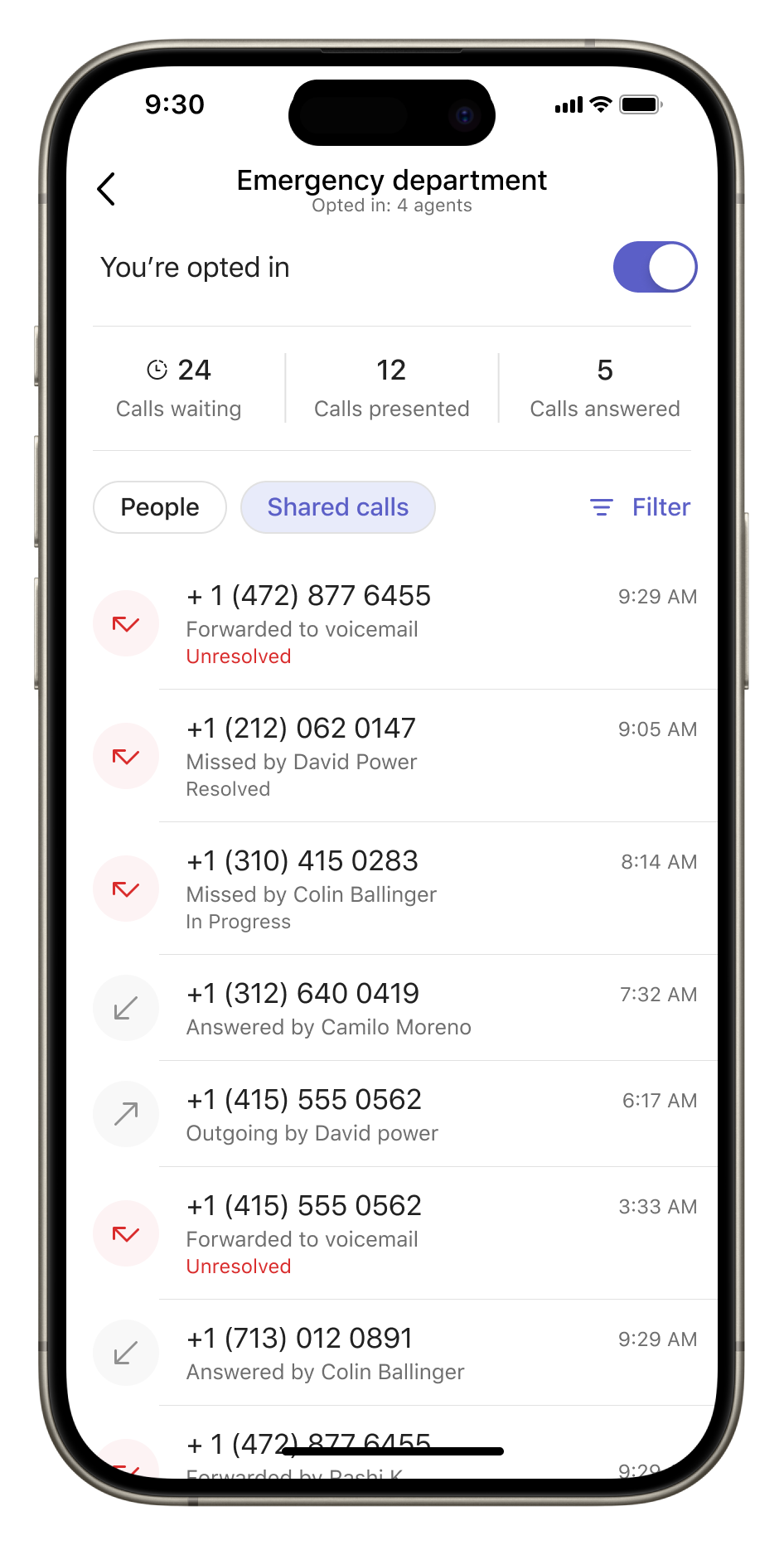
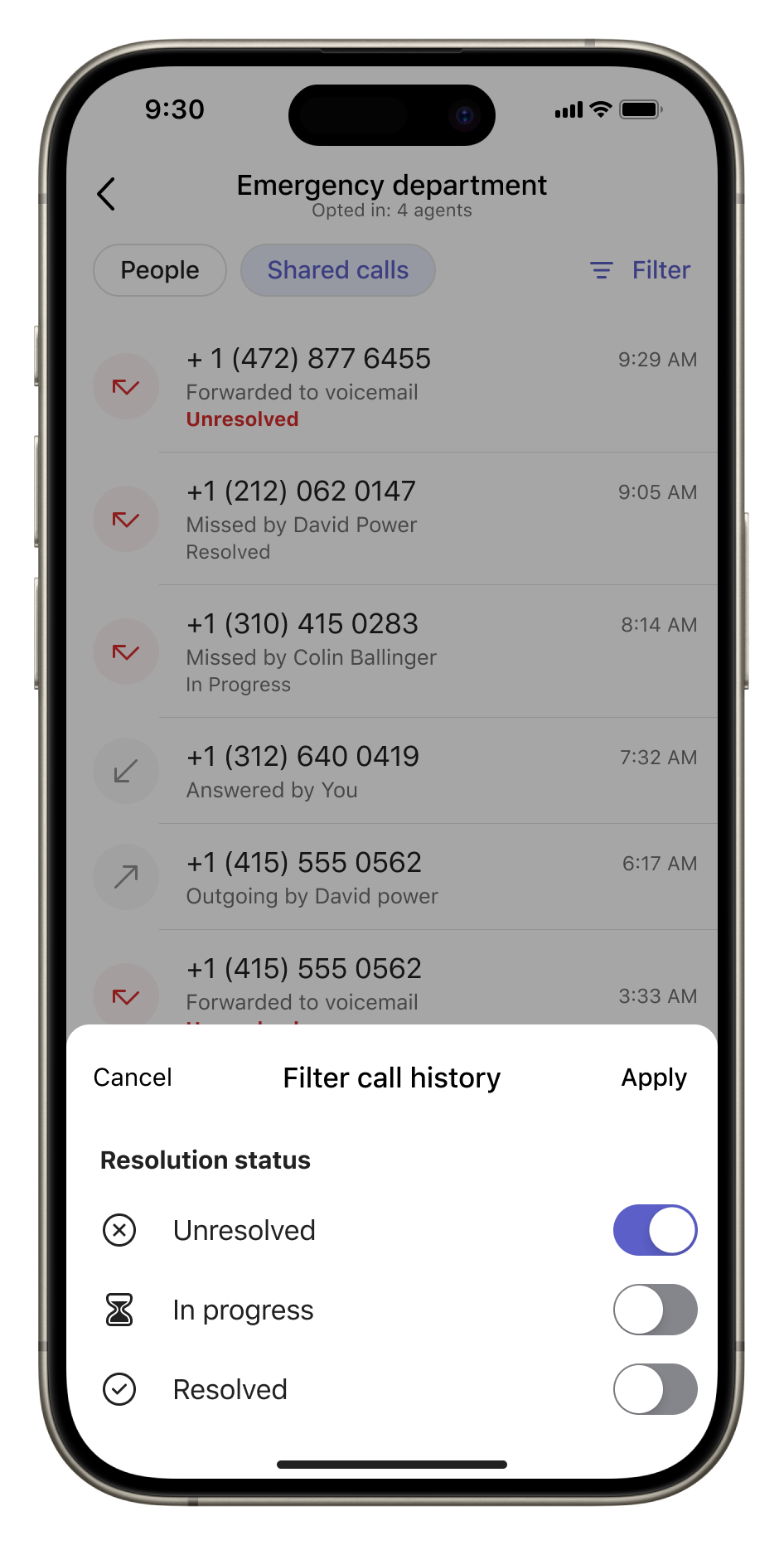
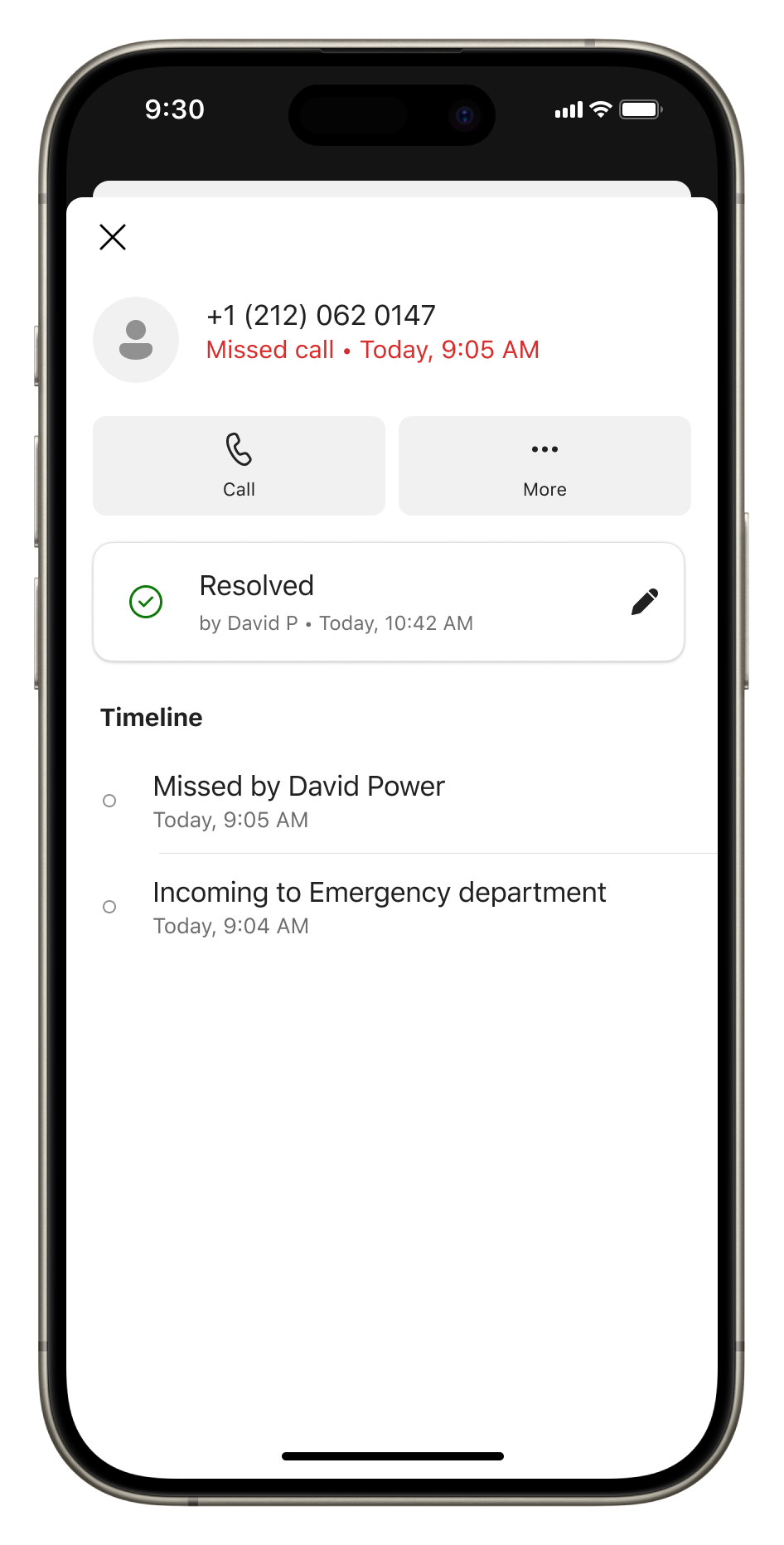
| Microsoft Teams Mobile: Introducing shared call history in the Queues appCategory:Microsoft TeamsNummer:MC1556098Status:stayInformed | [What and why] We are introducing shared call history in the Queues app on Microsoft Teams mobile, allowing authorized call queue representatives to view calls handled across their queue. This includes missed, answered, outgoing, and voicemail calls. By extending the existing desktop experience to mobile, we are helping teams coordinate customer follow-ups, avoid duplicate callbacks, and manage calls more efficiently while working away from their desks. [Rollout schedule]
[Impact on your organization] Who is affected
Platforms and services
What will happen
[Action required and recommendations] No new administrative action is required for this rollout. We recommend that you inform call queue representatives about the new mobile experience, particularly how to update missed call statuses to avoid duplicate follow-ups.
[Learn more] [Compliance considerations] No compliance considerations identified. Review as appropriate for your organization. | ||||||||||||
| Microsoft PowerPoint: Introducing plugins for Microsoft 365 CopilotCategory:Microsoft 365 apps Microsoft Copilot (Microsoft 365)Nummer:MC1556104Status:stayInformed | [What and why] We are introducing plugins for Microsoft 365 Copilot in PowerPoint to extend Copilot’s capabilities with new skills and connectors. Plugins bring specialized capabilities and information from connected services into presentation workflows, helping users create and refine presentations with content relevant to their work. [Rollout schedule]
Note: This rollout schedule is subject to change. We will update this post with a confirmed rollout schedule. [Impact on your organization] Who is affected
Platforms and services
What will happen
[Action required and recommendations] We recommend that you review available plugins and manage access for your organization in the Microsoft 365 admin center. [Compliance considerations] No compliance considerations identified. Review as appropriate for your organization. | ||||||||||||
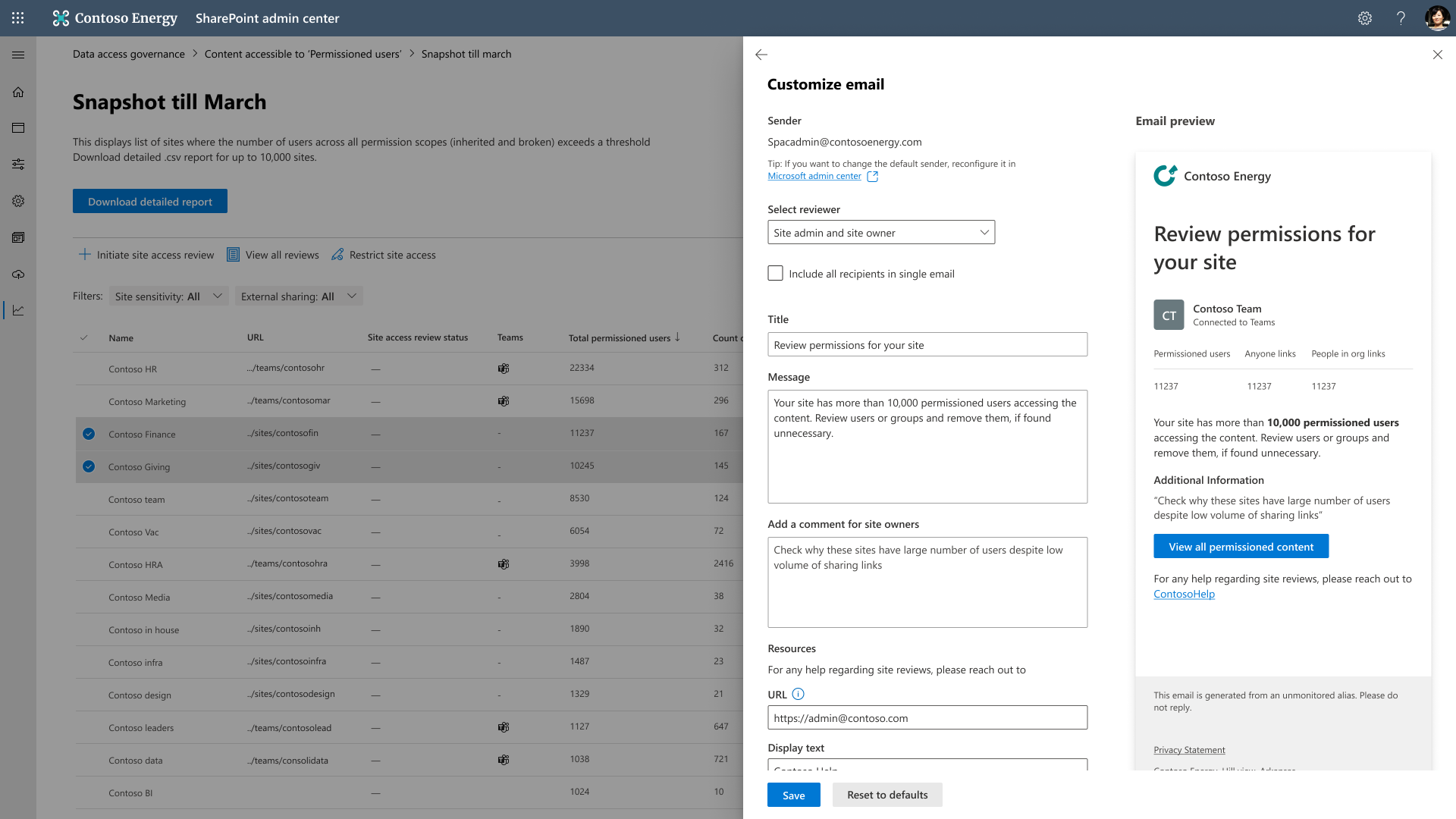
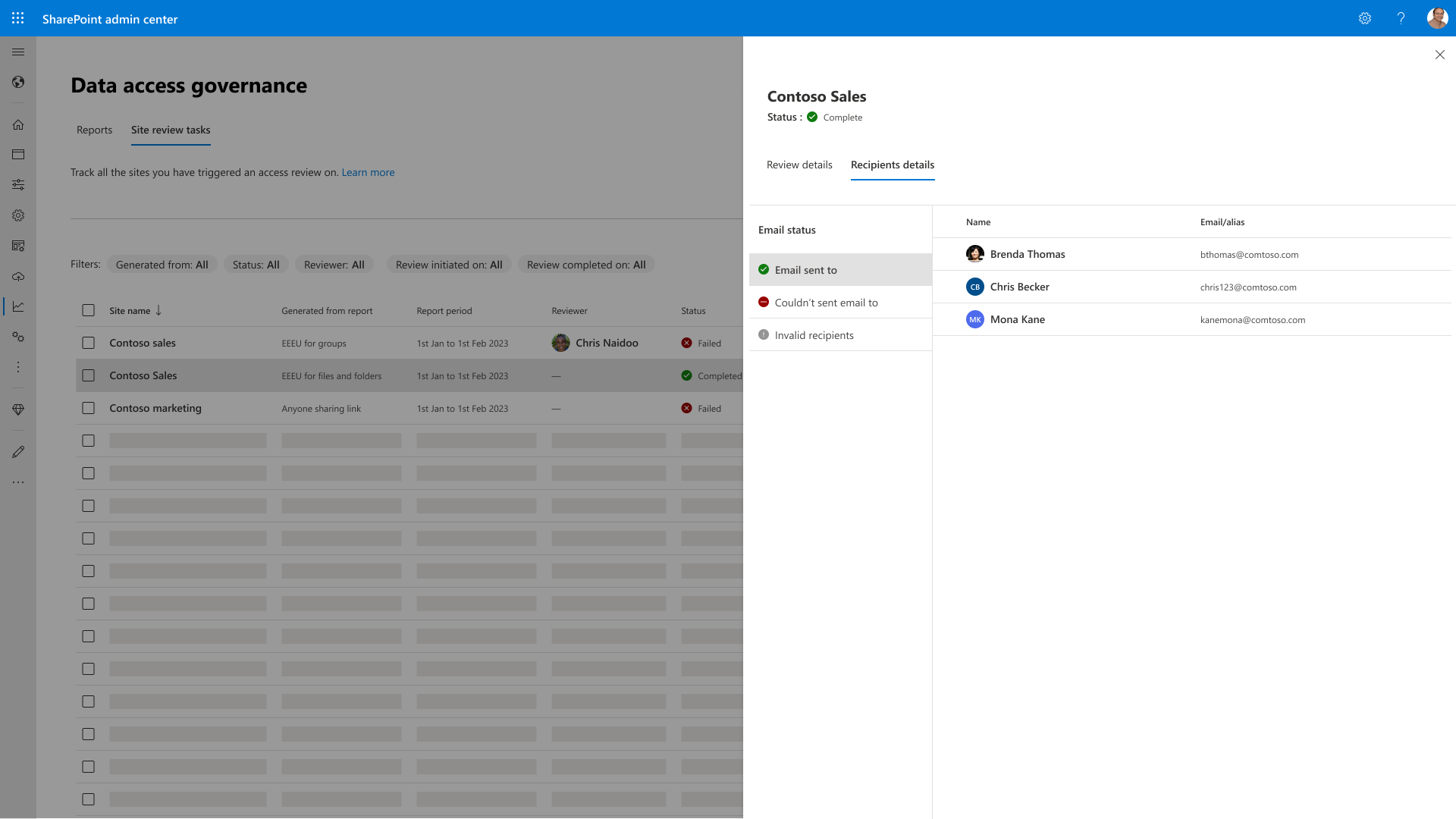
| Microsoft SharePoint: Enhanced data access governance reports and site access reviewsCategory:SharePoint Online Microsoft Copilot (Microsoft 365)Nummer:MC1556106Status:stayInformed | [What and why] Microsoft SharePoint is enhancing data access governance reports and site access reviews to give SharePoint admins more control, flexibility, and transparency when identifying and addressing potential data exposure. These updates help admins prioritize sites that may present the greatest data risk, direct review requests to the appropriate recipients, and track whether notifications were delivered. [Rollout schedule]
[Impact on your organization] Who is affected
Platforms and services
What will happen
[Action required and recommendations] No action is required before rollout. We recommend that SharePoint admins:
Learn more
[Compliance considerations]
| ||||||||||||
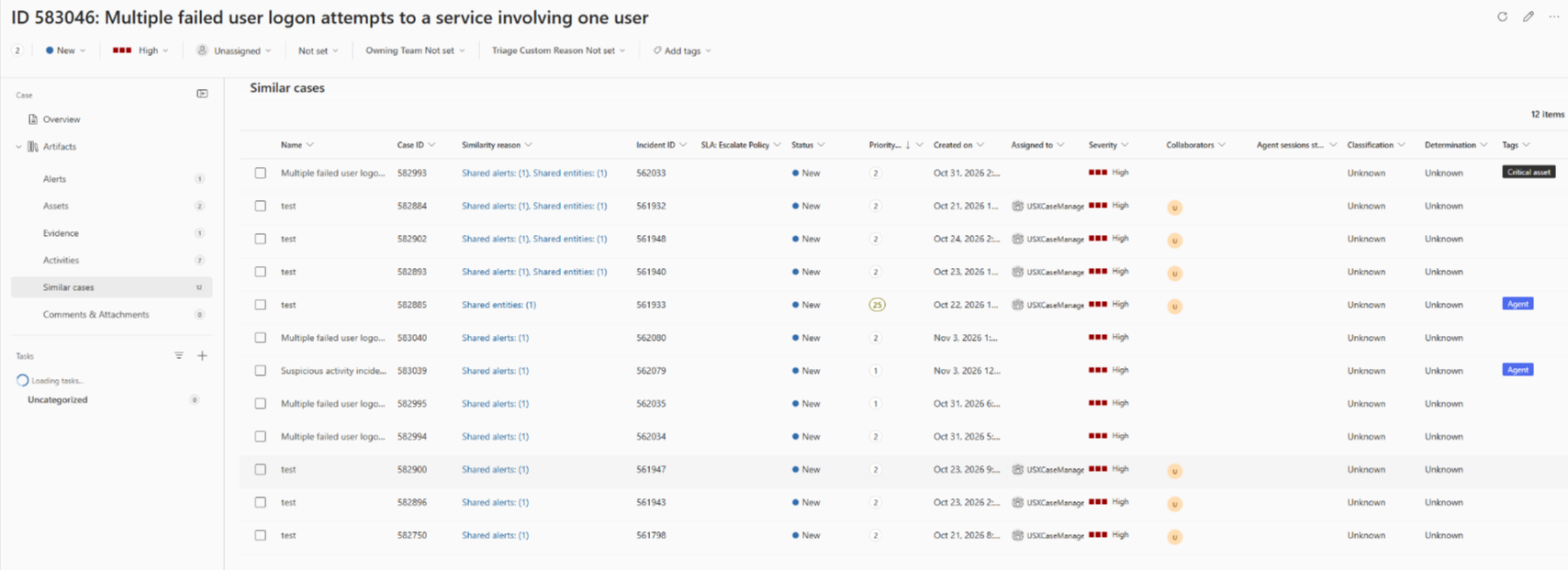
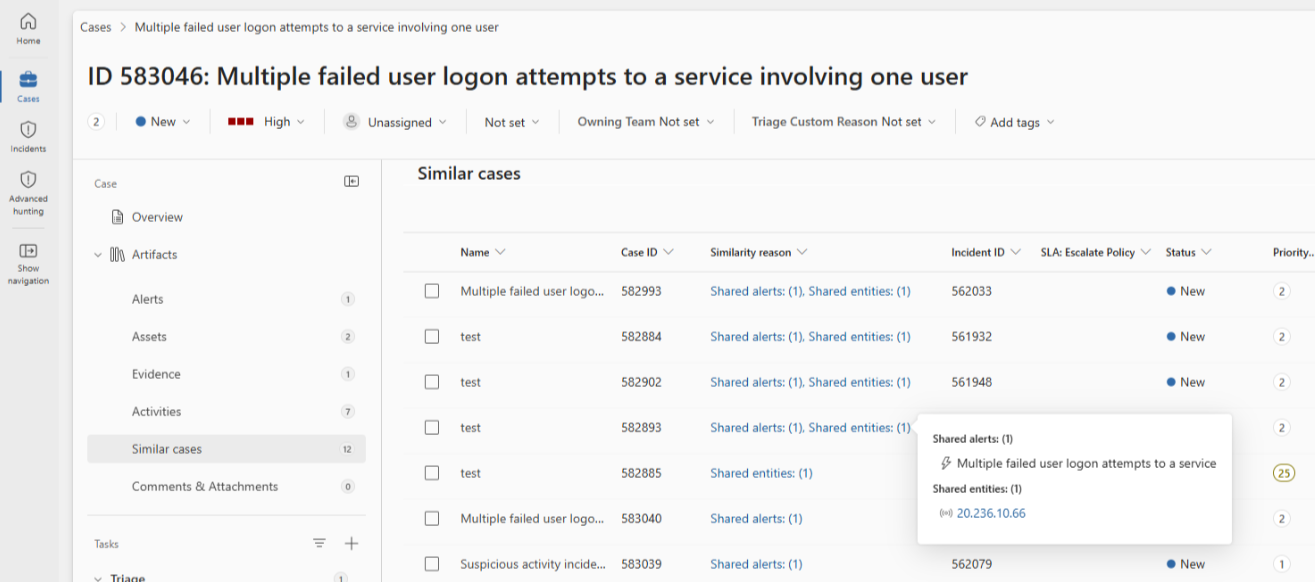
| Microsoft Defender: Similar cases comes to the unified security operations platformCategory:Microsoft Defender XDRNummer:MC1556107Status:stayInformed | [What and why] A new Similar cases tab appears on the incident page in the Microsoft Defender portal. The tab lists up to 20 incidents that share alert titles or entities with the current incident, helping security analysts identify recurring patterns and see how similar cases were handled. The Similarity reason column shows why each incident appears in the list. This update brings the Similar incidents experience from Microsoft Sentinel in the Azure portal to the unified security operations platform. As part of this update, the Associated incidents card on the Summary tab will be renamed Recommended correlations. Similar cases show separate cases that share alert titles or entities, while Recommended correlations identifies cases that are likely part of the same attack. The content of the renamed card will not change. [Rollout schedule]
[Impact on your organization] Who is affected
Platforms and services
What will happen
[Action required and recommendations] No action is required to prepare for this change. Learn more
[Compliance considerations] No compliance considerations identified. Review as appropriate for your organization. |