| (Updated) Microsoft Teams: Consecutive interpretation in Interpreter agent will be generally availableCategory:Microsoft Copilot (Microsoft 365)Nummer:MC1239927Status:stayInformed | Updated November 16, 2026: We have updated the timeline. Thank you for your patience. [Introduction] Consecutive interpretation in Interpreter for Teams meetings, currently in public preview, is planned to begin rolling out to general availability. This is a new mode in Interpreter that helps meeting participants collaborate more naturally in bilingual conversations. After an eligible meeting organizer turns it on, this turn-by-turn experience interprets each statement after a speaker finishes and then plays the interpreted audio for all meeting participants to hear. Similar to other new advanced Microsoft AI experiences, consecutive interpretation will be delivered through usage-based billing (UBB) with Copilot Credits. Usage charges can begin after an administrator configures a spending policy and an eligible meeting organizer turns on the experience for their meeting. A Copilot license is also required as a pre-requisite for the organizer of the meeting. The existing simultaneous interpretation mode in Interpreter for Teams meetings and Rooms, which is generally available, hasn’t changed. It’s still a personal listening experience that includes 20 hours of interpreted audio per month through a Copilot license or a Teams Rooms Pro license. Access beyond the hours included is subject to available capacity, limitations, and additional terms. This message is associated with Microsoft 365 Roadmap ID 557180. [When this will happen] - Targeted Release: Rollout begins in early May 2026 (previously early April) and is expected to complete by late May 2026 (previously mid-April).
- General Availability (Worldwide): Rollout begins in mid-November 2026 and is expected to complete by early December 2026.
[How this will affect your organization] Who is affected: Organizations that use Interpreter in Teams meetings, including public preview users of consecutive interpretation. - In a meeting, an eligible organizer can select More > Interpreter > Consecutive interpretation (uses credits), then choose the two spoken languages.
- Consecutive interpretation waits for each speaker to finish, then provides AI-generated spoken interpretation so that all participants hear the same interpreted speech. Interpretation quality may vary depending on audio quality, participant speech patterns, network conditions, and language pair.
- Available in Teams meetings on Windows, Mac and web; not currently supported in Teams Events, calls or Teams Rooms.
[What you need to do to prepare] |
| (Updated) Microsoft Defender for Office 365: Enhancing how we handle promotional mailCategory:Microsoft Defender XDRNummer:MC1279093Status:planForChange | Updated November 17, 2026: We have updated the timeline. Thank you for your patience. [Introduction] We are enhancing how Microsoft Defender for Office 365 identifies and manages promotional email. Promotional messages will be tagged as “promotions” (previously “Bulk” in preview) and can be moved automatically to a new Promotions folder. The system learns from user actions, such as moving messages into or out of the Promotions folder and applies those preferences to future messages. These improvements reduce inbox clutter and help users stay focused while still receiving promotional content they want. [When this will happen] - Public Preview (Limited): We will begin rolling out in mid-April 2026 and expect to complete by mid-May 2026 (previously end of April). To be included in the public preview program, send an email to [email protected] indicating: Organization name, Tenant ID and your onmicrosoft.com domain (e.g contoso.onmicrosoft.com). Slots are limited and will close on May 15th, 2026.
- General Availability (Worldwide): Rollout begins in late July 2026 (previously early July) and is expected to complete by mid-February 2027 (previously late November 2026).
- General Availability (DoD, GCC, GCC High): We will begin rolling out in late July 2026 (previously early July) and expect to complete by end of March 2027 (previously late November 2026).
[How this affects your organization] Who is affected - All organizations that use Microsoft Defender for Office 365 across Worldwide, GCC, GCC High, and DoD clouds
What will happen - Incoming promotional messages will be tagged as “promotions.” (previously “Bulk” in private and public preview)
- If the Bulk Moves Enabled setting is turned on, tagged messages will automatically move to a Promotions folder created in user mailboxes.
- The system will learn from user actions when they move messages into or out of the Promotions folder. Future messages will follow the learned behavior.
- Users will be able to create inbox rules that reference the promotions tag.
- During the Public Preview: Tagging will be opt-in and configured using Exchange transport rules.
- Folder routing will be enabled through anti-spam policy settings (“Bulk moves enabled”).
- Both features will be able to be scoped to pilot security groups for a staged rollout.
- At Worldwide General Availability, tagging will be enabled by default for all tenants and will always remain that way.
- For the tagging experience, supported outlooks clients are Outlook on the web and outlook for Windows. Other client such as Outlook for IOS/Android and classic outlook will follow subsequently
- For the promotions folder experiences, Outlook on the web, outlook for Windows, Outlook for IOS/Android and classic outlook are all supported.
Figure one – Admin configuration for tagging using exchange transport rule (required for public preview opt-In):  Figure two – Admin configuration for Bulk moves enabled to provision the promotions folder:  Figure three – System tagging of “Promotions” in outlook client and promotions folder (previously tagged as “Bulk” in private and public preview):  Figure four – User inbox rules using the promotions” tag:  [What you can do to prepare] - To be included in the public preview program, send an email to [email protected] indicating: Organization name, Tenant ID and your onmicrosoft.com domain (e.g contoso.onmicrosoft.com). Slots are limited and will close on April 30th, 2026.
- Review your internal mailbox and message handling guidance and update training materials if needed.
- If you plan to participate in the Public Preview, review your Exchange transport rule and anti-spam policy configurations to determine if you want to opt-in.
- Monitor the product documentation. You can review the following: Bulk email detection and bulk complaint level (BCL) in cloud organizations
[Compliance considerations] | Question | Answer | | Does the change alter how existing customer data is processed, stored, or accessed? | Yes. Incoming email will receive the promotions classification and may be moved automatically to the Promotions folder depending on admin configuration. | | Does the change introduce or significantly modify AI or ML that interacts with customer data? | Yes. The system learns from user actions when they move messages and applies that learning to future similar messages. | | Does the change include an admin control, and can it be controlled through Entra ID group membership? | Yes. Admins can enable or disable Bulk Moves Enabled and can opt in to tagging during Public Preview. These controls can be scoped using existing admin delegation models. | | Does the change allow a user to enable or disable the feature themselves? | Yes. Users can override tagging behavior by moving messages in or out of the Promotions folder, which trains the ML model and adjusts future message handling. |
|
| (Updated) Microsoft Purview: Data Lifecycle Management- Azure PST ImportCategory:Microsoft PurviewNummer:MC1281505Status:stayInformed | Updated November 17, 2026: We have updated the timeline. Thank you for your patience. [Introduction] Azure PST Import provides a structured, PowerShell-based way for administrators to import PST files stored in Azure Blob Storage into Exchange Online mailboxes, which are commonly used to store archived Outlook mailbox content. This capability helps organizations migrate historical email data in a controlled and auditable way by validating readiness before importing and by providing reports throughout the process. The process starts by creating an Azure PST Import endpoint to establish the connection between Azure storage and Exchange Online. Administrators then run a migration batch in Analyze mode to review readiness and validate the input before proceeding. Once the analysis results are reviewed, they use those results to create and start the import batch, which begins importing the PST files into the specified mailboxes. This message is associated with Microsoft 365 Roadmap ID 557559. [When this will happen] - Public Preview: We will begin rolling out mid-January 2027 (previously mid-October 2026) and expect to complete by mid-February 2027 (previously late October 2026).
- Worldwide: We will begin rolling out early March 2027 (previously late January) and expect to complete by late March 2027 (previously late February).
[How this affects your organization] Who is affected - Microsoft 365 administrators managing Exchange Online
- Administrators using Microsoft Purview Data Lifecycle Management
- Organizations that import PST files into user or archive mailboxes
What will happen - Administrators complete the Azure PST Import process using PowerShell cmdlets only.
- The workflow includes:
- Creating an Azure PST Import migration endpoint
- Running a migration batch in Analyze mode to validate readiness
- Reviewing analysis results and reports
- Creating and starting the import batch
- Performing post-import cleanup
- This experience is not available through a graphical user interface (GUI).
- Existing mailbox prerequisites and quotas are validated before importing begins.
- There is no direct user impact; the feature is admin-driven.
[What you can do to prepare] - Ensure your Azure storage account and container exist and are reachable; the endpoint creation cmdlet validates both during setup.
- Grant the Storage Blob Data Reader role to the Office 365 Import Service app on the target storage account. Without this permission, creating the Azure PST Import endpoint will fail.
- Prepare your batch input files (XML and/or CSV) and run the migration batch in Analyze mode first so the service can validate readiness before importing.
- Confirm analysis prerequisites for target mailboxes:
- Appropriate license assigned
- Mailbox is not inactive or soft-deleted
- Recipient type is UserMailbox
- Archive is enabled if importing to archive
- Quota validations (ArchiveQuota / RecoverableItemsQuota) occur during analysis
- Validate PST files ahead of time:
- Analysis verifies that all specified PST files exist
- PST file size is validated during analysis
For detailed cmdlet usage and guidance, review the Azure PST Import documentation on Microsoft Learn. [Compliance considerations] | Question | Answer | | Does the change alter how existing customer data is processed, stored, or accessed? | Yes. The feature enables administrators to import existing customer email data contained in PST files into Exchange Online mailboxes, where the data is then stored and processed according to existing Exchange Online behaviors. | | Does the change store customer data, and if so, where is it stored? | Yes. PST file contents are imported into Exchange Online mailboxes within the customer’s Microsoft 365 tenant and are stored according to the tenant’s data residency and storage configuration. | | Does the change modify retention policies, holds, or deletion workflows? | Yes. Once imported, mailbox data becomes subject to any existing Microsoft Purview retention policies, retention labels, holds, and deletion workflows already configured for the target mailboxes. | | Does the change affect audit logging capabilities? | Yes. Administrative actions related to PST import and the resulting mailbox changes are logged using existing Exchange Online and Microsoft Purview audit logging mechanisms. | | Does the change alter how admins can monitor or demonstrate compliance? | Yes. Administrators can use existing Exchange Online and Microsoft Purview reporting and audit tools to monitor PST import activity and demonstrate compliance after the data is imported. | | Does the change include an admin control? | Yes. The feature is controlled through administrator access to PowerShell cmdlets and Azure role assignments, including permissions on the Azure storage account used for PST import. |
|
| (Updated) Microsoft Teams Town halls: Upload custom backgrounds in Manage what attendees seeCategory:Microsoft TeamsNummer:MC1307982Status:stayInformed | Updated November 17, 2026: We have updated the timeline. Thank you for your patience. [Introduction] To help organizations deliver more polished and branded town hall events, Microsoft Teams is introducing the ability for organizers and presenters to upload custom background images in the Manage what attendees see experience. This enhancement allows teams to replace default backgrounds with branded visuals—such as company logos or event-specific designs—so presenters and shared content appear consistently on brand for attendees. This feature is available for Teams events organizers with a Teams Enterprise license. This update applies to Teams for Windows desktop and Mac desktop. This message is associated with Microsoft 365 Roadmap ID 561493. [When this will happen] - Targeted Release: Rollout begins in early June 2026 (previously late May) and is expected to complete by early June 2026 (previously late May).
- General Availability (Worldwide): Rollout begins in early June 2026 and is expected to complete by late November 2026 (previously early November).
[How this affects your organization] Who is affected - Organizers and presenters of Teams town hall events
- Users assigned a Teams Premium license
- Tenants using Manage what attendees see in town halls
What will happen - Organizers and presenters can upload custom background images directly within the Manage what attendees see experience.
- Uploaded backgrounds appear behind presenters and shared content in supported town hall layouts.
- JPEG and PNG image formats are supported, with recommended resolution guidance shown during upload.
- Custom backgrounds appear alongside existing default background options in the background picker.
- The feature is enabled by default for eligible users and applies only to town hall events where Manage what attendees see is enabled.
- There is no change to standard Teams meetings or webinars.
[What you can do to prepare] - No admin action is required before rollout.
- Consider notifying users who organize or present town halls about this new capability.
- Prepare branded background images that align with your organization’s visual identity guidelines.
- Update internal documentation or event playbooks if you provide guidance on hosting town halls.
- Optionally, run a test town hall event to familiarize presenters with the upload flow and attendee experience.
Learn more: Customize the event screen – Manage what attendees see in Microsoft Teams | Microsoft Support [Compliance considerations] | Question | Answer | | Does the change store new customer data? | Yes. Uploaded custom background images are stored as part of the Teams town hall event configuration. | | Does the change alter how existing customer data is processed or accessed? | Yes. Background images are rendered behind presenters and shared content during the live event for attendees. |
|
| (Updated) OneDrive transitions to the cloud.microsoft domainCategory:Microsoft OneDriveNummer:MC1392563Status:stayInformed | Updated November 17, 2026: We have updated the timeline. Thank you for your patience. [What and Why:] OneDrive is transitioning to the cloud.microsoft domain. Users will start seeing new URLs shown in the examples below as a part of their OneDrive experiences. Existing links continue to work — both domains will operate side by side indefinitely. As part of this transition, OneDrive URLs will change: - Previous domain: contoso-my.sharepoint.com/
- Unified domain: onedrive.cloud.microsoft/
This change aligns OneDrive with the broader Microsoft cloud domain strategy, creating a more consistent and recognizable experience across Microsoft 365 services. This update simplifies how users identify trusted Microsoft endpoints while maintaining compatibility with existing URLs and integrations. [Rollout Schedule:] General Availability (Worldwide): We began rolling out in early September 2026 (previously end of July) and expect to complete by end of September 2027 (previously early August 2026). - We began enabling the early production tenants in early September, with the broader worldwide rollout continuing gradually over approximately one year. As a result, customers should not expect to see this change immediately in their tenants once GA is announced.
[Impact on Your Organization:] Who is affected: - All users accessing OneDrive
- Admins managing Microsoft 365 environments, network configurations, and custom solutions
Platforms/Services: What will happen: For users: - Users will start seeing the cloud.microsoft domain in their OneDrive experiences (e.g., onedrive.cloud.microsoft instead of contoso-my.sharepoint.com).
- When users access content from geos different than their own, they will see a globe icon.
- No changes to file access, sharing, or collaboration functionality.
- The previous domain and unified domain will continue to exist side by side. Existing links will continue to work.
For admins: - No changes to admin functionality.
- The SharePoint URLs used for file storage and APIs remain unchanged (e.g., contoso-my.sharepoint.com continues to work for API calls).
- Important: Organizations with custom solutions that rely on OneDrive URL patterns should review those dependencies. Official Microsoft APIs (Microsoft Graph) will continue to function without changes. Custom solutions that parse or hardcode browser URLs may require updates.
What is NOT changing: - Existing links and bookmarks will continue to work. Links to previous domains are backwards compatible and will remain supported.
- There are no forced redirects from legacy URLs. Both domains will work side-by-side during and after the transition.
- SharePoint site URLs (e.g., contoso.sharepoint.com) are not affected by this change.
- Microsoft Graph APIs and other official APIs are not changing.
- File ownership, permissions, and sharing settings are unchanged.
- Consumer OneDrive URLs are not changing at this time and remain on live.com domain
[Action Required/Recommendations:] No immediate action is required, but we recommend the following: - Review any custom solutions that depend on OneDrive URL patterns.
- Ensure network rules allow traffic to
*.cloud.microsoft. - Update internal documentation and training materials with the new URL format.
- Prepare helpdesk teams for user questions about URL changes.
- Educate users to recognize the cloud.microsoft domain as trusted
Optional administrative considerations: - Review tenant allow list settings for external sharing
- Evaluate Tenant Restrictions v2 if applicable to your organization
- Consider upcoming capabilities such as anonymous link controls
Learn more: Configure Tenant Restrictions – Microsoft Entra ID – Microsoft Entra External ID | Microsoft Learn [Compliance considerations:] No compliance considerations identified, review as appropriate for your organization. |
| (Updated) Microsoft Teams: External presenters can manage event production controlsCategory:Microsoft TeamsNummer:MC1443517Status:stayInformed | Updated November 17, 2026: We have updated the timeline. Thank you for your patience. [What and why] Organizations can now allow trusted external presenters to manage Microsoft Teams event production controls. Federated (B2B) users and guest users can be assigned through the Who has control of production tools setting, enabling them to manage the attendee viewing experience during Teams events. This feature helps organizations that work with external event producers, agencies, and third-party event management partners by allowing authorized external presenters to perform production tasks without requiring internal staff to manage the event. This message is associated with Microsoft 365 Roadmap ID 567298. [Rollout schedule] - Targeted Release: Beginning in early August 2026 and expected to complete by early October 2026 (previously early September) (previously mid-August)
- General Availability (Worldwide, GCC, GCC High, DoD): Beginning early August 2026 and expected to complete by late November 2026 (previously early November)
[Impact on your organization] Who is affected - Organizations that use Microsoft Teams events
- Event organizers who work with external presenters, production vendors, agencies, or trusted partners
- Federated (B2B) users and guest users who are invited to participate in Teams events
Platforms and services - Microsoft Teams
- Teams events
What will happen - Event organizers can grant production control permissions to federated (B2B) users and guest users.
- Authorized external presenters can manage production controls and determine what attendees see during an event.
- The feature is available only when an organizer explicitly assigns production control access.
- Existing events and configurations will not be modified automatically.
[Action required and recommendations] No admin action is required before rollout. We recommend that you: - Review internal guidance and governance policies for Teams events that include external participants.
- Inform event organizers about this new capability.
- Determine which external presenters, vendors, or partners should be authorized to receive production control permissions.
- Update any training or documentation used by event organizers, if applicable.
Organizers can use the Who has control of production tools setting when configuring a Teams event to grant production access to trusted external users. [Compliance considerations] | Question | Answer | | Does this change provide a new way for users, tenants, or subscriptions to communicate? | Yes. This feature enables organizations to include federated (B2B) and guest users in Teams event production workflows, expanding collaboration and communication capabilities with trusted external participants. | | Does this change include an admin or organizer control? | Yes. Event organizers can use the Who has control of production tools setting to grant or restrict production control access for trusted external users when configuring a Teams event. | | Can users enable or disable this capability themselves? | Yes. Event organizers can choose whether to grant production control permissions to federated (B2B) and guest users when setting up an event. |
|
| (Updated) Microsoft Purview: Data Lifecycle Management- Azure PST ImportCategory:Microsoft PurviewNummer:MC1455013Status:stayInformed | Updated November 17, 2026: We have updated the timeline. Thank you for your patience. [What and Why:] Azure PST Import provides a structured, PowerShell-based way for administrators to import PST files stored in Azure Blob Storage into Exchange Online mailboxes, which are commonly used to store archived Outlook mailbox content. This capability helps organizations migrate historical email data in a controlled and auditable way by validating readiness before importing and by providing reports throughout the process. The process starts by creating an Azure PST Import endpoint to establish the connection between Azure storage and Exchange Online. Administrators then run a migration batch in Analyze mode to review readiness and validate the input before proceeding. Once the analysis results are reviewed, they use those results to create and start the import batch, which begins importing the PST files into the specified mailboxes. This message is associated with Microsoft 365 Roadmap ID 565865 [Rollout Schedule:] Global: We will begin rolling out early April 2027 (previously early December 2026) and expect to complete by late April 2027 (previously late December 2026). [Impact on your organization:] Who is affected - Microsoft 365 administrators managing Exchange Online
- Administrators using Microsoft Purview Data Lifecycle Management
- Organizations that import PST files into user or archive mailboxes
What will happen - Administrators complete the Azure PST Import process using PowerShell cmdlets only.
- The workflow includes:
- Creating an Azure PST Import migration endpoint
- Running a migration batch in Analyze mode to validate readiness
- Reviewing analysis results and reports
- Creating and starting the import batch
- Performing post-import cleanup
- This experience is not available through a graphical user interface (GUI).
- Existing mailbox prerequisites and quotas are validated before importing begins.
- There is no direct user impact; the feature is admin-driven.
[Action Required / Recommendations:] - Ensure your Azure storage account and container exist and are reachable; the endpoint creation cmdlet validates both during setup.
- Grant the Storage Blob Data Reader role to the Office 365 Import Service app on the target storage account. Without this permission, creating the Azure PST Import endpoint will fail.
- Prepare your batch input files (XML and/or CSV) and run the migration batch in Analyze mode first so the service can validate readiness before importing.
- Confirm analysis prerequisites for target mailboxes:
- Appropriate license assigned
- Mailbox is not inactive or soft-deleted
- Recipient type is UserMailbox
- Archive is enabled if importing to archive
- Quota validations (ArchiveQuota / RecoverableItemsQuota) occur during analysis
- Validate PST files ahead of time:
- Analysis verifies that all specified PST files exist
- PST file size is validated during analysis
For detailed cmdlet usage and guidance, review the Azure PST Import documentation on Microsoft Learn. [Compliance considerations:] | Question | Answer | | Does the change alter how existing customer data is processed, stored, or accessed? | Yes. The feature enables administrators to import existing customer email data contained in PST files into Exchange Online mailboxes, where the data is then stored and processed according to existing Exchange Online behaviors. | | Does the change store customer data, and if so, where is it stored? | Yes. PST file contents are imported into Exchange Online mailboxes within the customer’s Microsoft 365 tenant and are stored according to the tenant’s data residency and storage configuration. | | Does the change modify retention policies, holds, or deletion workflows? | Yes. Once imported, mailbox data becomes subject to any existing Microsoft Purview retention policies, retention labels, holds, and deletion workflows already configured for the target mailboxes. | | Does the change affect audit logging capabilities? | Yes. Administrative actions related to PST import and the resulting mailbox changes are logged using existing Exchange Online and Microsoft Purview audit logging mechanisms. | | Does the change alter how admins can monitor or demonstrate compliance? | Yes. Administrators can use existing Exchange Online and Microsoft Purview reporting and audit tools to monitor PST import activity and demonstrate compliance after the data is imported. | | Does the change include an admin control? | Yes. The feature is controlled through administrator access to PowerShell cmdlets and Azure role assignments, including permissions on the Azure storage account used for PST import. |
|
| (Updated) Microsoft Viva Engage: Reducing reply notification volume in emailCategory:Microsoft VivaNummer:MC1466754Status:stayInformed | Updated November 16, 2026: We have updated the timeline. Thank you for your patience. [What and why] Microsoft Viva Engage is updating email reply notifications to make them more relevant and intent-driven. With this change, users will continue to receive email notifications for interactions that directly involve them, such as direct replies and @mentions, while notification emails generated from broader participation in conversations will be reduced. This update is designed to help users focus on the conversations most relevant to them and reduce unnecessary email volume. Existing community subscription settings and other notification controls will remain unchanged. [Rollout schedule] - General Availability (Worldwide): Beginning in early September 2026 and expected to complete by end of November 2026 (previously late October)
[Impact on your organization] Who is affected - Users who receive Microsoft Viva Engage notifications through email
- Organizations that use Viva Engage communities or storylines
- Users who participate in Viva Engage conversations
Platforms and services - Microsoft Viva Engage
- Viva Engage email notifications
What will happen After this rollout: Users will continue to receive email notifications when: - They start a conversation.
- Someone directly replies to their post or comment.
- They are @mentioned.
Users will no longer be automatically subscribed to all future replies in a conversation because they: - Read the conversation.
- Commented on the conversation.
Community subscribers will continue to receive notifications for new posts and announcements. Storyline followers will continue to receive notifications for new posts and announcements. Existing user notification preferences and tenant-level controls will remain unchanged. No new admin settings, policies, or controls will be introduced. The change will be enabled automatically as part of the service update. [Action required and recommendations] No action is required. You may want to: - Review and update internal documentation that describes Viva Engage email notifications.
- Update training and support materials that reference reply notification behavior.
- Inform support and help desk teams that users may notice a reduction in email notifications from active conversations.
- Gather user feedback after rollout is complete.
[Compliance considerations] No compliance considerations identified, review as appropriate for your organization. |
| (Updated) Outlook: Insert SymbolsCategory:Exchange OnlineNummer:MC1479513Status:planForChange | Updated November 16, 2026: We have updated the timeline. Thank you for your patience. [What and Why:] A variety of symbols can be added to an email message that you are composing. On the Insert tab, select Symbols. [Rollout Schedule:] General Availability (Worldwide): We will begin rolling out early January 2027 (previously late November 2026) and expect to complete by late January 2027 (previously late December 2026). Targeted Release (Worldwide): We will begin rolling out on mid-October 2026 and expect to complete by mid-November 2026 (previously early November). General Availability (GCC): We will begin rolling out on early January 2027 (previously late November 2026) and expect to complete by late January 2027 (previously late December 2026). General Availability (GCC High): We will begin rolling out on early January 2027 (previously late November 2026) and expect to complete by late January 2027 (previously late December 2026). General Availability (DoD): We will begin rolling out on early January 2027 (previously late November 2026) and expect to complete by late January 2027 (previously late December 2026). [Impact on Your Organization:] Who is affected: - Users composing emails in new Outlook for Windows and Outlook on the web.
- Help desk and training teams that support Outlook message composition experiences.
Platforms/Services: - Exchange Online.
- New Outlook for Windows and Outlook on the web.
What will happen: - Users will be able to insert symbols into email messages from the Insert tab.
- This adds a built-in way to include special characters and symbols while composing messages.
- The capability will roll out automatically during the scheduled rollout window.
[Action Required/Recommendations:] - No admin action is required.
- Inform users that symbols can be inserted from the Insert tab when composing email.
- Update internal Outlook training or help desk guidance if it references how users add special characters to messages.
[Compliance considerations:] No compliance considerations identified. Review as appropriate for your organization. —————————-For Processing Do Not Delete—————————— Do you need to update your Service description: No Post Publish Date: 9/16/2026 Change type: Feature Product marketing manager: [email protected] Major Update: No |
| Microsoft Purview DLP: Improved setup and Intune multi-admin approval support for unmanaged apps in Edge for BusinessCategory:Microsoft PurviewNummer:MC1489971Status:stayInformed | Updated November 17, 2026: We have updated the timeline. Thank you for your patience. [What and why] Beginning in late November 2026, Microsoft Purview will roll out improvements to the setup and activation experience for inline collection and Data Loss Prevention (DLP) policies that protect interactions with unmanaged cloud apps in Microsoft Edge for Business. This update adds support for organizations that use Microsoft Intune multi-admin approval and provides clearer status information, more detailed error reporting, and remediation guidance in the Microsoft Purview portal. These enhancements help administrators activate protection more efficiently while preserving existing Intune approval controls. [Rollout schedule] - Worldwide: Beginning in early January 2027 (previously late November 2026) and expected to complete by end of January 2027 (previously early December 2026)
The rollout will occur progressively. Until the update reaches your tenant, Microsoft Purview may continue to display the current setup experience or indicate that Intune multi-admin approval is not supported. [Impact on your organization] Who is affected - Organizations using Microsoft Purview collection or DLP policies to monitor and protect supported activities with unmanaged cloud apps in Microsoft Edge for Business
- Organizations using Microsoft Intune multi-admin approval
- Organizations that require coordination between Purview and Intune administrators
Platforms/services - Microsoft Purview
- Microsoft Intune
- Microsoft Edge for Business
What will happen - Microsoft Purview inline protection for unmanaged apps will support tenants that use Intune multi-admin approval.
- Required Intune configuration changes will continue through your existing multi-admin approval process.
- Microsoft Purview will not bypass Intune approval requirements.
- The Microsoft Purview portal will provide clearer setup status information, more detailed error information, and guidance about actions required to complete activation.
- When Intune administrator assistance is required, a Purview administrator can send a task to the appropriate Intune administrator.
- Sending a task does not grant permissions, bypass approval requirements, or automatically complete requested Intune changes.
- Protection may remain pending or inactive until required Intune approvals or administrator actions are completed.
- You do not need to migrate or recreate existing collection or DLP policies.
- This update does not expand supported applications, browsers, activities, licenses, devices, or cloud environments.
- Existing DLP enforcement behavior remains unchanged.
[Action required and recommendations] No action is required before rollout. After the update reaches your tenant, if Microsoft Purview indicates that administrator action is required: - Review the status and error details in the Microsoft Purview portal to identify the required next step.
- In Microsoft Purview, send a task to the appropriate Intune administrator and have that administrator complete the requested action.
- Return to Microsoft Purview, review the request status, and complete any remaining steps.
- Check again after approximately one hour to confirm the supporting configuration and activation status are complete and that the error no longer appears.
If your organization does not use Intune multi-admin approval and your policies are already active, no action is required. For questions or support, contact your Microsoft account representative or Microsoft Support. Learn more [Compliance considerations] | Question | Answer | | Does the change alter how administrators can monitor, report on, or demonstrate compliance activities, for example, through Microsoft Purview or administrator reporting? | Yes. Administrators will receive clearer setup status information, more detailed error information, remediation guidance, and task-based coordination between Microsoft Purview and Microsoft Intune administrators. |
|
| (Updated) Microsoft Teams: Third-party synthetic audio and video detection in meetingsCategory:Microsoft TeamsNummer:MC1509787Status:planForChange | Updated November 17, 2026: We have updated the timeline. Thank you for your patience. [What and Why:] Organizations can enhance meeting security with synthetic audio and video detection solutions provided by certified third-party providers. Third-party detection solutions analyze meeting media for signs of synthetic or manipulated audio and video and send detection signals to Teams, enabling integrated in-meeting experiences and controls. Important: Synthetic media detection is performed by the third-party provider. Microsoft Teams provides the platform integration and experiences for surfacing and acting on detection signals from supported providers. This message is associated with Microsoft 365 Roadmap ID 573451. [Rollout Schedule:] Targeted Release (Worldwide): We will begin rolling out in late November 2026 (previously mid-November) and expect to complete by late November 2026. General Availability (Worldwide): We will communicate via Message center when we are ready to proceed. [Impact on Your Organization:] Organizations can choose and integrate certified third-party deepfake detection solutions into Microsoft Teams meetings, helping protect users from emerging AI-generated voice and video threats. This gives customers more flexibility to meet security and compliance needs while enabling users to make more informed trust decisions during meetings. [Action Required/Recommendations:] To use third-party Synthetic Audio and Video Detection in Microsoft Teams, administrators should evaluate and select a supported detection provider, deploy the provider app through Manage apps in the Teams admin center, grant required permissions, and configure applicable Teams meeting policies. [Compliance considerations:] | Question | Answer | | Does the change introduce or significantly modify AI/ML capabilities that interact with customer data? | Yes. Certified third-party providers may analyze meeting audio/video signals for synthetic media detection. Review provider terms, data handling, and compliance documentation before enabling. | | Does the change include an admin control? | Yes. Admins manage provider app deployment, permissions, and Teams meeting policy configuration. |
|
| (Updated) Microsoft Teams: Onboarding workflow for new team membersCategory:Microsoft TeamsNummer:MC1518033Status:stayInformed | Updated November 17, 2026: We have updated the timeline. Thank you for your patience. [What and Why:] Microsoft Teams is introducing an onboarding workflow that helps new team members get started faster by automatically connecting them to relevant channels when they join a team. This can improve engagement, accelerate onboarding, and make important information easier to find from the start. This message is associated with Microsoft 365 Roadmap ID 573452. [Rollout Schedule:] Targeted Release (Worldwide): We will begin rolling out in late November 2026 (previously mid-November) and expect to complete in late November 2026 (previously mid-November). General Availability (Worldwide): We will begin rolling out in early December 2026 and expect to complete by mid-December 2026. [Impact on Your Organization:] Today, new team members may need to manually discover and join the channels that are most relevant to their work. With this update, team owners can automatically add new members to relevant channels through the onboarding workflow when they are added to a team. [Action Required/Recommendations:] No admin action is required. You may want to inform team owners about this upcoming improvement so they understand how to connect new members to relevant channels more efficiently during onboarding. [Compliance considerations:] No compliance considerations identified. Review as appropriate for your organization. |
| (Updated) Copilot Code is rolling out in FrontierCategory:Microsoft Copilot (Microsoft 365)Nummer:MC1519871Status:stayInformed | Update November 17, 2026: Copilot Code is expanding to mobile and Mac, and local Sandbox is rolling out for enablement. We’ve also added guidance for admins managing local Sandbox policies and local execution. What’s new - Mobile: Copilot Code is expanding to the Microsoft Copilot mobile app on iOS and Android for Frontier customers. Users can start and continue cloud sessions, follow progress, respond to approval requests, and review results from their mobile device. Local sessions aren’t available on mobile.
- Mac: Copilot Code is expanding to the Microsoft Copilot desktop app on Mac. Admins should validate the supported app and update channel and confirm tenant enablement before deployment.
- Local Sandbox on Windows: Local Sandbox is now available for enablement. It limits Copilot Code and the processes it starts to permitted file and network access.
- GitHub Copilot CLI: Microsoft 365 Copilot licensed users in the Frontier program can sign in to GitHub Copilot CLI with their Microsoft 365 account, without requiring a GitHub account, and use Copilot Credits to access supported models. The experience is off by default and must be enabled by an admin in Copilot settings in the Microsoft 365 admin center. Usage is billed in Copilot Credits and requires usage-based billing and a spending policy that includes Code.
Resources [What and Why:] Copilot Code is an AI-powered coding experience in Microsoft Copilot that helps people turn ideas into trackers, dashboards, apps, and other solutions using natural language. Work IQ grounds what they build in emails, meetings, documents, chats, and connected data. People closest to a problem can build the solution they need while your organization maintains control. Published apps run on Copilot Managed Runtime and inherit your organization’s governance, security, and management controls. 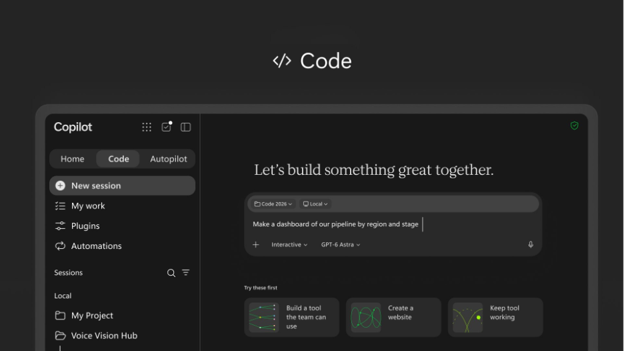
[Rollout Schedule:] - Copilot Code: Begins with the Frontier program in late October 2026.
[Impact on Your Organization:] Who is affected: - Users in the Frontier program who have a Microsoft 365 Copilot license and are enabled for usage-based billing.
- Microsoft 365 admins who manage the Copilot app, spending policies, and usage-based billing.
Platforms/Services: - Microsoft Copilot app on Windows
- Microsoft Copilot on the web
- Microsoft 365 admin center
- Copilot Managed Runtime
- Work IQ
- GitHub, when enabled
What users can do with Copilot Code - Users access Code from the Copilot app navigation pane and describe what they want to build. Copilot can ask clarifying questions and use their work context to build the solution.
- Users can refine what they build through conversation or direct edits. On PC, when local coding is enabled, users can also work with local files and tools or use the terminal.
- Users can publish projects to Copilot Managed Runtime, a Microsoft-managed cloud environment, and share them with others in their organization. Access to underlying data continues to depend on the user’s permissions.
- Users can connect Code to GitHub when the connection is enabled by an admin.
How admin settings control access Copilot Code uses usage-based billing. To use Copilot Code, users need: - A Microsoft 365 Copilot license.
- A spending policy.
By default: - Cloud coding sessions are enabled on web and PC for eligible users with a Copilot spending policy.
- Local coding sessions are disabled by default. Admins can allow local coding on PC by setting Code execution location to Cloud and local in the Microsoft 365 admin center.
- Users covered by a spending policy where the setting “Allow new Agents and services as they become available” is enabled automatically receive access to Code through that spending policy.
For more information about Allow new agents and services setting, see MC1470425. The following settings determine what users see and can use: | Code spending policy | Allow users to discover and use AI experiences enabled by usage-based billing | Code execution location | What users see | | Assigned | No effect | Cloud (default) | Code with cloud coding sessions | | Assigned | No effect | Cloud and local | Code with cloud coding sessions and local coding sessions on PC | | Not assigned | On | No effect | Code entry point and welcome page; Code cannot be used |
[Action Required/Recommendations:] Action is required if you want eligible users to use Copilot Code. - Review the Copilot Code blog.
- Deploy the unified Microsoft Copilot app.
- For Windows devices participating in Frontier, set the Microsoft Copilot target channel to Beta.
- Review your spending policies and confirm that Code is included for the users who should have access. If automatic access to new usage-based services is enabled, review which users will automatically receive Code through their existing spending policy.
- Enable Copilot Credit consumption and configure the appropriate spending policies in the Microsoft 365 admin center under Copilot > Cost management.
- Decide whether users should have cloud-only coding or cloud and local coding. Local coding is off by default.
- Prepare your help desk for the new Code experience, including the in-product experience and your organization’s access-request process.
- Review information about Copilot Managed Runtime.
- Review the Frontier program requirements and guidance.
Resources [Compliance considerations:] | Stores new customer data | Users can create projects/apps and publish them to Copilot Managed Runtime. | | Changes how existing customer data is accessed or processed | Code can use Work IQ, including emails, meetings, documents, chats, and connected data, to ground what users build. | | Introduces new user interaction with organizational data | Apps built with Code can use organizational context, and published apps may be shared with others in the organization subject to underlying data permissions. | | Introduces external/third-party integration | GitHub can optionally be connected when enabled by an admin. | | Introduces admin-controlled usage-based billing | Code uses usage-based billing and requires the applicable spending policy for users to use the experience. | | Introduces local execution/data interaction | Admins can optionally enable local coding sessions on PC, allowing users to work with local files and tools. |
|
| (Updated) Microsoft Teams: Report guest invitations for security concernsCategory:Microsoft TeamsNummer:MC1530615Status:stayInformed | Updated November 17, 2026: We have updated the timeline. Thank you for your patience. [What and Why:] Microsoft Teams will enable users to report guest invitations for security concerns directly from Teams. When users receive an unexpected or potentially malicious invitation to join another organization as a guest, they can report it to their IT admin for review, helping identify and mitigate phishing and other abuse through guest invitations. [Rollout Schedule:] General Availability (Worldwide): We will begin rolling out in late November 2026 (previously mid-November) and expect to complete by late November 2026 (previously mid-November). [Impact on Your Organization:] Users can report suspicious guest invitations when declining them in Teams. Reports are shared with their IT admin through the User reported security submissions report in the Teams admin center and with Microsoft for review. 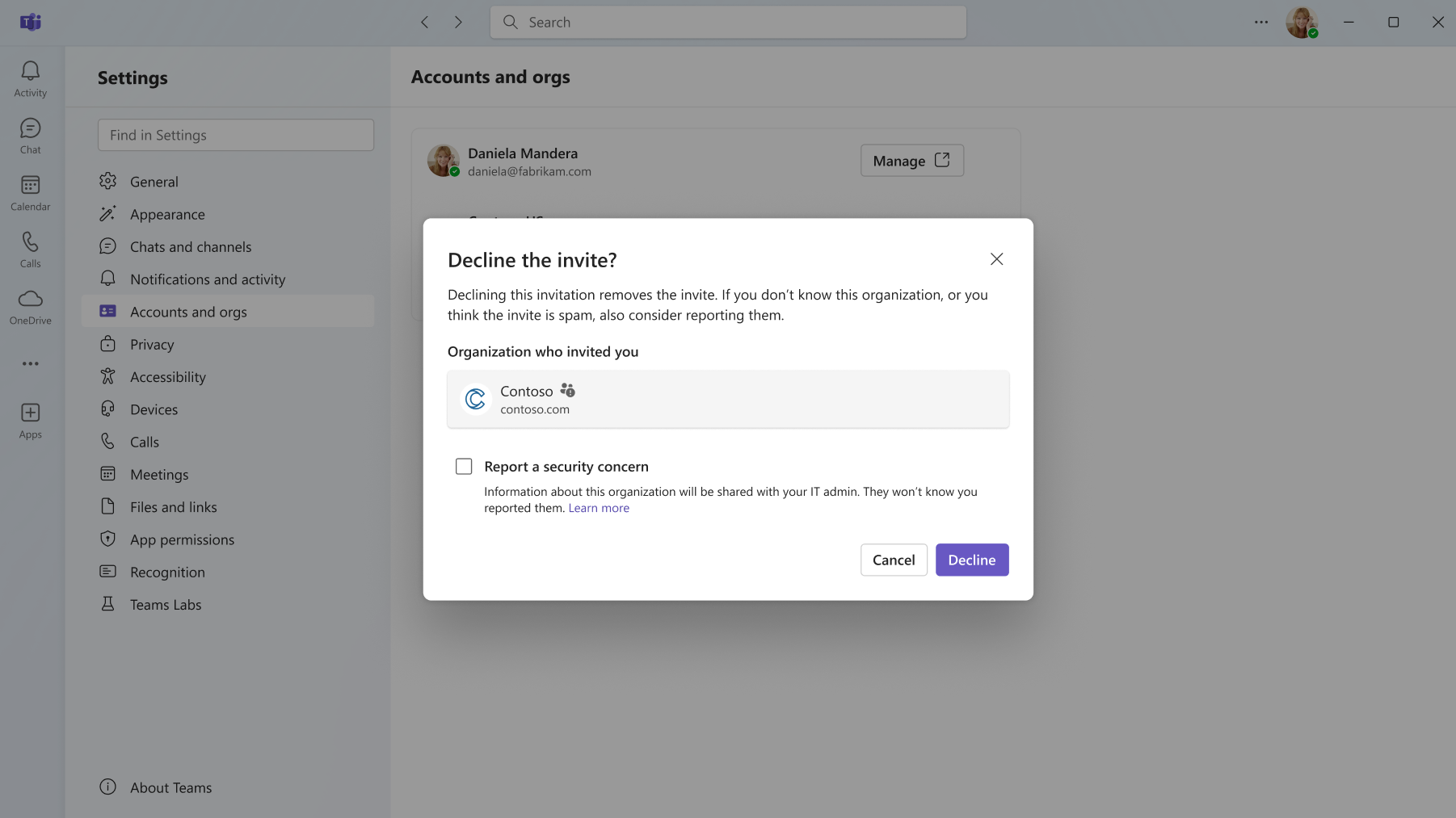
[Action Required/Recommendations:] No action is required for organizations that already have Report a security concern enabled in their Teams messaging policy. Admins can manage this capability through Teams admin center > Messaging policies > Report a security concern. [Compliance considerations:] | Question | Answer | | Does the change include an admin control? | Yes. The capability is controlled through the Teams messaging policy setting for Report a security concern. |
|
| Copilot Studio – Service principal authentication for workflowsCategory:Microsoft Copilot (Power Platform)Nummer:MC1557509Status:stayInformed | We are announcing service principal authentication for workflows in Copilot Studio. This feature will reach general availability by December 17, 2026.
How does this affect me?
With this feature, workflows will be able to be owned under a service principle (a Microsoft Entra app registration) instead of a named user account. This will allow production automation to continue running when people leave or change roles, passwords, or multi-factor authentication. This feature supports least-privilege, auditable, compliant automation and allows for cleaner application lifecycle management across your developer, sandbox, and production environments.
What action do I need to take?
This message is for awareness, and no action is required. |
| Dynamics 365 Contact Center – Set wait times as short as 5 seconds in Orchestration playbooksCategory:Dynamics 365 AppsNummer:MC1557570Status:stayInformed | We are increasing the maximum frequency of orchestration playbook re-evaluations by reducing the wait time from 30 seconds down to 5 seconds in Dynamics 365 Contact Center. This change reached general availability today, November 17, 2026.
How does this affect me?
With this shorter interval, you get finer control over priority escalation and Bullseye pool expansion. As a result, conversations reach the right queue or specialist sooner when wait times or queue status change. Once available, you can update existing playbooks and reduce the wait time to as low as 5 seconds.
What action do I need to take?
This message is for awareness, and no action is required. |
| Dynamics 365 Apps – Upgrade in-queue overflow to Conversation orchestrationCategory:Dynamics 365 AppsNummer:MC1557671Status:stayInformed | We are announcing the ability to upgrade in-queue overflow to Conversation orchestration in Dynamics 365 Apps. This feature reached general availability on November 13, 2026.
How does this affect me?
This feature enables you to upgrade your existing in-queue overflow settings to a Conversation orchestration (CO) playbook, for one queue or many at once.
Key functionality of this feature includes:
- Increased flexibility, with advanced options: Conversation orchestration offers capabilities that in-queue overflow doesn’t, including a wider range of conditions, actions tailored to different customer scenarios, and a single playbook that can be reused across multiple queues.
- Review before you confirm: See how your settings carry over to the playbook. Nothing changes until you confirm.
- One place for new overflow: New in-queue overflow configurations are now created in Conversation orchestration.
Playbooks that match your current in-queue overflow setup are free. Playbooks with additional conditions, branches or context variables use Copilot credits. Your existing in-queue overflow keeps working and remains editable until you choose to upgrade.
What action do I need to take?
This message is for awareness, and no action is required.
If you would like more information on this feature, please visit Upgrade legacy in-queue overflow to a conversation orchestration playbook. |
| Agent 365 Business Analytics app experienceCategory:Microsoft Viva
Microsoft Copilot (Microsoft 365)Nummer:MC1557727Status:stayInformed | [What and why:] We’re adding new capabilities to cost management in Microsoft 365 admin center that build on the FinOps for AI capabilities we announced in September in MC1479276. We’re also introducing Agent 365 Business Analytics, a new web app for business leaders and their managers to bring AI spend, usage and value together in one place to answer three questions: What’s driving my AI spend? What work is it supporting? Where should I invest next? Agent 365 Business Analytics begins rolling out in Frontier public preview on November 17, 2026. Changes to the admin experience for Agent 365 Business Analytics, including access management, are covered in a separate Message Center post: “Microsoft Agent 365 Business Analytics: Introducing Access Management”. More details on use case classification are covered in a separate Message Center post. Cost management in Microsoft 365 admin center - Spend, use case and value insights: See total spend across Microsoft AI services, including Cowork, with drill-down by user and model (Generally available, November 2026). See what people use AI for, mapped to a taxonomy of more than 6,000 use cases. Measure Cowork value with estimated dollar value, and customize time savings and dollar value for each use case (Frontier, November 2026). Spend and value insights then expand to non-Microsoft agents and AI services (Frontier, December 2026).
- Forecasting: Forecast spend based on the current burn rate at tenant-level and agent-level. (Frontier, November 2026)
- Optimization recommendations: Flag agents with unusual activity, such as spend spikes or high volume, and get model routing recommendations. (Frontier, November 2026)
- Multi-tenant management: Manage spend across tenants. (Public preview, November 2026)
- Delegated policy management: Hand off spending policy management to another admin (Frontier, November 2026), and then to business leaders (Frontier, December 2026).
Agent 365 Business Analytics (Frontier public preview) Highlights of the Frontier public preview include: - Cost and forecasting (November): See cost in currency alongside Copilot Credits across licensed and usage-based AI services, forecast spend, and model what-if scenarios such as a per-person spend cap or a different model mix.
- Service and model insights (November, December for Work IQ API): Drill into Copilot Cowork (including breakout by output type and skills used), Copilot Code, Autopilot, agents, and GitHub Copilot. See which models and providers are used most with flexible time ranges and custom HR attributes.
- Use case and value insights (November for Cowork, December for other AI services): See what work AI supports and which work drives cost, and track Cowork assisted hours, satisfaction rates, and estimated value based on time and hourly-rate assumptions you set.
- GitHub Copilot cost and budget (November): View metered spend alongside usage and adoption by organization, cost center, repository and model.
- Export (November, November end for session-level data): Programmatically export usage and cost data to CSV, Power BI or Microsoft Fabric. Session-level data for custom reporting and chargeback (admins only).
- Privacy (November): Minimum group size continues to hide aggregated insights for groups below your configured threshold, and existing tenant-level values are preserved.
Agent 365 Analytics is available through https://aka.ms/a365analytics. For more information, please see https://aka.ms/a365businessanalytics/blog. [Rollout schedule:] - Agent 365 Business Analytics: Rollout begins November 17, 2026, starting with Frontier tenants that have 50 or more Copilot licenses. Access expands to all Frontier tenants by December 7, 2026. Access to spend and value data from connected non-Microsoft AI platforms requires Agent 365 and/or Microsoft 365 E7 licensing.
- Cost management in Microsoft 365 admin center: Capabilities begin rolling out November 17, 2026. Access to spend and value data from connected non-Microsoft AI platforms requires Agent 365 and/or Microsoft 365 E7 licensing.
[Impact on Your Organization:] Who is affected: Frontier-program organizations in Worldwide environments as rollout reaches their tenant; existing Viva Insights users/admins (roles carry over); admins managing usage-based AI billing and cost management. Platforms/Services: Web – Agent 365 Business Analytics, Microsoft 365 admin center, Viva Insights. What will happen: - Agent 365 Business Analytics becomes available at aka.ms/a365analytics as rollout reaches each tenant; Viva Insights roles/settings (incl. minimum group size) carry over automatically.
- For tenants without Viva Insights, global admins, the CEO, and their next two management levels get tenant-level access by default; managers of 10+ person teams get org-level insight access. Cost data for tenant-level access stays off until an admin enables it.
- Manager-hierarchy data comes from Microsoft Entra ID by default; admins can upload a .csv or use MODIS to override HR attributes.
- Use case classification and Cowork AI value calculation are on by default for eligible tenants/users (admin-manageable; users can opt out of Cowork classification) – see the separate access-management post for details.
- Identifiable user-level data is off by default; admins can enable it per user/group via a Viva feature access management policy.
- Viva Insights will show a banner promoting Agent 365 Business Analytics.
[Action Required/Recommendations:] No action is required for the Frontier rollout (staged through Dec 7, 2026). To prepare: - Review Frontier program enrollment and who should get preview features: Get started with Frontier.
- Review who has access, including identifiable user-level data access: Roles in Viva Insights.
- Review minimum group size and other privacy settings against your organization’s requirements.
- Review use case classification and Cowork AI value settings (see the separate use case classification post).
- Verify the Microsoft Entra ID manager hierarchy is current, or upload/override HR attributes via .csv or connector.
Additional information: Agent 365 Business Analytics overview, use case insights overview, forecasting/what-if modeling, Cowork value metrics, usage-based billing overview. [Compliance considerations:] | Does the change store new customer data? | Aggregates AI spend/usage/value data (e.g. Cowork assisted hours, cost) with organizational data from Entra ID or uploaded HR attributes. | | Does the change introduce/modify AI capabilities interacting with customer data? | Analyzes Copilot Cowork/Code, Autopilot, agent and GitHub Copilot usage, including use-case classification, to produce insights. | | Does the change alter admin monitoring/reporting? | New cost-management and usage-reporting capability with new access/privacy controls (group-size threshold, identifiable-data opt-in, classification opt-out). |
|
| Autopilot availability in FrontierCategory:Microsoft Copilot (Microsoft 365)Nummer:MC1557730Status:stayInformed | [What and why:] Autopilot will begin a phased roll out within Frontier Public on November 17, 2026. We will give Admins 24 hours notice prior to enabling Autopilot in a tenant. Autopilot is an always-on, cloud-based personal agent that takes work off your plate and keeps delegated goals moving over time, rather than working one prompt at a time. Autopilot has its own account and identity, storage and mailbox, and its own remote computer. Access controls, approval guardrails and supported information-protection and compliance capabilities help keep delegated work within approved boundaries. [Rollout schedule:] - Frontier Public roll out begins November 17, 2026.
- Autopilot rolls out in phases to eligible customers.
- General availability timing will be confirmed separately.
[Impact on your organization:] Who is affected - Organizations enrolled in Frontier
- Microsoft 365 admins
- End users who meet licensing and admin configured prerequisites
Platforms / Services - Microsoft 365
- Microsoft Copilot
What will happen - Autopilot becomes available to tenants enrolled in Frontier on a rolling basis
- Autopilot is OFF by default and not available unless admins complete required enablement steps
- Users are unable to create an Autopilot unless all admin prerequisites are met
[Action required / Recommendations:] Pre-requisites The person responsible for the Autopilot (i.e., the accountable user to whom the agent is assigned) is required to have a Microsoft 365 Copilot license and consumption billing enabled. Availability is initially limited to eligible US customers. In addition, the following controls are required: - Identity platform: Microsoft Entra Agent ID. Provisioned automatically.
- Isolated runtime environment: Microsoft local (MXC)
- Immutable audit logs and cost management: Microsoft 365 audit logs and Agent 365 cost management.
The following controls are highly recommended: - Access and authorization governance: Microsoft Entra ID Governance (least-privileged access), Microsoft Entra Global Secure Access (tool, MCP, and data inspection), and Microsoft Entra Conditional Access.
- Data security and insider risk: Microsoft Purview Data Loss Prevention and Microsoft Purview Insider Risk Management.
- Threat protection: Microsoft Defender XDR and Dynamic Agent Risk.
For the most secure configuration, the following controls are also recommended: - Agentic security: Microsoft Perception (limited preview), Microsoft Entra Conditional Access dynamic controls (limited preview), Microsoft Entra ID Governance dynamic permissions (limited preview)
This licensing and controls guidance applies to Frontier Public Preview. Additional requirements and security recommendations may apply at General Availability. How do I get these required and highly recommended capabilities from Microsoft? - Required Microsoft Security capabilities: Intune P1/ME3, Any Microsoft 365 commercial license
- Highly recommended Microsoft Security capabilities: Entra Suite, Purview Suite/ME5, Defender Suite/ME5, Agent 365 paid license
- Most secure configuration: User-based billing
Admin actions (required) - Admin turns on access to Autopilots in MAC
- Admin sets up a Copilot Credits billing policy
- Admins enable Autopilot for a security group
User actions - Navigate to the Autopilot in the left-hand panel of the Copilot Home experience and select ‘Create Your Autopilot’
- Communicate with your Autopilot in Teams, the Copilot app or Outlook
Recommendations - Review this change with security and compliance stakeholders before enabling
Compliance considerations Autopilot is off by default. Administrators control access through the Microsoft 365 admin center and security-group assignments. Autopilot has its own identity; work performed on a user’s behalf uses that user’s permissions. Automated checks review consequential actions, but some actions can proceed without a separate confirmation. Before enabling this Frontier preview, review the Autopilot documentation with your security and compliance teams. Memory is always on in this release, and Microsoft 365 Copilot personalization settings do not apply. Data-protection and audit capabilities have preview limitations; Autopilot conversations are not yet covered by eDiscovery, retention, or legal hold. |
| Microsoft Copilot: Continue using models after reaching usage limits with Copilot CreditsCategory:Microsoft Copilot (Microsoft 365)Nummer:MC1557754Status:planForChange | [What and Why:] We’re introducing the option to continue using models in Copilot Chat and Office through usage-based billing (UBB) after reaching the usage limits included in a Microsoft 365 Copilot license. After reaching a limit, users can continue with Auto without consuming Copilot Credits or, if they have UBB enabled, can continue with the selected model by consuming Copilot Credits. New credit indicators in the UI help users understand when their work consumes Copilot Credits, while spending policies give administrators control over access and spending. This capability was originally announced in MC1479276 and is rolling out alongside the models available only through usage-based billing announced in MC1519122. Additionally, models offered in Chat and Word, Excel, and PowerPoint will now be visible in the model picker. Models that a user does not have access to will be greyed out and users will not be able to select them. [Rollout Schedule:] - Frontier: Rolling out now.
- General availability: Planned for early December 2026 in the Worldwide production cloud.
[Impact on Your Organization:] Who is affected: End users with a Microsoft 365 Copilot license. To use models with usage-based billing in Chat and Word, Excel and PowerPoint, users must also have access to available Copilot Credits through an applicable spending policy that includes the Models with usage-based billing in Chat and Office service. Platforms/Services: Copilot Chat in the Microsoft Copilot app and Copilot in Word, Excel, and PowerPoint across web, desktop, and mobile. What will happen: - When users reach an applicable model usage limit included in their license, they can continue with Auto without consuming Copilot Credits. Users that have UBB enabled can instead continue with the selected model using Copilot Credits.
- The new Models with usage-based billing in Chat and Office service will be available in spending policies.
- Access to models with usage-based billing requires the service to be included in an applicable spending policy, with credits available. Users without this access cannot use models with usage-based billing.
- Existing spending policies with Auto-apply new services enabled automatically include newly supported services as they become available. Policies with this setting disabled require administrators to add the service.
- A new credits icon helps users understand credit availability and whether their current experience consumes credits:
- A filled icon indicates that usage is metered and consumes Copilot Credits.
- An unfilled icon indicates that usage is not metered and does not consume Copilot Credits.
- Hovering over the icon shows credit usage details and an option to open a pane with additional information.
- Users can type and submit /cost as a prompt in Copilot to view details about their current session.
- Users will see models offered in Chat and Word, Excel, and PowerPoint visible in the model picker. If the user does not have access to a model, it will be greyed out, and the user will not be able to select it.
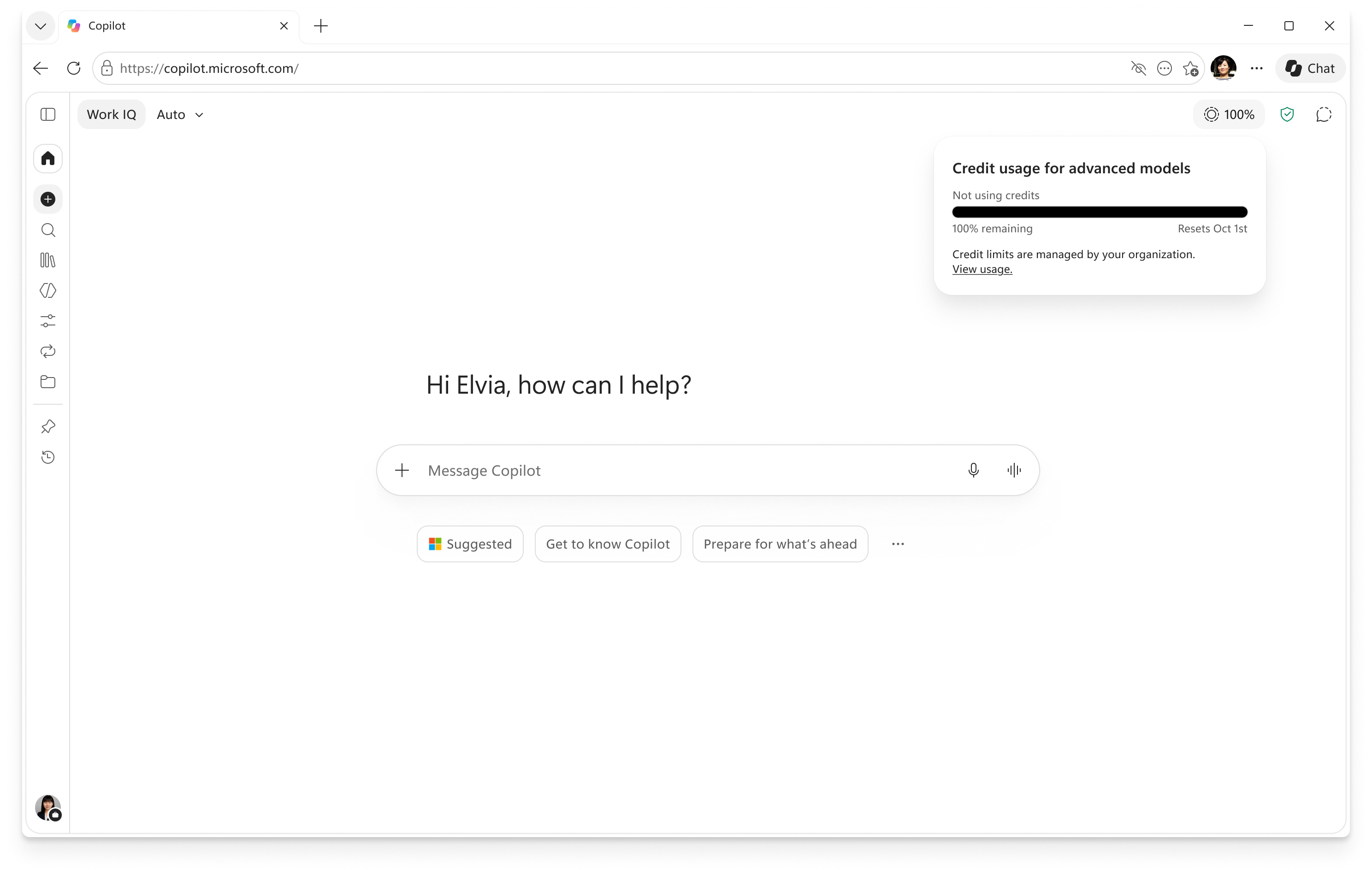
Image of credit icon and usage details. 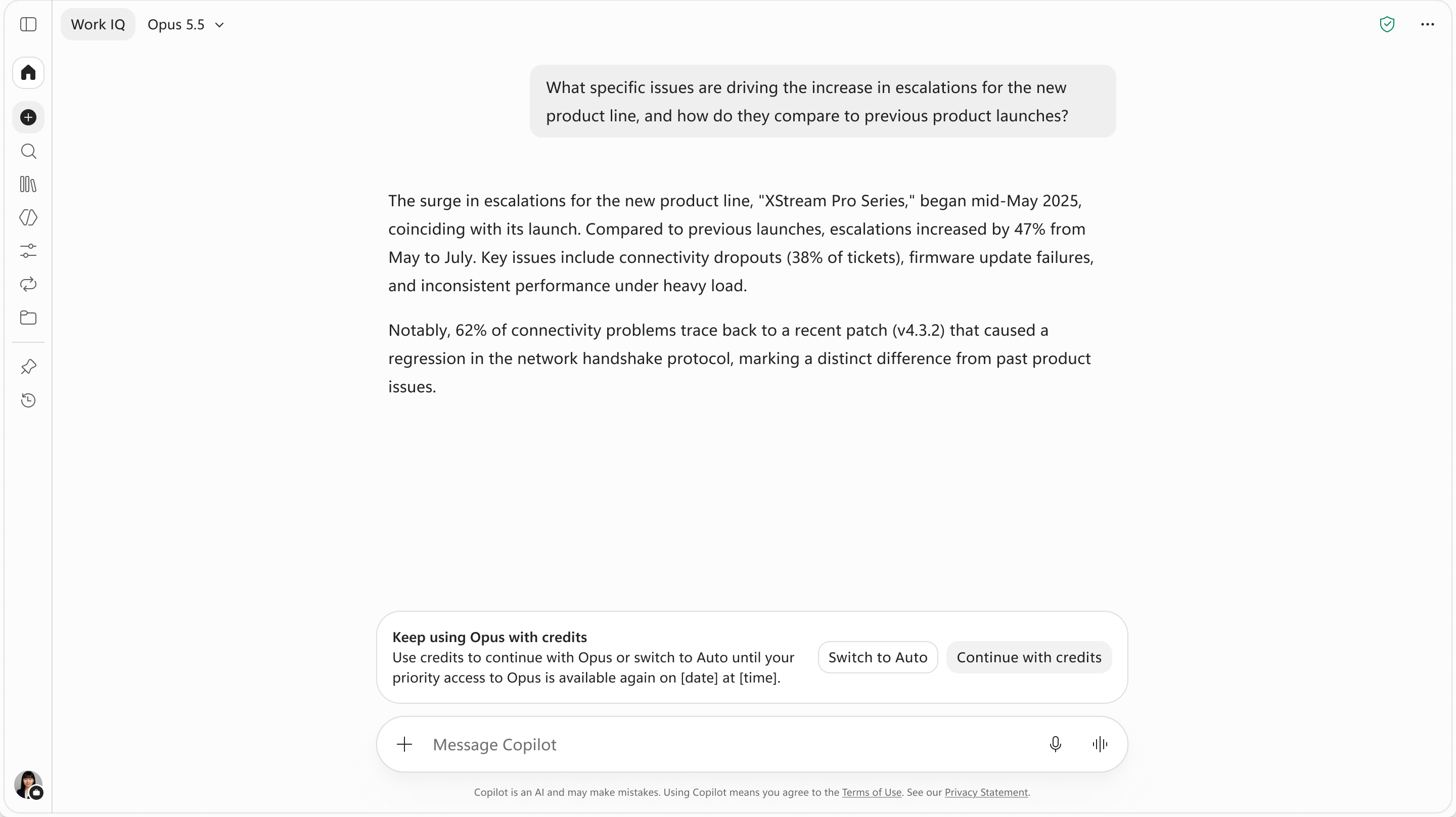
Image of banner allowing users to continue with credits if they have UBB enabled. Action Required/Recommendations:- Review existing spending policies. In the Microsoft 365 admin center, go to Copilot > Cost Management > Configuration and review the policies that apply to your users.
- Confirm service access. To allow usage-based model access, ensure the applicable policy includes Models with usage-based billing in Chat and Office, has an appropriate billing method, and has credits available.
- Review policy scope, limits, and alerts. Policies can apply to all users or selected Microsoft Entra ID security groups. Confirm the intended audience and configure spending limits and notifications.
- Prepare users and support teams. Explain the choice between Auto and credit-consuming model usage, the new credit indicators, and
/cost.
Use these resources to configure and manage access: [Compliance considerations:] | New way for end users to interact with generative AI | Yes | Eligible users can continue using a selected model after reaching an included usage limit by consuming Copilot Credits. | | Administrative control, including Microsoft Entra ID group membership | Yes | Administrators control access through service selection in spending policies. Policies support security-group targeting, spending limits, and alerts. [learn.microsoft.com] |
|
| Microsoft 365 Copilot: Use case classification for agent sessions and Copilot Cowork (Frontier public preview)Category:Microsoft Copilot (Microsoft 365)Nummer:MC1557759Status:stayInformed | [What and why] Use case classification is coming to public preview for Microsoft Frontier public tenants. This capability classifies agent sessions and user activity in Microsoft Copilot Cowork against a predefined taxonomy of use cases. These insights help organizations understand the work performed by users and agents, identify which use cases consume the most AI credits, and find opportunities to consolidate agents and optimize AI investments. Use case classification also provides the foundation for AI value metrics, including AI value for Copilot Cowork. [Rollout schedule] - Frontier preview: Beginning in mid-November 2026 and expected to complete by late November 2026
[Impact on your organization] Who is affected - Microsoft Frontier public tenants using eligible agents or Microsoft Copilot Cowork
Platforms and services - Microsoft 365 Copilot
- Microsoft Copilot Cowork
- Microsoft 365 admin center
- Microsoft Copilot Studio
- Azure AI Foundry
- Agent 365 Connected platforms
What will happen Use case classification will be enabled by default for eligible Frontier tenants and users. AI value calculations, currently limited to Copilot Cowork user activity, will also be enabled by default. The capability supports two types of activity: Agent sessions - Sessions from agents built with Copilot Studio and Azure AI Foundry, declarative agents, and third-party agents registered through Agent 365 Connected platforms will be classified according to the work performed.
- Eligible admins can review use cases and session counts in the agent Activity tab and Agent Map in the Microsoft 365 admin center.
- These classifications are not shared with end users or agent makers.
Work activity in Microsoft Copilot Cowork - User activity in Copilot Cowork will be assigned to the predefined use case that most closely represents the work performed.
- Eligible admins can view aggregated Cowork use cases, associated costs, and estimated value in the Microsoft 365 admin center under Cost Management > Consumption > Use cases.
- Admins can disable classification for specific users or groups, and eligible users can opt out through the Data and privacy tab in their Microsoft profile editor.
[Action required and recommendations] No action is required. Use case classification and AI value calculations will be enabled by default for eligible Frontier tenants and users. Global Administrators and AI Administrators can manage these capabilities through three independent controls: - Agent session classification: Turn off classification for the entire tenant in the Microsoft 365 admin center under Agents > Settings > Activity classification.
- Copilot Cowork work activity classification: Use Feature access management to create a policy that disables classification for the entire organization, specific groups, or individual users. Eligible users can also opt out through the Data and privacy tab in their Microsoft profile editor.
- AI value calculations: Turn AI value metrics on or off and customize the inputs used to calculate AI value in the Microsoft 365 admin center under Agents > Settings > AI value. AI value calculations based on use case classifications are currently limited to Copilot Cowork.
We recommend that admins: - Review the available classification and AI value controls to determine whether changes are needed to align with organizational requirements.
- Consider notifying users about work activity classification and the available opt-out option.
Additional considerations: - When classification is turned off, it stops within one day. Existing classification results are hidden, not deleted.
- If classification is turned back on, it resumes from that point without classifying activity from the period when it was disabled.
- Classifications use a predefined taxonomy rather than tenant-specific categories, so confidential project names are not surfaced as use cases.
- Individual user classifications are not visible to other people. Organization leaders see work activity use cases only as aggregated insights.
- Classifications are directionally accurate and intended to identify organizational trends, not audit individual interactions.
Learn more [Compliance considerations] This change introduces AI-based classification of agent sessions and Copilot Cowork activity, with associated reporting and administrative controls. Organizations should review these capabilities and controls against their privacy and compliance requirements. |
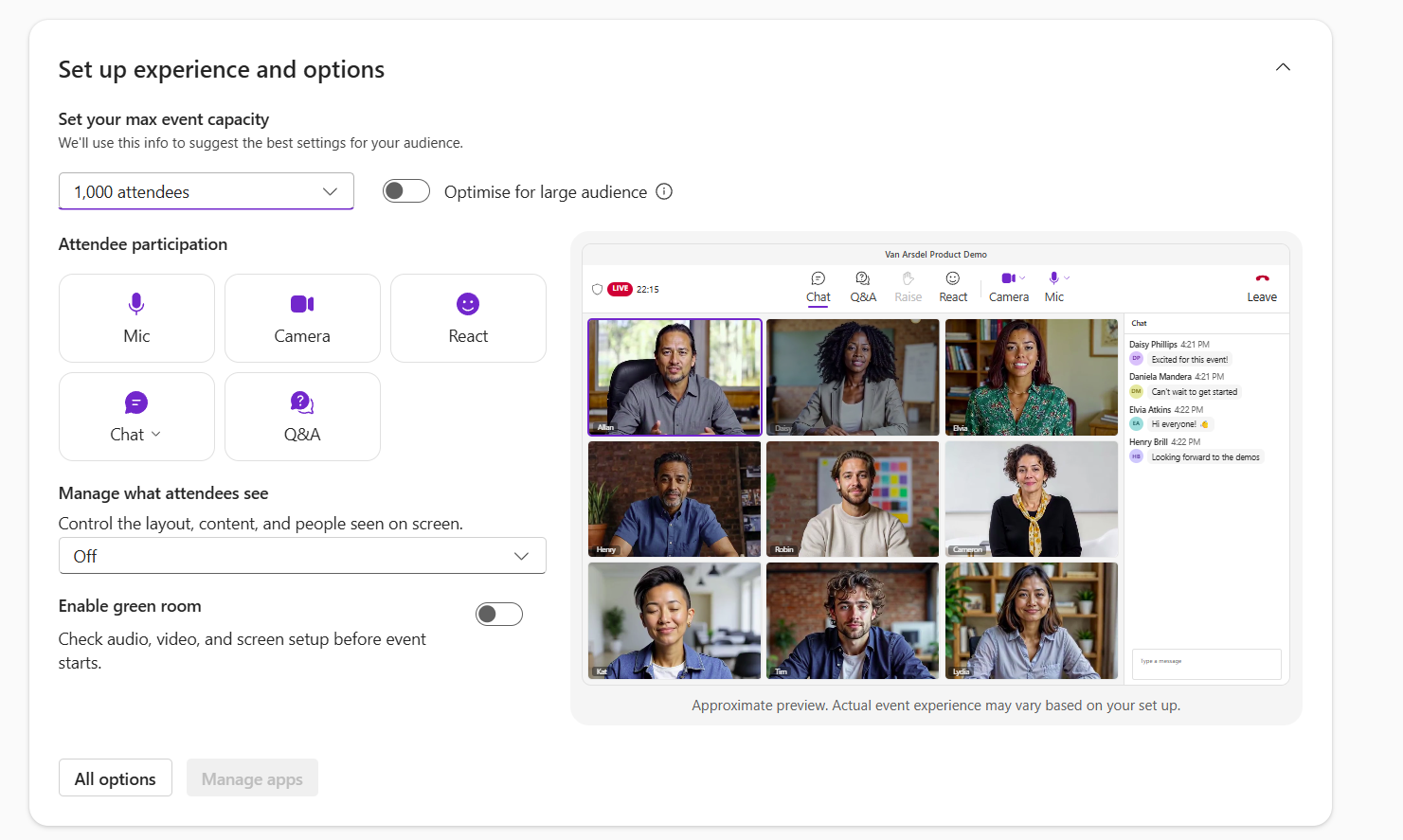
| Microsoft Teams: Registration capacity for town halls and webinars increases to 20,000Category:Microsoft TeamsNummer:MC1557760Status:stayInformed | [What and why] Starting in December, registration capacity for Microsoft Teams town halls and webinars scales with the event’s attendee capacity, up to 20,000 registrations per event. Organizers with Teams Enterprise can allow up to 3,000 registrations. Organizers with Attendee Capacity Packs can allow up to 20,000. Organizers can use this to plan large-scale events with registration. [Rollout schedule] - General Availability (Worldwide): We will begin rolling out in early December 2026 and expect to complete by late December 2026.
[Impact on your organization] Who is affected - Organizers of Teams town halls and webinars that use registration
- Admins who manage Teams events policies and Attendee Capacity Pack licenses
Platforms and services - Microsoft Teams (town halls and webinars)
What will happen - Registration capacity scales with attendee capacity, up to 20,000 registrations per event.
- Organizers with Teams Enterprise can allow up to 3,000 registrations.
- Organizers with Attendee Capacity Packs can allow up to 20,000 registrations.
- Large webinars with registration don’t support broadcast-style streaming, which is available with town halls.
- Organizers still need the right events policy. No new policy access is needed, only the right Attendee Capacity Pack where applicable.
- Existing Teams events policies and admin controls don’t change.
- We plan to support more registrations per event in future releases.
[Action required and recommendations] No action is required. To prepare, you can: - Tell organizers about the higher registration limits.
- Make sure organizers who need more than 3,000 registrations per event have an Attendee Capacity Pack of the right size. Assign packs in the Teams admin center (Add-on Licenses > Teams Events).
- Update internal training and documentation that mention a 1,000-registration limit.
- Review your Teams events policies in the Teams admin center (Meetings > Events policies) to confirm they meet your organization’s needs.
[Compliance considerations] No compliance considerations identified. Review as appropriate for your organization. |
| Microsoft Agent 365 Business Analytics: Introducing Access ManagementCategory:Microsoft Viva
Microsoft Copilot (Microsoft 365)Nummer:MC1557764Status:stayInformed | [What and why] We are introducing Access Management for Agent 365 Business Analytics, previously Copilot Analytics, so admins can manage who has access and what they can do directly in the product. The new Access Management experience brings role assignment and permissions into one place for Global administrators, AI administrators, and Viva Insights administrators. This simplifies the previous experience that involved managing access across Viva Feature Access Management (VFAM) settings in the Microsoft 365 admin center and in-product Manager Settings. At the core of the new model are Access Policies, rules that define the capabilities users can access and the data they can see. Each policy combines two components: - Permission Set: Defines what users can do, such as access dashboards and reports, export data, customize reports and publish them.
- Partition: Defines the population and datasets users can access, determining whose data they can see and which insights are available.
Admins can assign access policies to individual users, Microsoft Entra security groups, Group Managers, or define users based on organizational attributes. Existing role assignments such as Chief officers, Managers, and Analysts will continue to work, with users automatically transitioned to the corresponding system-defined access policies. The existing Viva Insights Web App Delegation VFAM will continue to control who can use delegation. With the new access model, delegation within a custom partition will mirror the leader’s effective access for that partition. A delegate will never receive more access than the leader and, as the leader receives new access or permissions within that partition, the delegate’s access will automatically stay in sync without requiring the delegation to be updated. [Rollout schedule] - General Availability (Worldwide): Rollout will begin in early January 2027 and is expected to complete by late January 2027.
[Impact on your organization] Who is affected - Global administrators, AI administrators, and Viva Insights administrators who manage access to Agent 365 Business Analytics.
- Users whose access is managed through access policies.
Platforms and services - Agent 365 Business Analytics
- Microsoft 365 admin center
- Microsoft Entra security groups
- Viva Feature Access Management (VFAM)
What will happen - Global administrators, AI administrators, and Viva Insights administrators will assign roles and permissions directly in Agent 365 Business Analytics.
- Global administrators, AI administrators, and Viva Insights administrators will receive Identification and export features automatically.
- Access policies will combine a permission set, which determines what users can do, with a partition, which determines which people and datasets users can see.
- Policies can be assigned to individual users, Microsoft Entra security groups, or, for group managers, organizational attributes.
- Existing role assignments will continue to work, and users will automatically move to system-defined access policies.
- Explicit grants in new access policies can override tenant-level VFAM restrictions.
- The
IdentifiableOutput, Analyst Report Publish, CopilotDashboard Export, Report Customization and Agent Metrics Export VFAM settings will be controlled via permission sets. - The existing Viva Insights Web App Delegation VFAM will continue to control who can use delegation.
[Action required and recommendations] For tenants with the default state of the IdentifiableOutput, Analyst Report Publish, CopilotDashboard Export, Report Customization and Agent Metrics Export VFAM settings, we recommend that you: - Review your current VFAM settings in the Microsoft 365 admin center and check who has the Copilot dashboard, Agent dashboard, export, identifiability, and publish enabled or restricted.
- Confirm who holds the Global administrator, AI administrator, and Viva Insights administrator roles. These admins will manage Access Management.
- Review access lists for leaders, group managers, and analysts against your organization’s privacy requirements.
- Review your partitions and identification, minimum group size, user-level export, and insights settings.
- Chief officers can now view and export company-wide Cost insights. Select Edit for the Chief Officer access policy in the Access management page, and enable the toggle. This gives chief officers and their delegates access to all of the spend and billing measures for usage-based billing services.
- Managers can view and export team-wide Cost insights by default. To disable Cost insights for managers, you can turn off the toggle by clicking on ‘Edit policy’ for the Manager access policy.
Important notice for tenants who have modified the default state any of the previously mentioned VFAM settings by creating custom policies: - In addition to the above, we also recommend that you set up matching access policies within 30 days of availability of the new access management.
[Learn more] We will update this post with new documentation prior to rollout. [Compliance considerations] No compliance considerations identified. Review as appropriate for your organization. |
| Microsoft Viva: Introducing Interactive Insights in the A365 Business Analytics appCategory:Microsoft Viva
Microsoft Copilot (Microsoft 365)Nummer:MC1557766Status:stayInformed | [What and why] We are introducing Interactive insights, an AI-powered feature in Agent 365 Business Analytics, to make it easier for users to understand AI adoption, engagement, and consumption data without manually building queries or reports. Using natural-language questions, users can curate summaries and generate visualizations and reports to identify patterns, understand usage and cost drivers, and inform decisions about AI adoption and investment. Responses are grounded in available data within each user’s authorized scope. [Rollout schedule] - Frontier Preview: Rollout will begin in mid-November 2026 and is expected to complete by late November 2026.
- General Availability (Worldwide): Rollout will begin in late March 2027 and is expected to complete by late April 2027.
[Impact on your organization] Who is affected - Tenants enrolled in the Frontier program.
- Eligible users with the following Agent 365 Business Analytics / Viva Insights / Microsoft 365 roles:
- Chief Officer
- Group Manager
- Analyst with global partition access
- Global Admin
- AI Admin
Platforms and services - Agent 365 Business Analytics
- Viva Feature Access Management (VFAM)
What will happen - Eligible users will see a new Interactive Insights tab in Agent 365 Business Analytics.
- Users can ask questions and follow-ups to explore trends, compare groups, and better understand AI usage and spending without manually building queries or reports.
- Access remains limited to each user’s approved data scope. The feature does not expand users’ data permissions.
- Interactive Insights will be enabled automatically for tenants enrolled in the Frontier program.
Interactive Insights home screen 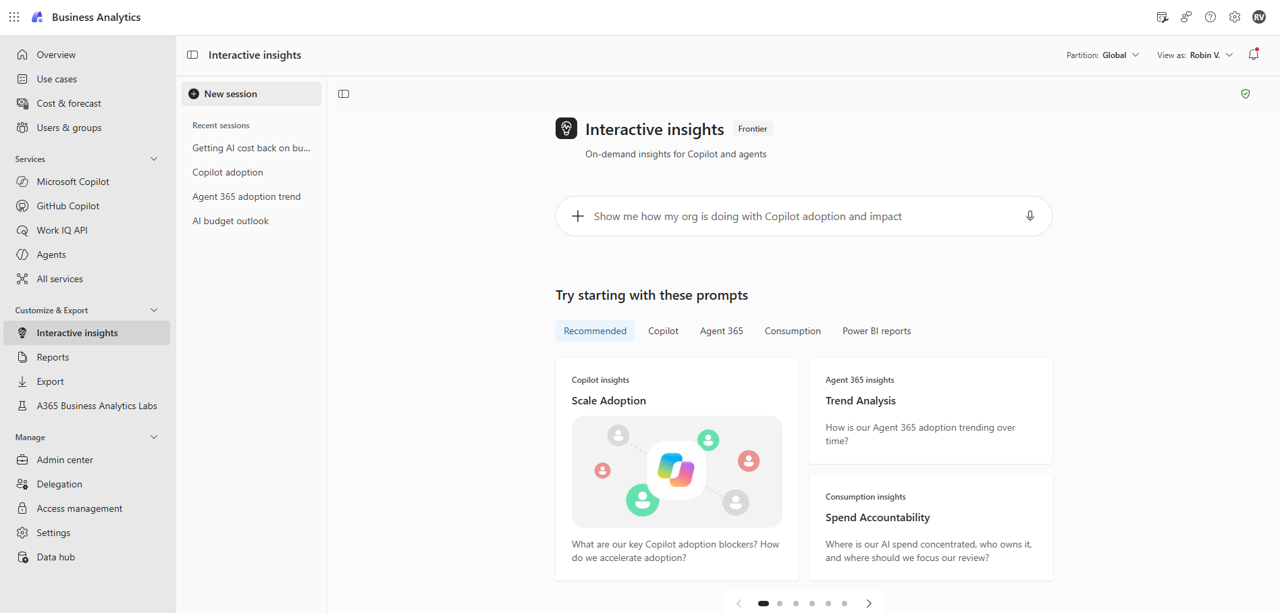
[Action required and recommendations] We recommend that you review eligible users in your organization and communicate the new experience to them. If needed, you can disable Interactive Insights at the tenant, group, or user level by using admin controls. [Compliance considerations] Does the change store new customer data? - No. Interactive insights analyzes customer data already available in Agent 365 Business Analytics and generates summaries and insights for users authorized to access that data. Optional contextual file uploads are user-initiated and subject to administrator configuration.
Does the change alter how existing customer data is processed, stored, or accessed (e.g., documents, emails, chats, etc.)? - No. Interactive insights does not change how existing customer documents, emails, chats, or other source content are processed, stored, or accessed. It provides a new way for authorized users to explore computed insights already available in Agent 365 Business Analytics, within their existing data permissions.
Does the change introduce or significantly modify AI/ML or agent capabilities that interact with or provide access to customer data? - Yes. Interactive insights introduces AI-powered analysis and content generation grounded in data within each user’s authorized scope. It does not modify source records or automatically carry out recommendations.
Does the change provide end users any new way of interacting with generative AI? - Yes. Eligible users can ask natural-language questions, refine analyses through follow-up requests, and generate summaries, visualizations, reports, and presentations.
Does the change modify how users can access, export, delete, or correct their personal data within Microsoft 365 services (GDPR Data Subject Rights)? - No. Interactive insights does not modify underlying personal records or replace existing access, export, correction, or deletion workflows. Users can delete their analysis sessions, and administrators can delete sessions for users, subject to applicable retention and hold requirements.
|
| Power Platform admin center – Reporting API for Copilot Credits (preview)Category:Microsoft Copilot (Power Platform)Nummer:MC1558020Status:stayInformed | We are announcing the Reporting API for Copilot Credits in Power Platform admin center. This feature is now available in public preview.
How does this affect me?
This feature enables you to access Copilot Credit usage from Copilot Studio through the Power Platform API.
The new API methods provide insights on usage by resource, environment, user, and feature. Details on how to use these of the new API methods can be found here.
Admins may leverage these reports for more insight on Copilot Studio usage. These read-only reports can be used along with Power Platform API credit allocations to monitor and optimize resources and environments that consume Copilot Credits.
What action do I need to take?
This message is for awareness, and no action is required.
For more information, please visit: |
| Microsoft Copilot in PowerPoint for Windows, Mac, and the web: Introducing new sales-focused skillsCategory:Microsoft 365 appsNummer:MC1558023Status:stayInformed | [What and why] In late October 2026, we began rolling out sales-focused Copilot skills in PowerPoint to help sellers, account teams, and sales leaders prepare customer materials, work with sales data, and refine presentations for sales conversations. Beginning in mid-November 2026, we will introduce additional skills that support tasks such as: - Preparing customer-facing presentations, including sales pitches, customer business reviews, client portfolio reviews, and proposal or RFP responses.
- Working with sales data, including preparing internal sales reviews for leadership, reviewing pipelines and forecasts, and visualizing sales data.
- Preparing for sales conversations, including creating account briefs, battle cards, and responses to customer objections.
- Refining existing presentations, including adapting pitches for new audiences and reimagining slides.
These examples illustrate the sales skills experience and are not a complete list. Skill names and availability may change as the experience evolves. [Rollout schedule] - General Availability (Worldwide): These additional skills will begin rolling out in mid-November 2026, with rollout expected to complete by late November 2026.
[Impact on your organization] Who is affected - Users with an appropriate Copilot license, including sellers, account teams, and sales leaders.
Platforms and services - Microsoft Copilot in PowerPoint for Windows, Mac, and the web
- Microsoft Copilot Cowork
What will happen - Users will be able to use sales-specific skills to create and refine sales presentation drafts in Copilot in PowerPoint.
- These skills can help sales teams prepare customer and leadership materials more quickly, with content tailored to the audience, opportunity, and next steps.
- Users can continue creating presentations with Copilot in PowerPoint as they do today.
- Initially, users can access these skills under the Sales category in Manage Plugins from the Add sources, skills, and more menu in Copilot.
- When rollout completes, users can enable the Sales plugin from Choose plugins > Discover plugins in the Copilot menu or from Plugins in the left navigation in Copilot Cowork.
[Action required and recommendations] No admin action is required for sales skills in PowerPoint. Admins can manage plugins for Copilot Cowork in the Microsoft 365 admin center and Microsoft 365 App Store. We recommend that you inform sellers, account teams, and sales leaders about the availability of these skills in PowerPoint for Windows, Mac, and web, and that you update internal training materials and documentation as needed. [Learn more] [Compliance considerations] No compliance considerations identified. Review as appropriate for your organization. |
| (Updated) Microsoft Purview | Data Lifecycle Management: New integration with Adaptive protectionCategory:Microsoft 365 suite
Microsoft PurviewNummer:MC791110Status:stayInformed | Updated November 17, 2026: We have updated the timeline. Thank you for your patience. Coming soon for Microsoft Purview: We are announcing the public preview of the integration of Adaptive protection with Data Lifecycle Management (DLM) to help you find the right balance to protect against data sabotage while enabling productivity. This new integration leverages DLM features to provide an additional control for Adaptive protection that automatically preserves items deleted by a user with an elevated risk level, so items can be restored if needed. This message is associated with Microsoft 365 Roadmap ID 392839. [When this will happen:] Public preview: We will begin rolling out in late June 2024 (previously early May) and expect to complete by late July 2024 (previously mid-July). General Availability: We will begin rolling out late January 2027 (previously late December 2026) and expect to complete by late February 2027 (previously mid-January). [How this will affect your organization:] After the rollout, and after you enable Adaptive protection for your tenant, the retention label and auto-apply policy for data lifecycle management will be automatically created for you. This policy will automatically include elevated risk users identified by Microsoft Purview | Insider Risk Management solution. If these users delete content from Microsoft SharePoint, Microsoft OneDrive, or Microsoft Exchange, a retention label is automatically applied to that content to retain it for 120 days. Retention labels are automatically applied to unlabeled content deleted by these users. When these users are no longer at the elevated risk level, they are automatically removed from the DLM policy, and the system will no longer keep a copy of content they delete. Any content copies previously retained when the user had an elevated risk level will be kept for the 120 days as specified by the retention label. Unlike other retention labeling scenarios, users do not see the retention label, and you do not need to create or manage the retention label or policy. At this time, you can’t change the retention period or assign different policies based on the different risk levels, or for different locations. The single retention label and auto-labeling policy for your tenant is not visible in the Microsoft Purview compliance portal. [What you need to do to prepare:] Learn more: Learn about retention policies & labels to retain or delete | Microsoft Learn If you’re using Adaptive protection and want to automatically retain content deleted by elevated risk users, follow these steps to turn on this new integration. - Sign in to the Microsoft Purview compliance portal.
- Navigate to Data lifecycle management > Microsoft 365 > Adaptive protection settings in the top right corner.
- Turn the setting ON and select Save.


If you’re not using Adaptive protection already, turn on Adaptive protection and the new feature will be enabled along with Adaptive protection. This rollout will happen automatically by the specified date with no admin action required before the rollout. You may want to notify your users about this change and update any relevant documentation as appropriate. |