25-November-2026 Below you will find a collection of news published yesterday. This news consists of Microsoft’s Roadmap when it is updated it will be below with items. Then there will be a section with the message center, if there is anything new there, this will be automatically included. And it contains a piece from blogs that I follow myself and would like to share with you. If I miss something in the blogs that do have an RSS feed, please let me know.
This entire post was automated via Microsoft Flow
have fun reading!
Office 365 Roadmap Updated: 2026-11-25
Additions : 14
Updates : 11
More Details At: www.roadmapwatch.com
Items from the MessageCenter in Microsoft 365
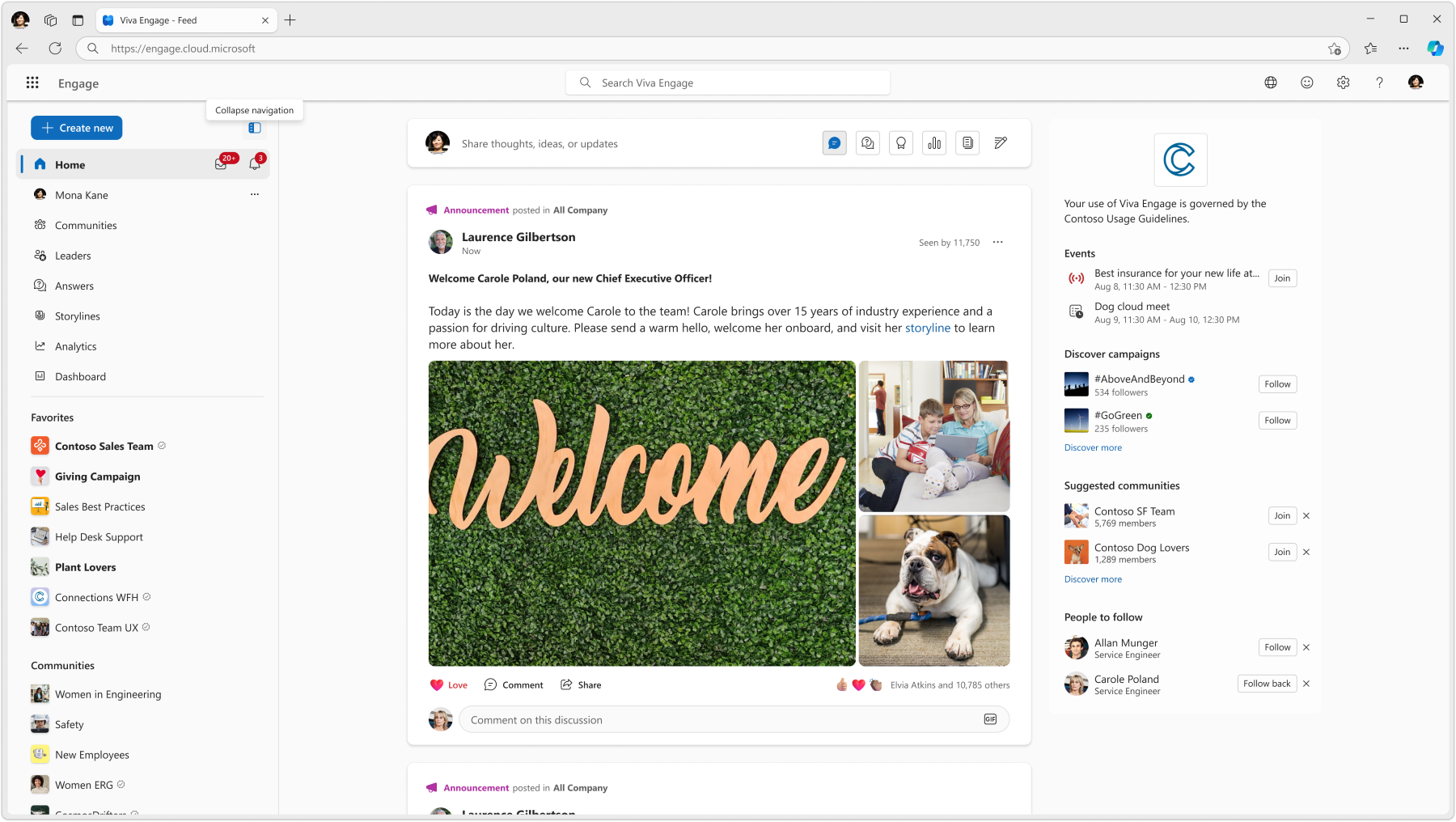
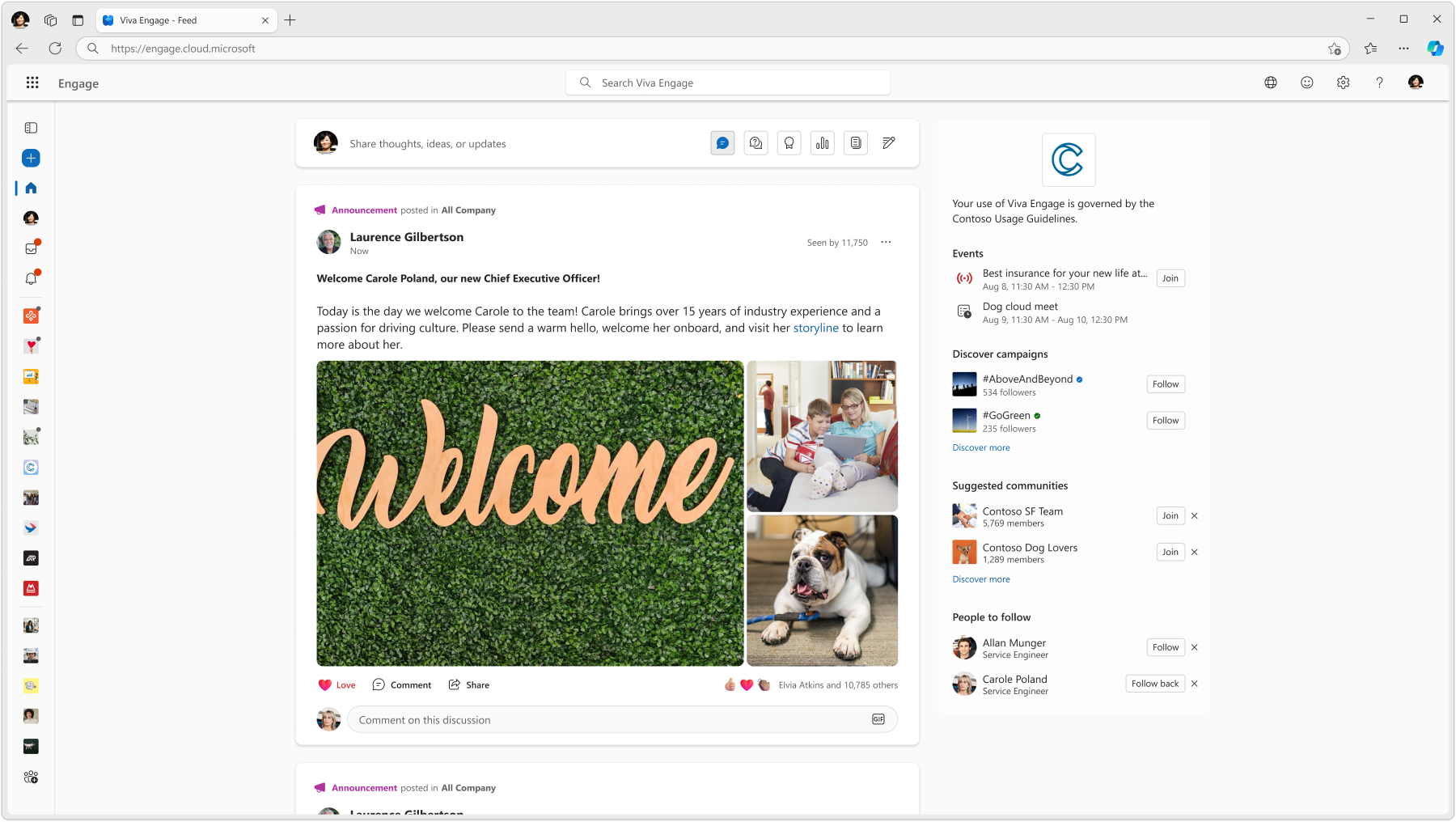
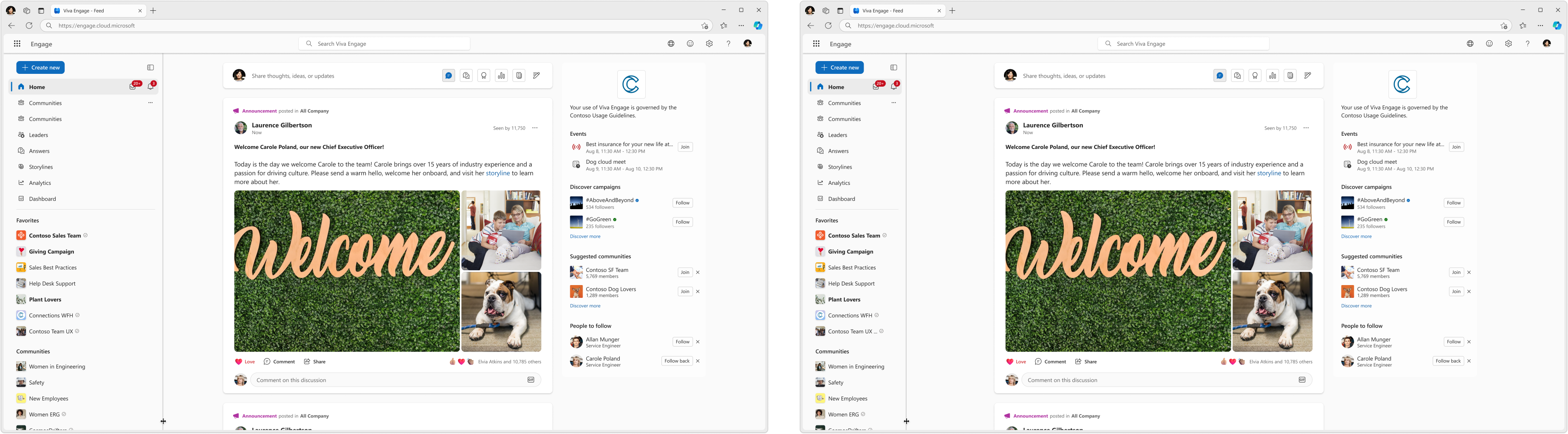
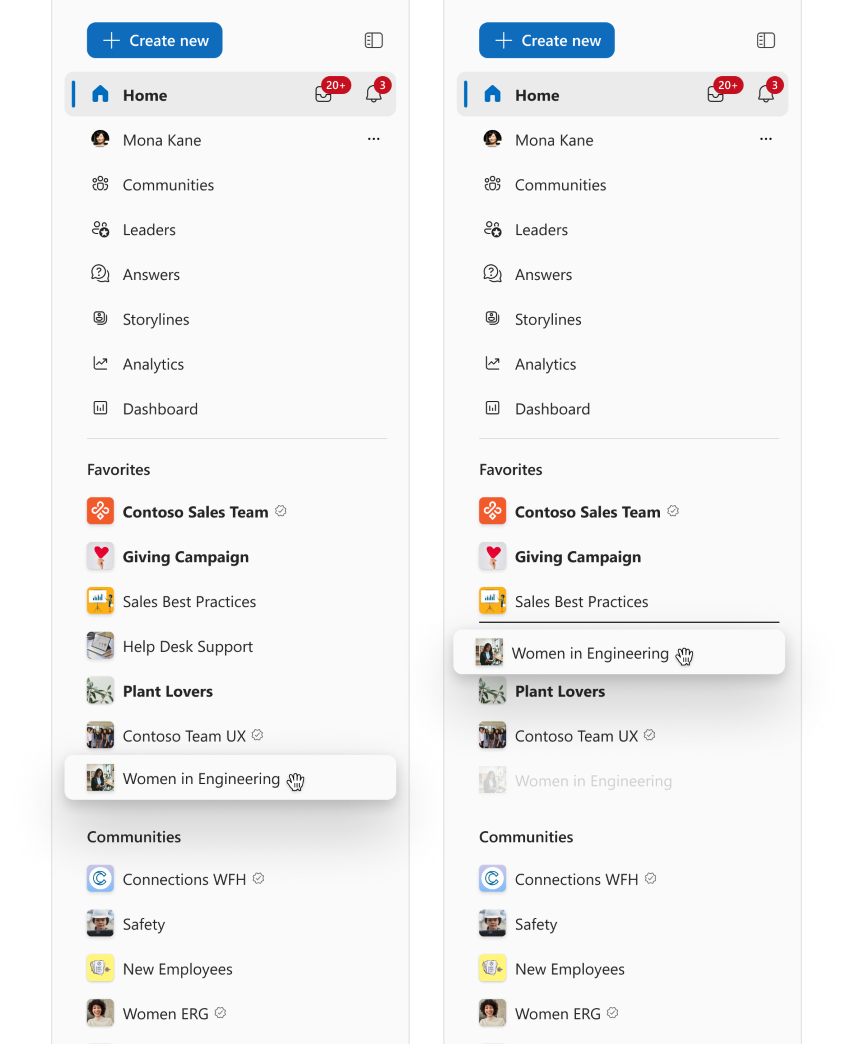
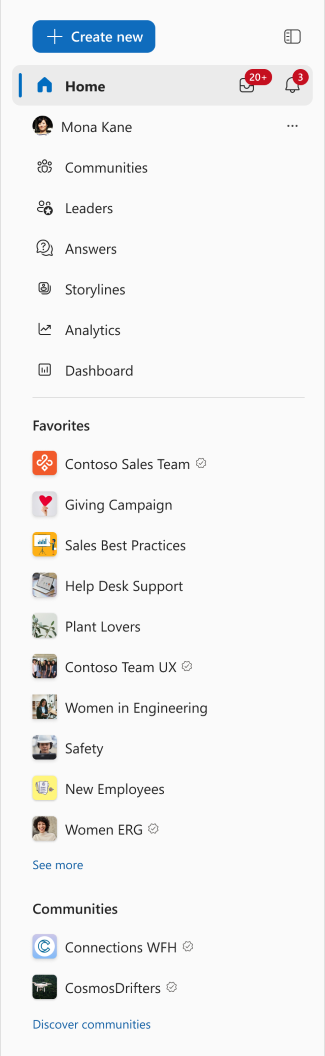
| (Updated) Microsoft Viva Engage: New left navigation controls for collapsing, resizing, and managing favoritesCategory:Microsoft VivaNummer:MC1470424Status:stayInformed | Updated November 24, 2026: We have updated the timeline. Thank you for your patience. [What and why] We’re introducing enhancements to the Viva Engage left navigation experience that give users more control over how they organize and use the navigation pane. Based on customer feedback, these improvements help users work more efficiently by allowing them to customize navigation, manage larger numbers of favorite communities, and optimize screen space while maintaining the same navigation structure and destinations. [Rollout Schedule]
[Impact on your organization] Who is affected
Platforms/Services
What will happen The following capabilities will be available in Viva Engage:
Additional details:
Collapsible left navigation menu:
Collapsed left navigation menu:
Resizable left navigation menu:
Drag-and-drop to reorder favorites:
Unlimited number of favorites:
[Action required/Recommendations] No admin action is required. Recommended actions:
[Compliance considerations] No compliance considerations identified, review as appropriate for your organization. | ||||||||
| (Updated) Microsoft 365 profile card: View dotted-line managers in the organization panelCategory:Microsoft 365 suiteNummer:MC1478957Status:stayInformed | Updated November 24, 2026: We have decided not to move forward with this change at this time. We apologize for any inconvenience. [What and why] The dotted-line manager feature announced in MC1478957 has been postponed indefinitely. We are prioritizing improvements to the profile experience in Microsoft 365 Copilot and do not have a revised rollout date to share. [When this will happen] The previously communicated October 2026 rollout timeline no longer applies. We will update this Message Center post when we have further information about future availability. [How this affects your organization] Your organization should not plan on availability of this feature based on the earlier announcement. We recognize that the previous timeline caused confusion and led some customers to spend time investigating why dotted-line manager information was not appearing. We apologize for the inconvenience. [What you need to do to prepare] No action is required to prepare for this postponed rollout. Please update any internal rollout plans or communications that reference the previous timeline. | ||||||||
| (Updated) Microsoft Teams: Streaming switchboard for NDI sources in meetings and eventsCategory:Microsoft TeamsNummer:MC1521613Status:stayInformed | Updated November 24, 2026: We have updated the timeline. Thank you for your patience. [What and why] A new streaming switchboard in Microsoft Teams will allow event producers to more easily manage and send NDI® sources to production software during Teams meetings and events. Event producers can individually select and stream up to eight NDI sources directly from a Teams meeting or event. [Rollout schedule]
[Impact on your organization] Who is affected
Platforms and services
What will happen
[Action required and recommendations] To prepare:
Learn more [Compliance considerations]
| ||||||||
| Viva Insights: GitHub Copilot metrics will be on by default, and the public preview opt-in setting is being retiredCategory:Microsoft VivaNummer:MC1523085Status:planForChange | Updated November 24, 2026: We have updated the timeline. Thank you for your patience. [What and why] We’re retiring the public preview opt-in setting for GitHub Copilot on the Viva Insights app settings page. After this change, GitHub Copilot metrics will be available by default in the Viva Insights Consumption dashboard for eligible tenants. This change provides a unified view of GitHub Copilot and Microsoft 365 Copilot adoption and usage across developers and knowledge workers. [Rollout schedule] General Availability (Worldwide): Beginning in mid-December 2026 (previously mid-November) and expected to complete by mid-January 2027 (previously mid-December 2026) [Impact on your organization] Who is affected
Platforms and services
What will happen
[Action required and recommendations] No action is required. This change will happen automatically. We recommend that you:
Learn more [Compliance considerations]
| ||||||||
| (Updated) Microsoft Copilot Feedback UX updateCategory:Microsoft Copilot (Microsoft 365) Microsoft 365 Copilot ChatNummer:MC1530595Status:stayInformed | Updated November 23, 2026: We have updated the timeline. Thank you for your patience. [What and Why:] We’re updating the thumbs-down feedback experience in Microsoft Copilot to make it easier for users to provide specific, actionable feedback. Today, many thumbs-down responses are submitted without comments, providing sentiment but limited information about the issue. When users select thumbs down, they’ll be able to select one or more feedback categories and optionally provide additional comments, giving each categorized response a signal that can be routed to the appropriate team or issue type. [Rollout Schedule:] General Availability (Worldwide): We will begin rolling out in mid-November 2026 (previously late October) and expect to complete early December 2026 (previously mid-November). [Impact on Your Organization:] Users who can submit feedback in supported Microsoft Copilot experiences may see the updated thumbs-down feedback form. The planned audience includes users signed in with Microsoft Entra ID organizational accounts, users signed in with consumer Microsoft accounts, and users in Education tenants. The feature isn’t currently planned for Mobile, GCC, GCC High, DoD, or other sovereign cloud environments. The updated feedback experience is planned for Microsoft Copilot, Copilot in Microsoft Edge, Copilot in Microsoft Outlook, and Copilot in Microsoft Teams, across web browsers, Windows, and macOS. The WXPN/Catalyst experience isn’t currently included. When a user selects thumbs down on a Copilot response, they may see selectable categories describing the issue, can select more than one category, and can optionally enter additional feedback in a free-text field. The thumbs-up feedback experience isn’t changing. This update applies only to the existing “Allow users to submit feedback to Microsoft” admin policy; all other feedback policy experiences remain unchanged. During the controlled rollout, some users will continue to see the existing feedback experience. [Action Required/Recommendations:] No admin action is required for this change. It will be visible to users who are already allowed to submit feedback under the existing policy. [Compliance considerations:]
| ||||||||
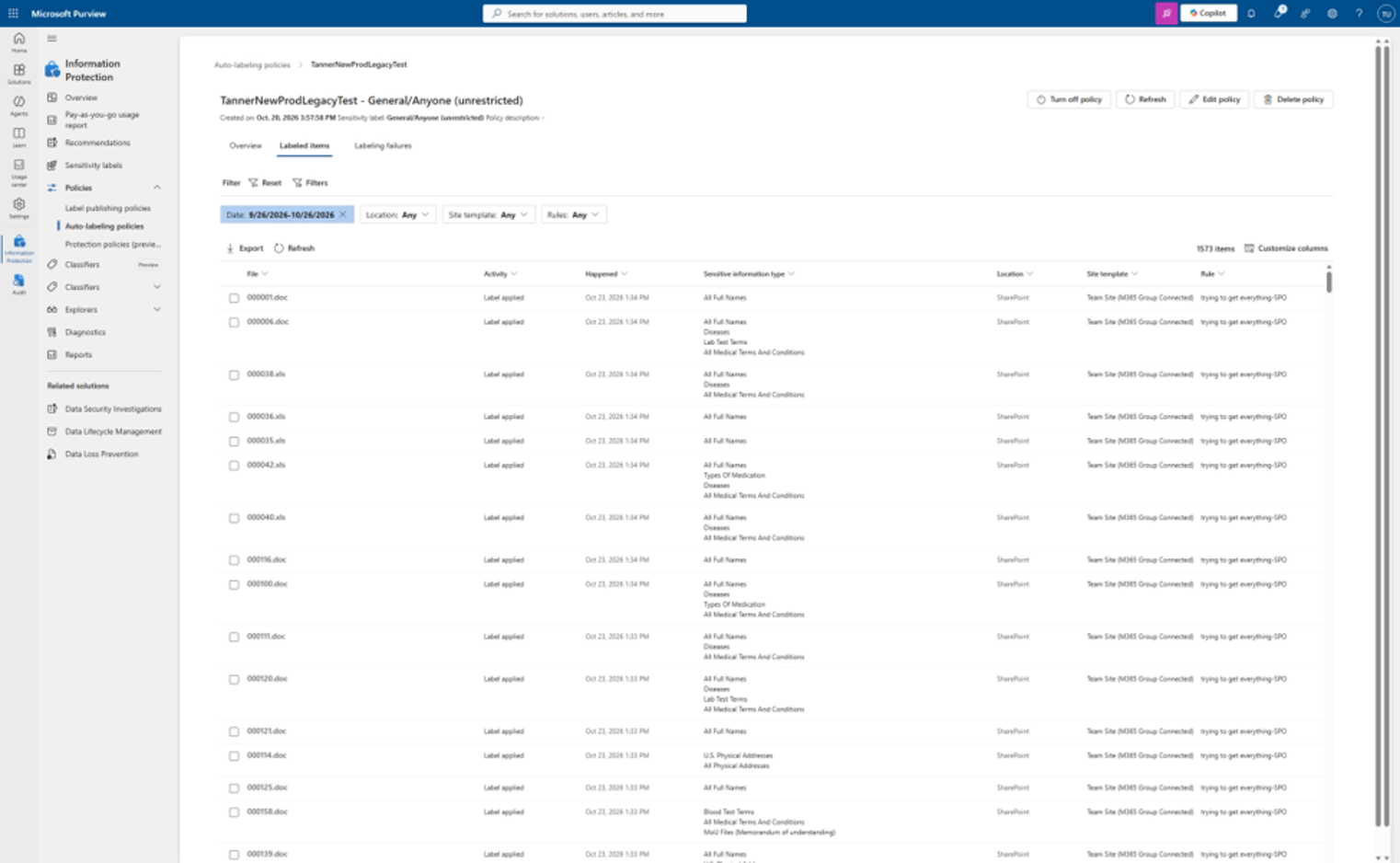
| (Updated) Microsoft Purview | Information Protection: Auto-labeling support for legacy Microsoft Office file formatsCategory:Microsoft 365 suite Microsoft PurviewNummer:MC1530948Status:stayInformed | Updated November 24, 2026: We have updated the timeline. Thank you for your patience. [What and why] Microsoft Purview service-side auto-labeling is adding support for legacy Microsoft Office file formats, including Word (.doc), Excel (.xls), and PowerPoint (.ppt). Organizations can automatically evaluate and apply sensitivity labels to these files in SharePoint and OneDrive. These legacy file formats will be supported in both simulation and enforcement. [Rollout schedule]
[Impact on your organization] Who is affected
Platforms and services
What will happen
[Action required and recommendations] If you want existing auto-labeling policies to evaluate legacy Office files:
New policies do not require the additional edit and policy run. Learn more
[Compliance considerations]
| ||||||||
| (Updated) Microsoft Teams: Pinch to zoom in on shared screensCategory:Microsoft TeamsNummer:MC1532242Status:stayInformed | Updated November 24, 2026: We have updated the timeline. Thank you for your patience. [What and Why:] Get a closer look at shared content in Teams calls and meetings with pinch-to-zoom using your touchpad. Quickly zoom in to make small text and detailed visuals easier to see, then zoom back out for the full view. Existing zoom controls remain available. [Rollout Schedule:] General Availability (Worldwide): We will begin rolling out on late November 2026 and expect to complete by late December 2026 (previously late November). Targeted Release (Worldwide): We will begin rolling out on mid-November 2026 and expect to complete by mid-November 2026. [Impact on Your Organization:] This capability will be enabled for all meetings by default, as an improvement to additional zooming controls. [Action Required/Recommendations:] Review your organization’s sharing policies and inform users and support teams about the addition to existing sharing experience. [Compliance considerations:] No compliance considerations identified. Review as appropriate for your organization. | ||||||||
| Microsoft 365 Copilot: Copilot Workspaces is replacing standalone agent selection with agentic chatCategory:Microsoft 365 apps Microsoft Copilot (Microsoft 365)Nummer:MC1550540Status:planForChange | [What and why] Microsoft 365 Copilot Workspaces (formerly Copilot Notebooks) is moving to an agentic chat experience. As part of this change, Researcher, Analyst, and Designer will no longer be available as standalone agent options within Copilot Workspaces. Instead of selecting or switching between agents, users can describe what they need in plain language. Copilot will automatically apply the appropriate research, analysis, or design skills based on the request and the workspace content. This change simplifies the user experience while preserving existing capabilities. Researcher, Analyst, and Designer will remain available as separate agents in the Microsoft 365 Copilot app for users who prefer working with a specific agent. [Rollout schedule]
[Impact on your organization] Who is affected
Platforms and services
What will happen
[Action required and recommendations] No admin action is required. We recommend that you:
[Compliance considerations] This change introduces an agentic chat experience in Copilot Workspaces, allowing users to interact with research, analysis, and design capabilities through natural language rather than selecting individual agents. Organizations should review this change as appropriate for their compliance requirements. | ||||||||
| [Outlook for iOS and Android] Copilot Chat in Outlook UX improvementsCategory:Exchange Online Microsoft Copilot (Microsoft 365)Nummer:MC1551148Status:stayInformed | [What and Why:] Copilot Chat in Outlook on iOS and Android is getting updated! We are refreshing the Microsoft 365 Copilot Chat experience in Outlook mobile to deliver a more consistent and intuitive experience across Microsoft 365 apps, with improvements to the chat interface, suggested prompts, response presentation, and navigation between chat views – making it easier for users to interact with Copilot while staying in the context of their work in Outlook. [Rollout Schedule:] General Availability (Worldwide): We will begin rolling out on mid December 2026 and expect to complete by late January 2027. [Impact on Your Organization:] After this update, users accessing Copilot Chat in Outlook on iOS or Android will notice:
Users can continue using Copilot for general conversations or within supported Outlook workflows. Existing Copilot capabilities and access controls remain unchanged. [Action Required/Recommendations:] No admin action is required. [Compliance considerations:] No compliance considerations identified. Review as appropriate for your organization. | ||||||||
| Plugins in PowerPoint for Microsoft 365 Copilot [Mac]Category:Microsoft 365 apps Microsoft Copilot (Microsoft 365)Nummer:MC1556095Status:stayInformed | [What and Why:] Plugins are coming to PowerPoint for Mac, adding new skills and connectors that extend what Copilot can do. Plugins bring specialized capabilities and information from connected services into presentation workflows. [Rollout Schedule:] General Availability (Worldwide): We will begin rolling out mid-November 2026 and expect to complete by early December 2026. [Impact on Your Organization:] Users will be able to discover and use plugins available to them in Copilot within PowerPoint for Mac, helping them create and refine presentations with capabilities and content relevant to their work. [Action Required/Recommendations:] Admins can review available plugins and manage access for their organization in the Microsoft 365 admin center. [Compliance considerations:] No compliance considerations identified. Review as appropriate for your organization. | ||||||||
| Microsoft Copilot in PowerPoint for Windows, Mac, and the web: Introducing new sales-focused skillsCategory:Microsoft 365 apps Microsoft Copilot (Microsoft 365)Nummer:MC1558023Status:stayInformed | [What and why] In late October 2026, we began rolling out sales-focused Copilot skills in PowerPoint to help sellers, account teams, and sales leaders prepare customer materials, work with sales data, and refine presentations for sales conversations. Beginning in mid-November 2026, we will introduce additional skills that support tasks such as:
These examples illustrate the sales skills experience and are not a complete list. Skill names and availability may change as the experience evolves. [Rollout schedule]
[Impact on your organization] Who is affected
Platforms and services
What will happen
[Action required and recommendations] No admin action is required for sales skills in PowerPoint. Admins can manage plugins for Copilot Cowork in the Microsoft 365 admin center and Microsoft 365 App Store. We recommend that you inform sellers, account teams, and sales leaders about the availability of these skills in PowerPoint for Windows, Mac, and web, and that you update internal training materials and documentation as needed. [Learn more] [Compliance considerations] No compliance considerations identified. Review as appropriate for your organization. | ||||||||
| Copilot video creation in Clipchamp Video Hub is now live in Frontier PublicCategory:Microsoft Copilot (Microsoft 365) Microsoft Clipchamp Nummer:MC1560920Status:planForChange | [What and Why:] Copilot video creation is coming to the Clipchamp Video Hub. It turns documents, ideas and work content into videos that make complex information easier to understand and act on. Users start with a prompt, a document from OneDrive, or relevant work context, then preview the video in chat and refine it through conversation until they’re happy with it. This is a usage-based billing (UBB) feature. Each video and subsequent refinements use Copilot Credits, billed through Copilot Credits usage-based billing in the Microsoft 365 admin center. To enable access, admins must enable Anthropic models and configure Copilot Credits spending policies for intended users. Key features:
How to get started: Admins first turn on Copilot video creation in a spending policy that includes the right users, in Copilot > Cost management in the Microsoft 365 admin center. Users can then:
[Rollout Schedule:] Public Preview (Frontier public): available as of November 17, 2026. General Availability (Worldwide): Expected February (timing subject to final confirmation). [Impact on Your Organization:] Users included in eligible spending policies can create and refine videos from work content in Clipchamp Video Hub. Video creation and refinements consume Copilot Credits and appear in Copilot cost management reporting. Governance:
Known limitations at preview:
[Action Required/Recommendations:] If you plan to enable this capability, confirm Anthropic models are enabled and update Copilot Credits spending policies to include Copilot video creation with Clipchamp for intended users. Review internal readiness guidance for admins and support teams before broader enablement. [Compliance considerations:] No compliance considerations identified, review as appropriate for your organization. | ||||||||
| Video creation from a prompt in Microsoft Clipchamp: now in Video Hub, with an upgraded experience comingCategory:Microsoft Clipchamp Nummer:MC1566260Status:planForChange | [What and Why:] Creating a video from a text prompt in Clipchamp is now available in Video Hub. By the end of February 2027, we’ll replace this experience with an upgraded version that does the same things, produces higher-quality videos and fixes known issues. The upgraded experience will be available to the same users as part of their existing subscription. [Rollout Schedule:] General Availability (Worldwide): Now: prompt-to-video is available in Video Hub. By the end of February 2027: the upgraded experience replaces the current one. We’ll publish an update to this post with confirmed dates. [Impact on Your Organization:] Users create videos from a prompt in Video Hub. See instructions here, How to create video with Copilot When the upgraded experience arrives, users get the same capabilities with better video quality. Existing content stays where it is. Video projects and exported MP4 files remain in users’ OneDrive or SharePoint, and users can keep opening, editing and exporting them in Clipchamp. All other Clipchamp features and admin settings stay the same. [Action Required/Recommendations:] No admin action is needed. You might want to share the support article above and tell users that prompt-to-video is in Video Hub, and update any internal training or help content to match. [Compliance considerations:] No compliance considerations identified, review as appropriate for your organization. | ||||||||
| Power Platform admin center – Inventory data export (preview) stops December 1, 2026Category:Power PlatformNummer:MC1567221Status:stayInformed | As previously announced in the Power Platform admin center on October 30th, 2026, data export (preview) is deprecated and will be retired in phases. Inventory data export stops on December 1, 2026. Usage and environment data exports aren’t affected by this change and continue to function as they do today. These will be retired at a later date, with advance notice. Data you’ve already exported is not affected by this change and will stay in your data lake. How does this affect me?
To keep getting inventory data, switch to the Power Platform inventory API before December 1, 2026. Before you migrate, compare data export and the inventory API. No action is needed for usage and environment data exports at this time. | ||||||||
| Updates available for Microsoft 365 Apps for Current ChannelCategory:Microsoft 365 appsNummer:MC1567225Status:stayInformed | We’ve released updates to the following update channel for Microsoft 365 Apps:
[When this will happen:] We’ll be gradually rolling out this update of Microsoft 365 Apps to users on that update channel starting November 24th, 2026 (PST). [How this will affect your organization:] If your Microsoft 365 Apps clients are configured to automatically update from the Office Content Delivery Network (CDN), then no action is required. If you manage updates directly you can now download this latest update and begin deployment. [What you need to do to prepare:] To get more details about this update view the following release notes: | ||||||||
| Microsoft Viva Engage: Minimum operating system requirements changing for iOS and iPadOSCategory:Microsoft VivaNummer:MC1567253Status:planForChange | [What and why] As announced in MC1556088, we are ending support for new releases of the Teams mobile app on iOS and iPadOS 17. Following this change, we are also updating the minimum operating system requirements for new releases of the Microsoft Viva Engage app for iOS and iPadOS. Beginning in early January 2027, new app releases will require iOS or iPadOS 18 or later. Devices running iOS or iPadOS 17 or earlier can continue using their current version of the Viva Engage app but will no longer receive app updates or new features. [Rollout schedule]
[Impact on your organization] Who is affected
Platforms and services
What will happen
[Action required and recommendations] No administrator action is required; this change will happen automatically. We recommend that you:
| ||||||||
| Microsoft Teams for Android and iOS: Update to the latest app version to maintain file accessCategory:Microsoft TeamsNummer:MC1567258Status:planForChange | [What and why] We are updating how Microsoft Teams mobile authenticates access to files stored in SharePoint Online and OneDrive. To improve security, we are retiring pre-authenticated URLs and transitioning file access to Microsoft Entra ID-based authentication. To support this change, users must run a compatible version of Teams for Android ( [Rollout schedule]
[Impact on your organization] Who is affected
Platforms and services
What will happen
[Action required and recommendations] To prepare for enforcement on April 1, 2027, we recommend that you begin updating users now and complete the following actions before that date:
No action is required for users already running the minimum compatible version or later. Important: Disabling pre-authenticated URLs (tempauth) through PowerShell before April 1, 2027, may disrupt file scenarios across Teams mobile, regardless of app version. We recommend avoiding this change until the scheduled enforcement date. [Learn more]
[Compliance considerations] No compliance considerations identified. Review as appropriate for your organization. | ||||||||
| OneDrive for Business: Bug fixes to ensure proper storage quota aligns with license limitsCategory:Microsoft OneDriveNummer:MC1567261Status:preventOrFixIssue | [What and Why:] We’re fixing an issue in OneDrive for Business license evaluation so that a user’s OneDrive storage quota is determined by their applicable storage plan. Today, users assigned certain storage-providing plans in combination with certain non-storage plans can incorrectly receive a 1 TB OneDrive quota. After this change, these combinations will no longer result in a 1 TB quota. OneDrive will instead apply the quota associated with the user’s storage plan, which may be lower than 1 TB. This change improves license and storage entitlement accuracy, helping organizations manage OneDrive capacity consistently with their assigned licenses. [Rollout Schedule:] Global: We will begin rolling out in early January 2027 and expect to complete by late January 2027. [Impact on Your Organization:] Who is affected: Your organization may be affected if users have a plan from both lists below. Plans that provide OneDrive storage:
Plans that don’t provide OneDrive storage but, when combined with one of the plans above, can currently result in an incorrect 1 TB quota:
Users with these license-plan combinations are incorrectly assigned the standard 1 TB OneDrive quota instead of the storage allowance provided by their storage plan. What will happen: OneDrive will correct how storage entitlement is determined for the license-plan combinations listed above. The user’s OneDrive quota will instead reflect their applicable storage plan (as listed above). As a result, affected users who currently have a 1 TB quota will see their OneDrive storage quota decrease. If an affected user is consuming more storage than their corrected license quota allows, their OneDrive will enter a read-only state. Users can reduce their stored content to bring their usage within their licensed quota. Organizations can also purchase additional storage using capacity packs. [Action Required/Recommendations:]
Additional resources: Add storage space, Site storage overquota enforcement FAQ. [Compliance considerations:] No compliance considerations identified. Review as appropriate for your organization. | ||||||||
| Microsoft 365 Backup: Up to 10-year recovery windows for SharePoint and OneDriveCategory:Microsoft 365 suite SharePoint Online Microsoft OneDriveNummer:MC1567262Status:stayInformed | [What and why] Microsoft 365 Backup now supports configurable recovery windows of up to 10 years for SharePoint sites and OneDrive accounts, extending the previous maximum of two years. This update gives organizations greater flexibility to configure how long backup recovery points are retained. [Rollout schedule]
[Impact on your organization] Who is affected
Platforms and services
What will happen
[Action required and recommendations] No action is required if your organization wants to keep its current recovery-window settings. To configure a longer recovery window:
We recommend that you:
Learn more
[Compliance considerations] This update introduces longer configurable recovery windows for SharePoint and OneDrive backup policies. Organizations should review their applicable backup, data retention, and compliance requirements before configuring longer recovery windows. | ||||||||
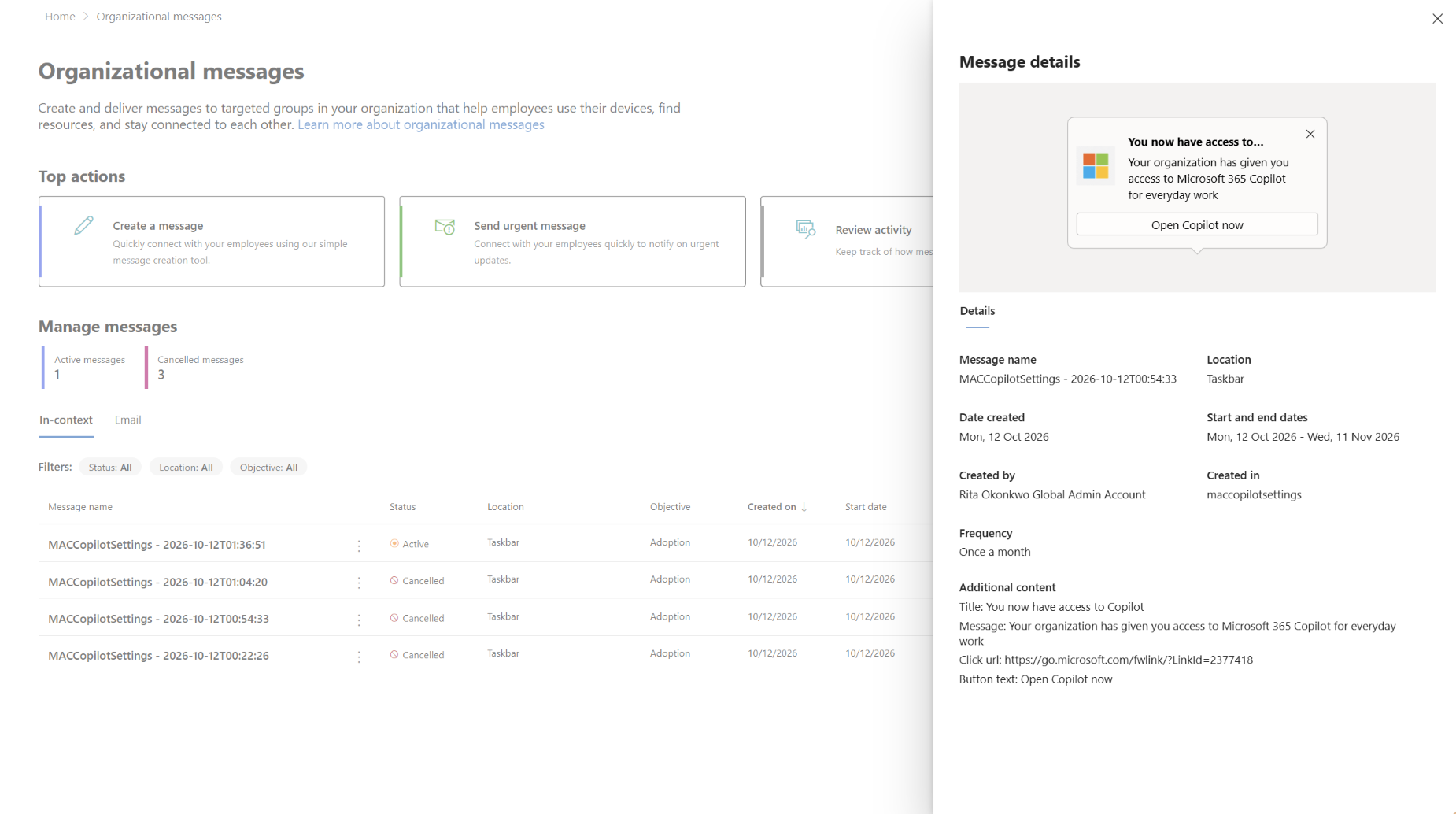
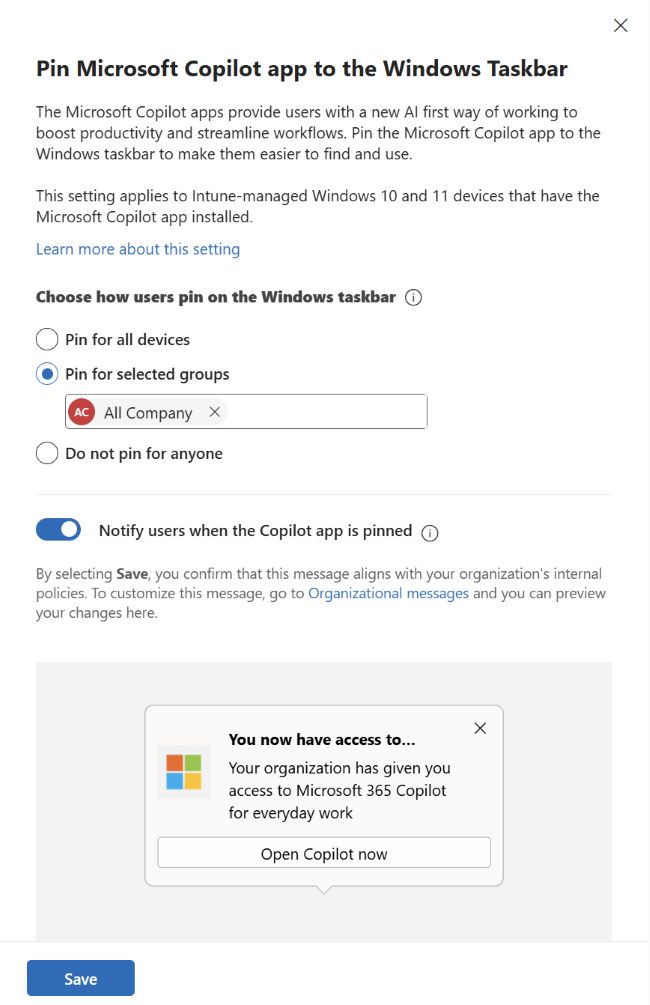
| Microsoft 365 Copilot: New notification option when pinning Copilot to the Windows taskbarCategory:Microsoft 365 suite Microsoft Copilot (Microsoft 365)Nummer:MC1567263Status:stayInformed | [What and why] We’re introducing a new notification option in the Pin Microsoft Copilot to the Windows taskbar setting in the Microsoft 365 admin center. When admins pin Microsoft Copilot for selected groups, they can choose to notify eligible users that Copilot has been pinned by their organization. The notification includes an Open Copilot action that launches the Microsoft Copilot desktop app. This optional notification helps organizations pair admin-led deployment with clear end-user communication so users understand why Copilot appears on their taskbar and can quickly start using it. [Rollout schedule]
[Impact on your organization] Who is affected
Platforms and services
What will happen
Screenshot 1 – OM detail screen view:
Screenshot 2 – Notification scheduled view:
Screenshot 3 -User pinning notification flyout view:
[Action required and recommendations] No action is required unless you want to use this capability. To notify users when deploying the Microsoft Copilot taskbar pin:
If your tenant doesn’t have an Intune license, you can use an XML configuration file to pin the Microsoft Copilot app. However, the notification capability described in this message requires the Microsoft 365 admin center experience and is currently available only when using Pin for selected groups. Learn more Additional documentation will be available in a Microsoft Learn article when this capability is released. [Compliance considerations]
|