
Planner Copilot Chat is Microsoft’s next step in pulling task management out of a separate app and into the conversation your team is already having. Instead of opening Planner to check what is overdue, users will be able to create, update and ask questions about their plans directly inside Microsoft 365 Copilot Chat, using plain language. For IT admins, that convenience comes with a familiar question: does a new way to reach Planner data change who can actually reach it. This post walks through what it does, when it rolls out, and what to check before your users start using it.
What Planner Copilot Chat Actually Does
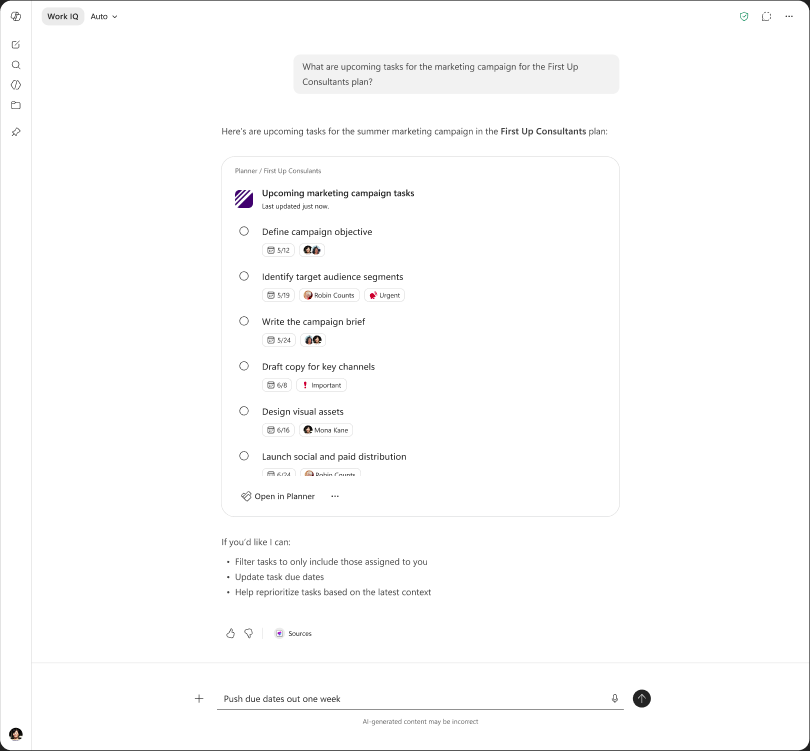
Microsoft announced Planner Copilot Chat in Message Center post MC1443523, tied to Roadmap ID 516577. The short version: Planner capabilities are moving into Microsoft 365 Copilot Chat, so users no longer need to switch applications to manage their work.
With this feature, users will be able to:
- Create Planner tasks and plans from Copilot Chat using natural language prompts, instead of clicking through the Planner interface.
- View task and plan details directly inside the chat. The first version is text-only, and Microsoft has said an interactive task card is coming in a later update.
- Manage and update tasks and plans across both Copilot and Planner, so the two stay in sync no matter where a user starts.
- Access this on desktop and web, with no separate configuration step required from admins.
The feature becomes available through Microsoft’s standard service rollout, so it will reach eligible users automatically once your tenant’s ring comes up. There is no toggle to flip and no policy to write before that happens, which is exactly why admins should read the rollout schedule closely.
Preview and GA Rollout Table for Planner Copilot Chat
Microsoft has published a single rollout stage for Planner Copilot Chat rather than a separate preview and general availability split. Here is what is confirmed:
| Stage | Timing | Scope |
|---|---|---|
| General Availability | Beginning early September 2026 | Worldwide |
| Full deployment window | Early August 2026 to late December 2027 | All tenants and rings |
That wide deployment window is normal for a Microsoft 365 feature reaching every tenant ring worldwide. Do not read late December 2027 as ‘nothing happens until then.’ Treat early September 2026 as the date Planner Copilot Chat can realistically start showing up for your users, and plan your admin review around that date, not the outer edge of the rollout window.
How to Prepare for Planner Copilot Chat
Microsoft’s own guidance is that no admin action is required before Planner Copilot Chat rolls out. That is true, but ‘no action required’ is not the same as ‘nothing to check.’ Here is the short version of what to do before early September 2026.
Step by Step for Planner Copilot Chat
- Confirm which users in your tenant hold an active Microsoft 365 Copilot license, since Planner Copilot Chat only appears for licensed users.
- Review your current Planner group and container structure, since that structure is what the new chat experience will inherit.
- Update internal training and adoption material so users understand they can now manage tasks from Copilot Chat instead of opening Planner directly.
- Give your help desk a short heads-up. A new entry point into familiar data tends to generate a wave of ‘is this normal’ tickets in the first week.
None of these steps block or delay this rollout. They just mean your team is not caught off guard when it appears.
What Admins Need to Know About Permissions
This is the part of Planner Copilot Chat that matters most if you are responsible for data governance. Microsoft states plainly that existing Planner permissions and access controls continue to apply, and that no changes to Planner data storage or permissions are expected with this release.
In practice, that lines up with how Planner access already works. Each plan lives inside a container, whether that is a Microsoft 365 group, a Team, or a channel, and membership in that container is what determines who can see and edit the plan. Planner Copilot Chat does not introduce a new access model on top of that. It uses the same container-based permissions that already govern Planner today.
Restricting Planner Copilot Chat Access if Needed
If you want tighter control before this feature reaches your users, Microsoft documents a PowerShell setting for exactly this. You can turn Planner Agent chat off entirely, or scope it to a specific security group, using Set-PlannerConfiguration -AllowPlannerCopilot. That control already exists today, independent of this particular rollout, so it is worth testing now rather than after your users start asking Copilot about their tasks.
The honest governance takeaway is this: Planner Copilot Chat does not open a new door into data your users could not already reach. It changes how easily that data can be asked for. Same permissions on paper, a much shorter path to the same answer. That is worth one verification pass, even when the compliance answer from Microsoft is a clean yes.
Admin Tips
- Do not assume ‘no admin action required’ means no communication is required. Tell your users before Copilot starts surfacing their task data in chat, so it does not feel like a surprise.
- Pull your Planner container list before rollout and confirm it still reflects who should have access, not who had access when the group was created two years ago.
- If any plans hold sensitive project or client information, decide now whether chat access should be restricted for those specific groups using the PowerShell control above.
- Add this feature to your Copilot adoption tracking, since it is the kind of quiet feature that drives real usage numbers without a big launch announcement.
License Requirements for Planner Copilot Chat
This feature requires an active Microsoft 365 Copilot license for each user who wants to use it. Standard Microsoft Planner access is required on top of that, following the same licensing your organization already has in place. Microsoft’s rollout schedule covers worldwide commercial tenants, so confirm your own tenant scope before communicating a date to users.
The Paul-Take
Here is my honest read on Planner Copilot Chat. The feature itself is not dramatic. Task management inside a chat window is a natural, low-risk convenience upgrade, and Microsoft’s compliance answers in the MC post are exactly what you want to see: same permissions, no new data storage, no forced admin action.
But every time a Copilot surface gets a new door into an existing data source, I want IT to ask one question before rollout day arrives, not after. Who can now reach this information through a two-line prompt that used to take five clicks to reach the same way. Planner Copilot Chat passes that check on paper. My advice is to actually run the check yourself instead of trusting the paper. Pull your container list, confirm your groups, and if you have plans that should stay quiet, test the Set-PlannerConfiguration restriction before your users find it on their own.
This should be rolling out in early September 2026 according to Microsoft.
If you found this useful, you might also want to read our take on Copilot Cost Management and how Restricted Content Discovery is changing what Copilot can surface in search.
MVP Reference List
- Message Center post: MC1443523
- Roadmap ID: 516577
- Microsoft Learn: Security, privacy, and compliance in Microsoft Planner
- Microsoft Learn: Turn off or restrict access to Planner Agent and Planner Agent chat in Planner